
הקדמה
Thank you for choosing the EZQuest USB C Hub Docking Station 8-in-1. This manual provides detailed instructions for setting up, operating, and maintaining your device. Please read this manual thoroughly before use to ensure optimal performance and longevity of your product.
פּראָדוקט איבערview
The EZQuest USB C Hub Docking Station 8-in-1 is designed to expand the connectivity of your USB-C enabled devices, offering a comprehensive solution for various peripherals and display needs. It features multiple ports for data transfer, video output, network connection, and power delivery.
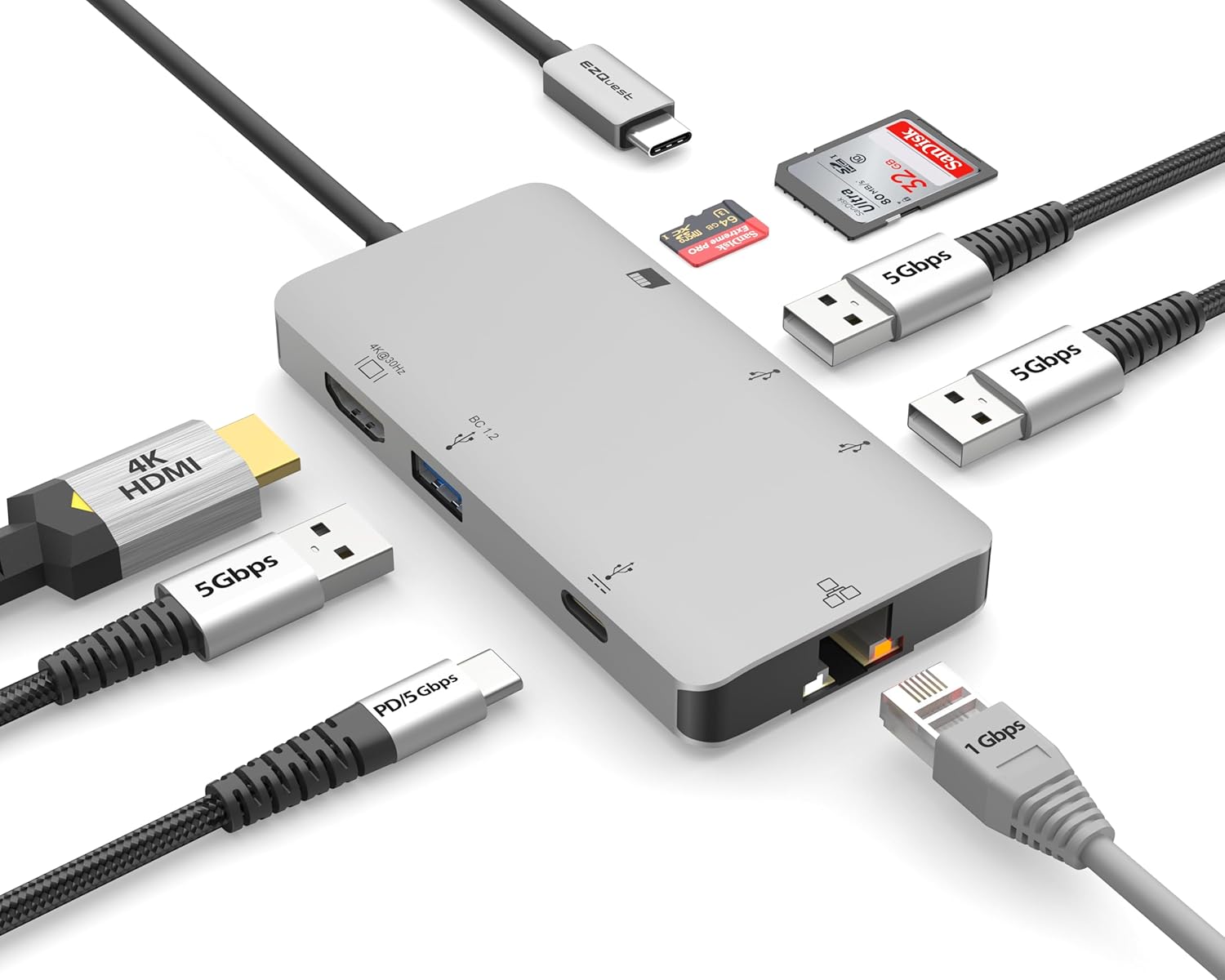
Image: The EZQuest USB C Hub Docking Station 8-in-1, showcasinג זײַן קאָמפּאַקטן דיזײַן און אינטעגרירטן USB-C קאַבל.

Image: A diagram illustrating the 8-in-1 expansion capabilities of the hub, including HDMI, USB-C PD, USB 3.0, Ethernet, and card readers.
סעטאַפּ אינסטרוקציעס
- פאַרבינדן צו האָסט מיטל: Plug the integrated USB-C cable of the EZQuest hub into an available USB-C/Thunderbolt 3/4 port on your laptop, tablet, or smartphone.
- מאַכט צושטעלן (אָפּציאָנאַל): For charging your host device, connect your USB-C power adapter to the USB-C Power Delivery port on the hub. The hub supports up to 100W input with 85W pass-through charging.
- HDMI אַרויסווייַז: Connect an HDMI cable from your monitor to the HDMI port on the hub for 4K 30Hz video output.
- עטהערנעט קשר: For a stable wired network, connect an Ethernet cable to the Gigabit Ethernet port on the hub.
- יו-עס-בי פּעריפעראַלס: Connect your USB-A devices (e.g., mouse, keyboard, external hard drive) to the three USB-A 3.0 ports.
- SD/Micro SD Cards: Insert your SD or Micro SD cards into the respective slots for data transfer.

Image: A user connecting the EZQuest USB C Hub to a laptop's USB-C port.

Image: Illustrates connecting a power adapter to the hub for pass-through charging of a laptop.
אַפּערייטינג ינסטראַקשאַנז
ווייַז רעזולטאַט (HDMI)
The HDMI port supports 4K resolution at 30Hz. Connect an HDMI-enabled display to extend or mirror your desktop for enhanced productivity or multimedia viewing. Ensure your display and device support 4K 30Hz for optimal performance. Note that the USB-C ports on the hub are for data and power delivery, not for connecting a monitor.
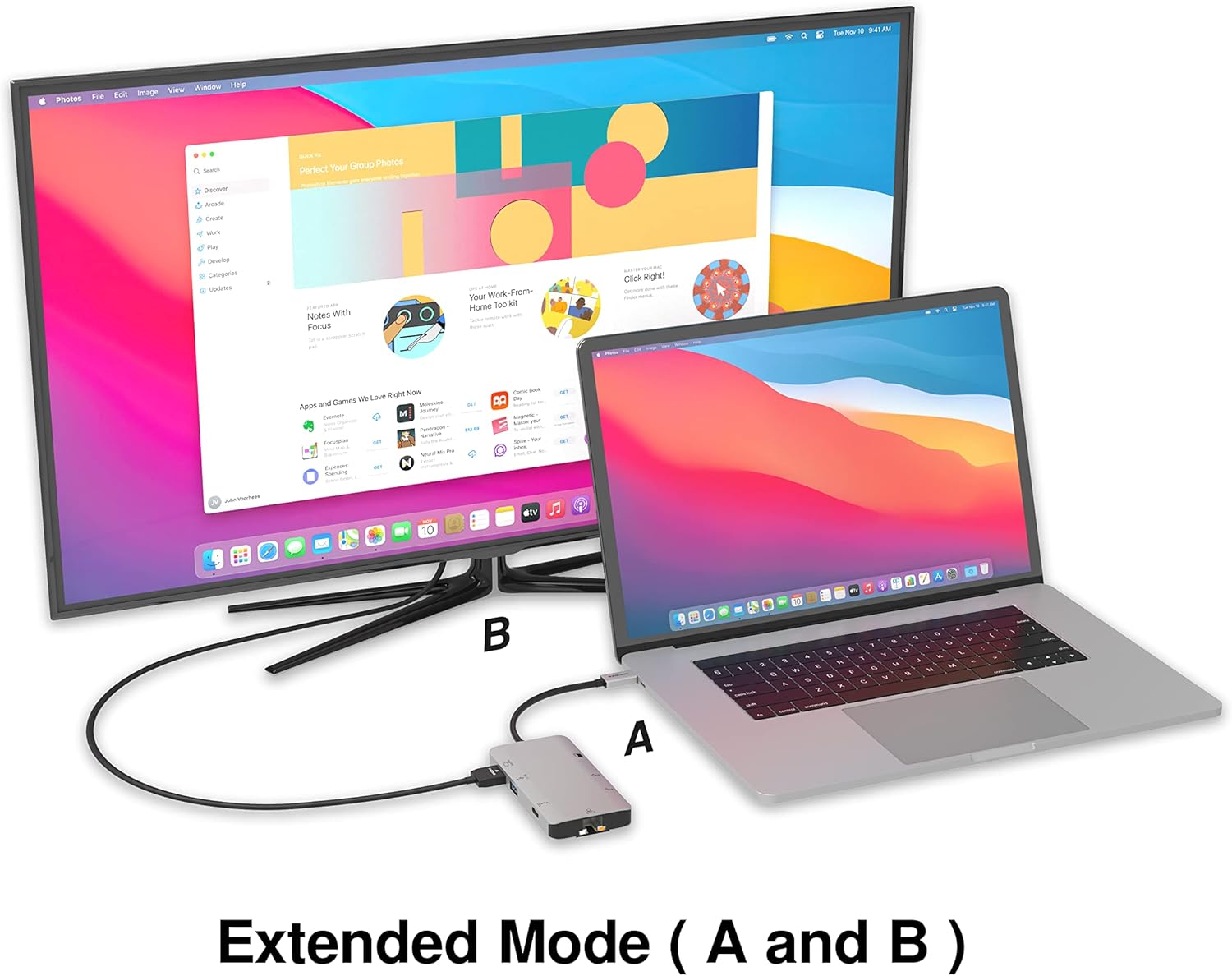
Image: A laptop connected to an external monitor via the hub, demonstrating extended display mode.
Data Transfer (USB-A & SD/Micro SD)
The three USB-A 3.0 ports offer data transfer speeds up to 5Gbps. The SD and Micro SD card slots allow for simultaneous read and write operations, facilitating quick file transfers from memory cards.

Image: Various devices like USB drives, SD cards, and an Ethernet cable connected to the EZQuest hub.
Network Connection (Gigabit Ethernet)
The Gigabit Ethernet port provides a stable and high-speed wired internet connection, ideal for large downloads, uploads, or streaming where Wi-Fi might be unreliable. An LED indicator confirms network activity.
מאַכט פאַרשפּרייטונג
The USB-A ports distribute power efficiently. One USB-A port with BC1.2 outputs 5V/1.5A (7.5W), while the other two USB-A ports deliver 5V/0.9A (4.5W) each. The total shared power when all ports are in use is 10 watts.

Image: A diagram detailing the power output and data transfer speeds of the USB-A ports on the hub.
פֿעיִקייטן און פּאָרץ
| פּאָרט טיפּ | קוואַנטיטי | פאַנגקשאַנאַליטי |
|---|---|---|
| HDMI | 1 | 4K @ 30Hz Video Output (Extended/Mirror Mode) |
| USB-C Power Delivery/Data | 1 | Up to 100W Power Input (85W Pass-Through), 5Gbps Data Transfer |
| וסב-א 3.0 | 3 | 5Gbps Data Transfer (One port BC1.2 5V/1.5A, two ports 5V/0.9A) |
| גיגאַביט עטהערנעט | 1 | 10/100/1000 Mbps Wired Network Connection with LED Indicator |
| סד קאָרט לייענער | 1 | SDHC/SDXC Read/Write |
| מיקראָ סד קאָרט לייענער | 1 | Micro SDHC/SDXC Read/Write |
קאַמפּאַטאַבילאַטי
This USB C Hub is compatible with a wide range of devices:
- Computers featuring USB-C, USB 4, Thunderbolt 4, or Thunderbolt 3 ports.
- USB-C smartphones and tablets equipped with OTG (On-The-Go) support.
Unsupported Device:
- The USB-A ports on this docking station do not support Apple SuperDrive. For connecting an Apple SuperDrive, an alternative adapter (e.g., EZQuest X40100 USB-C to USB-A Female Mini Adapter) directly to your Mac is recommended.
טראָובלעשאָאָטינג
- קיין אַרויסווייַז רעזולטאַט:
- Ensure your host device's USB-C port supports video output (DisplayPort Alternate Mode).
- Check all cable connections (USB-C from hub to device, HDMI from hub to monitor).
- Verify your monitor input source is set correctly to HDMI.
- פרובירט אן אנדערן HDMI קאבל אדער מאָניטאָר אויב פאַראַן.
- טשאַרדזשינג ישוז:
- Ensure your USB-C power adapter is connected to the hub's USB-C PD port.
- Verify your power adapter provides sufficient wattage (up to 100W recommended for laptops).
- Check if the host device's USB-C port supports Power Delivery.
- לאַנגזאַמע דאַטן טראַנספער:
- זייט זיכער אז איר ניצט USB 3.0 קאמפאטיבלע דעווייסעס און קייבלס פאר אפטימאלע גיכקייטן.
- The total shared power for USB-A ports is 10W; excessive power draw from multiple devices may affect performance.
- עטערנעט ארבעט נישט:
- קאָנטראָלירט די עטהערנעט קאַבל פֿאַרבינדונג צו ביידע דעם כאַב און אייער ראַוטער/מאָדעם.
- וועריפֿיצירט נעץ סעטטינגס אויף אייער האָסט מיטל.
- Ensure the LED indicator on the Ethernet port is active.
- SD/Micro SD Card Not Recognized:
- זיכער מאַכן אַז די קאַרטל איז גאָר אַרײַנגעשטעלט אין דעם ריכטיקן שפּאַלט.
- Try reinserting the card or using a different card.
- Check if the card is damaged or corrupted.
ספּעסאַפאַקיישאַנז
| שטריך | דעטאַל |
|---|---|
| מאָדעל נומער | X40030 |
| פּראָדוקט דימענשאַנז | 0.81 X 1.63 X 0.2 אינטשעס |
| פּונקט וואָג | 1.6 אונסעס |
| ייַזנוואַרג צובינד | וסב טיפּ C |
| HDMI רעזולטאַט | 4K @ 30Hz |
| וסב-C פּד אַרייַנשרייַב | אַרויף צו 100 וו |
| וסב-C פּד רעזולטאַט | אַרויף צו 85 וו |
| USB-A 3.0 Data Speed | 5 גבפּס |
| עטהערנעט ספּיד | 1 Gigabit (10/100/1000 Mbps) |
| Card Reader Support | SDHC, SDXC, Micro SDHC, Micro SDXC |
| מאַטעריאַל | Anodized Aluminum Housing |
וישאַלט
- רייניקונג: Use a soft, dry cloth to clean the hub. Avoid liquid cleaners or aerosols.
- סטאָרידזש: האַלט דעם כאַב אין אַ קיל, טרוקן אָרט אַוועק פון דירעקט זונשייַן און עקסטרעמע טעמפּעראַטורן.
- האַנדלינג: Avoid dropping the device or subjecting it to strong impacts. Do not attempt to disassemble the hub.
וואָראַנטי און שטיצן
The EZQuest USB C Hub Docking Station 8-in-1 comes with a 1-יאָר וואָראַנטי-פריי וואָראַנטי. This warranty covers manufacturing defects and ensures peace of mind regarding your investment.
For technical support, warranty claims, or any product-related inquiries, please visit the official EZQuest website or contact their customer service team through the contact information provided with your product packaging.