
הקדמה
The Official Luna Wireless Controller is designed to provide an optimal gaming experience with Amazon's cloud gaming service, Luna, and offers versatile connectivity options for a wide range of devices. This manual provides detailed instructions for setup, operation, and maintenance to ensure you get the most out of your controller.
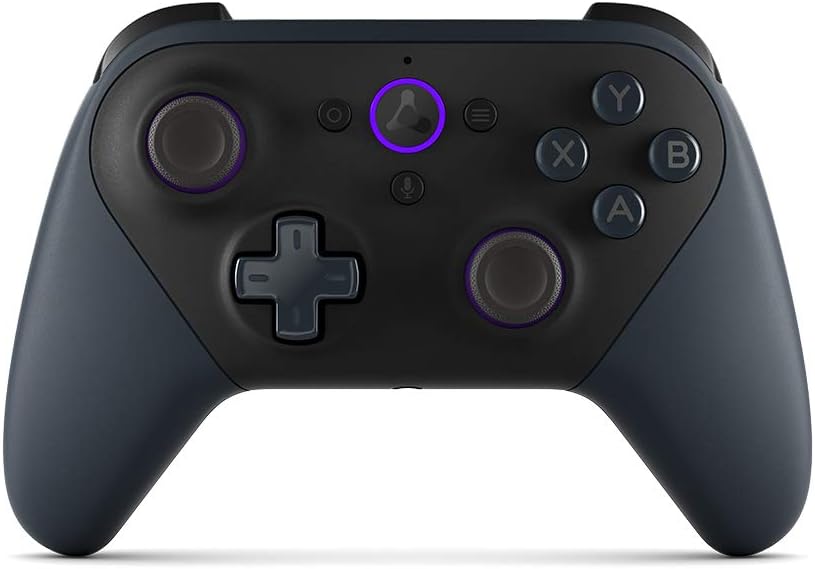
בילד: פראָנט view of the Luna Wireless Controller, showcasing its ergonomic design and button layout. The controller is black with purple accents on the thumbsticks and the Luna button.
שליסל פֿעיִקייטן
- Cloud Direct Technology: Connects directly to Amazon’s custom game servers via Wi-Fi for low-latency gameplay on Luna.
- Multi-Device קאַמפּאַטאַבילאַטי: Works across Windows, Mac, Fire TV, Fire tablet, iPhone, iPad, Chromebook, and Android devices.
- Seamless Screen Switching: Pause your game on one screen and resume on another when playing on Luna.
- עטלעכע קאַנעקטיוויטי אָפּציעס: Supports Wi-Fi, Bluetooth, and USB connections.
- ערגאָנאָמיק פּלאַן: Features offset thumbsticks, easy-access bumpers, precise triggers, and responsive action buttons for comfortable and accurate control.
- Integrated Alexa: Press the microphone button to ask Alexa to launch games and more on Fire TV.

Image: The Luna Controller with graphical icons illustrating its core features: low-latency gameplay, Wi-Fi connectivity, Bluetooth connectivity, USB connectivity, and seamless screen switching support.
סעטאַפּ
1. אויספּאַקן און באַטאַריע אינסטאַלירן
Your Luna Wireless Controller comes with 2 AA Amazon Basics batteries. To install:
- געפינט די באַטאַרייע אָפּטייל אויף דער צוריק פון דעם קאָנטראָללער.
- עפענען די אָפּטייל דעקן.
- אַרײַנשטעלן די צוויי AA באַטעריעס, און זיכער מאַכן אַז די פּאָלאַריטעט איז ריכטיק (+/-).
- פאַרמאַכן די באַטאַרייע אָפּטייל דעקן סיקיורלי.
2. Setting Up with the Luna Controller App
The Luna Controller app is essential for connecting your controller to Wi-Fi for Cloud Direct gameplay. Download the app from:
- אַמאַזאָן אַפּ סטאָר פֿאַר אַנדרויד
- Google פּלייַ סטאָר
- יאָס אַפּ סטאָר
Follow the in-app instructions to connect your controller to your Wi-Fi network. This enables Cloud Direct functionality for optimal Luna gaming.
3. פֿאַרבינדן זיך צו דעוויסעס
The Luna Controller offers multiple ways to connect to your devices:
- Cloud Direct (Wi-Fi): For the best Luna experience, connect your controller to Wi-Fi via the Luna Controller app. This reduces latency by connecting directly to Amazon's game servers.
- בלועטאָאָטה: Use Bluetooth Low Energy 5.0 for gameplay on Windows PC, Mac, Fire Tablets, Chromebooks, Fire TV, Android devices, or select Samsung Smart TVs. For Windows PC support outside of Luna, a specific Windows driver may be required (downloadable from Amazon's support page).
- וסב- C: Connect directly to your Windows PC or Mac using a USB-C cable (sold separately) for wired gameplay.
אַפּערייטינג די קאָנטראָללער
Controller Layout and Inputs
The Luna Controller features a standard gaming controller layout for intuitive use:
- קאַמף קנעפּלעך: X, Y, A, B
- Triggers & Bumpers: LT (Left Trigger), LB (Left Bumper), RT (Right Trigger), RB (Right Bumper)
- טהומבסטיקקס: Two offset thumbsticks (left and right) for precise movement and camera control.
- ריכטונגס-פאד (די-פאד): 4-way directional pad (up, down, left, right).
- סיסטעם קנעפּלעך: Home, Action, Menu, Microphone.

בילד: א נאָענטע בילד view of the Luna Controller's top-right side, highlighting the precise and responsive triggers (RT) and bumpers (RB) designed for gaming.
האַפּטיק באַמערקונגען
The controller includes vibration motors that provide tactile feedback during gameplay, enhancing immersion and responsiveness to in-game actions.
געפירט ווייַז
An LED indicator on the controller displays its connectivity status, low battery warnings, and software update notifications.
Alexa ינטעגראַטיאָן
Press the dedicated microphone button on the controller to activate Alexa. You can use voice commands to launch games and perform other actions on compatible Fire TV devices.
אַודיאָ רעזולטאַט
A 3.5 mm stereo audio output jack is available for connecting a headset, allowing for private audio and communication during gameplay.

בילד: א זייט view of the Luna Controller, emphasizing its textured grip and contoured shape, designed for comfort during extended gaming sessions.
וישאַלט
To ensure the longevity and optimal performance of your Luna Wireless Controller, follow these maintenance guidelines:
- רייניקונג: ניצט אַ ווייכע, טרוקענע שטאָף צו ווישן דעם קאָנטראָללער. פֿאַר שווערע שמוץ, אַ ביסל ווייכער מאַכןampשווענק דעם שטאָף מיט וואַסער. פֿאַרמייַדט ניצן שטרענגע כעמיקאַלן אָדער אַברייסיוו רייניגער.
- סטאָרידזש: האַלט דעם קאָנטראָללער אין אַ קיל, טרוקן אָרט אַוועק פון דירעקט זונשייַן און עקסטרעמע טעמפּעראַטורן.
- באַטערי זאָרגן: If the controller will not be used for an extended period, remove the batteries to prevent leakage and potential damage.
- ויסמיידן טראפנס: כאָטש עס איז שטאַרק, קענען אָפטע פאַלן שאַטן די אינעווייניקסטע קאָמפּאָנענטן. באַהאַנדלט דעם קאָנטראָללער מיט וואָרענונג.
טראָובלעשאָאָטינג
If you encounter issues with your Luna Wireless Controller, try the following solutions:
- קאָנטראָללער ניט ריספּאַנדינג:
- קאָנטראָלירן די באַטאַרייע לעוועלס און פאַרבייַטן אויב נייטיק.
- זייט זיכער אז דער קאנטראלער איז אנגעצונדן.
- Try re-pairing the controller via Wi-Fi (Luna app) or Bluetooth.
- Connect via USB-C cable to check if it functions in wired mode.
- High Latency/Lag:
- For Luna gameplay, ensure your controller is connected via Cloud Direct (Wi-Fi) and your Wi-Fi network is stable and strong.
- Reduce interference by moving closer to your Wi-Fi router or reducing other network activity.
- If using Bluetooth, ensure your device's Bluetooth is enabled and there are no other interfering Bluetooth devices nearby.
- בלועטאָאָטה קאַנעקטיוויטי ישוז:
- זייט זיכער אז אייער דעווייס'ס בלועטוט איז אנגעצינדן און קענטיק צו זען.
- Forget the controller from your device's Bluetooth settings and attempt to pair again.
- Update Bluetooth drivers on your PC if applicable.
- Buttons/Thumbsticks Not Working:
- Ensure no debris is lodged around the buttons or thumbsticks.
- Restart the controller and the device it's connected to.
For further assistance, refer to the official Amazon Luna support resources.
ספּעסאַפאַקיישאַנז
| שטריך | דעטאַל |
|---|---|
| קאָליר | שוואַרץ |
| Wi-Fi קאַנעקטיוויטי | Cloud Direct gameplay supports dual-band 802.11 a/b/g/n (2.4 and 5 GHz) networks |
| בלועטאָאָטה קאַנעקטיוויטי | Supports Bluetooth Low Energy 5.0 for gameplay on Windows PC, Mac, Fire Tablets, Chromebooks, Fire TV, Android device, or select Samsung Smart TV |
| וסב- C פּאָרט | For wired gameplay on Windows PC and Mac (cable sold separately) |
| גרייס | 156.4 X 107.6 X 58.5 מם |
| וואָג | 235.5 g (without batteries), 281.5 g (with batteries) |
| ינפּוץ | 12 buttons (home, action, menu, microphone, X, Y, A, B, LT, LB, RT, RB), 1 direction pad, 2 offset thumbsticks |
| האַפּטיקס | Vibration motors for tactile feedback |
| ווייַז | LED for connectivity status, low battery, software updates |
| אַודיאָ | 3.5 mm stereo audio output for headset |
| רעדנער | קיינער |
| Alexa | Press and ask Alexa to launch games and more on Fire TV |
| קאַמפּאַטאַבילאַטי | Works on compatible Windows PC, Mac, Fire TV, Fire Tablet, iPhone, iPad, Android Phones, and select Samsung Smart TVs via Cloud Direct. Does not work with gaming consoles. |
| אין-קעסטל אַקסעססאָריעס | 2 AA Amazon Basics batteries, setup guide |
וואָראַנטי און שטיצן
Your Luna Wireless Controller comes with a 1-יאָר לימיטעד וואָראַנטי און דינסט. Optional 1-year, 2-year, and 3-year extended warranties are available for U.S. customers, sold separately. Use of the Amazon Luna Controller is subject to these terms.
For detailed warranty information, technical support, or to purchase extended warranty options, please visit the official Amazon Luna support webזייטל אדער קאנטאקטירן עמעזאן קאסטומער סערוויס.