
Vivanco 25175
Vivanco MOOOVE AIR 25175 Bluetooth HiFi On-Ear Foldable Headphones User Manual
1. הקדמה
Thank you for choosing the Vivanco MOOOVE AIR 25175 Bluetooth HiFi On-Ear Foldable Headphones. This manual provides essential information for the proper setup, operation, and maintenance of your new headphones. Please read it carefully before use and retain it for future reference.
2. פּעקל אינהאַלט
זיכער מאַכן אַז אַלע זאכן זענען פאַראַן אין פּעקל:
- Vivanco MOOOVE AIR 25175 Bluetooth Headphones (1 piece)
- טשאַרדזשינג קאַבל (USB)
- אַודיאָ קאַבל (3.5 מ״מ דזשעק) (Assumed based on connectivity specifications)
- באַניצער מאַנואַל (דעם דאָקומענט)
3. פּראָדוקט איבערview
Familiarize yourself with the components of your Vivanco MOOOVE AIR 25175 headphones.
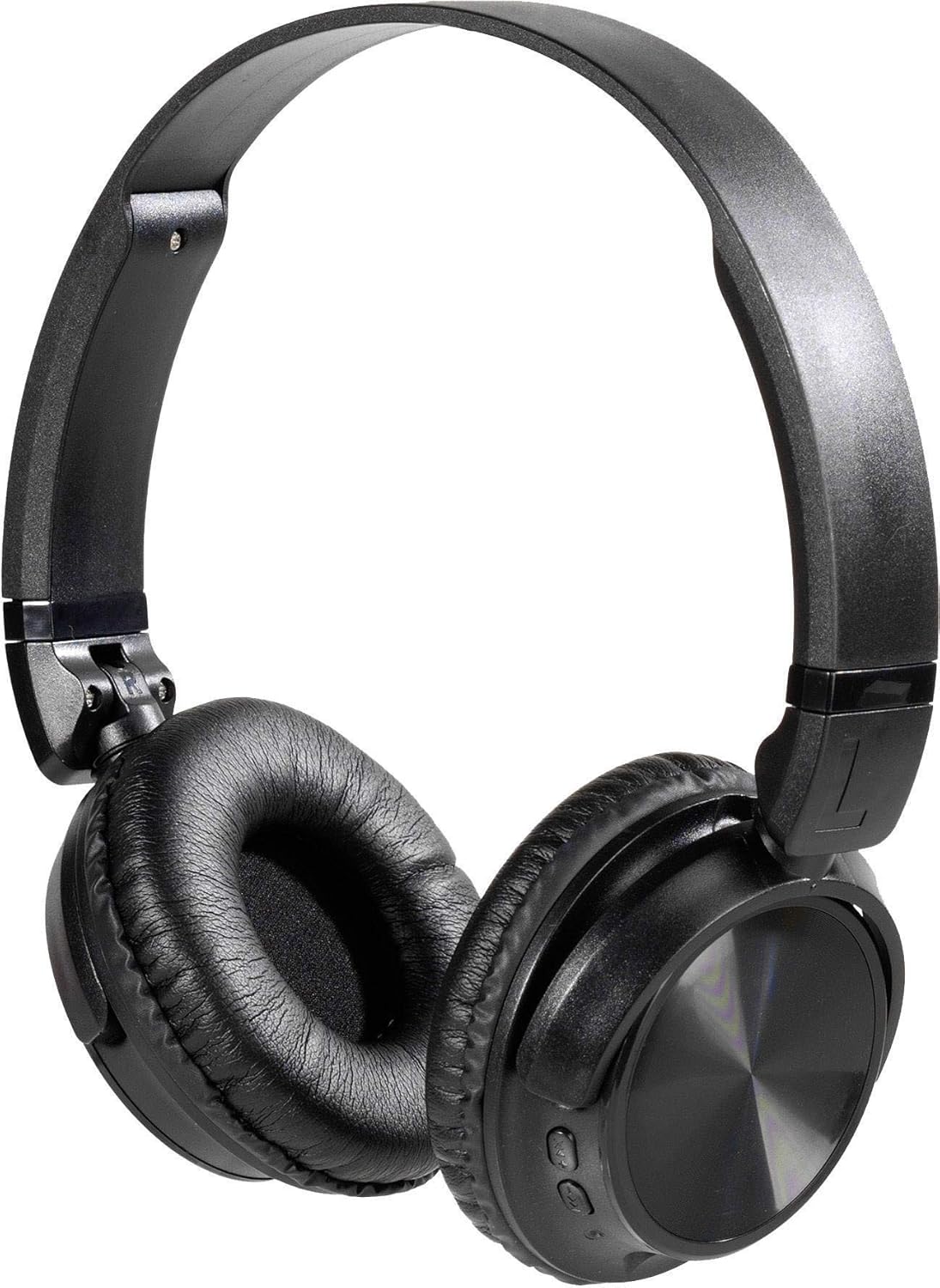
בילד באַשרייַבונג: A pair of black Vivanco MOOOVE AIR 25175 headphones, featuring an adjustable headband, soft cushioned earcups, and control buttons visible on the right earcup. The headphones are shown in an unfolded, ready-to-use position.
שליסל קאַמפּאָונאַנץ:
- אַדזשאַסטאַבאַל כעדבאַנד: פֿאַר אַ באַקוועמען פּאַסיק.
- געפּאָלסטערטע אויערקעפּלעך: צושטעלן טרייסט פֿאַר פֿאַרלענגערט צוהערן.
- קאָנטראָל קנעפּלעך: Typically located on one earcup for power, volume, playback, and call management.
- מיקראָפאָן: פֿאַר הענט-פריי קאַללס.
- Charging Port (USB): פֿאַר איבערלאָדן די אינערלעכע באַטאַרייע.
- Audio Input Port (3.5mm/2.5mm Jack): פֿאַר דראָטיקער פֿאַרבינדונג.
4. סעטאַפּ
4.1. טשאַרדזשינג די כעדפאָונז
- פֿאַרבינדט דעם קליינעם עק פֿונעם USB טשאַרדזשינג קאַבל צום טשאַרדזשינג פּאָרט אויף די כעדפאָונז.
- פֿאַרבינדט דעם גרעסערן עק פֿונעם USB טשאַרדזשינג קאַבל צו אַ USB מאַכט אַדאַפּטער (נישט אַרייַנגערעכנט) אָדער אַ קאָמפּיוטער'ס USB פּאָרט.
- The LED indicator on the headphones will illuminate, typically red, to show that charging is in progress.
- Once fully charged, the LED indicator will change color (e.g., turn blue or off). A full charge usually takes approximately 2-3 hours.
באַמערקונג: פֿאַר אַן אָפּטימאַלן באַטאַרייע לעבן, זאָל מען גאָר אויפֿלאָדן די כעדפאָונז איידער מען ניצט זיי צום ערשטן מאָל.
4.2. פּאָווערינג אויף / אויסגעלאשן
- צו מאַכט אויף: Press and hold the Power button (usually marked with a power symbol) for approximately 3-5 seconds until the LED indicator flashes and you hear an audible prompt.
- צו מאַכט אַוועק: דריק און האלט דעם פּאַוער קנעפּל פֿאַר אַרום 3-5 סעקונדעס ביז דער LED אינדיקאַטאָר וועט זיך אויסלעשן און איר הערט אַן אָודאַבאַלן פּראָמפּט.
5. קאַנעקטיוויטי
5.1. בלועטאָאָטה פּערינג
- זיכער מאַכן אַז די כעדפאָונז זענען גאָר אויפגעלאָדן און אויסגעלאָשן.
- Press and hold the Power button for approximately 5-7 seconds until the LED indicator flashes red and blue alternately, indicating pairing mode.
- אויף אייער בלוטוט-ענייבאַלד מיטל (סמאַרטפאָן, טאַבלעט, קאָמפּיוטער), גייט צו די בלוטוט סעטטינגס.
- זוכן פֿאַר available devices. The headphones should appear as "Vivanco MOOOVE AIR" or a similar name.
- Select the headphones from the list to connect. Once connected, the LED indicator will typically flash blue slowly or remain solid blue, and you may hear a confirmation tone.
- אויב געבעטן פֿאַר אַ פּאַראָל, אַרייַן "0000" (פיר נולן).
באַמערקונג: The headphones will automatically attempt to reconnect to the last paired device when powered on, if that device's Bluetooth is active and within range.
5.2. דראָט פֿאַרבינדונג (אָפּציאָנעל)
The Vivanco MOOOVE AIR 25175 headphones can also be used with a wired connection, even if the battery is depleted.
- Connect one end of the 3.5mm audio cable (or 2.5mm if applicable) to the audio input jack on the headphones.
- Connect the other end of the audio cable to the audio output jack of your device (e.g., smartphone, MP3 player, computer).
- The headphones will operate in passive mode, meaning Bluetooth functions and built-in controls may be disabled, and audio will be controlled directly from your connected device.
6. אפערירן די כעדפאָונז
6.1. מוזיק פּלייבאַק
- שפּיל / פּויזע: Press the Multi-function button (often the Power button or a dedicated Play/Pause button) once.
- ווייַטער שפּור: Press and hold the Volume Up button or a dedicated "Next" button. (Specific button functions may vary; refer to device markings).
- פֿריִערדיקע שפּור: Press and hold the Volume Down button or a dedicated "Previous" button. (Specific button functions may vary; refer to device markings).
6.2. באַנד קאָנטראָל
- פאַרגרעסערן באַנד: דריק דעם באַנד אַרויף (+) קנעפּל.
- פאַרמינערן באנד: דריק דעם באַנד אַראָפּ (-) קנעפּל.
6.3. רופן מאַנאַגעמענט
- ענטפֿערן / סוף רופן: דריק איין מאל דעם מולטי-פונקציע קנעפל בעת אן אנקומענדיקן רוף אדער אן אקטיוון רוף.
- אָפּוואַרפן רופן: דריק און האלט דעם מולטי-פונקציע קנעפל פאר בערך 2 סעקונדעס בעת אן אנקומענדיקן רוף.
- ריאַל די לעצטע נומער: דריקט צוויי מאָל דעם מולטי-פונקציע קנעפּל ווען קיין רוף איז נישט אַקטיוו.
7. וישאַלט
- רייניקונג: ווישט די כעדפאָונז מיט אַ ווייכן, טרוקענעם, לינט-פֿרייע שטאָף. ניצט נישט קיין שרײַבנדיקע רייניגער, אַלקאָהאָל, אדער כעמישע סאָלווענטן.
- סטאָרידזש: ווען נישט אין באַנוץ, זאָל מען האַלטן די כעדפאָונז אין אַ קיל, טרוקן אָרט, אַוועק פון דירעקט זונשייַן און עקסטרעמע טעמפּעראַטורן. דער צוזאַמענפאַלטבאַרער פּלאַן ערמעגליכט קאָמפּאַקט סטאָרידזש.
- וואַסער קעגנשטעל: The headphones are rated as waterproof. However, avoid prolonged submersion or exposure to high-pressure water jets. Ensure charging ports are dry before connecting cables.
8. טראָובלעשאָאָטינג
| פּראָבלעם | מעגלעך סיבה | לייזונג |
|---|---|---|
| די קאָפּהערער ווערן נישט אנגעצינדן. | נידעריק באַטאַרייע. | טשאַרדזש די כעדפאָונז גאָר. |
| קען נישט פארבינדן דורך בלוטוט. | כעדפאָונז נישט אין פּערינג מאָדע; מיטל בלועטוט אויסגעלאָשן; צו ווייט איינער פון אַנדערן. | Ensure headphones are in pairing mode (flashing red/blue). Turn on Bluetooth on your device. Keep devices within 1 meter during pairing. Forget previous pairings on your device and try again. |
| קיין געזונט. | די קול איז צו נידעריג; די כעדפאָונז זענען נישט פארבונדן; די אומרעכטע מקור פון די אודיאָ. | Increase volume on both headphones and connected device. Verify Bluetooth connection or wired connection. Check audio output settings on your device. |
| נעבעך געזונט קוואַליטעט. | Weak Bluetooth signal; interference; low-quality audio source. | Move closer to the connected device. Avoid obstacles. Try a different audio source. |
9. ספּעסאַפאַקיישאַנז
| סאָרט | Vivanco |
| מאָדעל נאָמען | 25175 |
| קאַנעקטיוויטי טעכנאָלאָגיע | Wireless (Bluetooth), Wired |
| פאָרם פאַקטאָר | Supra-aural (On-Ear) |
| אויער פּלייסמאַנט | Extra-aural |
| ימפּידאַנס | 32 אָהמס |
| ספּעציעלע פֿעיִקייטן | לייטווייט, פאָלדאַבלע |
| מאַטעריאַל | פּלאַסטיק |
| קאָנטראָל טיפּ | באַנד אַדזשאַסטמאַנט |
| קאַבלע פֿונקציע | ריטראַקטאַבאַל (Refers to included audio cable) |
| וואַסער קעגנשטעל מדרגה | וואָטערפּרוף |
| כעדפאָון דזשאַק | USB, 3.5mm Jack, 2.5mm Jack (USB primarily for charging, 3.5mm/2.5mm for audio input) |
| אַרייַנגערעכנט קאַמפּאָונאַנץ | 1 piece (headphones) |
10. וואָראַנטי און שטיצן
Information regarding specific warranty terms and customer support for the Vivanco MOOOVE AIR 25175 headphones is not available in this document. Please refer to the product packaging or the Vivanco official webזייטל פֿאַר דעטאַלירטע וואָראַנטי אינפֿאָרמאַציע און שטיצע קאָנטאַקטן.
Ask a question about this manual
Ask about setup, troubleshooting, compatibility, parts, safety, or missing instructions. Manuals+ will review the question and use this page’s manual context to help answer it.