
הקדמה
The Remo+ RemoBell S is a wired smart doorbell camera designed to enhance your home security. It provides high-definition video surveillance with a wide viewing angle, motion detection, two-way audio communication, and smart home integration. This manual provides essential information for the proper installation, operation, and maintenance of your RemoBell S.
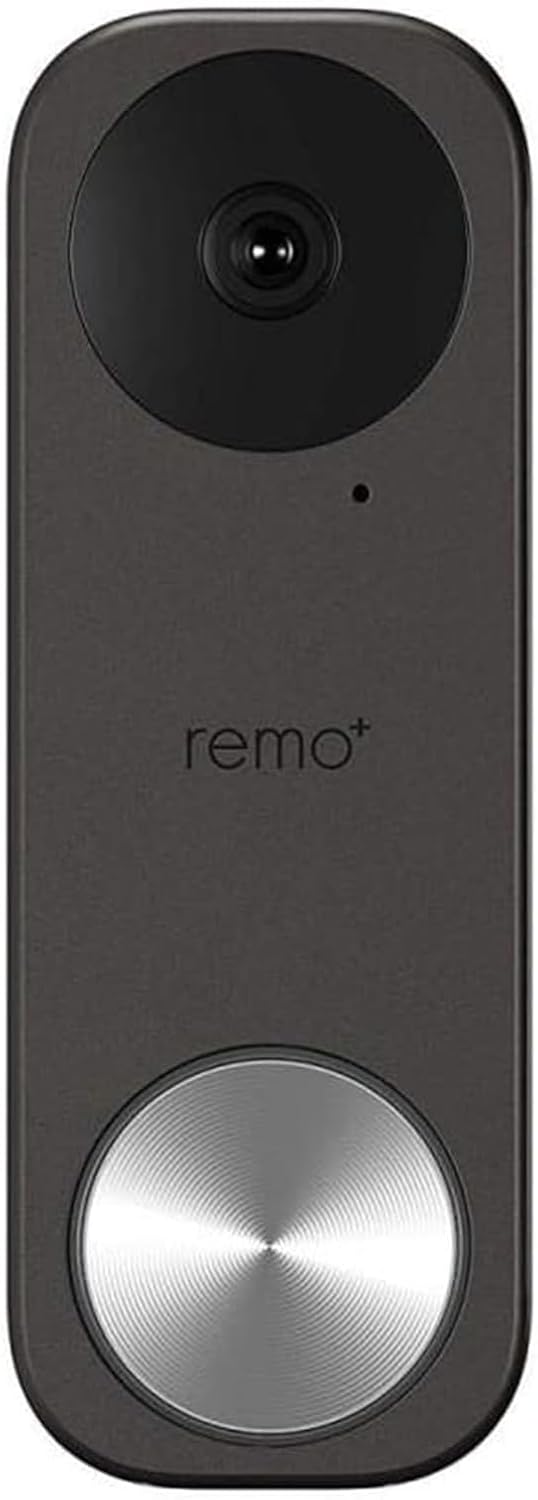
פיגורע 1: פראָנט view of the Remo+ RemoBell S Smart Doorbell Camera.
וואָס איז אַרייַנגערעכנט
ביטע זיכער מאַכן אַז אַלע קאָמפּאָנענטן זענען פאַראַן איידער איר הייבט אָן די אינסטאַלאַציע:
- RemoBell S Smart Doorbell Camera
- Mounting Plate(s)
- אינסטאַלאַציע שרויפן און אַנקערס
- וויירינג כאַרניס
- באַניצער מאַנואַל (דעם דאָקומענט)

Figure 2: Remo+ RemoBell S product packaging, showing the doorbell and included accessories.
סעטאַפּ
1. Power Requirements and Wiring
The RemoBell S requires a wired connection to your existing doorbell's transformer, providing 16-24 Volts AC. Ensure your current transformer meets these specifications for optimal performance. If your existing transformer does not meet these requirements, it may need to be replaced.
2. גשמיות ייַנמאָנטירונג
- קער אַוועק מאַכט: Before any wiring, locate your doorbell's circuit breaker and turn off the power to your doorbell system. Verify power is off using a voltagE tester.
- Remove Existing Doorbell: Carefully remove your old doorbell button from the wall. Disconnect the two existing wires.
- Choose Mounting Option: The RemoBell S includes multiple mounting plates. Select the appropriate plate for your installation (e.g., flat or angled bracket if mounting against a wall).
- אָנקלאַפּן די בראַקאַץ: Position the chosen mounting plate on the wall where your old doorbell was located. Mark the drill holes. Drill pilot holes if necessary and secure the mounting plate using the provided screws and anchors.
- פאַרבינדן וויירינג: Connect the two wires from your existing doorbell system to the terminals on the back of the RemoBell S. Ensure a secure connection.
- Attach Doorbell to Bracket: Carefully attach the RemoBell S camera unit to the mounted bracket.
- ומקערן מאַכט: Turn the power back on at your circuit breaker. The doorbell should power on and indicate readiness for app setup.
ווידעא 1: אן איבערview of the RemoBell S features and quick setup process.
3. אַפּ סעטאַפּ און פּערינג
- Download the Remo+ App: Download the official Remo+ app from your smartphone's app store (iOS or Android).
- שאַפֿן אַקאַונט/אַרײַנלאָגירן: Open the app and create a new account or log in with existing credentials.
- לייג דיווייס: Follow the in-app instructions to add a new device. Select the RemoBell S from the list of available products.
- פאַרבינדן צו Wi-Fi: The RemoBell S operates on 2.4 GHz Wi-Fi networks. Ensure your smartphone is connected to a 2.4 GHz network during the setup process. Input your Wi-Fi network name and password when prompted.
- פּאָרינג: The app will guide you through the pairing process, which may involve scanning a QR code or following voice prompts from the doorbell.

Figure 3: Simple setup process for the Remo+ RemoBell S.
אַפּערייטינג ינסטראַקשאַנז
1. לייוו View און צוויי-וועג רעדן
Access live video streaming of your front door anytime through the Remo+ app. When a visitor presses the doorbell or motion is detected, you will receive a push notification. Tap the notification to view the live feed and engage in two-way conversation with your visitor.

Figure 4: Monitoring live view from the RemoBell S on a smartphone.
2. באַוועגונג דעטעקשאַן
Customize motion detection zones to focus on specific areas of interest. Adjust sensitivity levels within the app to minimize false alerts. You will receive instant push notifications when motion is detected, even if the doorbell is not pressed.

Figure 5: Smart motion alerts and two-way communication via the RemoBell S.
3. נאַכט זעאונג
The RemoBell S features infrared night vision, providing clear video footage in low-light conditions or complete darkness. This ensures continuous surveillance and security around the clock.

Figure 6: Clear night vision capabilities of the RemoBell S.
4. קלאָוד סטאָרידזש
The device includes 3-day rolling cloud storage at no additional cost, allowing you to review recent activity. Optional paid plans are available for extended storage durations.
5. קלוגע קאָנעקטיוויטי
The RemoBell S integrates seamlessly with Amazon Alexa, Google Assistant, and IFTTT, allowing for enhanced smart home functionality and voice control.

Figure 7: RemoBell S integration with Google Home and Amazon Alexa.
וישאַלט
To ensure optimal performance and longevity of your RemoBell S, regular maintenance is recommended:
- רייניקונג: ווישט פּעריִאָדיש די קאַמעראַ לינז און די אויסערלעכע זייט פון דער טיר־גלאָק מיט אַ ווייכן, טרוקענעם שטאָף.amp שטאָף צו באַזייַטיקן שטויב און דעבריס. ויסמייַדן ניצן האַרב קעמיקאַלז.
- Firmware דערהייַנטיקונגען: Keep your device's firmware updated through the Remo+ app to access the latest features and security enhancements.
- קאָנעקטיוויטי קאָנטראָל: Regularly check your Wi-Fi connection strength in the app to ensure stable operation.
טראָובלעשאָאָטינג
If you encounter issues with your RemoBell S, try the following solutions:
- Wi-Fi קאַנעקטיוויטי ישוז:
- זיכער מאַכן אַז אייער Wi-Fi נעץ איז 2.4 GHz. די דעווייס שטיצט נישט 5 GHz נעטוואָרקס.
- During initial setup, connect your smartphone to the 2.4 GHz Wi-Fi band.
- If using a mobile phone for setup, temporarily disable cellular data (LTE) to prevent interference.
- Verify your router's 2.4 GHz and 5 GHz bands have different SSIDs.
- Check your router's settings for the maximum number of connected devices, especially on guest networks, and increase if necessary.
- No Power/Chime Not Working:
- Confirm your existing doorbell transformer provides 16-24 Volts AC. An incompatible transformer may prevent proper operation.
- ענשור אַז אַלע וויירינג קאַנעקשאַנז זענען זיכער.
- If using a mechanical chime, verify the chime type setting in the Remo+ app is correctly configured.
- פאַלש באַוועגונג אַלערץ:
- Adjust motion detection sensitivity settings in the app to a lower level.
- Refine motion zones to exclude areas with frequent, irrelevant movement (e.g., busy streets, swaying trees).
- Consider using an angled mounting plate to direct the camera away from high-traffic areas if applicable.
- ווידעא קוואַליטעט ישוז:
- Ensure a strong Wi-Fi signal at the doorbell's location.
- Adjust video quality settings (e.g., from 'Best' to 'Average') in the app if experiencing buffering or poor streaming.
- מיטל באַשטעטיק: If experiencing persistent issues, you may need to reset the device. Consult the app or quick start guide for specific reset instructions.
ספּעסאַפאַקיישאַנז
| שטריך | באַשרייַבונג |
|---|---|
| מאָדעל נומער | RMBL-1809H |
| דרינענדיק / דרויסנדיק באַניץ | דרויסנדיק |
| מאַכט מקור | Wired (16-24V AC) |
| קאַנעקטיוויטי פּראָטאָקאָל | ווי-פי (2.4 GHz) |
| ווידעא קאַפּטורע רעסאָלוטיאָן | 1080 פּ |
| פעלד פון View | 180 דיגריז |
| נידעריק ליכט טעכנאָלאָגיע | נאכט קאליר (אינפרארויט) |
| פלינק טיפּ | בלויז באַוועגונג |
| אינטערנאַציאָנאַלע פּראַטעקשאַן שאַץ | IP54 |
| קאַמפּאַטאַבאַל דעוויסעס | אַמאַזאָן אַלעקסאַ, אַנדרויד, גוגל אַסיסטאַנט, יאָס |
| נומער דימענשאַנז ל x וו x ה | 5.1 X 0.84 X 1.8 אינטשעס |
| פּונקט וואָג | 4.64 אונסעס |
וואָראַנטי און שטיצן
The RemoBell S comes with a manufacturer's warranty. For specific warranty terms, technical support, or service inquiries, please refer to the official Remo+ webזייטל אדער קאנטאקט זייער קאסטומער סערוויס גלייך. האלט אייער באווייז פון קויפן פאר גאראנטיע פארלאנגען.