
הקדמה
א דאנק פארן קויפןasing the DEVAISE Compact TV Stand, Model ADSG607HF. This manual provides essential information for the safe and efficient assembly, operation, and maintenance of your new TV stand. Please read these instructions carefully before assembly and retain them for future reference.
זיכערקייַט אינפֿאָרמאַציע
- זיכער מאַכן אַז אַלע טיילן זענען פאַראַן און נישט געשעדיגט איידער איר אַסעמבלט עס. ניצט עס נישט אויב עס פעלט אָדער זענען צעבראָכן.
- צוזאַמענשטעלן דעם אַפּאַראַט אויף אַ ווייכער, ריינער ייבערפלאַך צו פאַרמייַדן קראַצן.
- נישט צו שטארק אנציען די שרויפן בעתן צוזאמענשטעלן כדי נישט צו באשעדיגן דאס מאטעריאל.
- שטעלט דעם טעלעוויזיע שטאנד אויף א גלייכער און סטאַבילער ייבערפלאַך כדי צו פאַרמייַדן עס צו איבערקערן.
- Do not exceed the maximum weight capacity of 25 kg for the top panel.
- האַלטן קליין טיילן אַוועק פון קינדער בעשאַס פֿאַרזאַמלונג.
פּעקל אינהאַלט
באַשטעטיקט אַז אַלע קאָמפּאָנענטן וואָס זענען אויסגערעכנט אונטן זענען אַרייַנגערעכנט אין אייער פּעקל. אויב עס פעלט אָדער זענען צעבראָכן טיילן, ביטע קאָנטאַקטירט קונה שטיצע.
- Top Panel
- זייט פּאַנעלן (x2)
- דנאָ פּאַנעל
- אַדזשאַסטאַבאַל שעלף
- Casters (x5, 2 with lock)
- פֿאַרזאַמלונג האַרדווער (שרויף, דאַוועלז, אאז"ו ו)
- Assembly Tool (screwdriver)
אינסטרוקציעס פֿאַר אויפֿשטעלן און פֿאַרזאַמלען
Assembly is required for this TV stand. It is recommended to have two people for easier and safer assembly. An impact driver can speed up the process, but be careful not to overtighten.
שריט 1: צוגרייטן די קאַמפּאָונאַנץ
Unpack all components and lay them out on a soft, clean surface. Identify each part according to the included diagram (if any).
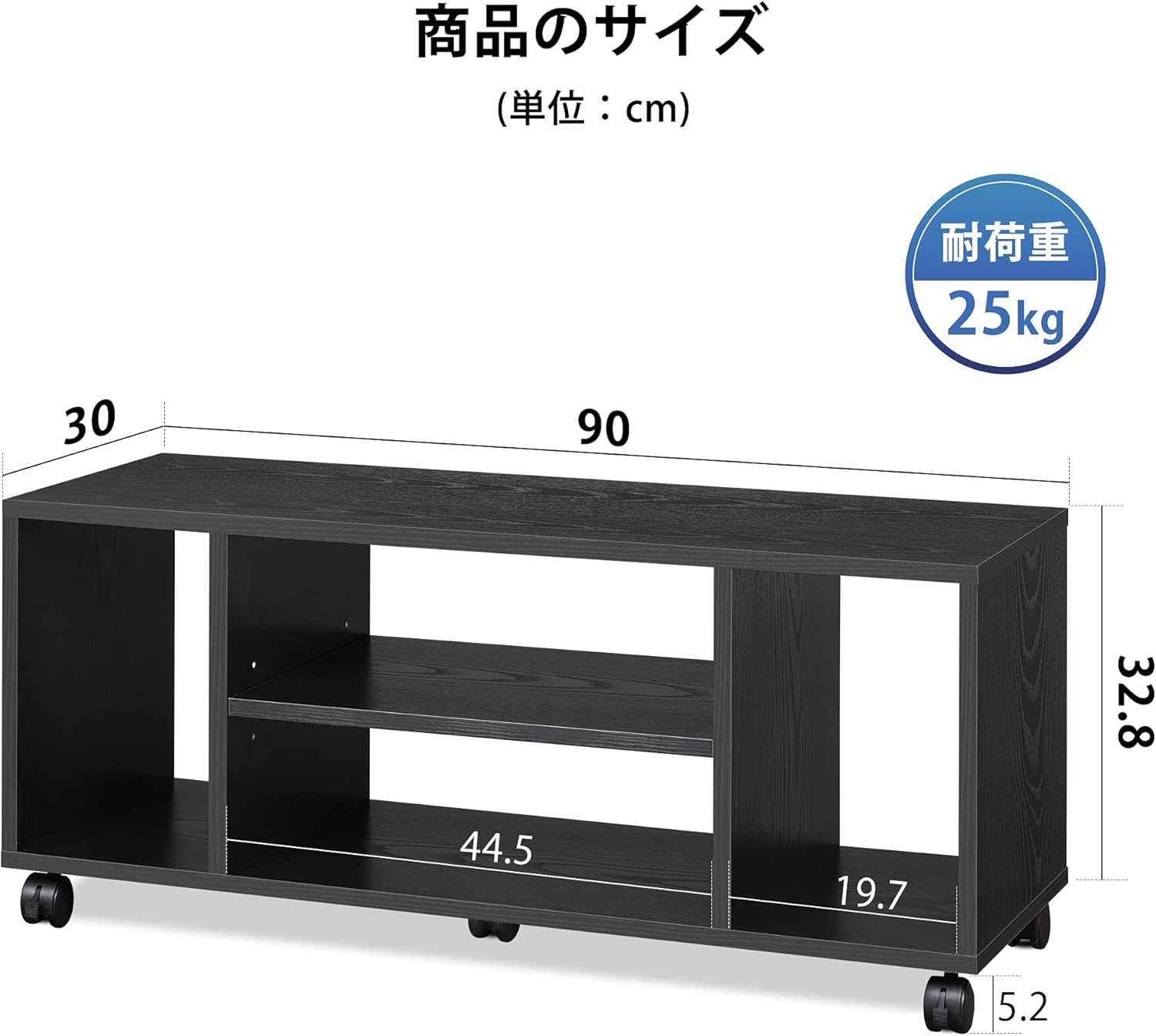
בילד: איבערview of the TV stand components and their dimensions (90cm width, 30cm depth, 38cm height).
Step 2: Attach Casters (Optional)
If you wish to use the casters for mobility, attach the five casters to the bottom panel. Ensure the two lockable casters are installed on the front side. If you prefer a stationary unit, you may omit this step.

Image: The TV stand equipped with five casters, demonstrating easy movement for cleaning. Two front casters have a lock function.
שריט 3: אַסעמבאַל די ראַם
Connect the side panels to the bottom panel using the provided hardware. Then, attach the top panel to complete the main frame. Follow the numerical sequence in the assembly diagram for best results.
Step 4: Install Adjustable Shelf
Insert the adjustable shelf into the central compartment. The shelf can be set at three different height levels to accommodate various media devices.

Image: The TV stand's open storage design, highlighting the side compartments and the central adjustable shelf with three height options.
אַפּערייטינג ינסטראַקשאַנז
Placing Your Television
Carefully place your television on the top panel of the stand. Ensure the TV's base is fully supported and centered. The stand is designed to stably hold TVs up to 40 inches with a maximum weight of 25 kg.
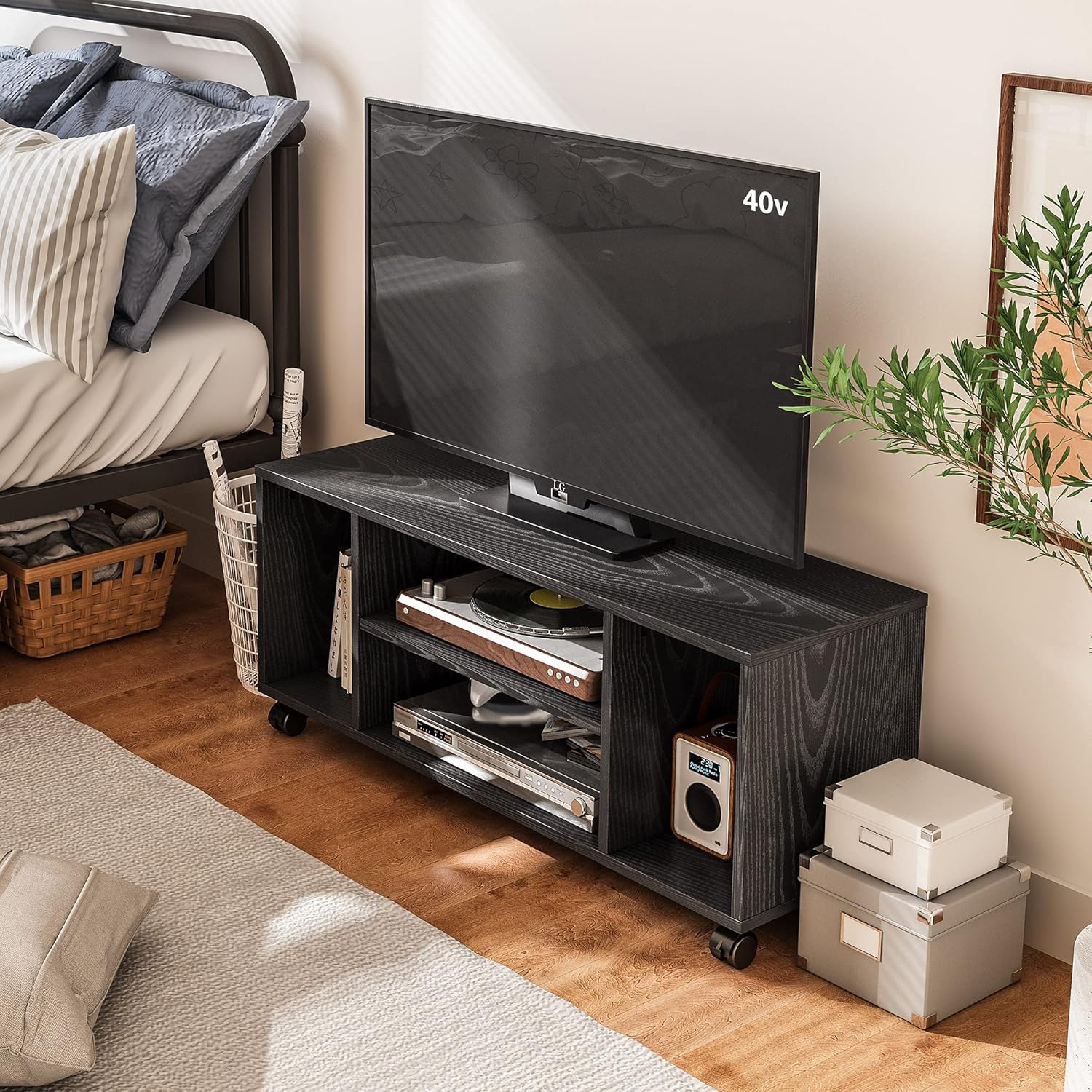
Image: The DEVAISE TV stand with a 40-inch television, demonstrating its use in a room setting.
Utilizing Storage
The four open compartments provide ample space for media devices, game consoles (e.g., PS5), magazines, or decorative items. The central shelf's adjustable height allows for flexible storage configurations.
Cable Management and Ventilation
The open-back design of the stand facilitates easy cable routing and promotes air circulation, preventing electronic devices from overheating.

Image: Detail of the open-back design, illustrating how cables can be easily passed through and how heat can dissipate.
מאָווינג די שטיין
If casters are installed, unlock the front two casters before moving the stand. When the stand is in its desired position, lock the front casters to secure it in place.
וישאַלט
- רייניקונג: ווישן די ייבערפלאַך מיט אַ ווייך, דamp שטאָף. פֿאַרמײַדט ניצן שאַרפֿע כעמיקאַלן אָדער אַברייסיוו רייניקונגסמיטלען וואָס קענען שאַטן די ענדיקונג.
- דורכקוק: קאָנטראָלירט פּעריִאָדיש אַלע שרויפן און פֿאַרבינדונגען צו זיכער מאַכן אַז זיי בלייבן פֿעסט. פֿעסטשטײַערט ווידער אויב נייטיק.
- סוויווע: האַלט דעם טעלעוויזיע שטאַנד אַוועק פון דירעקטער זון און איבערגעטריבענער פייכטקייט צו פאַרמייַדן קרום ווערן אָדער פאַרפאַרבונג.
טראָובלעשאָאָטינג
- דער שטאַנד איז וואָקלדיק: Ensure all screws are securely tightened. Check that the stand is placed on a flat, even surface.
- Casters not moving smoothly: Check for any debris obstructing the wheels. Ensure the locking mechanism is disengaged.
- שוועריקייט מיט פֿאַרזאַמלונג: Refer to the assembly diagrams and ensure all parts are oriented correctly. Do not force parts together.
ספּעסאַפאַקיישאַנז
| סאָרט | DEVAISE |
| מאָדעל נומער | ADSG607HF |
| קאָליר | שוואַרץ |
| מאַטעריאַל | האלץ |
| דימענשאַנז (ב x ד x ה) | 90 סענטימעטער X 30 סענטימעטער X 38 סענטימעטער |
| פּראָדוקט וואָג | 11 קג |
| מאַקסימום טעלעוויזיע גרייס געשטיצט | 40 אינטשעס |
| שפּיץ פּאַנעל לאָוד קאַפּאַציטעט | 25 קג |
| אַסעמבלי פארלאנגט | יא |
| קאַסטערס | 5 (2 with lock, removable) |
| UPC | 745103610816 |
וואָראַנטי און שטיצן
This DEVAISE product comes with a 1-יאָר פאַבריקאַנט ס וואָראַנטי פון די דאַטע פון קויפן. די וואָראַנטי קאָווערס חסרונות אין מאַטעריאַלס און ווערקמאַנשיפּ אונטער נאָרמאַל נוצן.
For warranty claims, missing parts, or technical assistance, please contact DEVAISE customer support through the retailer where you purchased the product or visit the official DEVAISE webפּלאַץ.
ביטע באַהאַלטן אייער קויפן-באַווייַז פֿאַר וואָראַנטי וואַלידאַציע.