
1. הקדמה
Thank you for choosing the Proscenic M7 Robot Vacuum Cleaner. This device is designed to provide efficient and thorough cleaning for your home, featuring advanced laser navigation, powerful suction, and intelligent mopping capabilities. Please read this manual carefully before using the product to ensure proper operation and maintenance.
2. וויכטיק סאַפעטי אינסטרוקציעס
- לייענען אַלע ינסטראַקשאַנז איידער ניצן דעם אַפּפּליאַנסע.
- לאָזט נישט קינדער אָפּערירן דעם ראָבאָט וואַקוום. היט אויף קינדער און חיות ווען דער ראָבאָט אַרבעט.
- Ensure the charging dock is placed against a wall on a level surface, away from water or heat sources.
- Remove any loose cables, small objects, or fragile items from the floor before operation to prevent entanglement or damage.
- Do not use the robot vacuum in wet environments or to clean up liquids.
- Do not use the robot vacuum near open flames or flammable materials.
- Only use the original power adapter and charging dock provided by the manufacturer.
- Turn off the robot and unplug the charging dock before performing any maintenance or cleaning.
3. פּראָדוקט איבערview
3.1 שליסל פֿעיִקייטן
- Laser Navigation (LDS): Scans your home in 360 degrees to create real-time maps for efficient cleaning paths.
- App & Alexa Control: Manage cleaning modes, schedules, virtual no-go zones, and spot cleaning via the ProscenicHome app or Alexa voice commands.
- Y-shaped Mopping: Emulates manual mopping for thorough dirt and grime removal with a 500ml electronically controlled water tank.
- שטאַרק סאַקשאַן: Up to 2000Pa suction power with three adjustable modes for various floor types.
- ריטשאַרדזש און רעסומע: Automatically returns to the charging dock when the battery is low and resumes cleaning from where it left off.
3.2 Robot Components
Familiarize yourself with the main components of your Proscenic M7 robot vacuum.

Image: Proscenic M7 Robot Vacuum highlighting its navigation and safety features like SLAM, Anti-Collision, LDS, Anti-falling, and Jam-resistant technology. A map overlay illustrates its ability to plan cleaning routes.
- LDS Sensor: Located on top for 360-degree scanning and mapping.
- באַמפּער: Front bumper with anti-collision sensors.
- זייט ברושעס: Two side brushes to sweep debris into the main brush path.
- הויפּט באַרשט: Underside brush for deep cleaning.
- Dustbin/Water Tank: Removable compartments for dry vacuuming and wet mopping.
- טשאַרדזשינג קאָנטאַקטן: On the underside, for connecting to the charging dock.
- Drop Sensors: On the underside, to prevent falling down stairs.
4. סעטאַפּ גייד
4.1 טשאַרדזשינג די ראָבאָט
- שטעלט דעם טשאַרדזשינג דאָק קעגן אַ וואַנט אין אַן אָפֿענעם אָרט, און זאָרגט אַז עס זענען נישטאָ קיין שטערונגען אינערהאַלב 1 מעטער (3 פֿיס) צו די זייטן און 2 מעטער (6 פֿיס) פֿאַרנט.
- פֿאַרבינדט דעם מאַכט אַדאַפּטער צום טשאַרדזשינג דאָק און שטעקט עס אַרײַן אין אַ וואַנט אַוטלעט.
- Place the robot onto the charging dock, ensuring the charging contacts align. The robot will begin charging. Allow it to fully charge before first use (approximately 5 hours).
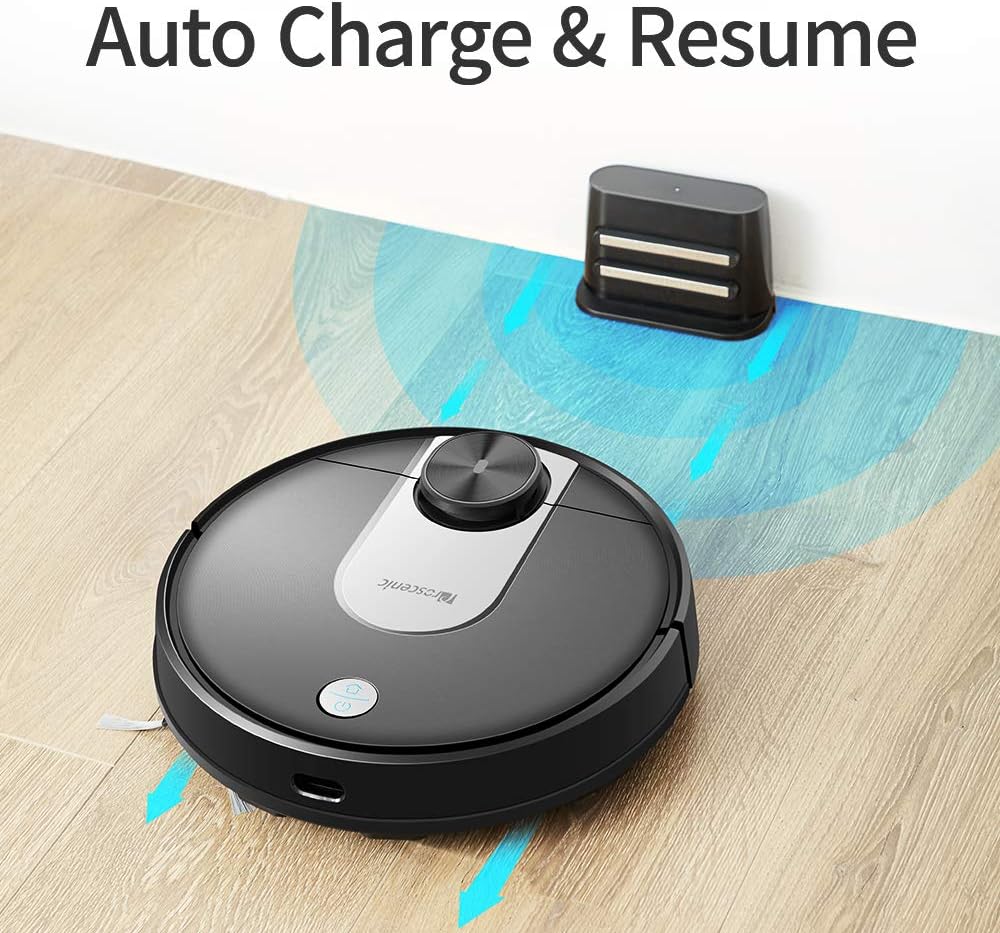
Image: The Proscenic M7 robot vacuum approaching its charging station, demonstrating its auto-charge and resume function.
4.2 Installing the ProscenicHome App
The ProscenicHome app allows you to control your robot vacuum remotely and access advanced features.
- דאַונלאָוד די "ProscenicHome" אַפּ פֿון די אַפּ סטאָר (iOS) אָדער גוגל פּליי סטאָר (אַנדרויד).
- רעגיסטרירן אַ חשבון און קלאָץ אין.
- Follow the in-app instructions to add your Proscenic M7 device. Ensure your phone is connected to a 2.4GHz Wi-Fi network, as the robot does not support 5GHz networks.
- During the binding process, ensure the robot is fully charged and near your Wi-Fi router for optimal connection. If you encounter issues, try restarting your router or moving the robot closer.

Image: A smartphone screen displaying the ProscenicHome app interface. It shows a generated cleaning map, current cleaned area, battery level, and cleaning time. Icons for scheduling, map saving, zoned cleaning, mopping, no-go zones, spot cleaning, and remote control are visible, along with compatibility logos for Alexa, Android, and iPhone.
5. אַפּערייטינג ינסטרוקטיאָנס
5.1 אָנהייבן אַ רייניקונג ציקל
- מאַנואַל אָנהייב: Press the power button on the robot once to start a full cleaning cycle.
- אַפּ קאָנטראָל: Open the ProscenicHome app and tap "Start" to initiate cleaning.
- The robot will use its laser navigation to map your home and plan an efficient cleaning path.
5.2 רייניקונג מאָדעס
The Proscenic M7 offers various cleaning modes accessible via the ProscenicHome app:
- אַוטאָ רייניקונג: The robot intelligently cleans the entire accessible area.
- אָרט רייניקונג: דירעקטירט דעם ראָבאָט צו רייניקן אַ ספּעציפֿישן קליין געגנט אינטענסיוו.
- Zoned Cleaning: Define a rectangular area on the app's map for the robot to clean. This requires a saved map.
- ברעג רייניקונג: The robot cleans along the perimeter of your rooms.
- Mopping Mode: Attach the water tank and mopping pad for wet cleaning.
5.3 מאָפּינג פֿונקציע
The M7 features a Y-shaped mopping pattern for effective wet cleaning.
- Fill the 500ml electronically controlled water tank with clean water.
- Attach the mopping pad securely to the water tank.
- Replace the dustbin with the filled water tank assembly.
- Select "Mopping Mode" in the app or allow the robot to detect the water tank and switch automatically.
- Adjust the water flow level via the app if desired.

בילד: א נאָענטע בילד view of the Proscenic M7 robot vacuum, showcasing its large 500ml water tank, designed for extensive mopping coverage.

בילד: אן איבערקאפ view of the Proscenic M7 robot vacuum on a wooden floor, illustrating its Y-shaped mopping movement pattern with arrows.
5.4 Map Management and Virtual Walls
- Map Memorization: After completing a full cleaning cycle and successfully returning to the charging dock, the robot will save the generated map. Ensure this feature is enabled in the app.
- Virtual No-Go Zones: Use the app to draw virtual boundaries or "no-go lines" on the map to prevent the robot from entering specific areas.
- שטח רייניקונג: Once a map is saved, you can define specific areas for cleaning.
6. וישאַלט
רעגולערע אויפהאלטונג גאראנטירט אפטימאלע פאָרשטעלונג און פארלענגערט די לעבנס-צייט פון אייער ראָבאָט וואַקוום.
6.1 רייניקן דעם מיסטקאַסטן און פילטער
- דריקן די אָפּפאַל קנעפּל און אַראָפּנעמען די אָפּפאַל.
- ליידיקט אויס דעם אינהאַלט פֿון מיסטקאַסטן אין אַ מיסטקאַסטן.
- Remove the filter and tap it gently to dislodge dust. Rinse the filter with water if necessary, ensuring it is completely dry before reinstallation.
- Wipe the inside of the dustbin with a dry cloth.
- צוריקשטעלן דעם פילטער און מיסטקאסטן.
6.2 Cleaning the Water Tank and Mopping Pad
- אַראָפּנעמען דעם וואַסער טאַנק פֿון דעם ראָבאָט.
- ליידיק קיין רוען וואַסער פון דעם טאַנק.
- Remove the mopping pad and rinse it thoroughly with water. Allow it to air dry.
- ריין די וואַסער טאַנק מיט אַדamp cloth and allow it to dry completely before storage or refilling.
6.3 רייניקונג באַרשטן און סענסאָרן
- הויפּט באַרשט: Remove the main brush cover and lift out the brush. Use the cleaning tool (if provided) to remove hair and debris.
- זייט ברושעס: Periodically check side brushes for tangled hair or debris. Remove and clean them as needed. Replace if worn.
- סענסאָרס: Gently wipe the LDS sensor, anti-drop sensors, and charging contacts with a clean, dry cloth to ensure they are free of dust and debris.
7. טראָובלעשאָאָטינג
If you encounter issues with your Proscenic M7, refer to the following common problems and solutions.
| פּראָבלעם | מעגלעך סיבה | לייזונג |
|---|---|---|
| דער ראָבאָט הייבט זיך נישט אָן און רעאַגירט נישט. | נידעריגע באַטעריע; מאַכט אויסשאַלטן. | Ensure the robot is fully charged; Check if the main power switch is on. |
| ראָבאָט בלייבט אָפט שטעקן. | Obstacles (cables, rugs, furniture); Drop sensors dirty. | Clear the cleaning area of obstacles. Use virtual no-go zones for problematic areas. Clean drop sensors. |
| App connection issues (Binding Error). | Incorrect Wi-Fi band (5GHz); Weak Wi-Fi signal; Robot not fully charged. | Ensure your phone is on a 2.4GHz Wi-Fi network. Move the robot closer to the router. Ensure the robot is fully charged before binding. Try restarting your router. |
| ראָבאָט טוט נישט צוריקקומען צו טשאַרדזשינג דאָק. | Charging dock obstructed; Charging contacts dirty. | Ensure the charging dock area is clear. Clean the charging contacts on both the robot and the dock. |
| שלעכטע רייניקונג פאָרשטעלונג. | מיסטקאַסטן פול; באַרשטן פֿאַרפּלאָנטערט; פֿילטער פֿאַרשטאָפּט. | Empty the dustbin. Clean the main and side brushes. Clean or replace the filter. |
| Mopping leaves streaks or misses spots. | Mopping pad dirty or dry; Water tank empty; Water flow setting too low. | Clean or wet the mopping pad. Refill the water tank. Adjust water flow in the app. |
| Map not saving or virtual walls not working. | First full cleaning cycle not completed; App glitch. | Ensure the robot completes a full cleaning cycle and returns to the dock successfully to generate and save the map. Restart the app or robot if issues persist. |
8. ספּעסאַפאַקיישאַנז
| שטריך | דעטאַל |
|---|---|
| סאָרט | פּראָסעניק |
| מאָדעל נאָמען | M7 |
| ספּעציעלע שטריך | No-Go Zone |
| קאָליר | שוואַרץ |
| אַרייַנגערעכנט קאַמפּאָונאַנץ | באַטערי |
| פילטער טיפּ | פּאַטראָן |
| באַטערי לעבן | Up to 1.5 Hours (3200mAh capacity) |
| דוסטבין קאַפּאַציטעט | 0.5 ליטער |
| וואַסער טאַנק קאַפּאַציטעט | 500 מל |
| מאַכט מקור | באַטאַרייע פּאַוערד |
| קאָנטראָל מעטאָד | Voice (Alexa), App |
| קאַמפּאַטאַבאַל דעוויסעס | אַמאַזאָן עקאָ (אַלעקסאַ) |
| פאָרם פאַקטאָר | ראָבאָטיש |
| פּראָדוקט דימענשאַנז | 16.5 X 13.4 X 5.5 אינטשעס |
| פּונקט וואָג | 12.62 פונט |
| ייבערפלאַך רעקאָמענדאַציע | טעפּעך, האַרטע פּאָדלאָגעס |
9. וואָראַנטי און שטיצן
For warranty information or technical support, please refer to the warranty card included with your product or visit the official Proscenic website. You may also contact Proscenic customer service directly for assistance with product operation, maintenance, or troubleshooting beyond this manual.