
1. הקדמה
This manual provides instructions for the Zerone Universal Remote Control, designed as a replacement for various Haier TV models. It is compatible with Haier HTR-A18M, 55D3550, 40D3500M, and 48D3500 series televisions. This remote control offers direct access to digital TV functions without complex programming.

Image 1.1: The Zerone Universal Remote Control in use, demonstrating its compatibility with Haier HTR-A18M, 55D3550, 40D3500M, and 48D3500 TV models.
2. סעטאַפּ
2.1 באַטאַרייע ייַנמאָנטירונג
The remote control requires two (2) AAA batteries (not included) for operation. Follow these steps to install the batteries:
- געפֿינען די באַטאַרייע אָפּטייל אויף די צוריק פון די ווייַט קאָנטראָל.
- דריק אַראָפּ אויף דעם לאַטש און שלעפּ אַראָפּ דעם באַטעריע דעקל.
- אַרײַנשטעלן צוויי AAA באַטעריעס, און זיכער מאַכן אַז די פּאָזיטיוו (+) און נעגאַטיוו (-) טערמינאַלן זענען ריכטיק אויסגעשטעלט מיט די מאַרקירונגען אינעווייניק אין דעם אָפּטייל.
- רוק די באַטאַרייע דעקן צוריק אין פּלאַץ ביז עס קליקס סיקיורלי.
The remote is ready for use immediately after battery installation; no additional programming is required for compatible Haier TV models.

בילד 2.1: דעטאַלירט view of the remote control, highlighting the battery compartment for AAA battery installation.
3. אַפּערייטינג ינסטרוקטיאָנס
3.1 יקערדיק פאַנגקשאַנז
This remote control provides standard functions for your Haier TV. Point the remote directly at your television's infrared receiver for optimal performance.
- מאַכט קנעפּל (U): צינדט אָן אָדער אויס דעם טעלעוויזאָר.
- אַרייַנשרייַב: Selects video input sources (HDMI, AV, etc.).
- נומער קנעפּלעך (0-9)דירעקטע קאַנאַל אויסוואַל.
- וואָל +/-: אַדזשאַסטירט די באַנד אַרויף אָדער אַראָפּ.
- טש +/-: טוישט קאַנאַלן אַרויף אָדער אַראָפּ.
- שטום: שטומט אדער אנשטומט דעם טעלעוויזיע אודיאָ.
- MENU: גייט אריין אין דעם הויפּט מעניו פון דער טעלעוויזיע.
- נאַוויגאַציע קנעפּלעך (אַרויף, אַראָפּ, לינקס, רעכטס, גוט): נאַוויגירט דורך מעניוז און באַשטעטיקט סעלעקשאַנז.
- BACK / EXIT: Returns to the previous screen or exits the current menu.
- DISPLAY: Shows current channel information.
- SAP / AUDIO: Selects audio language or mode.
- שלאָף: Sets the sleep timer.
- PICTURE / WIDE: Adjusts picture mode or aspect ratio.
- CH.LIST / FAVORITE: Accesses channel list or favorite channels.
- Media Control Buttons (Play, Pause, Fast Forward, Rewind): קאָנטראָלירט מעדיע ווידערשפּיל.
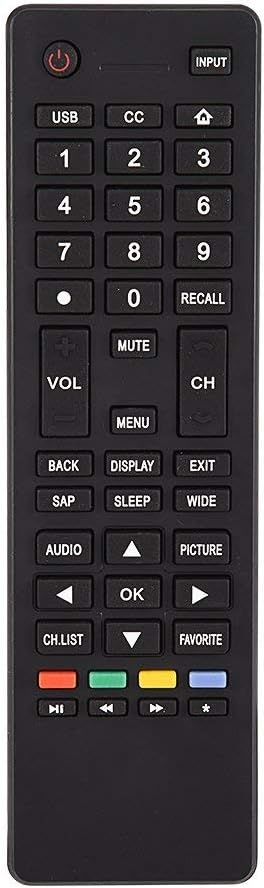
בילד 3.1: איבערview of the remote control's button layout for easy identification of functions.
3.2 אַפּערייטינג קייט
The remote control has a stable signal transmission distance of up to 10 meters (33 feet). Actual remote distance may vary depending on environmental factors and the specific model of your TV.
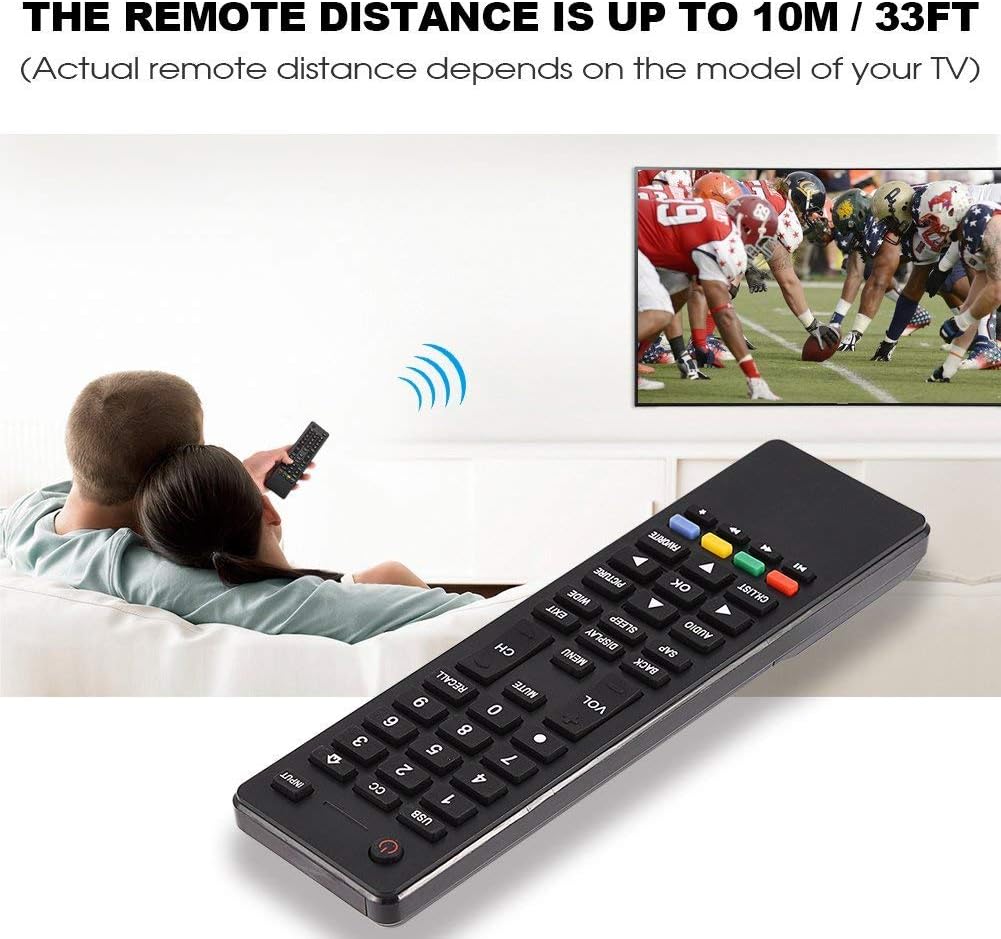
Image 3.2: Visual representation of the remote control's effective operating distance to the television.
4. וישאַלט
4.1 רייניקונג
צו רייניקן די ווײַטקאָנטראָל, ניצט אַ ווייכע, טרוקענע שטאָף. פֿאַר שווערע שמוץ, לייכט ווישטampen the cloth with water or a mild cleaning solution. Avoid using harsh chemicals or abrasive cleaners, as these can damage the remote's surface or internal components.
4.2 באַטערי קער
- טוישט די באַטעריעס ווען די ווייַט קאָנטראָל רעאַקציע ווערט טראָגלעך אָדער הערט אויף צו אַרבעטן.
- דו זאלסט נישט מישן אַלט און נייַ באַטעריז, אָדער פאַרשידענע טייפּס פון באַטעריז.
- אַרויסנעמען די באַטעריעס אויב די ווײַטקאָנטראָל וועט נישט ווערן גענוצט פֿאַר אַ לענגערע צײַט כּדי צו פֿאַרמײַדן ליקאַדזש.
- אָפּזאָגן געוויינט באַטעריז ריספּאַנסאַבלי לויט די היגע רעגיאַליישאַנז.
5. טראָובלעשאָאָטינג
5.1 ווײַטקאָנטראָל רעאַגירט נישט
- קוק באַטעריז: Ensure batteries are inserted correctly with the correct polarity (+/-) and are not depleted. Replace with fresh AAA batteries if necessary.
- שורה פון דערזען: Make sure there are no obstructions between the remote control and the TV's infrared sensor.
- דיסטאַנסע: Confirm you are within the effective operating range (up to 10 meters / 33 feet).
- טעלעוויזיע קאָמפּאַטיביליטי: Verify that your TV model is listed as compatible (Haier HTR-A18M, 55D3550, 40D3500M, 48D3500).
5.2 Buttons Not Working Correctly
- ריין רימאָוט: Dust or debris under buttons can cause malfunction. Refer to the Maintenance section for cleaning instructions.
- באַטערי טשעק: Weak batteries can lead to inconsistent button responses. Replace batteries.
6. ספּעסאַפאַקיישאַנז
| שטריך | דעטאַל |
|---|---|
| סאָרט | נול |
| קאַמפּאַטאַבאַל דעוויסעס | Haier HTR-A18M, 55D3550, 40D3500M, 48D3500 TVs |
| קאַנעקטיוויטי טעכנאָלאָגיע | ינפרערעד |
| מאַקסימום קייט | 10 מעטער (33 פֿיס) |
| באַטערי טיפּ | 2 X AAA (ניט אַרייַנגערעכנט) |
| קאָנטראָללער טיפּ | קנעפּל קאָנטראָל |
| מאַטעריאַל | ABS |
| מאָדעל נומער | Zerone9rnag3b5y4-cr |
| UPC | 647213811490 |

Image 6.1: Physical dimensions of the Zerone Universal Remote Control.
7. וואָראַנטי אינפֿאָרמאַציע
This product is offered as an Amazon Renewed item. Amazon Renewed products are professionally inspected and tested to work and look like new. If you are not satisfied with your purchase, renewed products are eligible for replacement or refund under the Amazon Renewed Guarantee.
Additionally, the manufacturer provides a 90-טאָג לימיטעד וואָראַנטי. For specific details regarding the terms and conditions of this warranty, please refer to the documentation provided at the time of purchase or contact customer support.
8. קונה שטיצן
If you encounter any issues or have questions regarding your Zerone Universal Remote Control that are not addressed in this manual, please contact the seller or Amazon Renewed customer service for assistance.
For Amazon Renewed Guarantee claims, please visit the Amazon Renewed program page or contact Amazon customer support directly.