
1. הקדמה
This manual provides essential information for the safe and efficient operation of your Strong SRT 32HB3003 32-inch HD LED TV. Please read these instructions carefully before using the television and retain them for future reference.
2. זיכערקייַט אינפֿאָרמאַציע
שטענדיק אָבסערווירן די פאלגענדע זיכערהייט מיטלען צו פאַרמייַדן עלעקטרישע קלאַפּ, פייַער אָדער שעדיקן צו די טעלעוויזיע:
- דו זאלסט נישט ויסשטעלן די טעלעוויזיע צו רעגן אָדער נעץ.
- עפֿנט נישט דעם טעלעוויזאָרasinג; רעפֿערירט אַלע סערוויסינג צו קוואַליפֿיצירטע פּערסאָנעל.
- ענשור געהעריק ווענטאַליישאַן אַרום די טעלעוויזיע.
- נעמט ארויס דעם טעלעוויזאר בעת בליץ-שטורעמס אדער ווען מען ניצט עס נישט פאר לאנגע צייטן.
- האַלט דעם טעלעוויזאָר אַוועק פון היץ קוועלער און דירעקט זונשייַן.
3. פּעקל אינהאַלט
באַשטעטיקן אַז אַלע זאכן זענען פאַראַן אין דער פּאַקאַדזשינג:
- Strong SRT 32HB3003 LED TV
- ווייַט קאָנטראָל
- 2x AAA באַטעריז
- טעלעוויזיע שטייט
- באַניצער מאַנואַל

Image: The Strong SRT 32HB3003 TV packaging, highlighting key features such as DVB-T2/C/S2 tuner, HDMI, USB, and Dolby Audio.
4. סעטאַפּ
4.1 שטיין ייַנמאָנטירונג
צו אינסטאַלירן דעם טעלעוויזיע שטאַנד:
- לייגט פֿאָרזיכטיק דעם טעלעוויזאָר מיטן פּנים אַראָפּ אויף אַ ווייכער, ריינער ייבערפֿלאַך כּדי צו פֿאַרמייַדן שאָדן צום עקראַן.
- גלייכט אויס די שטאַנד באַזעס מיט די קאָרעספּאָנדירנדיקע סלאָץ אויף דער אונטערשטער טייל פון דער טעלעוויזיע.
- באַפֿעסטיקן די שטאַנדן מיט די צוגעשטעלטע שרויפֿן.
4.2 קאַנעקשאַנז
Connect your external devices to the TV using the appropriate ports.
- אַנטענע / קאַבלע: Connect your DVB-T2 or DVB-C antenna/cable to the 'ANT IN' port.
- סאַטעליט: Connect your satellite dish to the 'SATELLITE IN' port for DVB-S2 reception.
- HDMI דעוויסעס: Use HDMI ports for high-definition devices like Blu-ray players, game consoles, or set-top boxes. HDMI 1 supports ARC (Audio Return Channel).
- USB דעוויסעס: אַרײַנשטעלן USB דרייווס אין די USB 2.0 פּאָרטן פֿאַר מעדיע ווידערשפּיל.
- CI+ Module: Insert a CI+ module (Common Interface) into the CI+ slot for encrypted channels.
- אַודיאָ רעזולטאַט: Use the Headphone jack for private listening or the Digital Optical Output (TOS-Link) for external audio systems.
- AV IN: פֿאַר עלטערע דעוויסעס, ניצט דעם AV IN פּאָרט.

בילד: הינטערשטע view of the Strong SRT 32HB3003 TV, illustrating the placement of connection ports including HDMI, USB, and antenna inputs.

Image: A diagram detailing the Common Interface (CI) slot and other connectivity options such as USB, headphone jack, AV IN, HDMI 1, HDMI 2, Satellite IN, and S/PDIF (digital optical audio out).
4.3 ערשטע מאָל אינסטאַלאַציע
After connecting the power cable and turning on the TV, the First Time Installation wizard will guide you through initial setup steps, including language selection, country, and channel scanning for DVB-T2, DVB-C, or DVB-S2.
5. אָפּערייטינג
5.1 רימאָוט קאָנטראָל איבערview
The remote control allows you to access all TV functions. Insert the two AAA batteries into the remote control, ensuring correct polarity.

Image: The remote control for the Strong SRT 32HB3003 TV, featuring buttons for power, numerical input, volume control, channel selection, menu access, source input, and media playback functions.
5.2 יקערדיק פאַנגקשאַנז
- מאַכט: דרוק די רויטער מאַכט קנעפּל to turn the TV on or off.
- באַנד: ניצן די וואָל +/- קנעפּלעך צו סטרויערן די באַנד.
- קאַנאַל: ניצן די טש +/- קנעפּלעך צו טוישן טשאַנאַלז.
- שטום: דרוק די שטום קנעפּל צו צייטווייליג שטיל מאַכן דעם אַודיאָ.
5.3 מקור סעלעקציע
דרוק די מקור button on the remote control to select the desired input source (e.g., HDMI 1, HDMI 2, DVB-T2, DVB-C, DVB-S2, AV).
5.4 מעניו נאַוויגאַציע
דרוק די MENU button to access the main menu. Use the arrow buttons to navigate and OK to confirm selections. The צוריק button returns to the previous menu or exits the current menu.
5.5 מעדיע ווידערשפּיל (USB)
Insert a USB storage device into one of the USB ports. The TV supports playback of photos, videos, and music files. Access the media player through the main menu or by selecting the USB source.
5.6 עלעקטראָניש פּראָגראַם גייד (EPG)
דרוק די EPG קנעפּל צו view the Electronic Program Guide, which displays program schedules for digital channels.
5.7 האטעל מאָדע
The TV features a Hotel Mode, which allows for restricted access to certain settings and functions, ideal for hospitality environments. Consult the advanced settings menu for Hotel Mode configuration.
6. וישאַלט
6.1 רייניקונג
- שטענדיק אויסשטעקן דעם טעלעוויזאר איידער איר רייניגט.
- ניצט אַ ווייכן, טרוקענעם שטאָף צו ווישן דעם עקראַן און קאַבינעט.
- פֿאַר שווערע פֿלעקן, לײַכט דריקןampווישט דעם שטאָף מיט וואַסער אָדער אַ מילד, נישט-אַבראַוויזיוו רייניגער ספּעציעל דיזיינד פֿאַר עלעקטראָניק.
- Never spray cleaning liquids directly onto the TV.
6.2 סטאָרידזש
If storing the TV for an extended period, ensure it is kept in a cool, dry place, protected from dust and extreme temperatures. It is recommended to use the original packaging for storage.
7. טראָובלעשאָאָטינג
אויב איר טרעפט פּראָבלעמען מיט אייער טעלעוויזיע, באַזירט זיך אויף די פאלגענדע געוויינטלעכע לייזונגען:
| פּראָבלעם | מעגלעך סיבה / לייזונג |
|---|---|
| קיין מאַכט | Check if the power cable is securely connected. Ensure the power outlet is functional. |
| קיין בילד נישט, אבער סאונד איז דא | קאָנטראָלירט די אויסוואַל פון די אַרייַנגאַנג מקור. מאַכט זיכער אַז די עקסטערנע דעוויסעס זענען אנגעצינדן און ריכטיק פארבונדן. |
| קיין קלאַנג, אָבער בילד איז דאָ | Check volume level and mute status. Verify audio settings in the menu. |
| ווייַט קאָנטראָל נישט ארבעטן | Check and replace batteries. Ensure no obstructions between remote and TV sensor. |
| נעבעך בילד קוואַליטעט | Check antenna/cable connection. Adjust picture settings in the menu. |
8. ספּעסאַפאַקיישאַנז
Detailed technical specifications for the Strong SRT 32HB3003 HD LED TV:
| שטריך | באַשרייַבונג |
|---|---|
| מאָדעל נומער | SRT 32HB3003 |
| פאַרשטעלן גרייס | 32 אינטשעס (80 סענטימעטער) |
| האַכלאָטע | 1366 x 768 pixels (HD-Ready) |
| ווייַז טעכנאָלאָגיע | געפירט |
| דערפרישן קורס | 60 הז |
| טונער טעכנאָלאָגיע | דווב-C, דווב-ס2, דווב-ט2 |
| HDMI פּאָרץ | 2 (1x HDMI ARC) |
| וסב 2.0 פּאָרץ | 2 |
| אנדערע ינטערפייסיז | Headphone, Digital Optical Out (TOS-Link), CI+ interface, AV IN |
| ספּעציעלע פֿעיִקייטן | Electronic Program Guide (EPG), USB Media Playback, Parental Control, Hotel Mode |
| מאַכט קאַנסאַמשאַן | 50 וואט |
| ענערגיע עפעקטיווקייַט קלאַס | A+ |
| יערלעך ענערגיע קאַנסאַמשאַן | 45 קוו / אַנאַם |
| פּראָדוקט דימענשאַנז (B x H x D) | 73.2 X 43.5 X 7.78 סענטימעטער |
| וואָג | 4.15 קג |

Image: The energy efficiency label for the Strong SRT 32HB3003, indicating an A+ rating and an annual energy consumption of 45 kWh.
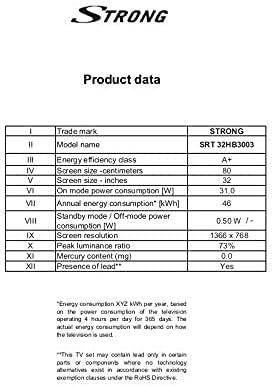
Image: A product data table providing detailed specifications for the Strong SRT 32HB3003, including screen size, resolution, and power consumption.
9. וואָראַנטי און שטיצן
Your Strong SRT 32HB3003 TV comes with a limited warranty. For specific warranty terms and conditions, please refer to the warranty card included in your product packaging or visit the official Strong website. For technical support, troubleshooting assistance, or service inquiries, please contact Strong customer service through their official channels.
פֿאַר ווייטערדיקע הילף, ביטע באַזוכט די Strong official webפּלאַץ.