
1. הקדמה
This manual provides instructions for the installation, operation, and maintenance of the Cisco CP-68KEM-3PCC Expansion Module. This module is designed to enhance the functionality of your Cisco IP Phone 6851 by providing additional programmable keys.
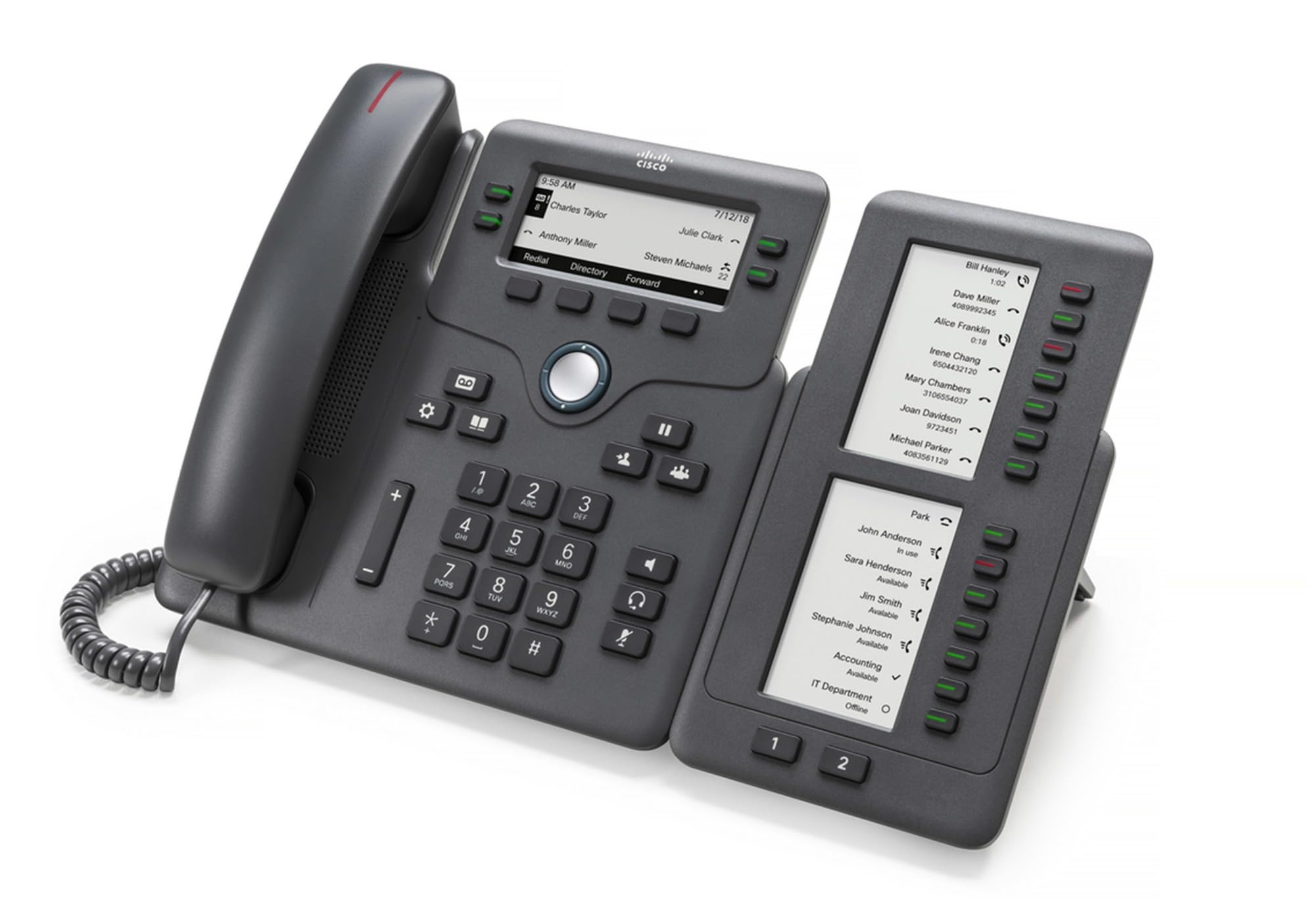
Figure 1: Cisco CP-68KEM-3PCC Expansion Module. This image shows the front view of the expansion module with its grayscale LCD screen and programmable keys.
The Cisco CP-68KEM-3PCC Expansion Module adds 14-line keys and 2-page keys, totaling 28 additional keys, with an easy-to-read grayscale LCD screen. It is ideal for monitoring and managing call status, directory numbers, and speed dial functions.
2. וואָס איז אין דער קעסטל
פֿאָרזיכטיק אויספּאַקן די קעסטל און זיכער מאַכן אַז אַלע זאַכן זענען דאָרט:
- Cisco CP-68KEM-3PCC Phone Expansion Module
- Connecting Cable (typically included for linking to the phone)
- דאָקומענטאַציע (די באַניצער מאַנואַל, זיכערהייט אינפֿאָרמאַציע)
If any items are missing or damaged, please contact your vendor or Cisco support immediately.
3. סעטאַפּ אינסטרוקציעס
Follow these steps to connect your Cisco CP-68KEM-3PCC Expansion Module to your Cisco IP Phone 6851.
- Prepare the IP Phone: Ensure your Cisco IP Phone 6851 is powered off and disconnected from the network.
- Connect the Expansion Module: Locate the expansion port on the back or side of your Cisco IP Phone 6851. Connect the provided connecting cable from the expansion module to this port.
- באַוואָרענען די קשר: Ensure the cable is securely fastened to prevent accidental disconnection.
- מאַכט אויף: Reconnect your Cisco IP Phone 6851 to the network and power it on. The expansion module should be detected automatically.
- באַשטעטיקן פאַנגקשאַנאַליטי: Once the phone has booted, check the expansion module's display and keys to ensure they are responsive.
For detailed visual instructions, refer to the official Cisco documentation or support webפּלאַץ.
4. Operating the Expansion Module
The expansion module provides additional keys for various functions, enhancing your call management capabilities.
4.1 פּראָגראַממאַבלע קיז
The 28 programmable keys (14 keys across 2 pages) can be configured for:
- Directory Numbers (DNs): Assign specific phone lines or extensions.
- ספּיד דייל: פּראָגראַמיר אָפֿט גערופֿענע נומערן פֿאַר שנעלן צוטריט.
- Feature Keys: Assign functions like call transfer, conference, or call park.
- Call Status Monitoring: Monitor the status of other lines (e.g., busy, ringing).
4.2 Page Navigation
Use the dedicated page keys (usually located near the display) to switch between the two pages of programmable keys. The grayscale LCD screen will update to show the labels for the currently active page.
4.3 קאָנפיגוראַטיאָן
Configuration of the programmable keys is typically managed through your organization's phone system administrator or via the web interface of the Cisco IP Phone 6851. Consult your IT department for specific configuration instructions.
5. וישאַלט
To ensure the longevity and optimal performance of your Cisco CP-68KEM-3PCC Expansion Module, follow these maintenance guidelines:
- רייניקונג: Use a soft, dry, lint-free cloth to clean the exterior surfaces. For stubborn marks, slightly dampווישט דעם שטאָף מיט וואַסער. פֿאַרמייַדט ניצן שטרענגע כעמיקאַלן, אַברייסיוו רייניגער, אָדער סאָלווענטן, ווײַל די קענען שאַטן די ענדיקונג און עלעקטראָנישע קאָמפּאָנענטן.
- סוויווע: Keep the module in a clean, dry environment, away from direct sunlight, excessive heat, and moisture.
- האַנדלינג: Handle the module with care. Avoid dropping it or subjecting it to strong impacts.
- קאַבלע פאַרוואַלטונג: Ensure connecting cables are not kinked, pinched, or under strain.
There are no user-serviceable parts inside the expansion module. Do not attempt to open or repair the device yourself.
6. טראָובלעשאָאָטינג
If you encounter issues with your expansion module, try the following troubleshooting steps:
| פּראָבלעם | מעגלעך סיבה | לייזונג |
|---|---|---|
| Module not recognized by phone | Loose cable connection, phone not restarted, incompatible phone model. |
|
| די שליסלען זענען נישט ריספּאַנדינג | Software glitch, configuration issue. |
|
| דיספּליי איז ליידיק אָדער פליקערט | שטראָם פּראָבלעם, אינערלעכע חסרון. |
|
If these steps do not resolve the issue, please contact Cisco technical support or your authorized reseller.
7. ספּעסאַפאַקיישאַנז
| שטריך | דעטאַל |
|---|---|
| מאָדעל נומער | CP-68KEM-3PCC |
| סאָרט | סיסקאָ |
| קאַמפּאַטאַבאַל דעוויסעס | Cisco IP טעלעפאָנירן 6851 |
| קאָליר | שוואַרץ |
| מאַטעריאַל | מעטאַל |
| נומער דימענשאַנז (LxWxH) | 5.1 X 10.2 X 20.3 סענטימעטער |
| מאַכט מקור | Corded (powered via host IP Phone) |
| נומער פון קיז | 28 (14 keys across 2 pages) |
| ווייַז | Grayscale LCD |
| GTIN/UPC | 889728068383 |
8. וואָראַנטי אינפֿאָרמאַציע
The Cisco CP-68KEM-3PCC Expansion Module comes with a 2 יאָר פּראָדוקט וואָראַנטי פֿון דעם קויפֿדאַטום. די וואָראַנטי דעקט חסרונות אין מאַטעריאַלן און אַרבעט אונטער נאָרמאַלן באַנוץ. עס דעקט נישט קיין שאָדן פֿאַראורזאַכט דורך אומרעכטן באַנוץ, אומגליקן, נישט-אָטעריזירטע מאָדיפֿיקאַציעס, אָדער עקסטערנע סיבות.
For warranty claims or detailed terms and conditions, please refer to the official Cisco warranty policy available on their webזייטל אדער קאָנטאַקט אייער קויפן-פונקט.
9. שטיצן
For technical assistance, product information, or to report issues, please contact Cisco support:
- סיסקאָ סופּפּאָרט Webפּלאַץ: באַזוכן די באַאַמטער סיסקאָ סופּפּאָרט webפּלאַץ for documentation, downloads, and contact options.
- Authorized Reseller: Contact the reseller from whom you purchased the product.
When contacting support, please have your product model (CP-68KEM-3PCC) and serial number ready.