
הקדמה
This manual provides essential information for the proper use and maintenance of your Easytry123 replacement infrared remote control. This remote is designed to be compatible with specific Philips LED HDTV TV models, including 49PUS6501/12, 49PUS6551/12, 49PUS6561/12, 49PUS7101/12, 49PUS7181/12, 49PUT6801/98, and 55PUS6501/12. Please verify your TV model number to ensure compatibility.
Important Note: This is a replacement remote control and may not support all functions of your original TV remote. It is not a universal remote control.
פּראָדוקט איבערview

בילד 1: פראָנט view of the Easytry123 replacement remote control, showing the power button, navigation pad, channel/volume controls, and numeric keypad.
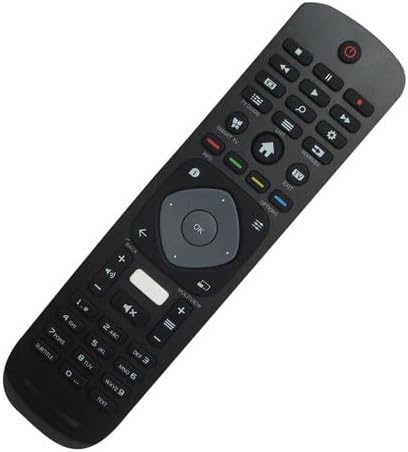
בילד 2: געווינקלטע פראָנט view פון דער ווײַטקאָנטראָל, אונטערשטרייַכנדיק זײַן ערגאָנאָמישן פּלאַן און קנעפּל אויסלייג.

בילד 3: צוריק view פון דער ווײַטקאָנטראָל, ווײַזנדיק דעם דעקל פֿון דער באַטעריע־אָפּטיילונג.
The Easytry123 replacement remote control features a standard button layout for TV operation, including power, channel, volume, navigation, and numeric input. It is designed for comfortable handling and intuitive use.
סעטאַפּ
1. באַטאַרייע ייַנמאָנטירונג
- געפֿינען די באַטאַרייע אָפּטייל אויף די צוריק פון די ווייַט קאָנטראָל.
- רוקט דעם דעקל פונעם באַטעריע־אָפּטייל אַראָפּ אָדער אַרויס צו עס עפֿענען.
- Insert two (2) AAA batteries, ensuring the positive (+) and negative (-) terminals match the diagrams inside the compartment.
- פאַרמאַכן די באַטאַרייע אָפּטייל דעקן סיקיורלי.
No setup or coding is required for this remote control. Once batteries are installed, it is ready for use with compatible Philips TV models.
אַפּערייטינג ינסטראַקשאַנז
This remote control operates using infrared (IR) technology. Ensure there is a clear line of sight between the remote control and the IR receiver on your television for optimal performance.
- מאַכט קנעפּל: פּרעסע צו דרייען די טעלעוויזיע אויף אָדער אַוועק.
- נומעריק קיפּאַד (0-9): ניצן צו גלייך אריינלייגן קאַנאַל נומערן.
- קאַנאַל אַרויף / אַראָפּ: Press to change channels sequentially.
- באַנד אַרויף / אַראָפּ: Press to adjust the sound volume.
- שטיל קנעפּל: Press to mute or unmute the TV sound.
- Navigation Pad (Arrow Buttons & OK): Use to navigate menus and confirm selections.
- Back/Exit Buttons: Used to return to the previous screen or exit menus.
- סמאַרט טעלעוויזיע/היים קנעפּל: Accesses the TV's smart features or home screen.
Functionality may vary depending on your specific TV model. Some advanced features or specific buttons present on your original remote may not be replicated on this replacement unit.
וישאַלט
באַטערי פאַרבייַט
Replace batteries when the remote control's response becomes sluggish or stops working. Always replace both batteries at the same time with new AAA batteries. Do not mix old and new batteries, or different types of batteries.
רייניקונג
צו רייניקן די ווײַטקאָנטראָל, ניצט אַ ווייכע, טרוקענע שטאָף. פֿאַר שווערע שמוץ, אַ ביסל ווייכער מאַכןampווישט דעם שטאָף מיט וואַסער. פֿאַרמייַדט ניצן שטרענגע כעמיקאַלן, שרײַבנדיקע רייניקונגס־מיטלען, אָדער איבערגעטריבענע פֿײַכטקייט, ווײַל די קענען שאַטן דעם ווײַטקאָנטראָל.
טראָובלעשאָאָטינג
- ווייַט ניט ריספּאַנדינג:
- קאָנטראָלירט צי די באַטעריעס זענען ריכטיק אַרײַנגעשטעלט מיט דער ריכטיקער פּאָלאַריטעט.
- פאַרבייַטן אַלטע באַטעריעס מיט נייַע AAA באַטעריעס.
- זיכער מאַכן אַז עס זענען נישטאָ קיין שטערונגען צווישן דעם ווײַטקאָנטראָל און דעם טעלעוויזיע'ס IR ופנעמער.
- Confirm that the remote is pointed directly at the TV.
- עטלעכע פונקציעס אַרבעטן נישט:
- As a replacement remote, it may not support all functions of the original TV remote. This is normal for some replacement units.
- באַשטעטיקט אַז אייער טעלעוויזיע מאָדעל איז ליסטעד ווי קאָמפּאַטיבל.
- קורץ אָפּערייטינג קייט:
- פאַרבייַטן באַטעריז.
- זיכער מאַכן אַז קיין שטאַרקע ליכט קוועלער (ווי דירעקטע זונשייַן) זאָלן נישט שטערן דעם IR סיגנאַל.
ספּעסאַפאַקיישאַנז
| סאָרט | גרינג צו טריי123 |
| מאָדעל נומער | גרינג צו טריי5633 |
| קאַמפּאַטאַבאַל דעוויסעס | Television (Specific Philips LED HDTV models) |
| קאַנעקטיוויטי טעכנאָלאָגיע | ינפרערעד (IR) |
| קאָנטראָללער טיפּ | קנעפּל קאָנטראָל |
| מאַקסימום קייט | 10 מעטער (אומגעפער 33 פֿיס) |
| באַטעריז פארלאנגט | 2 X AAA באַטעריז (ניט אַרייַנגערעכנט) |
| ספּעציעלע שטריך | Replacement item; may not work with all original functions. Not a universal remote. |
וואָראַנטי און שטיצן
וואָראַנטי אינפֿאָרמאַציע
This Easytry123 remote control comes with a 90-day warranty from the date of purchase. This warranty covers manufacturing defects under normal use. It does not cover damage caused by misuse, accidents, unauthorized modifications, or battery leakage.
קונה שטיצן
For any questions, issues, or warranty claims regarding your Easytry123 remote control, please contact the seller or manufacturer directly through your purchase platform. Provide your order number and a detailed description of the issue for prompt assistance.