
1. הקדמה
This manual provides instructions for the Superior Electronics Universal Replacement Remote Control, model SUPTRB015. This remote is designed to be a direct replacement for original remote controls of LG, Samsung, and Sony televisions, including Smart TV models. It is ready to use without any programming.
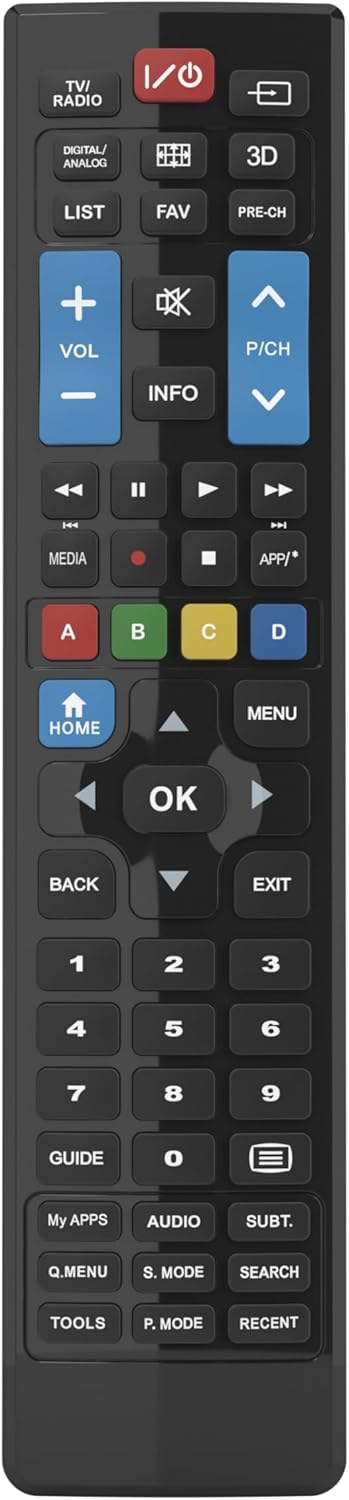
Figure 1: Superior Electronics Universal Remote Control (SUPTRB015)
2. סעטאַפּ
2.1. באַטאַרייע ייַנמאָנטירונג
די ווײַטקאָנטראָל דאַרף צוויי AAA באַטעריעס (נישט אַרייַנגערעכנט). פֿאָלגט די סטעפּס צו זיי אינסטאַלירן:
- געפֿינען די באַטאַרייע אָפּטייל אויף די צוריק פון די ווייַט קאָנטראָל.
- דריק אַראָפּ אויף דעם לאַטש און שלעפּ אַראָפּ דעם באַטעריע דעקל.
- Insert two AAA batteries, ensuring the positive (+) and negative (-) terminals match the diagrams inside the compartment.
- רוק די באַטאַרייע דעקן צוריק אין פּלאַץ ביז עס קליקס סיקיורלי.

Figure 2: Battery Compartment on the back of the remote.
2.2. Initial Use (No Programming Required)
This universal remote control is designed for immediate use with LG, Samsung, and Sony televisions. Once batteries are installed, it is ready to operate your TV without any additional programming or code setup.
3. אַפּערייטינג ינסטרוקטיאָנס
The remote control features an intuitive layout with dedicated buttons for common functions and Smart TV access. Refer to Figure 3 for a visual guide to the buttons.

Figure 3: Remote Control Button Layout.
3.1. גרונטלעכע טעלעוויזיע פונקציעס
- מאַכט קנעפּל (ⓘ): צינדט אָן אָדער אויס דעם טעלעוויזאָר.
- באַנד אַרויף/אַראָפּ (VOL +/-): Adjusts the sound volume.
- Channel Up/Down (P/CH +/-): טוישט טעלעוויזיע קאַנאַלן.
- שטום קנעפּל (🔇): שטומט אדער אנשטומט דעם טעלעוויזיע קלאַנג.
- נומער קנעפּלעך (0-9): Directly select TV channels.
- Input/Source Button (⎌): Selects the input source (HDMI, AV, etc.).
3.2. Navigation and Menu Functions
- Directional Pad (Up, Down, Left, Right Arrows): Navigates through menus and options.
- OK קנעפּל: Confirms selections.
- HOME קנעפּל: Accesses the TV's main home screen or Smart Hub.
- MENU קנעפּל: עפֿנט דאָס הויפּט מעניו פֿון דער טעלעוויזיע.
- BACK קנעפּל: גייט צוריק צום פריערדיקן עקראַן אָדער מעניו.
- EXIT קנעפּל: פֿאַרלאָזט דעם איצטיקן מעניו אָדער אַפּליקאַציע.
- INFO קנעפּל: Displays information about the current program or input.
3.3. Smart TV and Media Functions
- Dedicated Smart TV Buttons: Access popular streaming apps directly (e.g., Netflix, YouTube, Prime Video). These buttons are typically labeled or have recognizable logos.
- Media Control Buttons (Play, Pause, Stop, Rewind, Fast Forward): קאָנטראָלירט מעדיע ווידערשפּיל.
- קאָלירטע קנעפּלעך (רויט, גרין, געל, בלוי): These buttons often have specific functions within Smart TV apps or teletext, as indicated on your TV screen.
4. וישאַלט
4.1. רייניקן די ווײַטקאָנטראָל
כדי צו אויפהאלטן די אויסזען און פונקציאנאליטעט פון דער ווײַטקאָנטראָל:
- ווישן די ייבערפלאַך מיט אַ ווייך, טרוקן שטאָף.
- פֿאַר שווערן שמוץ, אַ ביסל דampyi די שטאָף מיט וואַסער אָדער אַ מילד, ניט-אַברייסיוו רייניקונג.
- ניצט נישט קיין שאַרפע כעמיקאַלן, סאָלווענטן, אדער אַברייסיוו רייניקונג פּאַדס, ווייל די קענען שעדיקן די ענדיקונג אדער אינעווייניקסטע קאָמפּאָנענטן פון דער ווייַטקאָנטראָל.
4.2. באַטערי פאַרבייַט
Replace batteries when the remote's response becomes sluggish or it stops functioning. Always replace both batteries at the same time with new AAA batteries. Do not mix old and new batteries, or different types of batteries.
5. טראָובלעשאָאָטינג
אויב איר האָט פּראָבלעמען מיט אייער ווײַטקאָנטראָל, פּרוּווט די פֿאָלגנדיקע לייזונגען:
- ווייַט ניט ריספּאַנדינג:
- קאָנטראָלירט צי די באַטעריעס זענען ריכטיק אַרײַנגעשטעלט מיט דער ריכטיקער פּאָלאַריטעט (+/-).
- פאַרבייַטן די באַטעריז מיט פריש אָנעס.
- זיכער מאַכן אַז עס זענען נישטאָ קיין שטערונגען צווישן דער ווײַטקאָנטראָל און דעם טעלעוויזיע'ס אינפֿראַרוד ופנעמער.
- Make sure you are within the effective operating range (up to 10 meters).
- געוויסע קנעפּלעך אַרבעטן נישט:
- This remote is designed for LG, Samsung, and Sony TVs. Ensure your TV is one of these brands.
- Some advanced functions or very specific buttons might not be universally supported across all TV models, especially older ones.
- Clean the remote control, especially around the unresponsive buttons, to ensure no debris is preventing contact.
- Smart TV buttons not working:
- Ensure your TV is a Smart TV and is connected to the internet.
- The dedicated Smart TV buttons (e.g., Netflix, YouTube) are compatible with most LG, Samsung, and Sony Smart TV models. If they don't work, you may need to access these apps through your TV's main Smart Hub/Home menu using the navigation buttons.
6. ספּעסאַפאַקיישאַנז
| סאָרט | Superior Electronics |
| מאָדעל נאָמען | Superior Electronics Replacement LG/Samsung/Sony SUPTRB015 |
| ספּעציעלע שטריך | וניווערסאַל |
| קאָליר | שוואַרץ |
| מאַקס סופּפּאָרטעד דעוויסעס | 3 (LG, Samsung, Sony) |
| קאַמפּאַטאַבאַל דעוויסעס | טעלעוויזיע |
| קאַנעקטיוויטי טעכנאָלאָגיע | ינפרערעד |
| קאָנטראָללער טיפּ | קנעפּל קאָנטראָל |
| מאַקסימום קייט | 10 מעטער |
| נומער פון באַטעריז | 2 AAA (Required) |

Figure 4: Remote Control Dimensions (approx. 20 cm length, 4.5 cm width).
7. וואָראַנטי און שטיצן
Superior Electronics products are manufactured to high-quality standards. For information regarding warranty coverage, please refer to the documentation provided with your purchase or visit the official Superior Electronics website. For technical support or further assistance, please contact Superior Electronics customer service through their official channels.
ביטע האַלטן דעם מאַנואַל פֿאַר צוקונפֿט רעפֿערענץ.