
1. הקדמה
This manual provides comprehensive instructions for the proper use and maintenance of your Zerone Replacement TV Remote Control, model BN59-01199G. This remote is designed as a direct replacement for compatible Samsung Smart TVs, ensuring seamless operation without complex setup.

Image 1.1: The Zerone Replacement TV Remote Control, showcasing its button layout and ergonomic design.
2. פּעקל אינהאַלט
- 1 x Zerone Replacement TV Remote Control (Model: BN59-01199G)
3. ספּעסאַפאַקיישאַנז
| שטריך | דעטאַל |
|---|---|
| שאָל מאַטעריאַל | ABS |
| ווייַט קאָנטראָל דיסטאַנסע | Greater than 8 meters (actual distance may vary based on TV model and environment) |
| באַטאַרייע מאָדעל | 2 קס אַאַ באַטעריז (ניט אַרייַנגערעכנט) |
| פּראָדוקט דימענשאַנז | אומגעפער 175 x 45 x 20 מ״מ (6.9 x 1.8 x 0.8 אינטשעס) |
| פּונקט וואָג | בעערעך. 67 ג (2.46 אונסעס) |
| קאַמפּאַטאַבאַל דעוויסעס | Samsung Smart TVs requiring BN59-01199G remote |

Image 3.1: Dimensions of the remote control: 175mm (6.9in) length, 45mm (1.8in) width, and 20mm (0.8in) thickness.
4. סעטאַפּ
4.1 באַטאַרייע ייַנמאָנטירונג
- געפֿינען די באַטאַרייע אָפּטייל אויף די צוריק פון די ווייַט קאָנטראָל.
- רוקט דעם באַטעריע דעקל אַראָפּ צו עס עפענען.
- אַרײַנשטעלן צוויי (2) AA באַטעריעס, און זיכער מאַכן אַז די פּאָזיטיוו (+) און נעגאַטיוו (-) טערמינאַלן זענען ריכטיק אויסגעשטעלט מיט די מאַרקירונגען אינעווייניק אין דעם אָפּטייל.
- רוק די באַטאַרייע דעקן צוריק אין פּלאַץ ביז עס קליקס סיקיורלי.
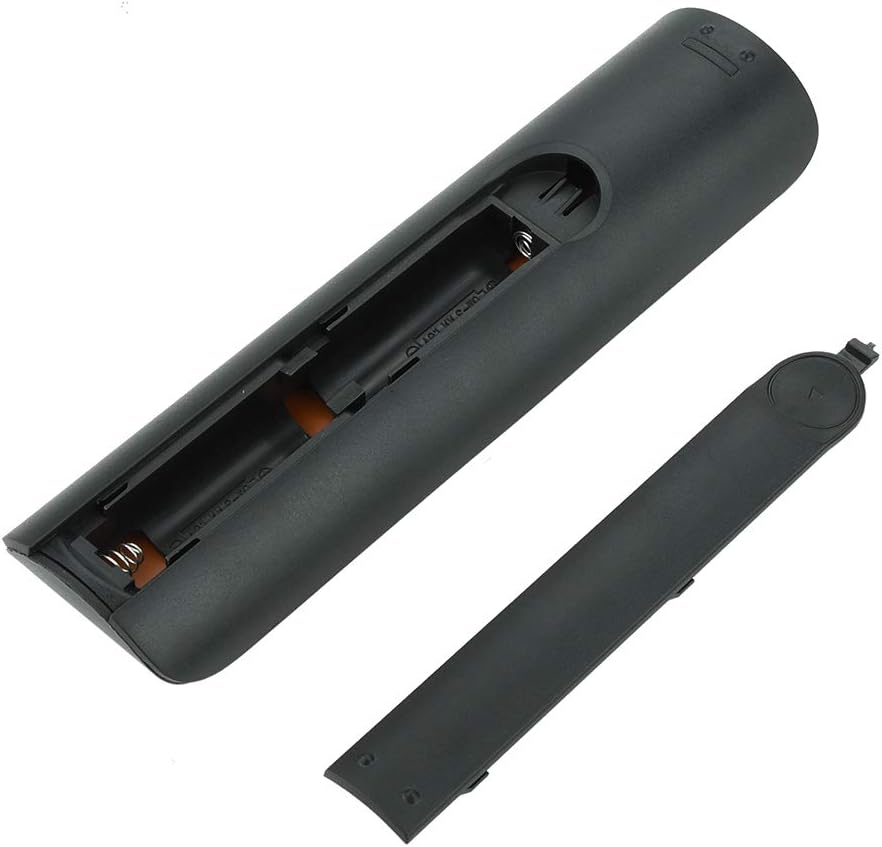
בילד 4.1: View of the remote control with the battery cover removed, showing the two AA battery slots.
4.2 ערשט נוצן
This remote control is designed to work directly with compatible Samsung Smart TVs that originally used the BN59-01199G model. No programming or pairing is typically required. Simply install the batteries and point the remote towards your television.

Image 4.2: The remote control positioned near a television, illustrating its intended use with compatible Samsung models.
5. אַפּערייטינג ינסטרוקטיאָנס
The remote control features standard buttons for TV operation. Refer to the image below for a visual guide to the button layout.

בילד 5.1: א דעטאלירטע view of the remote control's buttons, including power, number pad, volume, channel, and smart functions.
- מאַכט קנעפּל (רויט): טורנס די טעלעוויזיע אויף אָדער אַוועק.
- נומערן בלאט (0-9): פֿאַר דירעקט קאַנאַל אַרייַנגאַנג.
- באַנד אַרויף / אַראָפּ (+/-): אַדזשאַסץ די טעלעוויזיע באַנד.
- קאַנאַל אַרויף/אַראָפּ (CH +/-): טוישט טעלעוויזיע קאַנאַלן.
- שטום: שטילט דעם טעלעוויזיע אַודיאָ.
- Smart Hub: Accesses the Smart Hub interface for apps and streaming services.
- מעניו: עפֿנט דעם הויפּט מעניו פֿון דער טעלעוויזיע.
- מכשירים: Provides quick access to common TV functions.
- אינפֿאָרמאַציע: ווײַזט אינפֿאָרמאַציע וועגן דעם איצטיקן פּראָגראַם אָדער אַרייַנגאַנג.
- נאַוויגאַציע פּאַד (אַרויף, אַראָפּ, לינקס, רעכטס, אַרייַן): געניצט צו נאַוויגירן מעניוז און אויסקלייבן אָפּציעס.
- צוריקקומען: גייט צוריק צום פריערדיקן עקראַן אָדער מעניו.
- אַרויסגאַנג: שליסט דעם איצטיקן מעניו אדער אַפּליקאַציע.
- קאָלירטע קנעפּלעך (A, B, C, D): פונקציאָנאַליטעט ווערייִרט לויט טעלעוויזיע מאָדעל און אַפּלאַקיישאַן.
- פּלייבאַק קאָנטראָלס: Play, Pause, Stop, Fast Forward, Rewind for media playback.
6. וישאַלט
6.1 רייניקונג
צו רייניקן די ווײַטקאָנטראָל, ווישט עס אָפּ מיט אַ ווייכן, טרוקענעם שטאָף. פֿאַר שווערן שמוץ, ווישט עס אַ ביסלampen the cloth with water or a mild, non-abrasive cleaner. Avoid using harsh chemicals or excessive moisture, as these can damage the remote's electronics.
6.2 באַטערי פאַרבייַט
Replace batteries when the remote control's response becomes sluggish or stops working. Always replace both AA batteries at the same time with new ones. Do not mix old and new batteries, or different types of batteries.
7. טראָובלעשאָאָטינג
- ווייַט ניט ריספּאַנדינג:
- קאָנטראָלירט צי די באַטעריעס זענען ריכטיק אַרײַנגעשטעלט מיט דער ריכטיקער פּאָלאַריטעט.
- פאַרבייַטן די באַטעריז מיט פריש אָנעס.
- זיכער מאַכן אַז עס זענען נישטאָ קיין שטערונגען צווישן דער ווײַטקאָנטראָל און דעם טעלעוויזיע'ס אינפֿראַרוד ופנעמער.
- Confirm the remote is pointed directly at the TV.
- Short remote control distance:
- This can indicate low battery power; replace the batteries.
- Environmental factors or strong light sources can interfere with the infrared signal. Try using the remote in different lighting conditions.
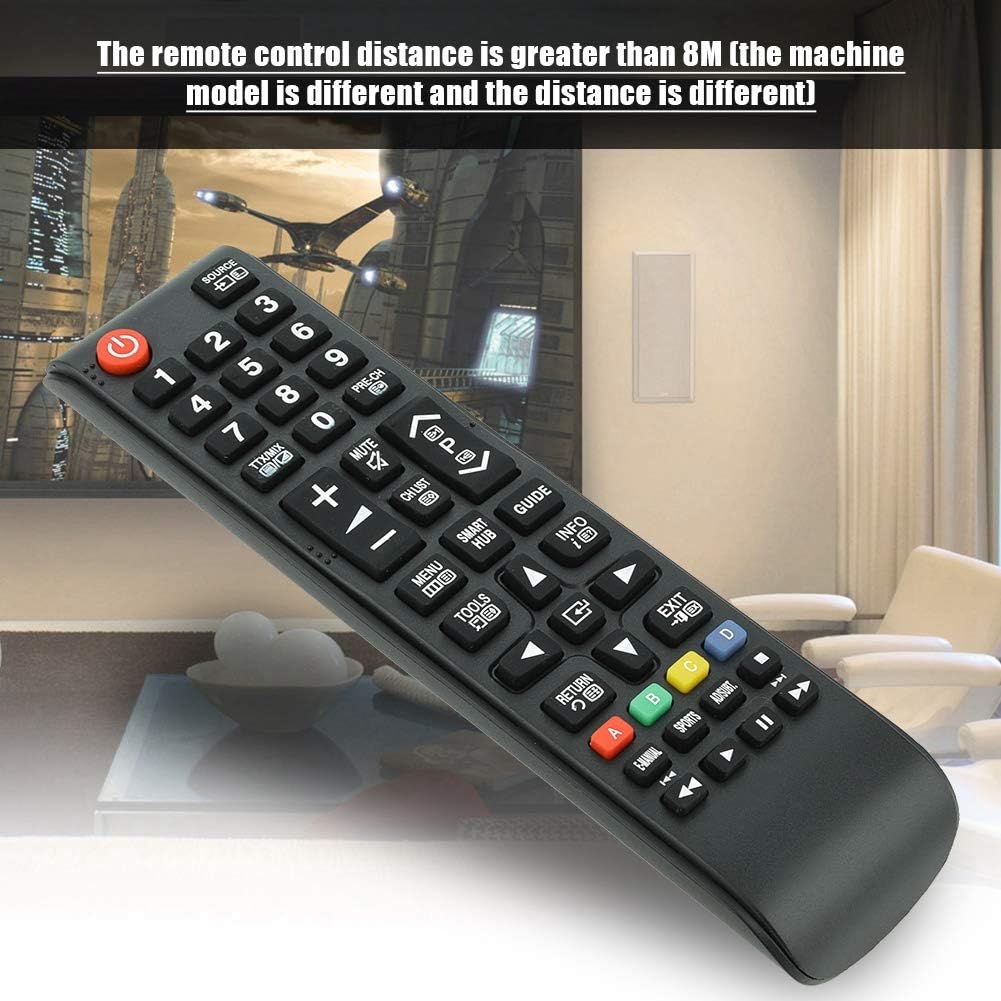
Image 7.1: The remote control in a typical home environment, demonstrating its effective range for TV operation.
8. וואָראַנטי און שטיצן
Zerone products are manufactured with quality in mind. If you encounter any issues or are not satisfied with your product, please contact the seller or manufacturer for support. Refer to your purchase documentation for specific warranty terms and contact information.