
פּראָדוקט איבערview
The EinCar Android 6.0 Quad Core Car Stereo is a double DIN in-dash multimedia system designed for vehicle integration. It features a 6.2-inch capacitive HD touch screen, built-in GPS navigation, Bluetooth connectivity for hands-free calling and music streaming, and a DVD/CD player. This unit supports Wi-Fi and 4G internet connectivity (with optional dongle) and comes with a wireless backup camera for enhanced safety. An external microphone is also included for clear audio during calls.

בילד: פראָנט view of the EinCar Android Car Stereo unit, showcasing the 6.2-inch display and control buttons. Various accessories such as a wireless backup camera, remote control, and external microphone are displayed around the main unit.
שליסל פֿעיִקייטן
- אַפּערייטינג סיסטעם: אַנדרויד 6.0 מאַרשמעלאָו
- פּראַסעסער: קוואַד-האַרץ קפּו
- זכּרון: 1 גיגאבייט ראַם, 16 גיגאבייט אינערלעכע סטאָרידזש
- ווייַז: 6.2-inch Capacitive HD Touch Screen (1024 x 600 resolution)
- נאַוויגאַציע: Built-in GPS with support for Google Maps online navigating and dual zone function
- קאַנעקטיוויטי: Built-in Wi-Fi, Bluetooth for hands-free calls and music, USB, SD card support
- מולטימעדיאַ: DVD/CD Player, support for various music and video formats (MPEG-1/2/4, H264, MP3, WMA, AAC, etc.)
- ראַדיאָ: FM/AM tuner with RDS function
- אַפּאַראַט שטיצן: Wireless backup camera included, supports DVR input (DVR not included)
- סקרין שפּיגל: קאַמפּאַטאַבאַל מיט iPhone און אַנדרויד סמאַרטפאָנעס
- קוסטאָמיזאַטיאָן: Live wallpapers, DIY wallpaper from Gallery, adjustable button light colors

Image: A visual representation of the car stereo's main menu interface, displaying icons for Radio, Music, Weather, Navigation, and Bluetooth. Key specifications like Android 6.0, Quad Core CPU, 1GB RAM, and 16GB ROM are highlighted. The image also shows the multi-color button customization feature.
ייַנמאָנטירונג און סעטאַפּ
It is highly recommended to have this unit installed by a qualified professional to ensure proper wiring and functionality. Incorrect installation can lead to damage to the unit or your vehicle.
פּעקל אינהאַלט:
- EinCar Android Car Stereo Unit
- ווירעלעסס באַקקופּ קאַמעראַ
- פונדרויסנדיק מיקראָפאָן
- ISO קאַבל
- גפּס אַנטענע
- ווייַט קאָנטראָל
- ינסטאַלירן בראַקאַץ
- וסב קאַבלע
- באַניצערס מאַנואַל (דאָס דאָקומענט)
- וואָראַנטי קאַרד

בילד: א דעטאַלירטע view of the included accessories such as the microphone, ISO cable, GPS antenna, remote control, install bracket, user's manual, warranty card, and USB cable. Below this, a diagram illustrates the rear connections of the car stereo, labeling various audio/video outputs, USB, GPS antenna, and microphone inputs.
Wiring Diagram (Refer to the included diagram for full details):
Connect the ISO cable to your vehicle's wiring harness. Ensure all connections are secure.
- מאַכט קאַנעקשאַנז: Connect the constant 12V (yellow), accessory 12V (red), and ground (black) wires.
- רעדנער קאַנעקשאַנז: Connect the speaker wires according to their polarity (e.g., front left +, front left -).
- גפּס אַנטענע: Connect the GPS antenna to the dedicated port on the rear of the unit and place it in a location with a clear view פון הימל.
- פונדרויסנדיק מיקראָפאָן: Plug the external microphone into its designated jack for improved call quality.
- באַקקופּ אַפּאַראַט: Connect the wireless backup camera receiver to the unit's video input for rearview display. Ensure the camera is powered correctly.
- USB/SD: Connect USB devices or insert SD cards into the respective slots for media playback.
אַפּערייטינג ינסטראַקשאַנז
Basic Operation and Interface Navigation:
The unit features a capacitive touch screen for intuitive control. Physical buttons on the left and right sides of the display provide quick access to common functions like MAP, MIC, POWER, RADIO, DVD, MENU, MODE, BT, DIM, and TUN.
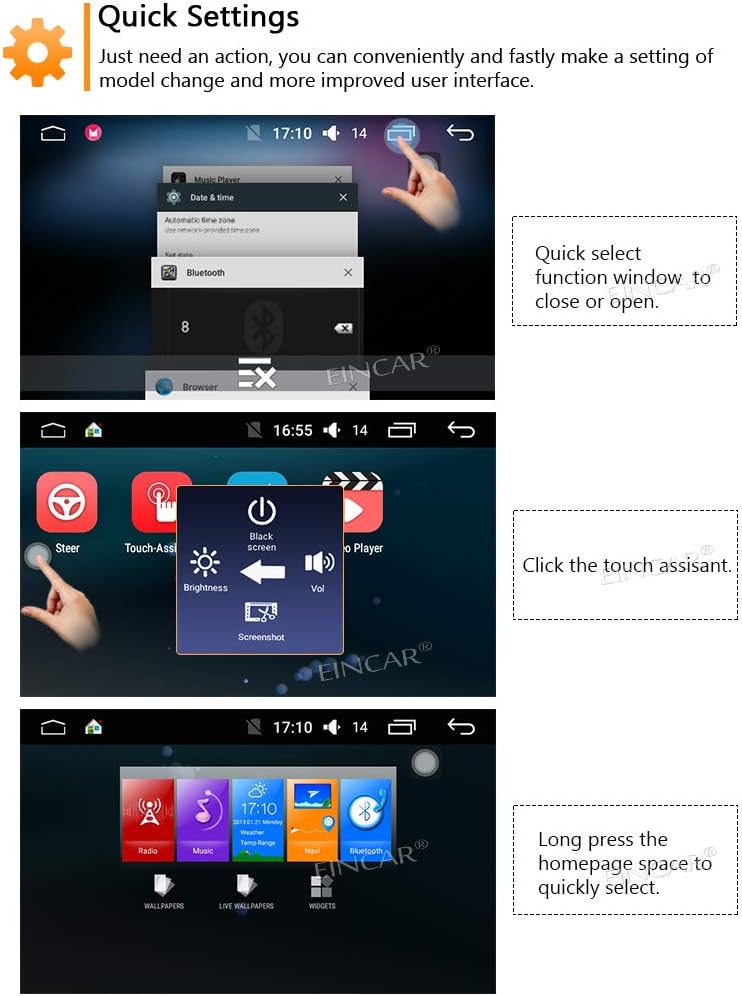
Image: Demonstrates quick settings and interface navigation. It shows how to quickly select function windows, access the touch assistant for brightness and volume control, and long-press the homepage space for quick selection of wallpapers, live wallpapers, and widgets.
- מאַכט אויף / אַוועק: דרוק די מאַכט קנעפּל.
- באַנד קאָנטראָל: ניצן די VOL knob or the on-screen volume controls.
- שנעל סעטטינגס: Access common settings like brightness, black screen, and volume via the touch assistant.
- Homepage Customization: Long-press an empty area on the homepage to change wallpapers or add widgets.
גפּס נאַוויגאַציע סיסטעם:
The unit comes with a built-in GPS system supporting both US and Russian GLONASS satellites for improved positioning accuracy.

Image: Illustrates the GPS navigation interface, showing a map view and controls. It also displays two examples of positioning data, one showing signal strength from GPS satellites and another showing a compass-like display with both GLONASS and GPS satellite positions.
- Access Navigation: דרוק די מאַפּע button or select the Navigation icon on the home screen.
- Online Navigation: Supports Google Maps and other online navigation applications when connected to the internet.
- צווייענדיק זאָנע פֿונקציע: Navigate while playing music or other media in the background.
בלועטאָאָטה קאַנעקטיוויטי:
פֿאַרבינדט אייער סמאַרטפאָון דורך בלועטוט פֿאַר הענט-פֿרײַ רופן און אַודיאָ סטרימינג.
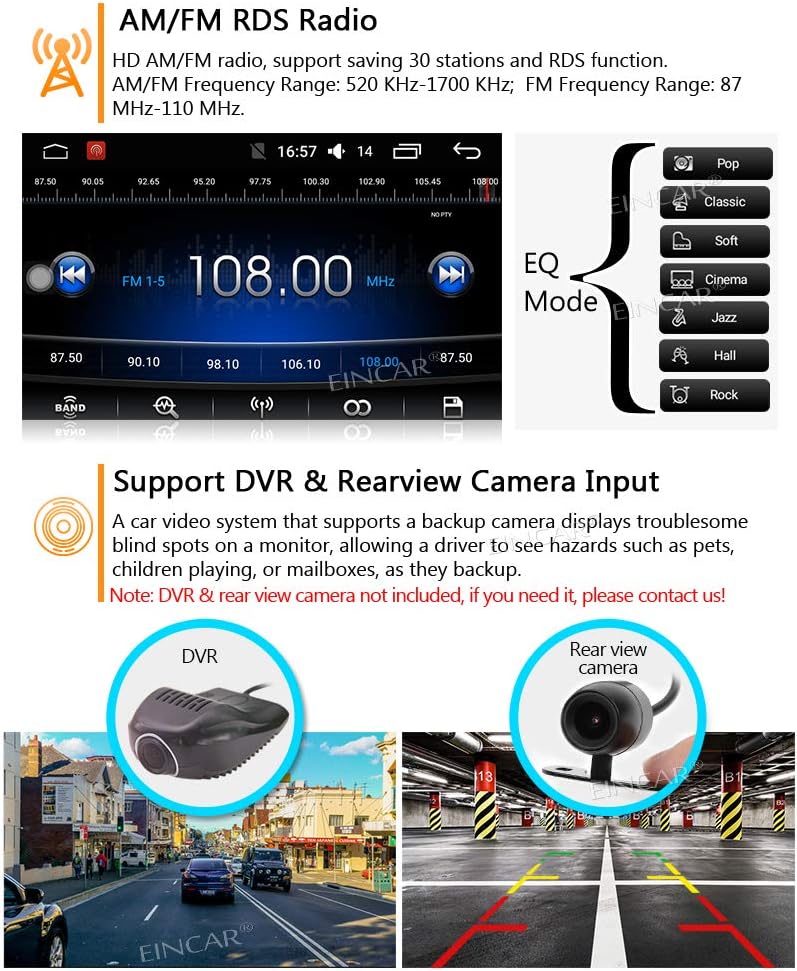
Image: Shows the Bluetooth interface with a dial pad and call history. It also illustrates the screen mirroring function, indicating compatibility with Android (USB/WiFi) and iPhone (WiFi) devices, allowing content from the phone to be displayed on the car stereo screen. An external microphone is shown, emphasizing clear sound.
- פּאָרינג: Go to the Bluetooth settings on the unit and your phone, search for available devices, and pair with "EinCar" or similar.
- הענט-פריי רופן: Make and receive calls directly from the unit. The external microphone ensures clear voice transmission.
- בלועטאָאָטה מוזיק: Stream audio from your phone to the car stereo. Use play/pause/previous/next controls on the unit.
- טעלעפון בוך: Download your phone's contacts for easy dialing.
Radio (AM/FM RDS):
Enjoy your favorite radio stations with the built-in AM/FM tuner and RDS function.
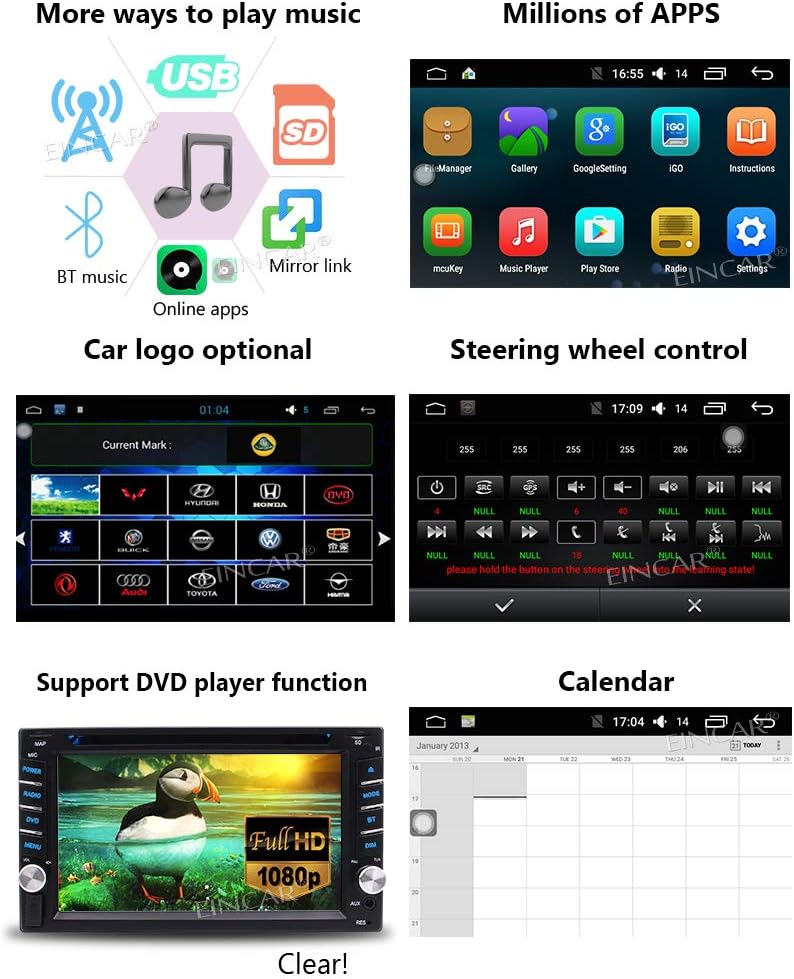
Image: Displays the AM/FM radio interface with frequency display and station presets. It also shows an EQ (Equalizer) mode selection with options like Pop, Classic, Soft, Jazz, Hall, and Rock. Additionally, the image illustrates the support for DVR and rearview camera inputs, showing examples of a DVR camera and a rearview קאַמעראַ מיט פּאַרקינג ליניעס.
- טונינג: Manually tune or use auto-scan to find stations.
- פּרעסעץ: Save up to 30 favorite stations for quick access.
- RDS פונקציע: Displays station information (e.g., song title, artist) where available.
- עקוואַליזער (עק): Adjust audio settings with various preset EQ modes (Pop, Classic, Jazz, etc.) or custom settings.
מולטימעדיאַ פּלייבאַק:
The unit supports various media sources and formats.
- DVD/CD Player: Insert discs into the slot for playback.
- USB/SD קאָרט: Connect USB drives or insert SD cards containing music or video files.
- שטיצט פֿאָרמאַטירונגען:
- Music: MP3, WMA, AAC, RM, FLAC etc.
- Video: MPEG-1/2/4, H264, H263, VC1, RV, RMVB, DivX, Sorenson Spark, VP8, AVS Stream.
- Photo: JPS, BMP, PNG, GIF.
- Online Apps: Access millions of apps via Google Play Store when connected to the internet.
Internet Connectivity (Wi-Fi & 4G):
The unit has built-in Wi-Fi for internet access. 4G internet requires an additional dongle (not included).

Image: Highlights the support for Wi-Fi hotspot sharing and 4G internet. It shows icons for mobile hotspot, built-in Wi-Fi sharing, and 4G network, along with the Google Play Store logo, indicating access to thousands of apps.
- Wi-Fi האָצפּאָט: Connect to your phone's mobile hotspot or a public Wi-Fi network.
- 4G Internet: Requires a compatible 4G dongle (sold separately) for cellular data access.
- Google פּלייַ סטאָר: Download and install various applications for navigation, entertainment, and utilities.
סקרין שפּיגל:
Mirror your smartphone's screen onto the car stereo display.
- קאַמפּאַטאַבילאַטי: Supports iPhone (via Wi-Fi) and Android smartphones (via USB or Wi-Fi).
- באַניץ: Display navigation apps, videos, photos, or other content from your phone.
DVR & Rearview אַפּאַראַט אַרייַנשרייַב:
The unit supports external DVRs and rearview קאַמעראַס.
- דערציעןview אַפּאַראַט: The included wireless backup camera automatically displays the rear view ווען די אויטאָ איז אין ריווערס.
- DVR אריינגאנג: Connect a compatible DVR (not included) to record driving footage.
סטירינג ראָד קאָנטראָל:
If your vehicle supports steering wheel controls, you can configure them to operate the car stereo.
- סעטאַפּ: Access the steering wheel control settings in the unit's menu to map functions to your vehicle's steering wheel buttons.
וישאַלט
Proper maintenance ensures the longevity and optimal performance of your EinCar car stereo.
- רייניקונג די פאַרשטעלן: ניצט אַ ווייכן, לינט-פֿרייע שטאָף צו פֿאָרזיכטיק ווישן דעם ריר-עקראַן. פֿאַר שווערע פֿלעקן, אַ ביסל ווישןampen the cloth with water or a screen cleaner designed for electronics. Avoid harsh chemicals or abrasive materials.
- רייניקונג די אַפּאַראַט: ווישט אָפּ די אויסערלעכע זייט פון דער איינהייט מיט אַ טרוקענעם, ווייכן שטאָף. ניצט נישט קיין פליסיקע רייניקונגסמיטלען גלייך אויף דער איינהייט.
- דיסק טאַץ: Keep the DVD/CD disc tray free of dust and debris. Avoid inserting bent, scratched, or irregular-shaped discs.
- ווענטילאַטיאָן: זיכער מאַכן אַז די ווענטילאַציע עפענונגען פון דער אַפּאַראַט זענען נישט פאַרשטאָפּט צו פאַרמייַדן איבערהיצונג.
- ווייכווארג דערהייַנטיקונגען: קאָנטראָלירט פּעריִאָדיש דעם פאַבריקאַנט'ס website or contact support for any available software updates to improve performance and add features.
טראָובלעשאָאָטינג
If you encounter issues with your EinCar car stereo, refer to the following common problems and solutions.
| פּראָבלעם | מעגלעך סיבה | לייזונג |
|---|---|---|
| דער אַפּאַראַט טוט נישט מאַכט אויף. | נישט ריכטיגע וויירינג; דורכגעבלאָזן פיוז; פּראָבלעם מיט דער באַטעריע פון דעם אויטאָ. | Check power connections (yellow, red, black wires). Inspect vehicle's fuse box and the unit's fuse. Ensure vehicle battery is charged. |
| קיין געזונט. | קול צו נידעריג; שטום פונקציע אקטיוו; נישט ריכטיגע רעדנער וויירינג; Ampליפיער אַרויסגעבן. | Increase volume. Check if unit is muted. Verify speaker connections. If external amplifier is used, check its power and connections. |
| דזשי-פי-עס סיגנאַל פאַרלוירן אָדער נישט ריכטיק. | GPS antenna not properly connected or obstructed; Driving in areas with poor satellite coverage. | Ensure GPS antenna is securely connected and placed in a clear location (e.g., dashboard, away from metal obstructions). Move to an open area. |
| בלועטאָאָטה קשר ישוז. | Device not in pairing mode; Interference; Unit or phone Bluetooth off. | Ensure both unit and phone Bluetooth are on and in pairing mode. Delete previous pairings and try again. Move closer to the unit. Restart both devices. |
| טאָוטש סקרין רעאַגירט נישט. | Software glitch; Screen calibration needed; Physical damage. | Restart the unit. Perform a factory reset (refer to settings menu, note this will erase data). If issue persists, contact support. |
| בעקאַפּ קאַמעראַ ווײַזט זיך נישט. | Camera not powered; Incorrect video input connection; Wireless signal interference. | Check power supply to the camera. Verify video input connection on the unit. Ensure wireless transmitter/receiver are functioning. |
For issues not listed here, or if solutions do not resolve the problem, please contact EinCar customer support.
ספּעסאַפאַקיישאַנז
| שטריך | דעטאַל |
|---|---|
| סאָרט | איינקאַר |
| מאָדעל נומער | aTT.AN6032GNN+WFCAM4 |
| אָפּערייטינג סיסטעם | אַנדרויד 6.0 |
| קפּו | Quad-core frequency |
| באַראַן | 1GB DDR3 |
| Internal Storage (Flash) | 16 גיגאבייט |
| פאַרשטעלן גרייס | 6.2 אינטשעס |
| ווייַז טיפּ | Capacitive HD Touch Screen, LCD |
| האַכלאָטע | 1024 X 600 |
| ראַדיאָ טונער | FM/AM, RDS, DAB/DAB+ (optional) |
| גפּס | Built-in, supports Google Maps, Dual Zone |
| קאַמפּאַטאַבאַל דיסק | ווי / קאָמפּאַקטדיסק שפּילער |
| ווידעא דעקאָדער | 1080 פּ |
| ווי-פי | געבויט-אין |
| בלועטאָאָטה | Yes, for hands-free calls, music streaming, phonebook |
| שטיצט מוזיק פֿאָרמאַטירונגען | MP3, WMA, AAC, RM, FLAC etc. |
| שטיצט ווידעא פֿאָרמאַטירונגען | MPEG-1/2/4, H264, H263, VC1, RV, RMVB, DivX, Sorenson SparK, Spark, VP8, AVS Stream |
| שטיצט פאָטאָ פאָרמאַץ | JPS, BMP, PNG, GIF etc. |
| Screen Link | Yes (Android USB/WiFi, iPhone WiFi) |
| מענטש צובינד אַרייַנשרייַב | מיקראָפאָן, טאָוטשסקרין |
| קאַנעקטער טיפּ | בלועטוט, יו-עס-בי, וויי-פיי |
| Voltage | 12 וואלטס |
| פּראָדוקט דימענשאַנז | 17.8 X 17.2 X 10 סענטימעטער (7.01 X 6.77 X 3.94 אינטשעס) |
| פּונקט וואָג | 2.5 קילאָגראַמס |
| UPC | 784237330931 |
וואָראַנטי און שטיצן
Your EinCar Android Car Stereo comes with a warranty. Please refer to the included Warranty Card for specific terms, conditions, and duration of the warranty.
קונה שטיצן:
For technical assistance, troubleshooting beyond this manual, or warranty claims, please contact EinCar customer support.
- אָנליין שטיצן: Visit the official EinCar website for FAQs, drivers, and software updates.
- קאָנטאַקט אינפֿאָרמאַציע: Refer to the Warranty Card or product packaging for direct contact details (phone, email).