
1. הקדמה
The Cellularline EASYSPORT GPS is a smartwatch designed for sports enthusiasts, enabling comprehensive monitoring of athletic performance. Its integrated GPS allows tracking of workout routes without needing a smartphone. The ultra-bright touch display ensures clear visibility of settings in various outdoor conditions. With IP68 certification, the Easysport GPS is suitable for use during showering or swimming, making it an ideal companion for achieving fitness goals.
2. פּעקל אינהאַלט
ביטע קאָנטראָלירט אַז אַלע זאכן זענען פאַראַן אין דעם פּעקל:
- Cellularline EASYSPORT GPS Smartwatch
- Charging Cable / Charging Dock
- באַניצער מאַנואַל (דעם דאָקומענט)
3. פּראָדוקט איבערview
Familiarize yourself with the components of your EASYSPORT GPS smartwatch.
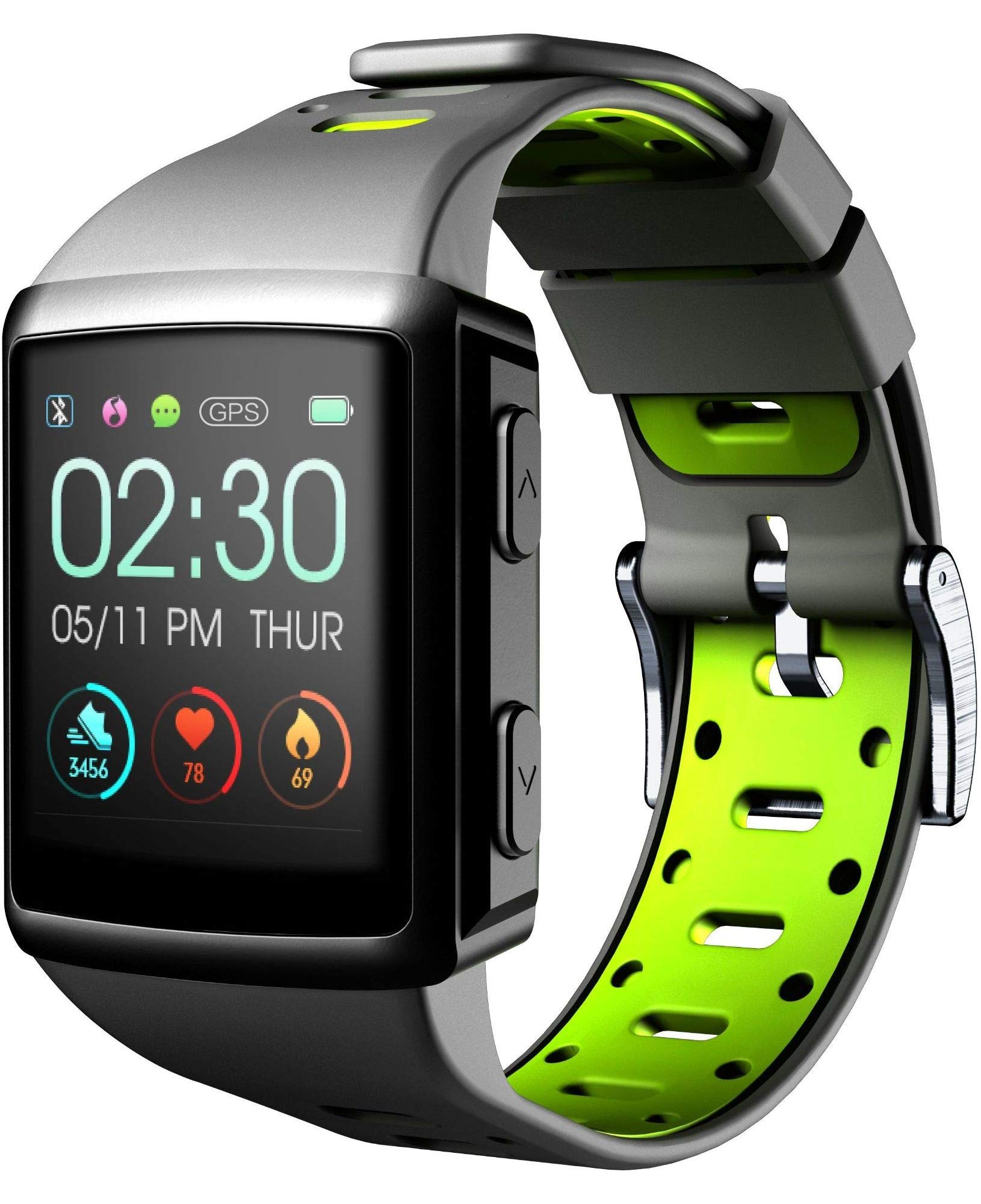
פיגורע 3.1: פראָנט view of the smartwatch display, showing current time, date, and activity metrics like steps, heart rate, and calories burned.

פיגורע 3.2: אַנגגאַלד view of the smartwatch, highlighting the sporty lime and black silicone strap and the physical control buttons on the side.

פיגורע 3.3: דערציען view of the smartwatch, illustrating the integrated heart rate (HR) sensor designed for continuous monitoring during activities.
4. סעטאַפּ
4.1 טשאַרדזשינג די מיטל
Before first use, fully charge your EASYSPORT GPS smartwatch. A full charge typically takes approximately 3 hours.
- Connect the charging cable to the charging dock.
- Align the smartwatch with the charging dock's contacts until it securely snaps into place.
- Plug the USB end of the charging cable into a compatible USB power adapter (not included) or a computer's USB port.
- דער דיספּלעי וועט ווײַזן דעם טשאַרדזשינג סטאַטוס.

פיגורע 4.1: The smartwatch connected to its charging dock, illustrating the charging process.
4.2 מאַכט אויף / אַוועק
- צו מאַכט אויף: Press and hold the power button (usually located on the side) for a few seconds until the screen lights up.
- צו מאַכט אַוועק: Navigate to the settings menu on the smartwatch, locate the "Power Off" option, and confirm. Alternatively, press and hold the power button until a power-off prompt appears, then confirm.
4.3 פארבינדן מיט א סמאַרטפאָון
To unlock the full potential of your smartwatch, pair it with your smartphone via Bluetooth.
- מאַכן זיכער אַז בלועטאָאָטה איז ענייבאַלד אויף דיין סמאַרטפאָנע.
- Download and install the companion app for Cellularline EASYSPORT GPS from your smartphone's app store.
- עפֿענען די אַפּ און נאָכגיין די ינסטראַקשאַנז אויף דעם עקראַן צו שאַפֿן אַ חשבון אָדער קלאָץ אין.
- In the app, select "Add Device" or "Pair New Device" and choose "EASYSPORT GPS" from the list of available devices.
- באַשטעטיקן די פּאָרינג בקשה אויף ביידע דיין סמאַרטפאָון און סמאַרטוואַטטש אויב געבעטן.
5. אַפּערייטינג ינסטרוקטיאָנס
5.1 טאָוטשסקרין נאַוויגאַציע
The EASYSPORT GPS features a responsive touchscreen for intuitive navigation.
- שלעפּן אַרויף / אַראָפּ: סקראָלן דורך מעניוז אדער נאָוטאַפאַקיישאַנז.
- שלעפּן לינקס / רעכט: צוטריט פֿאַרשידענע ווידזשעטס אָדער שנעלע סעטטינגס.
- צאַפּן: אויסקלייבן אַן אייטעם אָדער באַשטעטיקן אַן אַקציע.
- דריקן און האַלטן: May activate specific functions or customize watch faces.
5.2 דזשי-פי-עס טרעקינג
The integrated GPS allows you to track your distance and route during outdoor activities without needing your smartphone.
- Start an outdoor activity (e.g., running, cycling) from the sports mode menu on your smartwatch.
- Ensure you are in an open area for optimal GPS signal acquisition.
- The smartwatch will automatically begin tracking your route and distance.
- Review your activity data, including maps, in the companion app after syncing.
5.3 Heart Rate Monitoring (HR Function)
The smartwatch continuously monitors your heart rate, providing valuable insights into your fitness and workout intensity.
- Ensure the smartwatch is worn snugly on your wrist, with the sensor making good contact with your skin.
- Access the heart rate widget or start a workout to view פאַקטיש-צייט האַרץ קורס דאַטן.
- Historical heart rate data can be viewאין דער באַגלייטער אַפּ.

פיגורע 5.1: The smartwatch display showing heart rate data (e.g., 78 bpm) along with steps and calories, indicating active monitoring.
5.4 Notifications and Caller ID
Stay connected with full text notifications and caller ID directly on your wrist.
- Once paired with your smartphone, the smartwatch will display incoming call names (Caller ID) and full text of messages from WhatsApp, Twitter, and other social applications.
- Manage notification settings through the companion app on your smartphone.
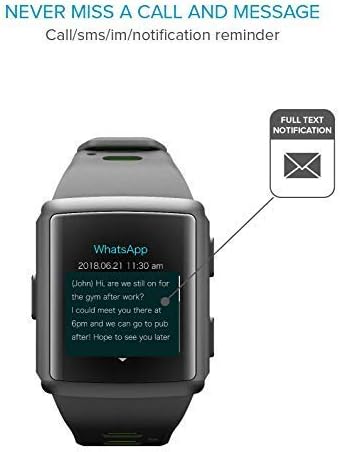
פיגורע 5.2: The smartwatch screen showing a detailed WhatsApp message notification, demonstrating the full text display feature.
6. וישאַלט
6.1 Water Resistance (IP68 Certified)
The EASYSPORT GPS is IP68 certified, meaning it is resistant to dust and can withstand immersion in water up to 1.5 meters for 30 minutes. This makes it suitable for showering and swimming.
- Rinse the smartwatch with fresh water after exposure to chlorinated or salt water.
- דריק נישט די קנעפלעך אונטערן וואסער.
- Avoid exposing the device to hot water, steam, or high-pressure water jets.
- The water resistance is not permanent and may decrease over time with normal wear and tear.

פיגורע 6.1: Visual representation of the smartwatch's IP68 certification, showing its suitability for water-related activities like swimming and showering.
6.2 רייניקונג
Clean your smartwatch regularly to maintain its appearance and functionality.
- ווישט דעם עקראַן און רימען מיט אַ ווייכן, דamp, לינט-פֿרייַ שטאָף.
- דו זאלסט נישט נוצן האַרב קעמיקאַלז אָדער אַברייסיוו קלינערז.
- זיכער מאַכן אַז די טשאַרדזשינג קאָנטאַקטן זענען ריין און טרוקן איידער טשאַרדזשינג.
7. טראָובלעשאָאָטינג
If you encounter issues with your EASYSPORT GPS smartwatch, try the following solutions:
| פּראָבלעם | מעגלעך לייזונג |
|---|---|
| די מיטל טוט נישט מאַכט אויף | Ensure the device is fully charged. Connect it to the charging dock and power source for at least 30 minutes. |
| קען נישט צוזאמענשטעלן זיך מיטן סמאַרטפאָן |
|
| גפּס ניט טראַקינג אַקיעראַטלי | זייט זיכער אז איר זענט אין אן אפענעם דרויסנדיקן שטח מיט א קלארן view of the sky. Wait for the GPS signal to acquire before starting your activity. |
| נאָוטאַפאַקיישאַנז ניט דערשייַנען |
|
| Heart rate readings are inaccurate | Ensure the smartwatch is worn snugly on your wrist, not too tight or too loose. Clean the sensor on the back of the device. |
8. ספּעסאַפאַקיישאַנז
| שטריך | דעטאַל |
|---|---|
| מאָדעל נאָמען | Easysport GPS |
| מאָדעל נומער | BTEASYSPORTHRGPSK |
| סאָרט | סעללולאַרלינע |
| קאַנעקטיוויטי טעכנאָלאָגיע | בלועטאָאָטה |
| ווירעלעסס קאָמוניקאַציע סטאַנדאַרד | בלועטאָאָטה |
| גפּס | אינטעגרירטע דזשי-פי-עס |
| ווייַז טיפּ | לקד טאָוטשסקרעען |
| פאַרשטעלן גרייס | 2 אינטשעס |
| ספּעציעלע שטריך | Touchscreen, Heart Rate Monitor, GPS |
| וואַסער קעגנשטעל מדרגה | IP68 (Waterproof up to 1.5 meters) |
| באַנד מאַטעריאַל | סיליקאָנע |
| קאָליר | Lime, Black |
| שטיצט אַפּפּליקאַטיאָן | GPS (and companion app for notifications/data sync) |
| קאַמפּאַטאַבאַל דעוויסעס | סמאַרטפאָנעס |
| בדעה וילעם | וניסעקס אַדאַלט |
9. וואָראַנטי און שטיצן
The Cellularline EASYSPORT GPS Smartwatch comes with a warranty as specified by the manufacturer. For detailed warranty information and support, please refer to the official Cellularline webפּלאַץ אָדער קאָנטאַקט זייער קונה דינסט.
- וואָראַנטי טיפּ: לעבן
- פֿאַר טעכנישע שטיצע, הילף מיט טראָובלעשווטינג, אָדער וואָראַנטי קליימז, ביטע באַזוכט די Cellularline official webפּלאַץ or contact their authorized service center.