
הקדמה
This manual provides essential information for the safe and effective use of your Canon PowerShot SX740 HS Digital Camera. Please read it thoroughly before operating the camera to ensure proper handling and to maximize its features. The Canon PowerShot SX740 HS is a compact digital camera featuring a 20.3-megapixel CMOS sensor, 40x optical zoom, 4K video recording capabilities, and built-in Wi-Fi and Bluetooth connectivity.

פיגורע 1: פראָנט view of the Canon PowerShot SX740 HS Digital Camera with the lens retracted.
וואָס איז אין די קעסטל
באַשטעטיקט אַז אַלע די פאלגענדע זאכן זענען אַרייַנגערעכנט אין דיין פּעקל:
- Canon PowerShot SX740 HS דיגיטאַל אַפּאַראַט
- NB-13L Lithium-Ion Battery Pack
- CB-2LH Battery Charger
- האַנטגעלענק רימען
- HDMI קאַבלע
- דרייַפוס
- SanDisk 64GB SDHC Memory Card
- Premium Camera Case
- High Speed USB Card Reader
סעטאַפּ
1. אויפלאָדן און אינסטאַלירן די באַטאַרייע
- Insert the NB-13L battery into the CB-2LH charger.
- Plug the charger into a power outlet. The charging indicator light will show the charging status.
- אַמאָל גאָר באפוילן, אַראָפּנעמען די באַטאַרייע פון די טשאַרדזשער.
- עפֿנט דעם דעקל פֿונעם באַטעריע־אָפּטייל אויף דער אונטערשטער זײַט פֿון דער קאַמעראַ.
- אַרײַנשטעלן די אויפֿגעלאָדענע באַטאַרייע אין דעם אָפּטייל, זיכער מאַכנדיק אַז זי זאָל זיך ריכטיק אויסשטעלן. פֿאַרמאַכט דעם דעקל זיכער.
2. ינסערטינג די זכּרון קאָרט
- עפֿנט דעם דעקל פֿון דער זכּרון קאַרטל שפּאַלט, וואָס געפֿינט זיך געוויינטלעך לעבן דער באַטעריע אָפּטייל.
- Insert the SDHC memory card with the label facing the front of the camera until it clicks into place.
- נאָענט די זיקאָרן קאָרט שפּעלטל דעקן.
3. ערשטע איינשטראָם און גרונטלעכע סעטטינגס
- דרוק די מאַכט קנעפּל צו קער אויף די אַפּאַראַט.
- פֿאָלגט די אינסטרוקציעס אויף דעם עקראַן צו שטעלן דעם דאַטע, צייט און שפּראַך.
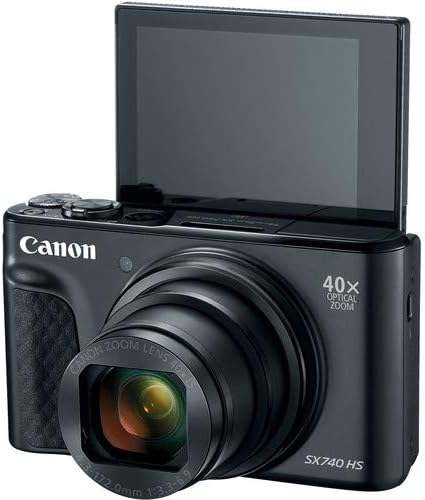
פיגורע 2: פראָנט view of the camera with the LCD screen tilted upwards, ready for use.
אַפּערייטינג די אַפּאַראַט
1. מאַכט אויף / אויסגעלאשן
דרוק די מאַכט קנעפּל וואָס געפינט זיך אויף דער שפּיץ פֿון דער קאַמעראַ צו עס אָנצינדן אָדער אויסלעשן.
2. שיסערייַ מאָדעס
The camera offers various shooting modes. Use the mode dial or menu options to select:
- אָטאַמאַטיק מאָדע: For simple point-and-shoot operation, where the camera automatically adjusts settings.
- פּראָגראַם (P) מאָדע: ערלויבט מער קאָנטראָל איבער סעטטינגס בשעת די קאַמעראַ שטעלט די עקספּאָוזשער.
- סצענע מאָדעס: Optimized settings for specific scenarios like portraits, landscapes, or night scenes.
- Feature Assistant: Provides on-screen explanations to help you understand and use various camera features.
3. פארגרעסערן אפעראציע
The camera features a 40x optical zoom lens. Use the zoom lever around the shutter button to zoom in (telephoto) or out (wide-angle). Digital zoom can extend the range further, but may reduce image quality.

פיגורע 3: פראָנט view of the camera with the lens extended for zooming.
4. פאָקוסינג
The camera primarily uses autofocus. Point the camera at your subject and half-press the shutter button to focus. The focus frame will appear on the LCD screen. For specific situations, manual focus options may be available in the menu.
5. ווידעא רעקאָרדינג
To record videos, switch to video mode (if available via a dedicated button or mode dial) or press the dedicated movie recording button. The camera supports 4K video capture. Press the button again to stop recording.
6. Using the Tilting LCD Screen
The 3.0-inch LCD screen can tilt 180 degrees, allowing for easy framing of selfies or shots from various angles. Adjust the screen to your desired position.

פיגורע 4: צוריק view פון דער קאַמעראַ, ווייַזנדיק דעם LCD עקראַן און קאָנטראָל אויסלייג.
7. Wi-Fi און בלועטוט קאָנעקטיוויטי
The camera features built-in Wi-Fi and Bluetooth for connecting to compatible mobile devices. Download the Canon Camera Connect app to your smartphone or tablet to transfer images, remotely control the camera, and share photos.
- Enable Wi-Fi or Bluetooth in the camera's menu.
- Open the Canon Camera Connect app on your mobile device and follow the pairing instructions.
וישאַלט
1. רייניקונג די קאַמעראַ
- לענס: Use a soft, lint-free cloth or a lens brush to gently remove dust. For smudges, use a specialized lens cleaning solution and cloth. Avoid touching the lens directly with your fingers.
- LCD פאַרשטעלן: Wipe gently with a soft, dry cloth. Do not use harsh chemicals.
- אַפּאַראַט גוף: ניצט אַ ווייכן, טרוקענעם שטאָף צו ווישן אַוועק שטויב און שמוץ.
2. באַטערי קער
- סטאָר באַטעריז אין אַ קיל, טרוקן אָרט ווען ניט אין נוצן.
- פֿאַרמײַדט אָפֿט פֿולשטענדיק אויסצולאָדן די באַטעריע כּדי צו פֿאַרלענגערן איר לעבן.
- אַרויסנעמען די באַטאַרייע פֿון דער קאַמעראַ אויב זי וועט נישט געניצט ווערן פֿאַר אַ לענגערע צײַט.
3. סטאָרידזש
When storing the camera for long periods, ensure it is clean, dry, and stored in a protective case to prevent dust and damage. Remove the battery and memory card.
טראָובלעשאָאָטינג
אויב איר טרעפט פּראָבלעמען מיט אייער קאַמעראַ, זעט די פאלגענדע געוויינטלעכע לייזונגען:
- קאַמעראַ טוט זיך נישט אָן: זיכער מאַכן אַז די באַטאַרייע איז גאָר אויפגעלאָדן און ריכטיק אַרײַנגעשטעלט. פּרוּווט אַן אַנדערע אויפגעלאָדעטע באַטאַרייע אויב פֿאַראַן.
- זכּרון קאַרטל טעות: Check if the memory card is inserted correctly. Format the card (this will erase all data) if the error persists, or try a different compatible SDHC card.
- בילדער זענען פארשוואומען: Ensure the lens is clean. Check your focus settings and make sure the camera has successfully focused on your subject before taking the shot. Use optical image stabilization for handheld shots.
- Wi-Fi/Bluetooth connection issues: Ensure Wi-Fi/Bluetooth is enabled on both the camera and your mobile device. Restart both devices and try pairing again. Confirm the Canon Camera Connect app is up to date.
- בליץ ברענט נישט: Check the flash mode settings. Ensure the flash is popped up if it's a manual pop-up type.
For more complex issues or persistent problems, please consult the official Canon support webפּלאַץ אָדער קאָנטאַקט קונה דינסט.
ספּעסאַפאַקיישאַנז
| שטריך | באַשרייַבונג |
|---|---|
| מאָדעל נאָמען | PowerShot SX740 HS |
| פאָטאָ סענסאָר האַכלאָטע | 20.3 מעגאַפּיקסעלס |
| אָפּטיש פארגרעסער | 40x |
| ווידעא קאַפּטורע פֿאָרמאַט | 4K |
| בילד פּראַסעסער | קאַנאָן דידזשיק 8 |
| קאַנעקטיוויטי | בלועטוט, HDMI, USB, Wi-Fi |
| ווייַז טיפּ | Tilting LCD |
| בילד סטאַביליזאַטיאָן | אָפּטיש |
| באַטערי טיפּ | ליטיום יאָן (NB-13L) |
| קאָמפּאַטיבלע זכּרון | SDHC (up to 64 GB) |
| קעסיידערדיק שיסערייַ | 10 ראָמען פּער סעקונדע |
| געשטיצט File פֿאָרמאַט | JPEG, רוי |
וואָראַנטי און שטיצן
Your Canon PowerShot SX740 HS Digital Camera is covered by a manufacturer's warranty. Please refer to the warranty card included with your product for specific terms and conditions. For technical support, service, or additional information, please visit the official Canon webזייטל אדער קאנטאקטירן קאנאן קאסטומער סערוויס גלייך. האלט אייער קויף קוויטל אלס באווייז פון קויפן פאר גאראנטיע טענות.
אָנליין רעסורסן: Canon USA Official Webפּלאַץ