
1. הקדמה
This user manual provides comprehensive instructions for the setup, operation, and maintenance of your SHARP LC-32HI5012E HD Ready Smart LED TV. Please read this manual thoroughly before using your television to ensure proper functionality and safety.
The SHARP LC-32HI5012E is an 81 cm (32-inch) HD Ready Smart LED TV featuring Active Motion 200 technology for enhanced picture quality and a Triple Tuner for versatile reception options. It includes integrated Wi-Fi and a Harman/Kardon sound system for a complete entertainment experience.
2. פּעקל אינהאַלט
ווען איר עפנט דעם פעקל, ביטע זיכער מאכן אז אלע פאלגנדע זאכן זענען אריינגערעכנט:
- SHARP LC-32HI5012E Main Unit
- ווייַט קאָנטראָל (מיט באַטעריז)
- באַניצער מאַנואַל (דעם דאָקומענט)

בילד: פראָנט view of the SHARP LC-32HI5012E television, displaying a vibrant city skyline on its screen. This image shows the slim bezel design and the central SHARP logo.
3. סעטאַפּ
3.1 צוזאַמענשטעלן דעם שטאַנד
Carefully place the TV screen-down on a soft, flat surface to prevent damage. Attach the two stand feet to the designated slots at the bottom of the TV, securing them with the provided screws. Ensure the stand is firmly attached before proceeding.
3.2 קאַנעקטינג פּעריפעראַלס
אייער טעלעוויזיע אָפפערט פֿאַרשידענע פֿאַרבינדונג אָפּציעס פֿאַר עקסטערנע דעוויסעס:
- HDMI פּאָרטן (x3): פֿאַרבינדט בלו-רэй שפּילער, שפּיל קאַנסאָולז, אָדער סעט-טאָפּ באָקסעס.
- USB פּאָרטן (x2): פֿאַר מעדיע ווידערשפּיל פֿון USB דרייווס.
- Antenna In (RF): Connect your terrestrial antenna for DVB-T/T2HD reception.
- Sat In: פֿאַרבינדט אייער סאַטעליט שיסל פֿאַר DVB-S/S2 אָפּנאַם.
- RJ45 (LAN): פֿאַר אַ דראָטיקער אינטערנעט פֿאַרבינדונג.
- CI+ Port: פֿאַר קאָנדישאַנאַל אַקסעס מאָדולן (CAM) צו view ענקריפּטיד טשאַנאַלז.
- Mini Component/YPbPr, Mini AV Composite: פֿאַר עלטערע אַנאַלאָג דעוויסעס.
- דיגיטאַל אָפּטיש אַודיאָ רעזולטאַט: פֿאַר פֿאַרבינדן צו עקסטערנע אַודיאָ סיסטעמען.
- Audio out / Headphone: פֿאַר כעדפאָונז אָדער עקסטערנע רעדנערס.

בילד: הינטערשטע view of the SHARP LC-32HI5012E television, highlighting the arrangement of various input and output ports for connecting external devices.
3.3 ערשטע איינשטראָם און ערשטע אויפשטעל
After connecting all necessary cables, plug the power cord into an electrical outlet. Press the power button on the remote control or the TV. The first-time setup wizard will guide you through:
- שפּראַך סעלעקציע.
- Network connection (Wi-Fi or wired LAN).
- Channel scanning for DVB-C, DVB-S/S2, or DVB-T/T2HD.
- צייט זאָנע און אַנדערע גרונט סעטטינגס.
4. אַפּערייטינג ינסטרוקטיאָנס
4.1 גרונטלעכע טעלעוויזיע פונקציעס
- מאַכט אויף / אַוועק: ניצט דעם מאַכט קנעפּל אויף דער ווייַטקאָנטראָל אָדער טעלעוויזיע.
- באַנד קאָנטראָל: ניצט די VOL +/- קנעפלעך.
- קאַנאַל סעלעקציע: Use CH +/- or number buttons.
- אַרייַנשרייַב מקור: Press the SOURCE button to switch between HDMI, AV, TV, etc.
- מעניו נאַוויגאַציע: Use arrow keys and OK button to navigate menus.
4.2 סמאַרט טעלעוויזיע פֿעיִקייטן
Your SHARP LC-32HI5012E is equipped with integrated Wi-Fi and offers access to various smart features:
- פאַר-אינסטאַלירן אַפּפּס: Access popular streaming services like Netflix and YouTube directly.
- Web בלעטערער: בלעטער דעם אינטערנעט גלייך פֿון אייער טעלעוויזיע.
- Aquos Net+: Access additional online content and services provided by Sharp.
Ensure your TV is connected to the internet for full Smart TV functionality.
4.3 אַודיאָ סיסטעם
The integrated Harman/Kardon sound system provides a high-quality audio experience with excellent dynamics and clarity. Adjust audio settings in the TV menu to customize your sound preferences.
5. וישאַלט
5.1 רייניקן דעם עקראַן
צו רייניקן דעם עקראַן, ווישט עס אָפּ מיט אַ ווייכן, לינט-פֿרייעם שטאָף. פֿאַר שווערע פֿלעקן, ווישט עס אַ ביסל.ampווישט דעם שטאָף מיט וואַסער אָדער אַ ספּעציעלן עקראַן רייניגער. דו זאלסט נישט spray liquid directly onto the screen.
5.2 אַלגעמיינע קער
- האַלט דעם טעלעוויזאָר אַוועק פון דירעקטער זונשייַן און היץ־קוואַלן.
- זיכער מאַכן אַז עס איז גענוג ווענטילאַציע אַרום דעם טעלעוויזאָר.
- נעמט ארויס דעם טעלעוויזאר פון דער עלעקטרישער אויסשטעל בעת בליץ-שטורעמס אדער ווען עס בלייבט אומאכט פאר לאנגע צייטן.
6. טראָובלעשאָאָטינג
If you encounter any issues with your TV, please refer to the following common problems and solutions before contacting support.
| פּראָבלעם | מעגלעך סיבה | לייזונג |
|---|---|---|
| קיין מאַכט | Power cord unplugged, power outlet issue. | Check power cord connection. Try a different outlet. |
| קיין בילד נישט, אבער סאונד איז דא | Incorrect input source, faulty cable. | באַשטעטיקן די ריכטיקע אַרייַנגאַנג מקור. קאָנטראָלירט די HDMI/AV קאַבל קאַנעקשאַנז. |
| קיין געזונט | Volume muted or too low, external audio system issue. | Unmute volume, increase volume. Check external audio connections. |
| קען נישט פאַרבינדן צו Wi-Fi | Incorrect password, router issue, TV too far from router. | Re-enter password. Restart router. Move TV closer or use wired connection. |
7. ספּעסאַפאַקיישאַנז
| שטריך | דעטאַל |
|---|---|
| סאָרט | SHARP |
| מאָדעל נומער | LC-32HI5012E |
| סקרין טעכנאָלאָגיע | געפירט |
| האַכלאָטע | HD גרייט (1366 x 768 בילדצעלן) |
| פאַרשטעלן דיאַגאָנאַל | 81.3 סענטימעטער (32 אינטשעס) |
| דערפרישן קורס | 60 הז |
| ספּעציעלע שטריך | אינטערנעט (סמאַרט טעלעוויזיע) |
| שטיצט אינטערנעט באַדינונגס | Netflix, YouTube, Browser |
| קאַנעקטיוויטי טעכנאָלאָגיע | USB, HDMI, LAN, Wi-Fi |
| טונערס | DVB-C, DVB-S/S2, DVB-T/T2HD |
| אַודיאָ סיסטעם | האַרמאַן / קאַרדאָן |
| פּראָדוקט דימענשאַנז (B x H x D) | 74 x 49.1 x 18 ס״מ (מיט שטאַנד) |
| וואָג | 4.8 קילאָגראַמס |
| מאַונטינג טיפּ | טיש בארג |
7.1 ענערגיע עפעקטיווקייט
The SHARP LC-32HI5012E has an energy efficiency rating of F. For detailed energy consumption information, please refer to the energy label and product information sheet.

Image: Energy efficiency label for the SHARP LC-32HI5012E television, showing its energy class F and power consumption details.
For more details, visit the official EPREL database: https://eprel.ec.europa.eu/qr/402565
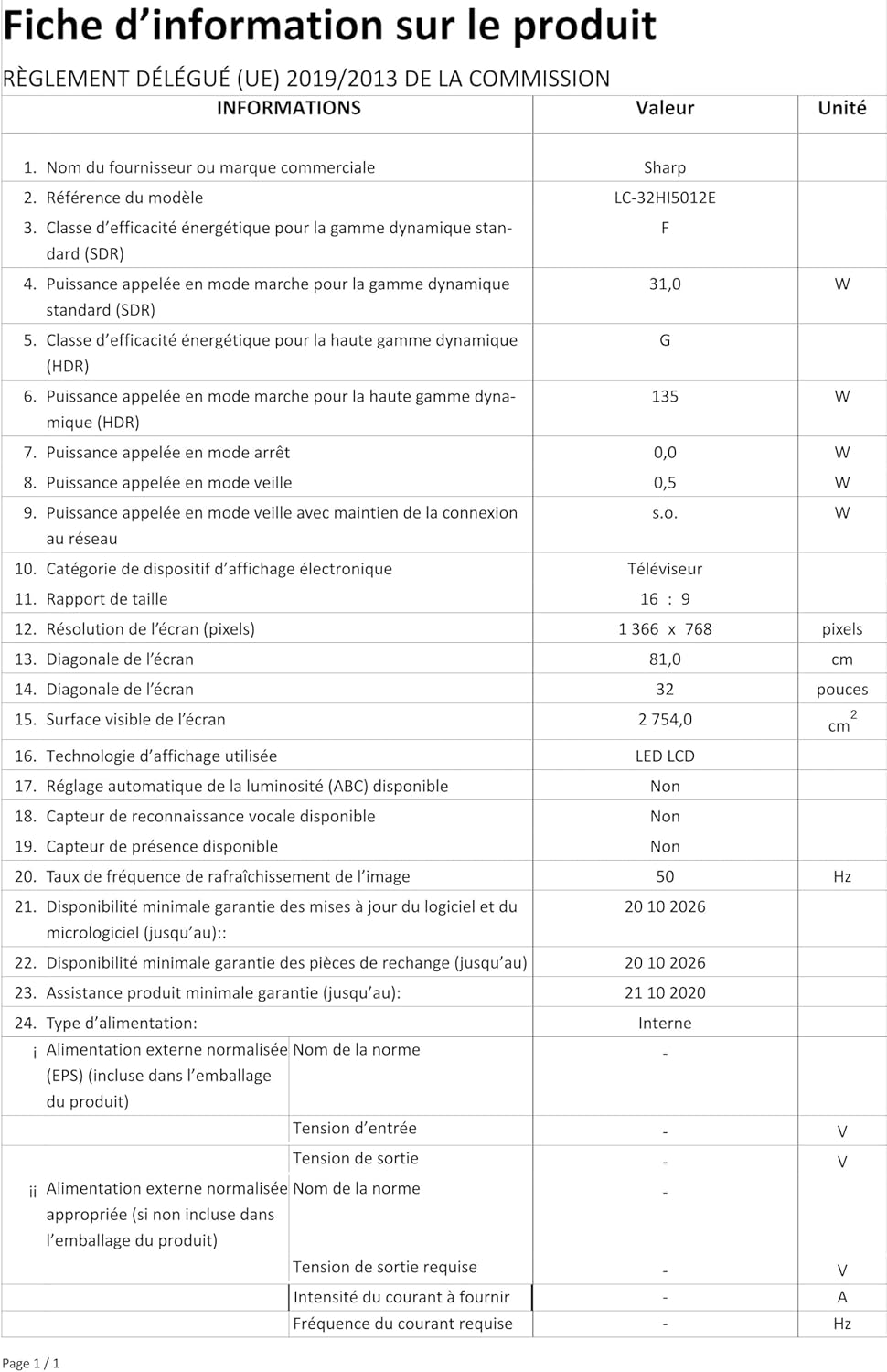
Image: Product information sheet detailing technical specifications and compliance information for the SHARP LC-32HI5012E television.
8. וואָראַנטי און שטיצן
For warranty information, please refer to the warranty card included with your product or visit the official SHARP webזייטל. האַלט אייער קויף קוויטל ווי אַ באַווייַז פון קויפן פֿאַר קיין וואָראַנטי קליימז.
For technical support or service inquiries, please contact SHARP customer service. Contact details can typically be found on the SHARP official webפּלאַץ אָדער אין די פּראָדוקט פּאַקקאַגינג.