
Itek ITMC30V201FHD
iTek GGC 30-אינטש קערווד מאָניטאָר באַניצער מאַנואַל
Model: ITMC30V201FHD
ברוכים הבאים
Thank you for choosing the iTek GGC 30-inch Curved Monitor. This manual provides essential information for setting up, operating, and maintaining your new monitor. Please read it thoroughly before use to ensure optimal performance and safety.
וויכטיק סאַפעטי אינסטרוקציעס
כדי צו פאַרמייַדן שאָדן און ענשור זיכער אָפּעראַציע, ביטע אָבסערווירן די פאלגענדע פאָרזיכטיגקייטן:
- שטעלט נישט אויס דעם מאָניטאָר צו רעגן, פייכטקייט, אדער עקסטרעמע טעמפּעראַטורן.
- זיכער מאַכן אַז די ווענטילאַציע אַרום דעם מאָניטאָר איז ריכטיק. בלאָקירט נישט די ווענטילאַציע עפענונגען.
- ניצט נאָר דעם מאַכט אַדאַפּטער וואָס ווערט צוגעשטעלט מיטן מאָניטאָר.
- ויסמיידן פּלייסינג שווער אַבדזשעקץ אויף די מאַכט שנור.
- Disconnect the power plug from the outlet if the monitor will not be used for a long period.
- פרובירט נישט צו סערוויסן דעם מאָניטאָר אַליין. לאָזט איבער אַלע סערוויסינג צו קוואַליפֿיצירטע פּערסאָנעל.
- רייניקן דעם מאָניטאָר עקראַן און casinג מיט אַ ווייכן, טרוקענעם שטאָף. פֿאַרמייַדן ניצן אַברייסיוו רייניגער אָדער סאָלווענטן.
פּעקל אינהאַלט
ביטע טשעק די פּאַקעט פֿאַר די פאלגענדע זאכן:
- iTek GGC 30-inch Curved Monitor
- מאָניטאָר שטאַנד (באַזע און האַלדז)
- מאַכט אַדאַפּטער און קאַבלע
- DisplayPort קאַבלע
- HDMI קאַבלע
- באַניצער מאַנואַל
- שרויפן פֿאַר שטאַנד פֿאַרזאַמלונג
פּראָדוקט איבערview
The iTek GGC 30-inch Curved Monitor is designed for an immersive viewing experience, ideal for gaming and professional use. It features a WFHD (2560x1080) resolution, a high 200Hz refresh rate, and a rapid 1ms MPRT response time.

Key Performance Highlights
- 200Hz Refresh Rate & AMD FreeSync Technology: Experience ultra-smooth visuals and tear-free gaming with a high refresh rate and adaptive sync technology.

Figure 2: 200Hz Refresh Rate and AMD FreeSync Technology in action. - Flicker-Free & Low Blue Light: Designed to reduce eye strain during prolonged use, providing a more comfortable viewינג דערפאַרונג.

Figure 3: Flicker-Free and Low Blue Light features for eye comfort. - 1ms MPRT ענטפער צייט: Minimizes motion blur and ghosting, crucial for fast-paced games and action sequences.

Figure 4: Rapid Refresh Rate and Response Time for smooth visuals. - 1800R געבויגענער דיספּליי: The immersive curvature brings the edges of the screen closer to your field of view, enhancing depth perception and reducing distortion.

Figure 5: 1800R Curved Display for an immersive experience.
סעטאַפּ
אַסעמבאַלינג די סטאַנד
- נעמט פֿאָרזיכטיק אַרויס דעם מאָניטאָר און שטאַנד קאָמפּאָנענטן פֿון דער פּאַקאַדזשינג.
- Attach the stand neck to the monitor panel using the provided screws. Ensure it clicks securely into place or is fastened tightly.
- Attach the stand base to the stand neck, securing it with the thumb screw or screws from underneath.
- שטעלט דעם צוזאַמענגעשטעלטן מאָניטאָר אויף אַ סטאַבילער, גלאַטער ייבערפלאַך.
קאַנעקטינג דיין מאָניטאָר
The iTek GGC monitor offers multiple connectivity options for various devices:
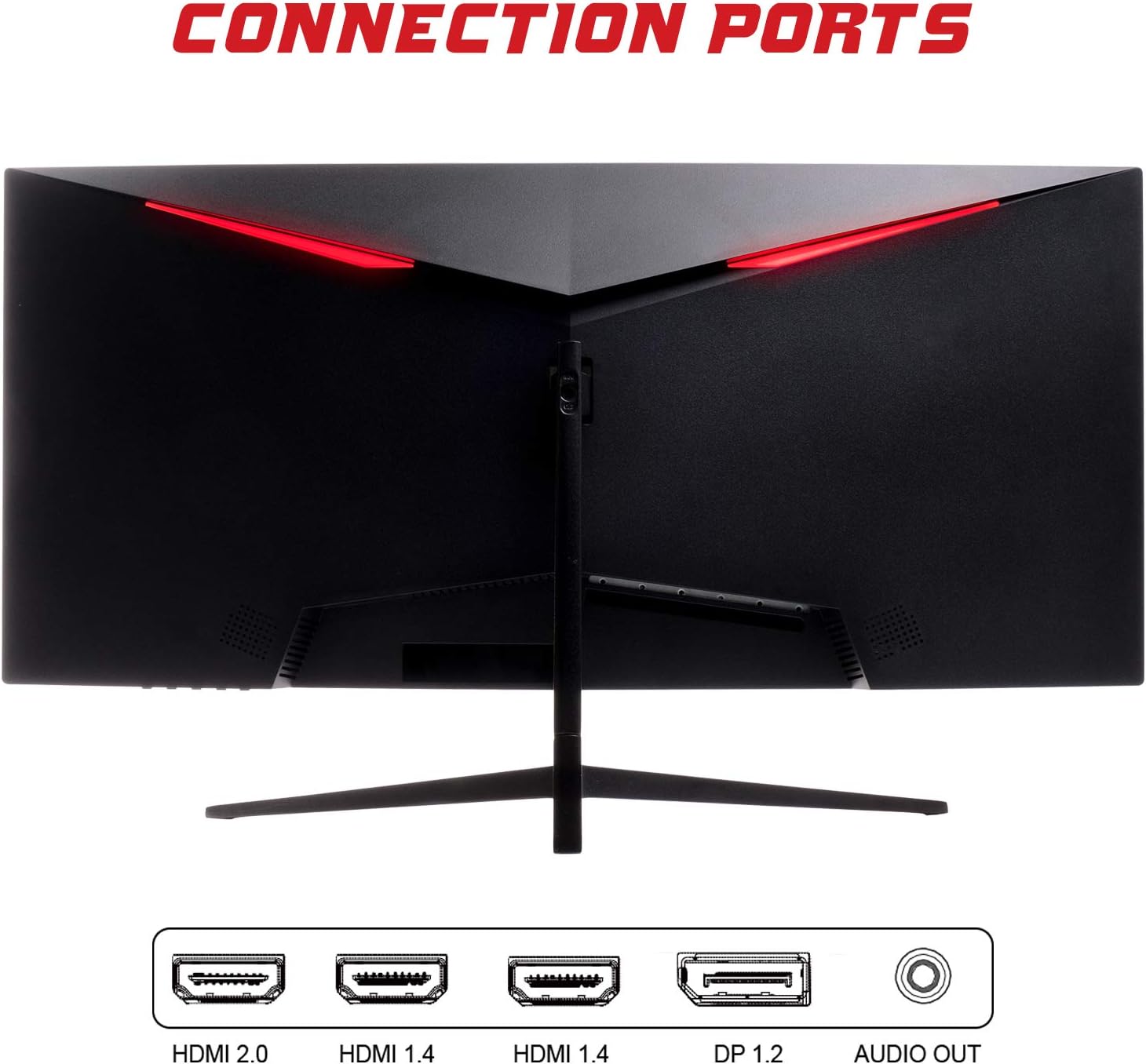
- דיספּלייפּאָרט (DP 1.2): For high-resolution and high-refresh-rate connections to your PC.
- HDMI (HDMI 2.0, HDMI 1.4 x2): Connect to PCs, gaming consoles, and other multimedia devices. HDMI 2.0 supports higher refresh rates at certain resolutions.
- אַודיאָ אָוט: פֿאַרבינדט עקסטערנע רעדנערס אָדער כעדפאָונז.
After connecting the video cable, connect the power adapter to the monitor and then to a power outlet.
אַפּערייטינג די מאָניטאָר
מאַכט אויף / אַוועק
דריק דעם מאַכט קנעפּל, וואָס געפינט זיך געוויינטלעך אויף דער אונטערשטער אָדער הינטערשטער זייט פון מאָניטאָר, צו עס אנצינדן אָדער אויסלעשן. די מאַכט אינדיקאַטאָר ליכט וועט זיך אָנצינדן ווען דער מאָניטאָר איז אָן.
אויף-סקרין ווייַז (אָסד) מעניו
The OSD menu allows you to adjust various monitor settings. Use the buttons on the monitor (typically on the back or bottom right) to navigate the menu.
- בילד סעטטינגס: אַדזשאַסטירן העלקייט, קאָנטראַסט, שאַרפֿקייט און גאַמאַ.
- קאָליר סעטטינגס: מאָדיפיצירן קאָליר טעמפּעראַטור, כיו, און זעטיקונג.
- אַרייַנשרייַב אויסקלייַבן: מאַנועל באַשטימען צווישן DisplayPort און HDMI אינפּוטס.
- אַודיאָ: Adjust volume for the audio output.
- סיסטעם סעטטינגס: Access language, OSD timeout, and reset options.
- גיימינג פֿעיִקייטן: Enable/disable FreeSync, adjust response time overdrive, and activate crosshair overlays if available.
וישאַלט
Proper care ensures the longevity of your monitor:
- שטענדיק אויסלעשן דעם מאָניטאָר און אַרויסציען דעם עלעקטרישן שנור איידער איר רייניגט עס.
- ניצט אַ ווייכע, לינט-פֿרייע שטאָף צו פֿאָרזיכטיק ווישן דעם עקראַן. פֿאַר שווערע פֿלעקן, אַ ביסל ווישןampווישט דעם שטאָף מיט וואַסער אָדער אַ מילד, נישט-אַבראַוויזיוו עקראַן רייניגער.
- רייניקן דעם מאָניטאָר casinג מיט אַ ווייכן, טרוקענעם שטאָף.
- Avoid spraying liquids directly onto the screen or casing.
- Do not use benzene, thinner, ammonia-based cleaners, or abrasive materials.
טראָובלעשאָאָטינג
אויב איר טרעפט פּראָבלעמען מיט אייער מאָניטאָר, ביטע זעט די פאלגענדע טאַבעלע פֿאַר געוויינטלעכע פּראָבלעמען און לייזונגען:
| פּראָבלעם | מעגלעך לייזונג |
|---|---|
| קיין מאַכט | Ensure the power cable is securely connected to the monitor and the power outlet. Check if the power outlet is working. |
| קיין סיגנאַל / ליידיקער עקראַן | Verify the video cable (DisplayPort or HDMI) is firmly connected to both the monitor and your computer. Select the correct input source via the OSD menu. Ensure your computer is powered on and not in sleep mode. |
| בילד פליקעריג אדער נישט סטאַביל | Check the video cable connection. Try a different cable or port. Ensure your graphics card drivers are up to date. Adjust the refresh rate in your computer's display settings. |
| שלעכטע בילד קוואַליטעט (פאַרשווימטע, פאַרדרייטע פארבן) | Adjust brightness, contrast, and color settings in the OSD menu. Ensure the display resolution on your computer matches the monitor's native resolution (2560x1080). |
| קיין קלאַנג פֿון אַודיאָ אַרויס | Check the audio cable connection to your speakers/headphones. Verify the volume setting in the OSD menu and on your computer. Ensure the correct audio output device is selected in your computer's sound settings. |
טעכניש ספּעסאַפאַקיישאַנז
| שטריך | באַשרייַבונג |
|---|---|
| סאָרט | יטעק |
| מאָדעל | ITMC30V201FHD |
| פאַרשטעלן גרייס | 30 אינטשעס |
| טאַפליע טיפּ | VA |
| קערוואַטשער | ר1800 |
| האַכלאָטע | 2560 x 1080 (WFHD) |
| אַספּעקט פאַרהעלטעניש | 21:9 |
| דערפרישן קורס | 200 הז |
| ענטפער צייט | 1ms MPRT |
| ברייטנאַס | 350 סי / מ² |
| קאַנטראַסט פאַרהעלטעניש | 3000:1 |
| Viewינג אַנגלע | 178° (האָריזאָנטאַל/ווערטיקאַל) |
| קאַנעקטיוויטי | 1x DisplayPort 1.2, 1x HDMI 2.0, 2x HDMI 1.4, Audio Out |
| ספּעציעלע פֿעיִקייטן | HDR Ready, FreeSync, Low Blue Light, Flicker Free, VESA Mountable |
| פּראָדוקט גרייס (מיט שטאַנד) | 70.68 X 40.89 X 18.48 סענטימעטער |
| וואָג | 6.9 קג |
ענערגיע עפעקטיווקייַט

For detailed energy consumption information and product registration, please refer to the official EPREL database:
וואָראַנטי און שטיצן
Your iTek GGC monitor is backed by a manufacturer's warranty. Please retain your proof of purchase for warranty claims.
- גאַראַנטירטע פּראָדוקט שטיצע: This product is guaranteed to have support available until at least January 1, 2031.
- For technical support, warranty inquiries, or service requests, please contact iTek customer service through their official webפּלאַץ אָדער די קאָנטאַקט אינפֿאָרמאַציע צוגעשטעלט מיט דיין קויפן.
Ask a question about this manual
Ask about setup, troubleshooting, compatibility, parts, safety, or missing instructions. Manuals+ will review the question and use this page’s manual context to help answer it.