
הקדמה
This manual provides instructions for the Easytry123 replacement remote control, model Easytry4921. This remote is designed to be compatible with various Saba LED and LCD HDTV models, including LED26V11, SBV1943H, SBV2243H, SCB1909W, SCB1910VX, LED32PV412, and S19104DVD. Please read this manual carefully before use to ensure proper operation.
וויכטיק באַמערקונג:
- This is a replacement remote control. Some advanced functions of your original TV remote may not be supported.
- Ensure your TV model is listed in the compatible models for full functionality.
- Batteries are not included with this remote control.
סעטאַפּ
1. באַטאַרייע ייַנמאָנטירונג
די ווײַטקאָנטראָל דאַרף צוויי (2) AAA באַטעריעס פֿאַר אָפּעראַציע. פֿאָלגט די סטעפּס צו אינסטאַלירן די באַטעריעס:
- געפֿינען די דעקן פון די באַטאַרייע אָפּטייל אויף די צוריק פון די ווייַט קאָנטראָל.
- דריק אַראָפּ אויף דעם טאַב און שלעפּ דעם דעקל אַראָפּ צו עפֿענען דעם אָפּטייל.
- Insert two AAA batteries, ensuring the positive (+) and negative (-) terminals align correctly with the markings inside the compartment. Incorrect installation can prevent the remote from functioning.
- שטופּט צוריק דעם דעקל פון דעם באַטעריע־אָפּטייל ביז עס קליקט זיכער.
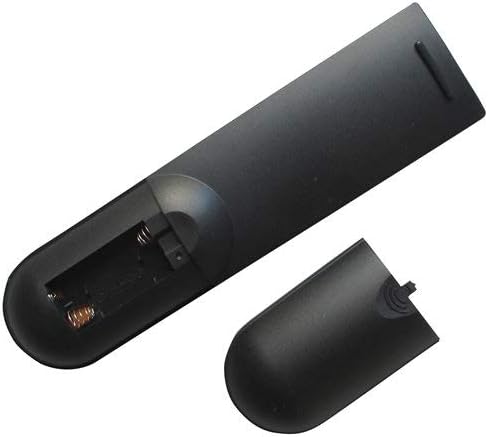
Image: Back of the remote control with the battery cover removed, revealing the battery compartment. This shows where to insert the AAA batteries.

Image: Back of the remote control with the battery cover partially removed, illustrating the correct orientation for battery insertion.
After installing the batteries, the remote control is ready for use. No programming is typically required for this replacement remote.
אַפּערייטינג ינסטראַקשאַנז
This remote control operates using infrared (IR) technology. Ensure there is a clear line of sight between the remote control and the TV's IR receiver for optimal performance.
יקערדיק פאַנגקשאַנז:
- מאַכט קנעפּל: טורנס די טעלעוויזיע אויף אָדער אַוועק.
- קאַנאַל אַרויף / אַראָפּ: ענדערונגען די טעלעוויזיע קאַנאַל.
- באַנד אַרויף / אַראָפּ: Adjusts the TV's audio volume.
- שטיל קנעפּל: שטומט אדער אנשטומט דעם טעלעוויזאר'ס אודיא.
- אַרייַנגאַנג/מקור קנעפּל: Cycles through available input sources (e.g., HDMI 1, AV, Component).
- נומער קנעפּלעך (0-9): Directly select TV channels.
- מעניו קנעפּל: גייט אריין אין דעם טעלעוויזיע'ס אויף-סקרין מעניו.
- Navigation Buttons (Up, Down, Left, Right, OK/Enter): Used to navigate through TV menus and confirm selections.
Refer to your television's original user manual for specific functions and menu navigation details, as these may vary by TV model.
וישאַלט
רייניקונג די רימאָוט קאָנטראָל
צו רייניקן די ווײַטקאָנטראָל, ניצט אַ ווייכע, טרוקענע שטאָף. פֿאַר שווערע שמוץ, אַ ביסל ווייכער מאַכןampen the cloth with water or a mild, non-abrasive cleaner. Do not use harsh chemicals or immerse the remote control in water.
באַטערי פאַרבייַט
Replace the batteries when the remote control's response becomes sluggish or stops working. Always replace both batteries at the same time with new AAA batteries. Do not mix old and new batteries, or different types of batteries, as this can lead to leakage or damage.
באַטערי זיכערקייַט:
- Remove batteries if the remote control will not be used for an extended period.
- פּאָטער פון געוויינט באַטעריז לויט די היגע רעגיאַליישאַנז.
- האַלטן באַטעריז אויס פון דערגרייכן פון קינדער.
טראָובלעשאָאָטינג
| פּראָבלעם | מעגלעך סיבה | לייזונג |
|---|---|---|
| ווייַט קאָנטראָל טוט נישט אַרבעטן. |
|
|
| עטלעכע פאַנגקשאַנז טאָן ניט אַרבעט. |
|
|
| Remote control works intermittently. |
|
|
ספּעסאַפאַקיישאַנז
- מאָדעל: גרינג צו טריי4921
- סאָרט: גרינג צו טריי123
- קאַמפּאַטאַבאַל דעוויסעס: Saba LED/LCD HDTVs (LED26V11, SBV1943H, SBV2243H, SCB1909W, SCB1910VX, LED32PV412, S19104DVD)
- קאַנעקטיוויטי טעכנאָלאָגיע: ינפרערעד (IR)
- קאָנטראָללער טיפּ: קנעפּל קאָנטראָל
- מאַכט מקור: 2 X AAA באַטעריז (ניט אַרייַנגערעכנט)
- ספּעציעלע שטריך: ערגאַנאַמיק פּלאַן
וואָראַנטי און שטיצן
Information regarding specific warranty terms for this Easytry123 replacement remote control is not provided in the product details. For any support inquiries or further assistance, please contact the seller directly through the platform where the purchase was made.
Please refer to the original product listing or your purchase documentation for any available warranty information.