
1. פּראָדוקט איבערview
The Sato One-Touch Timer TM-22 is a versatile digital timer designed for various timing needs, from kitchen use to laboratory applications. It combines ease of use with practical features to enhance your daily tasks.
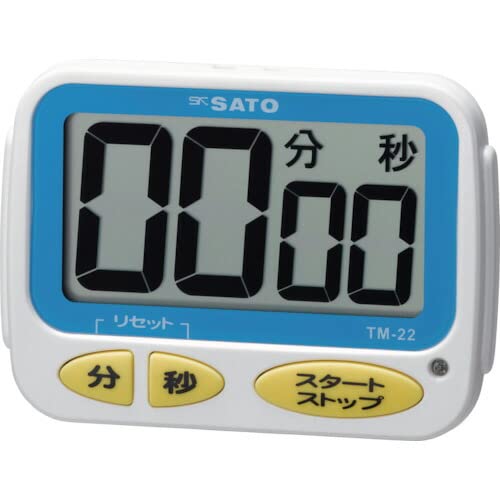
בילד 1: פראָנט view of the Sato One-Touch Timer TM-22. The timer features a clear digital display and control buttons.
שליסל פֿעיִקייטן:
- Automatic Reset Alarm: The alarm sounds for 5 seconds at the set time and automatically resets to the initial set time.
- פּשוט אָפּעראַציע: The primary key is for starting; no complex operations are required to stop the timer's alarm cycle.
- Dual Notification: Alerts users with both sound (70dB) and light.
- Drip-Proof Construction: Designed to resist splashes, making it suitable for kitchen environments.
- עטלעכע מאַונטינג אָפּציעס: Equipped with a magnet on the back for attachment to metal surfaces and a strap for hanging.
- קאָונטדאָוון און ציילן-אַרויף פאַנגקשאַנז: Supports both decreasinג און פאַרגרעסערןasing time measurements.
2. סעטאַפּ
ייַנמאָנטירונג פון באַטאַרייע:
The TM-22 timer requires one AAA battery for operation. A battery is included with the unit.
- געפינט דעם דעקל פון דעם באַטעריע אָפּטייל אויף דער צוריקזייט פון דעם טייַמער.
- שלעפּט אָדער נעמט אַראָפּ דעם דעקל צו עפֿענען דעם אָפּטייל.
- אַרײַנשטעלן איין AAA באַטעריע, און זיכער מאַכן אַז די פּאָזיטיוו (+) און נעגאַטיוו (-) טערמינאַלן זענען ריכטיק אויסגעשטעלט מיט די מאַרקירונגען אינעווייניק אין דעם אָפּטייל.
- פאַרבייַטן די באַטאַרייע אָפּטייל דעקן סיקיורלי.
The timer should power on, and the display will show '00:00' or the last set time.
3. אַפּערייטינג ינסטרוקטיאָנס
The TM-22 timer features both countdown and count-up functionalities.
3.1. קאַונטדאַון טייַמער
This function allows you to set a specific duration, and the timer will count down to zero.
- שטעלן צייט: Use the 'M' (Minute) button and 'S' (Second) button to adjust the desired countdown duration. The timer can be set from 1 second up to 99 minutes and 59 seconds.
- Start Countdown: Press the 'START' button to begin the countdown.
- שרעק אָנזאָג: When the time reaches zero, an alarm will sound for 5 seconds, accompanied by a flashing light.
- אָטאַמאַטיק באַשטעטיק: After the 5-second alarm, the timer automatically resets to the initial set time, ready for the next countdown without manual intervention.
- פּויזע / האַלטן: To pause the countdown, press the 'START' button again. To resume, press 'START' once more. To clear the set time, press the 'RESET' button (if available) or hold the 'START' button for a few seconds.
3.2. Count-up Timer
This function measures elapsed time from zero.
- Start Count-up: Ensure the timer display shows '00:00'. If not, press the 'RESET' button to clear any previous settings. Press the 'START' button to begin counting upwards from zero.
- פּויזע / נעמענ זיכ ווידער: To pause the count-up, press the 'START' button. To resume, press 'START' again.
- באַשטעטיק: To reset the count-up timer to '00:00', press the 'RESET' button (if available) or hold the 'START' button for a few seconds while paused.
4. וישאַלט
רייניקונג:
To maintain the timer's appearance and functionality:
- Wipe the exterior of the timer with a soft, dry cloth.
- Do not use abrasive cleaners, solvents, or chemical agents, as these may damage the casinג אדער אַרויסווייַז.
- The timer is drip-proof, but do not immerse it in water or expose it to heavy splashing.
באַטערי פאַרבייַט:
Replace the battery when the display becomes dim or the timer's functions become erratic.
- Follow the battery installation steps outlined in the "2. Setup" section.
- ניצט שטענדיק אַ פרישע AAA באַטעריע.
- פּאָטער פון געוויינט באַטעריז לויט די היגע רעגיאַליישאַנז.
5. טראָובלעשאָאָטינג
If you encounter issues with your TM-22 timer, refer to the following common problems and solutions:
| פּראָבלעם | מעגלעך סיבה | לייזונג |
|---|---|---|
| Timer does not turn on. | די באַטעריע איז טויט אָדער נישט ריכטיק אינסטאַלירט. | קאָנטראָלירט די פּאָלאַריטעט פון די באַטעריע. פאַרבייטן מיט אַ נייער AAA באַטעריע. |
| דער עקראַן איז שוואַך אָדער פליקערט. | נידעריק באַטאַרייע מאַכט. | פאַרבייַטן די אַאַאַ באַטאַרייע. |
| דער אַלאַרם קלינגט נישט. | Volume obstruction or internal issue. | Ensure the speaker is not covered. Check battery level. If problem persists, contact support. |
| Timer does not reset automatically after alarm. | This feature is specific to the countdown function. | Ensure you are using the countdown function. For count-up, manual reset is required. |
6. ספּעסאַפאַקיישאַנז
| שטריך | דעטאַל |
|---|---|
| מאָדעל נומער | טם-22 |
| מאַקסימום צייט | 99 מינוט 59 סעקונדעס |
| Minimum Timing | 1 רגע |
| דימענשאַנז (H X W X D) | 67 מם רענטגענ 93 מם רענטגענ 20 מם |
| וואָג | 96 ג |
| מאַכט מקור | אַאַאַ באַטאַרייע x 1 (אַרייַנגערעכנט) |
| שרעק באַנד | 70 דב |
| פאַנגקשאַנז | Countdown, Count-up |
| ספּעציעלע פֿעיִקייטן | Drip-proof construction, Magnet on back, Hanging strap, Sound and light notification |
7. וואָראַנטי און שטיצן
For warranty information, technical assistance, or customer support regarding your Sato One-Touch Timer TM-22, please contact your authorized retailer or the manufacturer, Sato Corporation. Keep your purchase receipt as proof of purchase.
Please visit the official Sato webזייטל פֿאַר די מערסט אַרויף-צו-דאַטע שטיצע אינפֿאָרמאַציע און קאָנטאַקט דעטאַלן.