
Alpha EK 60
Alpha EK-60 61-Key Electronic Piano Keyboard User Manual
Portable Digital Keyboard with Audio Input, Microphone Input, Headphone Output, 255 Tones, Rhythms, LED Display
1. הקדמה
א דאנק פארן קויפןasing the Alpha EK-60 61-Key Electronic Piano Keyboard. This manual provides detailed instructions for the proper setup, operation, and maintenance of your new instrument. The EK-60 is designed to offer a rich musical experience with its versatile features, including a wide range of tones and rhythms, intelligent teaching functions, and various connectivity options. Please read this manual thoroughly before using the product to ensure optimal performance and longevity.
2. זיכערקייַט אינפֿאָרמאַציע
To prevent electric shock, fire, or damage to the unit, please observe the following precautions:
- שטעלט נישט אויס די קלאַוויאַטור צו רעגן אָדער פייכטקייט.
- לייגט נישט קיין זאכן אָנגעפילט מיט פליסיקייטן, ווי למשל וואַזעס, אויף דער קלאַוויאַטור.
- דו זאלסט נישט פאַרשפּאַרן קיין ווענטאַליישאַן אָופּאַנינגז.
- ניצט נאָר דעם ספּעציפֿישן מאַכט אַדאַפּטער.
- נעמט נישט אויס אדער מאדיפיצירט נישט דעם איינהייט. לאָזט איבער אלע סערוויסעס צו קוואַליפֿיצירטע פּערסאָנעל.
- האַלטן אויס פון דערגרייכן פון קליין קינדער.
3. פּעקל אינהאַלט
ביטע קאָנטראָלירט אַז אַלע די פאלגענדע זאכן זענען אַרייַנגערעכנט אין דיין פּעקל:
- 1 x Alpha 61-Key Standard Keyboard EK-60
- 1 x אַדזשאַסטאַבאַל שטאַנד
- 1 x מוזיק שיט האָלדער
- 1 X מאַכט אַדאַפּטער
- 1 x באַניצער מאַנואַל (דאָס דאָקומענט)
4. פּראָדוקט איבערview
Familiarize yourself with the components of your Alpha EK-60 keyboard.
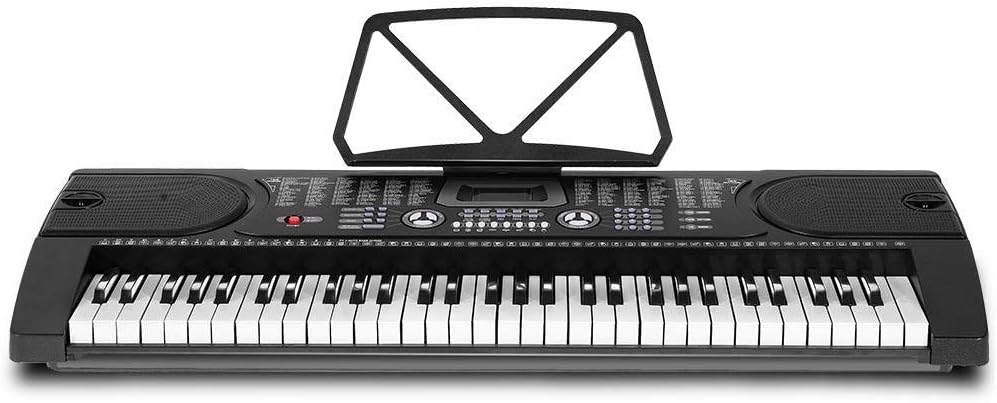
פיגור 4.1: פון אויבן אַראָפּ view of the Alpha EK-60 keyboard, highlighting the control panel, integrated speakers, and the 61 standard piano keys.

Figure 4.2: Detail of the LED display for convenient settings adjustment and the battery compartment for portable use.

פיגורע 4.3: View of the multiple jacks including Audio Input, Microphone Input, and Headphone Output for versatile connectivity.
שליסל פֿעיִקייטן:
- 61-Key Standard Piano Keyboard
- LED display for easy navigation
- 24 דעמאָ לידער
- 255 timbres (instrument sounds)
- 255 rhythms (accompaniment styles)
- 61 kinds of keyboard percussions
- 8 פּאַנעל פּערקוסשאַנז
- Master volume, accompaniment volume, and tempo control
- Intelligent teaching function: one-key, follow and ensemble function
- ריטם פּראָגראַממינג פֿונקציע
- Auto chord and chord timbre option
- רעקאָרד און פּלייבאַק פאַנגקשאַנאַליטי
- Sustain and vibrato effects
- Microphone input and speaker output
- Headphone jack for silent practice
- Battery powered option (6 x AA-size batteries, not included)
5. סעטאַפּ
5.1 צוזאַמענשטעלן דעם שטאַנד
- Unpack all components of the adjustable stand.
- Connect the horizontal support bars to the vertical legs, ensuring they are securely fastened.
- Adjust the height of the stand to your preferred playing position using the adjustment knobs. The stand is adjustable from 59cm to 79cm in height.
- Place the keyboard securely on top of the assembled stand.
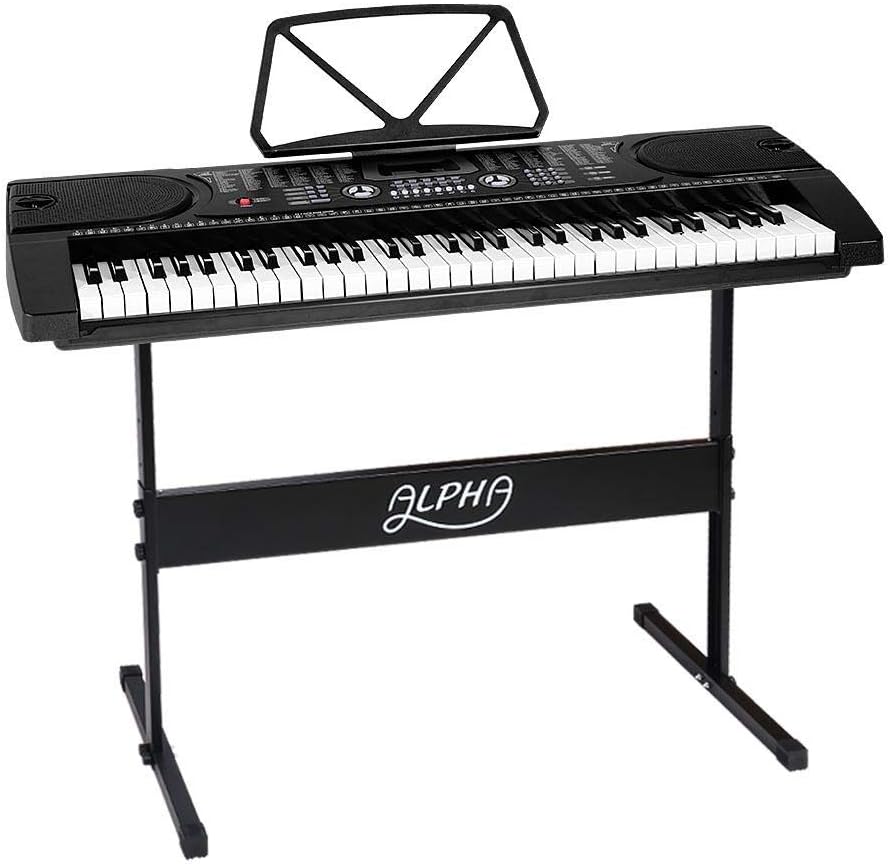
Figure 5.1: The Alpha EK-60 keyboard fully assembled on its adjustable stand, ready for use.
5.2 אנשטעלן די קלאַוויאַטור
The Alpha EK-60 can be powered by the included AC adaptor or by batteries.
ניצן די אַק אַדאַפּטער:
- Connect the DC plug of the power adaptor to the DC 9V input jack on the rear of the keyboard.
- Plug the AC adaptor into a standard wall outlet.
ניצן באַטעריז:
- געפינט די באַטעריע אָפּטייל אויף דער אונטערשטער זייט פון דער קלאַוויאַטור.
- עפענען די באַטאַרייע אָפּטייל דעקן.
- Insert 6 x AA-size batteries (not included), ensuring correct polarity (+/-).
- פאַרמאַכן די באַטאַרייע אָפּטייל דעקן סיקיורלי.
Note: When using batteries, disconnect the AC adaptor. The keyboard will automatically switch to battery power if the adaptor is removed.
6. אַפּערייטינג ינסטרוקטיאָנס
6.1 יקערדיק אָפּעראַציע
- מאַכט אויף / אַוועק: דרוק די מאַכט קנעפּל צו דרייען די קלאַוויאַטור אָן אָדער אויס.
- באַנד קאָנטראָל: ניצן די בעל באַנד קנעפּל צו סטרויערן דעם אַלגעמיינעם געזונט לעוועל.
- טעמפּעראַטור קאָנטראָל: ניצן די TEMPO קנעפּלעך צו סטרויערן די גיכקייט פון ריטמען און דעמאָ לידער.
6.2 אויסקלייבן טענער און ריטמען
- Tones (Timbre): דרוק די TIMBRE button, then use the number pad or +/- buttons to select from 255 different instrument sounds. The selected timbre number will appear on the LED display.
- ריטמס: דרוק די ריטם button, then use the number pad or +/- buttons to select from 255 accompaniment rhythms. Press אָנהייב / האַלטן צו אָנהייבן אָדער ענדיקן דעם ריטם.
6.3 Intelligent Teaching Function
The EK-60 features a 3-step intelligent teaching system to help you learn to play.
- איין-שליסל: Plays the melody of a demo song by pressing any key.
- גיי: Waits for you to play the correct note before proceeding with the melody.
- צוזאמען: Plays the accompaniment while you play the melody.
To use, select a demo song, then press the desired teaching mode button (איין שליסל, גיי, אָדער אַנסאַמבאַל).
6.4 רעקאָרדינג און פּלייבאַק
The keyboard allows you to record your performances.
- דרוק די REC button to start recording. The LED display will indicate recording mode.
- שפּילט אייער געוואונטשענע מעלאָדיע.
- דרוק די שפּיל button to stop recording and play back your recorded performance.
6.5 קאַנעקטיוויטי
- כעדפאָון דזשאַק: פאַרבינדן כעדפאָונז צו די כעדפאָון jack for silent practice.
- מיקראָפאָן אַרייַנשרייַב: פאַרבינדן אַ מיקראָפאָן צו די מיק ינפּוט jack to sing along while playing.
- אַודיאָ אַרייַנשרייַב / רעזולטאַט: ניצן די אַודיאָ אַרייַנשרייַב to connect external audio devices (e.g., MP3 player) and the אַודיאָ אָוטפּוט to connect to external speakers or an ampליפער.
7. וישאַלט
Proper care will ensure the longevity of your Alpha EK-60 keyboard.
- רייניקונג: Wipe the keyboard with a soft, dry cloth. For stubborn dirt, use a slightly damp cloth and then wipe dry immediately. Do not use abrasive cleaners, waxes, or solvents.
- סטאָרידזש: When not in use for extended periods, store the keyboard in a cool, dry place away from direct sunlight and extreme temperatures. If using batteries, remove them before long-term storage to prevent leakage.
- האַנדלינג: פֿאַרמײַדט צו לאָזן פֿאַלן די קלאַוויאַטור אָדער אויסשטעלן זי צו שטאַרקע קלאַפּן.
8. טראָובלעשאָאָטינג
If you encounter any issues with your keyboard, refer to the following table for common problems and solutions.
| פּראָבלעם | מעגלעך סיבה | לייזונג |
|---|---|---|
| קיין געזונט | Volume is too low; Power is off; Headphones connected; Faulty power connection. | Increase master volume; Turn on power; Disconnect headphones; Check power adaptor or replace batteries. |
| שליסלען ריספּאַנד נישט | Keyboard is in a teaching mode; Internal malfunction. | Exit teaching mode; Power cycle the keyboard. If issue persists, contact support. |
| Rhythm/Demo song not playing | Rhythm/Demo song not selected; START/STOP button not pressed. | Select a rhythm/demo song; Press START/STOP. |
| פאַרקרימט געזונט | Volume too high; External device connected incorrectly. | Reduce volume; Check connections of external devices. |
אויב די פראבלעם בלייבט נאך פרובירן די לייזונגען, ביטע קאנטאקטירט קאסטומער סופארט.
9. ספּעסאַפאַקיישאַנז
| שטריך | באַשרייַבונג |
|---|---|
| מאָדעל | עק-60 |
| שליסלען | 61 Standard Piano Keys |
| Key Width | 1.9 סענטימעטער |
| Tones (Timbres) | 255 |
| רהיטמס | 255 |
| דעמאָ סאָנגס | 24 |
| מאַקסימום פּאָליפאָני | 8 |
| קאַנעקטיוויטי | Audio Input, Audio Output, Headphone Jack (3.5mm), Microphone Input (3.5mm) |
| מאַכט צושטעלן | AC Adaptor (DC 9V) or 6 x AA-size batteries (not included) |
| דימענסיעס (קלאַוויאַטור) | 86 סענטימעטער (ל) רענטגענ 32.5 סענטימעטער (וו) |
| Dimensions (Overall with Stand) | 86cm (L) x 32.5cm (W) x 59-79cm (H) |
| וואָג | 6.2 קילאָגראַמס |
| קאָליר | שוואַרץ |

Figure 9.1: Detailed dimensions of the Alpha EK-60 keyboard and its adjustable stand.
10. וואָראַנטי און שטיצן
10.1 וואָראַנטי אינפֿאָרמאַציע
The Alpha EK-60 keyboard comes with a 1 יאָר וואָראַנטי from the date of purchase. This warranty covers manufacturing defects and ensures the product is free from defects in material and workmanship under normal use. It does not cover damage caused by misuse, accident, unauthorized modification, or normal wear and tear.
10.2 קונה שטיצן
For any queries, technical assistance, or warranty claims, please contact the seller or manufacturer directly. Please have your purchase receipt and product model number (EK-60) ready when contacting support.
Ask a question about this manual
Ask about setup, troubleshooting, compatibility, parts, safety, or missing instructions. Manuals+ will review the question and use this page’s manual context to help answer it.