
1. הקדמה
The Zerone Sport Action DV Camera is a compact and portable device designed for capturing high-definition video during various outdoor activities. Featuring 1080P and 720P recording options, a 120-degree wide-angle lens, and an IPX-4 waterproof aluminum alloy shell, this camera is built for durability and ease of use. It includes a built-in microphone for audio recording and provides vibration feedback for operational status.
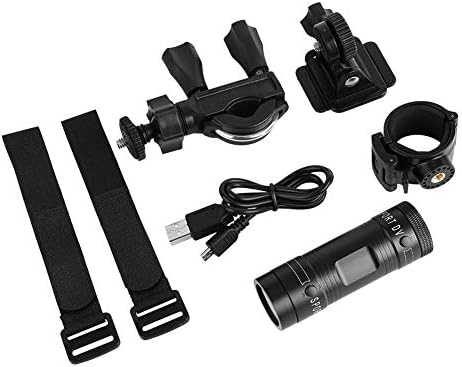
Image 1.1: The Zerone Sport Action DV Camera unit.
2. זיכערקייַט אינפֿאָרמאַציע
- שטעלט נישט אויס די קאַמעראַ צו עקסטרעמע טעמפּעראַטורן אדער דירעקטע זונשייַן פֿאַר לענגערע פּעריאָדן.
- While the camera features an IPX-4 waterproof rating, it is designed to withstand splashes and light rain. Do not submerge or soak the camera in water.
- האַלטן די מיטל אַוועק פון שטאַרק מאַגנעטיק פעלדער.
- Use only the specified charging cable and power adapter to prevent damage.
- פּרוּווט נישט צו צענעמען אָדער מאָדיפֿיצירן די קאַמעראַ, ווײַל דאָס וועט בטל מאַכן די וואָראַנטי און קען פאַראורזאַכן שאָדן.
- האַלט די קאַמעראַ אין אַ טרוקענעם, קילן אָרט ווען זי איז נישט אין באַנוץ.
3. פּעקל אינהאַלט
ביטע טשעקן דעם פּעקל צו זיכער מאַכן אַז אַלע זאכן זענען דאָרט:
- Zerone Sport Action DV Camera Unit
- וסב טשאַרדזשינג קאַבלע
- Mounting Accessories (e.g., bike mount, helmet mount, strap mounts)
- Rechargeable Battery (may be pre-installed)
- באַניצער מאַנואַל (דעם דאָקומענט)
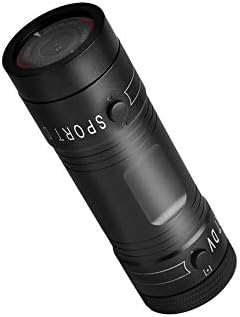
Image 3.1: Contents of the Zerone Sport Action DV Camera package, showing the camera, USB cable, and various mounting options.
4. קאַמעראַ איבערview
מאַכט זיך באַקאַנט מיט די קאַמעראַ'ס קאָמפּאָנענטן און קאָנטראָלס.
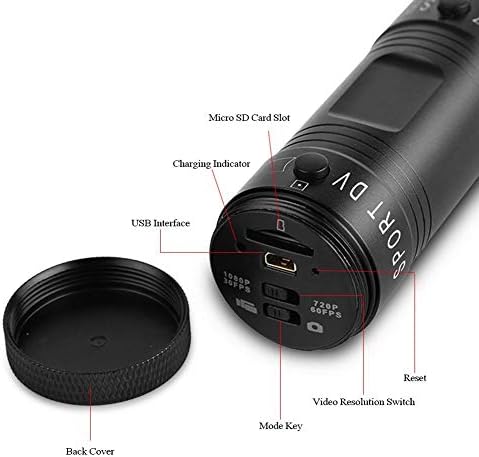
בילד 4.1: דעטאַלירט view of the camera's rear end, highlighting the Micro SD card slot, USB interface, charging indicator, mode key, video resolution switch (1080P 30fps / 720P 60fps), and reset button.
- מיקראָ סד קאָרט שפּעלטל: Insert your Micro SD card here. A card is required for operation.
- טשאַרדזשינג ינדיקאַטאָר: Displays charging status. A red light indicates charging; it turns off when fully charged.
- USB צובינד: צום אויפלאָדן און פֿאַרבינדן צו אַ קאָמפּיוטער.
- מאָדע שליסל: Used to switch between recording modes (e.g., video, photo).
- Video Resolution Switch: Selects between 1080P 30fps and 720P 60fps recording resolutions.
- באַשטעטיק קנעפּל: געניצט צו ריסעט דעם דעווייס אויב עס ווערט נישט-רעאגירנדיק.
- Power Button (Front): Located on the front side of the camera.
- Record/Stop Button (Back): Located on the back side of the camera.
5. סעטאַפּ
5.1 טשאַרדזשינג די באַטאַרייע
- פֿאַרבינדט די קאַמעראַ צו אַ USB שטראָם מקור (למשל, קאָמפּיוטער, וואַנט אַדאַפּטער) ניצנדיק דעם צוגעשטעלטן USB קאַבל.
- די רויט ליכט on the back of the camera will illuminate, indicating that it is charging.
- אַמאָל גאָר באפוילן, די רויט ליכט וועט קער אַוועק.
- Note: If the camera blinks red and blue when plugged in, it indicates that an SD card is not inserted. This is not a charging indicator.
5.2 ינסערטינג אַ מיקראָ סד קאָרט
A Micro SD card (not included) is required for recording video and photos. The camera supports Micro SD cards up to a certain capacity (check product packaging for maximum supported size, typically 32GB or 64GB for similar devices).
- ונסקרעוו די צוריק דעקן פון די אַפּאַראַט.
- Locate the Micro SD card slot (refer to Image 4.1).
- שטעקט אריין די מיקראָ SD קאַרטל מיט אײַן אין דעם שפּאַלט ביז עס קליקט אַרײַן. מאַכט זיכער אַז די קאַרטל איז ריכטיק אָריענטירט.
- Replace the back cover, ensuring it is securely tightened to maintain water resistance.
5.3 מאָונטינג די אַפּאַראַט
The camera comes with various mounting accessories for different applications.
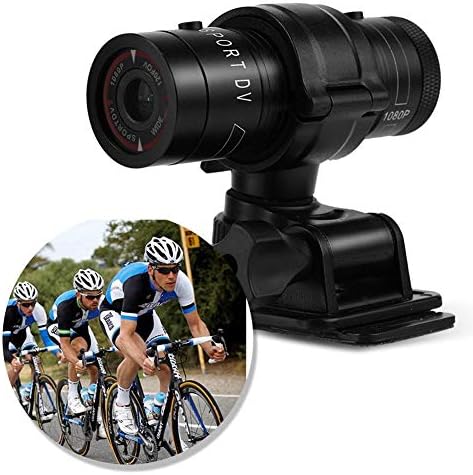
Image 5.1: The camera attached to a bicycle handlebar, demonstrating one of its mounting options.
- Bike Mount: ניצן די clamp mount to attach the camera securely to bicycle handlebars or other tubular structures.
- Helmet Mount: Utilize the adhesive or strap mounts to fix the camera to a helmet.
- Strap Mounts: For attaching to various gear or body parts.
Ensure all mounts are securely fastened before engaging in activities to prevent the camera from falling.
6. אַפּערייטינג די קאַמעראַ
6.1 מאַכט אויף / אַוועק
- צו אָנפאַנגען, דריקן און האַלטן די מאַכט קנעפּל (front switch) until the camera vibrates.
- צו האַלטן אַוועק, דריקן און האַלטן די מאַכט קנעפּל again until the camera vibrates once.
6.2 Selecting Video Resolution
Before recording, select your desired video resolution using the switch on the back of the camera (refer to Image 4.1).
- רוק דעם באַשטימען צו "1080P 30fps" for Full HD video at 30 frames per second.
- רוק דעם באַשטימען צו "720P 60fps" for HD video at 60 frames per second.
6.3 רעקאָרדינג ווידעא
- מאַכן זיכער אַז די אַפּאַראַט איז פּאַוערד אויף.
- דרוק די רעקאָרד / האַלטן קנעפּל (back switch) to start recording. The camera will vibrate three times to indicate recording has started.
- צו האַלטן רעקאָרדינג, דריקן די רעקאָרד / האַלטן קנעפּל again. The camera will vibrate once to indicate recording has stopped.
6.4 קאַנעקטינג צו אַ קאָמפּיוטער
צו אַריבערפירן files or access recorded content:
- מאַכן זיכער אַז די אַפּאַראַט איז פּאַוערד אַוועק.
- פאַרבינדן די אַפּאַראַט צו דיין קאָמפּיוטער מיט די צוגעשטעלט וסב קאַבלע.
- The camera will be recognized as a removable storage device.
- You can then access and transfer your video files.
7. וישאַלט
- רייניקונג: ניצט אַ ווייכע, טרוקענע שטאָף צו רייניקן די קאַמעראַ קערפּער. פֿאַר די אָביעקטיוו, ניצט אַ ספּעציאַליזירטע אָביעקטיוו רייניקונג שטאָף און לייזונג. פֿאַרמייַדט אַברייסיוו מאַטעריאַלן.
- סטאָרידזש: When not in use for extended periods, store the camera in a cool, dry place. Ensure the battery is partially charged (around 50%) to prolong its lifespan.
- וואַסער קעגנשטעל: Regularly check that the back cover is securely tightened to maintain the IPX-4 water resistance. Avoid exposing the USB port or SD card slot to moisture when the cover is open.
- באַטערי זאָרגן: Avoid fully discharging the battery frequently. Recharge it when the low battery indicator appears.
8. טראָובלעשאָאָטינג
| פּראָבלעם | מעגלעך סיבה | לייזונג |
|---|---|---|
| די קאַמעראַ גייט נישט אָן. | באַטערי איז דיפּליטיד. | לאָדט די קאַמעראַ גאָר אויף. |
| Camera blinks red and blue, then turns off. | No Micro SD card inserted or card is faulty. | Insert a functional Micro SD card. Ensure it is properly seated. |
| קען נישט רעקאָרדירן ווידעא. | No Micro SD card, card full, or card error. | Insert a Micro SD card, delete old fileס, אדער פֿאָרמאַטירן די קאַרטל (דאָס וועט אויסמעקן אַלע דאַטן). |
| נעבעך ווידעא קוואַליטעט. | Lens is dirty; low light conditions; incorrect resolution setting. | Clean the lens. Ensure adequate lighting. Select 1080P resolution for higher detail. |
| די אַפּאַראַט איז נישט ריספּאַנדינג. | ווייכווארג פראבלעם. | Use a thin object (like a paperclip) to press the באַשטעטיק קנעפּל (אָפּשיקן צו בילד 4.1). |
9. ספּעסאַפאַקיישאַנז
| שטריך | דעטאַל |
|---|---|
| סאָרט | נול |
| מאָדעל נומער | Zeronefg3h149y2s |
| ווידעא קאַפּטורע רעסאָלוטיאָן | 1080 פּ (30 פפּס), 720 פּ (60 פפּס) |
| אָביעקטיוו ווינקל | 120-degree A+ grade wide-angle |
| וואָטערפּרוף רייטינג | IPX-4 (splash-proof) |
| שאָל מאַטעריאַל | אַלומינום צומיש |
| פאָטאָ סענסאָר טעכנאָלאָגיע | קמאָס |
| מאַקסימום עפענונג | 1.8 מילאַמיטערז |
| פלאַש זכּרון טיפּ | Micro SD (card not included) |
| ווידעא קאַפּטורע פֿאָרמאַט | AVI |
| שטיצט אַודיאָ פֿאָרמאַט | AAC, MP3, PCM, FLAC, or Dolby Digital/AC-3 |
| קאַנעקטיוויטי טעכנאָלאָגיע | וסב |
| פּונקט וואָג | 10.8 אונס (בעערעך 306 גראַמז) |
| פּראָדוקט דימענשאַנז | 11.81 x 6.3 x 5.91 אינטשעס (אומגעפער 30 x 16 x 15 ס״מ) |
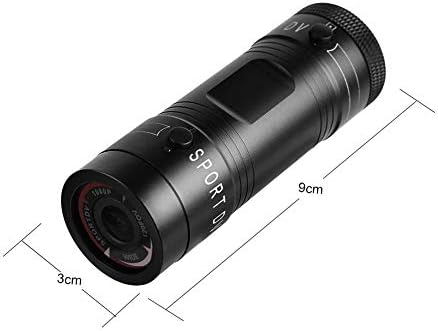
Image 9.1: Physical dimensions of the camera, showing a length of 9cm and a diameter of 3cm.
10. וואָראַנטי און שטיצן
פֿאַר וואָראַנטי אינפֿאָרמאַציע און טעכנישע שטיצע, ביטע זעט די דאָקומענטאַציע וואָס איז צוגעשטעלט געוואָרן מיט אייער קויף אָדער קאָנטאַקטירט דעם הענדלער/פאַבריקאַנט גלייך. האַלט אייער קויף באַווייַז פֿאַר וואָראַנטי קליימז.
Manufacturer: Zerone
For further assistance, you may visit the Zerone Store on Amazon: Zerone Store