
1. הקדמה
This manual provides detailed instructions for the proper use and maintenance of your AKAMATE EB03 Active Noise Cancelling Bluetooth Neckband Earphones. Please read this manual thoroughly before using the product to ensure optimal performance and longevity.
The AKAMATE EB03 earphones feature Active Noise Cancellation (ANC) technology, Bluetooth V4.2 connectivity, a magnetic design for secure wear, and an IPX5 water-resistant rating, making them suitable for various activities.
2. זיכערקייַט אינפֿאָרמאַציע
Please observe the following safety guidelines to prevent damage to the device or personal injury:
- Do not expose the earphones to extreme temperatures, humidity, or corrosive substances.
- פֿאַרמײַדט צו לאָזן פאַלן אָדער אויסשטעלן די אויערפֿאָנען צו שטאַרקע קלאַפּן.
- Do not attempt to disassemble or modify the earphones. This will void the warranty and may cause damage.
- רייניקט די אויערפאָונז מיט אַ ווייכן, טרוקענעם שטאָף. ניצט נישט קיין שאַרפע כעמיקאַלן אדער שאַרפע מאַטעריאַלן.
- קאָנסומער אַלערט: רובֿ יוזערז טאָן ניט דאַרפֿן אַ דערלויבעניש צו אַרבעטן דעם וויירליס מיקראָפאָן סיסטעם. פונדעסטוועגן, אַפּערייטינג דעם מיקראָפאָן סיסטעם אָן אַ דערלויבעניש איז אונטערטעניק צו זיכער ריסטריקשאַנז: די סיסטעם קען נישט פאַרשאַפן שעדלעך ינטערפיראַנס; עס מוזן אַרבעטן מיט אַ נידעריק מאַכט מדרגה (ניט מער ווי 50 מיליוואַץ); און עס האט קיין שוץ פון ינטערפיראַנס באקומען פון קיין אנדערע מיטל.
- Purchasers should also be aware that the FCC is currently evaluating use of wireless microphone systems, and these rules are subject to change. For more information, call the FCC at 1-888-CALL-FCC (TTY: 1-888-TELL-FCC) or visit the FCC's wireless microphone webפּלאַץ בייַ fcc.gov/cgb/wirelessmicrophones.
3. פּעקל אינהאַלט
ביטע טשעק די פּאַקעט פֿאַר די פאלגענדע זאכן:
- AKAMATE EB03 Active Noise Cancelling Earphones
- וסב טשאַרדזשינג קאַבלע
- קייפל גרייסן פון אויער עצות (קליין, מיטל, גרויס)
- באַניצער מאַנואַל
4. פּראָדוקט איבערview
Familiarize yourself with the components of your AKAMATE EB03 earphones.

בילד 4.1: איבערview of the AKAMATE EB03 Active Noise Cancelling Earphones, showing the earbuds, inline control panel, and neckband cable.
- עאַרבודז: In-ear design with ear hooks for secure fit.
- Inline Control Panel: Contains buttons for power, volume, track control, and ANC activation.
- מיקראָפאָן: אינטעגרירט פֿאַר הענט-פֿרײַ רופן.
- טשאַרדזשינג פּאָרט: געפינען זיך אויף דער אינליין קאנטראל איינהייט.
5. סעטאַפּ
5.1 אויפלאָדן די אויערפאָונז
Before first use, fully charge the earphones. A full charge takes approximately 1.5 hours.
- Connect the provided USB charging cable to the charging port on the inline control unit.
- פאַרבינדן די אנדערע סוף פון די וסב קאַבלע צו אַ וסב מאַכט מקור (למשל, קאָמפּיוטער, וואַנט אַדאַפּטער).
- די LED אינדיקאַטאָר וועט ווייַזן די טשאַרדזשינג סטאַטוס (למשל, רויט פֿאַר טשאַרדזשינג, בלוי פֿאַר גאָר טשאַרדזשד).

Image 5.1: The earphones connected to a USB charging cable, illustrating the charging process and battery life information.
5.2 פּאָרן מיט אַ בלועטוט מיטל
The earphones use Bluetooth V4.2 for wireless connection. Ensure your device's Bluetooth is enabled.
- With the earphones powered off, press and hold the Multi-function button (usually the center button on the inline control) for approximately 5-7 seconds until the LED indicator flashes red and blue alternately. This indicates pairing mode.
- אויף אייער בלוטוט-פארשטארקטע דעווייס (סמאַרטפאָן, טאַבלעט, אאז"וו), גייט צו די בלוטוט סעטטינגס און זוכט פֿאַר פאַראַן דעווייסעס.
- Select "AKAMATE EB03" (or similar name) from the list of found devices.
- Once paired, the LED indicator will flash blue slowly, and you may hear a confirmation tone.
5.3 טראָגן די אויערפאָנען
פֿאַר אָפּטימאַלער געזונט קוואַליטעט און באַקוועמלעכקייט, קלייַבט די ריכטיקע גרייס פֿון די אויער שפּיץ און זאָרגט פֿאַר אַ זיכערן פּאַסיק.

Image 5.2: The AKAMATE EB03 earphones displayed with different sizes of ear tips and ear hooks, highlighting their ergonomic design for comfortable wear.
- Select the ear tips that provide a snug and comfortable seal in your ear canal.
- Position the ear hooks over your ears to secure the earphones during movement.
- The neckband cable should rest comfortably around your neck.
6. אַפּערייטינג ינסטרוקטיאָנס
6.1 מאַכט אויף / אַוועק
- מאַכט אויף: Press and hold the Multi-function button for approximately 3 seconds until the LED flashes blue and you hear a power-on prompt.
- מאַכט אַוועק: Press and hold the Multi-function button for approximately 3-4 seconds until the LED flashes red and you hear a power-off prompt.
6.2 Active Noise Cancellation (ANC) Function
The ANC feature reduces ambient noise by up to 22dB, blocking approximately 92% of background noise.

Image 6.1: Visual representation of Active Noise Cancelling technology, showing how inverse sound waves cancel out ambient noise, with an ANC switch on the earphone's control unit.
- אַקטאַווייט ANC: Locate the dedicated ANC switch or button on the inline control unit and slide/press it to the 'ON' position. The ANC indicator light will illuminate.
- דיאַקטיווייט ANC: Slide/press the ANC switch/button to the 'OFF' position.
6.3 מוזיק פּלייבאַק

Image 6.2: The AKAMATE EB03 earphones, emphasizing their capability to produce high-fidelity stereo sound with deep bass and clear mid-tones.
- שפּיל / פּויזע: דריקט קורץ דעם מולטי-פונקציע קנעפּל.
- באַנד אַרויף: דריק קורץ דעם '+' קנעפל.
- באַנד אַראָפּ: דריק קורץ דעם '-' קנעפל.
- ווייַטער שפּור: לאַנג דריקן די '+' קנעפּל.
- פֿריִערדיקע שפּור: לאַנג דריקן דעם '-' קנעפּל.
6.4 רוף פאַרוואַלטונג
- ענטפֿערן / סוף רופן: דריקט קורץ דעם מולטי-פונקציע קנעפּל.
- אָפּוואַרפן רופן: לאַנג דריקן די מולטי-פונקציע קנעפּל פֿאַר 2 סעקונדעס.
- ריאַל די לעצטע נומער: טאָפּל דריקן די מולטי-פונקציע קנעפּל.
6.5 Magnetic Earbuds Feature
The earbuds feature built-in magnets, allowing them to attach to each other when not in use, preventing tangles and securing them around your neck.
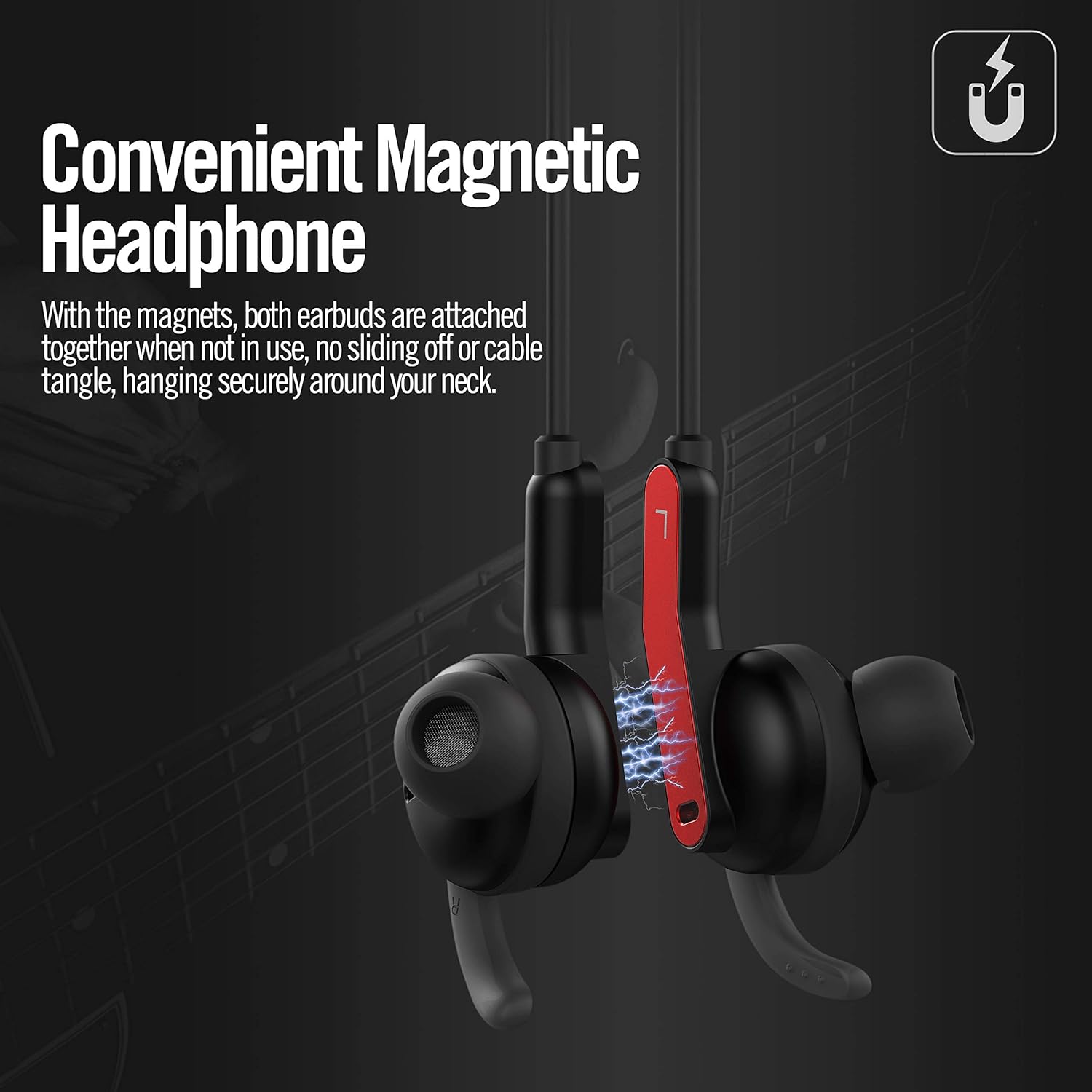
Image 6.3: The AKAMATE EB03 earbuds shown magnetically connected, illustrating how they can be secured around the neck to prevent loss or tangling.
7. וישאַלט
7.1 רייניקונג
- Wipe the earphones with a soft, slightly damp שטאָף. דו זאלסט נישט נוצן אַברייסיוו קלינערז אָדער סאָלוואַנץ.
- Remove ear tips and clean them separately with mild soap and water, then dry thoroughly before reattaching.
7.2 סטאָרידזש
- האַלט די אויערפאָונז אין אַ קיל, טרוקן אָרט אַוועק פון דירעקט זונשייַן און עקסטרעמע טעמפּעראַטורן.
- When not in use, the magnetic earbuds can be connected to prevent tangling.
7.3 וואַסער קעגנשטעל (IPX5)
The AKAMATE EB03 earphones are rated IPX5, meaning they are protected against low-pressure water jets from any direction. This makes them resistant to sweat and light rain.

Image 7.1: A person wearing the AKAMATE EB03 earphones in a wet setting, demonstrating the product's IPX5 water resistance against sweat and splashes.
- דו זאלסט נישט סאַבמערדזש די ירפאָונז אין וואַסער.
- Ensure the charging port cover is securely closed to maintain water resistance.
8. טראָובלעשאָאָטינג
If you encounter issues with your earphones, refer to the following common problems and solutions:
| פּראָבלעם | מעגלעך לייזונג |
|---|---|
| די אויערפאָונז ווערן נישט אנגעצינדן. | זיכער מאַכן אַז די אויערפאָונז זענען גאָר אויפגעלאָדן. |
| קענען ניט פאַרבינדן מיט בלועטאָאָטה מיטל. |
|
| קיין קלאַנג אדער שלעכטע קלאַנג קוואַליטעט. |
|
| די ANC פונקציע אַרבעט נישט עפֿעקטיוו. |
|
9. ספּעסאַפאַקיישאַנז
| שטריך | דעטאַל |
|---|---|
| מאָדעל | EB03 |
| בלועטאָאָטה ווערסיע | V4.2 |
| אַקטיוו ראַש קאַנסאַליישאַן (ANC) | Up to 22 dB reduction (92% of background noise) |
| ווירעלעסס ראַנגע | אַרויף צו 33 פֿיס (10 מעטער) |
| באַטעריע לעבן (ANC אויסגעלאָשן) | אַרויף צו 8 שעה |
| באַטעריע לעבן (ANC אן) | אַרויף צו 4 שעה |
| טשאַרדזשינג צייט | בעערעך 1.5 שעה |
| סטאַנדביי צייט | אַרויף צו 200 שעה |
| וואַסער קעגנשטעל שאַץ | IPX5 |
| וואָג | 19 גראַמז (0.67 אַז) |
| מיקראָפאָן | געבויט-אין |
| מאַטעריאַל | פּלאַסטיק |
| קאָנטראָל מעטאָד | Touch (referring to button presses) |
10. וואָראַנטי און שטיצן
For warranty information and customer support, please refer to the documentation included with your purchase or contact AKAMATE customer service through the retailer where the product was purchased. Please retain your proof of purchase for warranty claims.