
סערוואָ 225
SERVO 225 Mobile Phone User Manual
Model: SERVO 225
1. הקדמה
This user manual provides comprehensive instructions for the operation and maintenance of your new SERVO 225 mobile phone. Please read this manual carefully before using the device to ensure proper functionality and to maximize its lifespan. The SERVO 225 is a compact and reliable mobile phone featuring dual SIM capability, a 2.4-inch display, and essential functions for daily communication.

פיגור 1.1: פאָרנט און הינטן view of the SERVO 225 mobile phone, showcasinג זײַן קאָמפּאַקטן דיזײַן און קלאַוויאַטור.
2. זיכערקייַט אינפֿאָרמאַציע
- דו זאלסט נישט דיסאַסעמבאַל אָדער מאָדיפיצירן די מיטל.
- האַלטן די מיטל אַוועק פון וואַסער און נעץ.
- ניצט נאָר אָריגינעלע אָדער באַשטעטיקטע אַקסעסאָריעס.
- ויסמיידן עקסטרעם טעמפּעראַטורעס.
- דו זאלסט נישט נוצן די טעלעפאָן בשעת דרייווינג.
- Dispose of batteries and the device responsibly according to local regulations.
- Before first use, ensure to remove any insulating tape from the battery terminals.
3. פּעקל אינהאַלט
ביטע קאָנטראָלירט דעם אינהאַלט פֿון אייער פּאַקעט. אויב עס פֿעלן אָדער זענען געשעדיגט עפּעס, קאָנטאַקטירט אייער הענדלער.
- 1 x SERVO 225 Mobile Phone
- 1 x Battery (1400 mAh Li-ion)
- 1 רענטגענ טשאַרדזשער
- קסנומקס רענטגענ פּראַטעקטיוו קאַסע
- 1 x באַניצער מאַנואַל (דאָס דאָקומענט)

Figure 3.1: The SERVO 225 package contents, including the phone, battery, charger, and protective case.
4. פּראָדוקט איבערview
The SERVO 225 features a classic candy bar design with a physical keypad and a 2.4-inch display. It supports dual SIM cards for flexible network usage.
4.1. פיזישע אייגנשאפטן
- ווייַז: 2.4-inch VGA screen.
- קיפּאַד: Standard alphanumeric keypad with navigation keys.
- אַפּאַראַט: 0.3 Megapixel CMOS camera with flash on the rear.
- צוריק דעקן: Features a mechanical back cover, available in various colors like Black, Brown, and Gold.
- דימענסיעס: אומגעפער 122 x 52 x 11 מ״מ (4.80 x 2.05 x 0.43 אינטשעס).
- וואָג: בעערעך 80 גראַמז.

Figure 4.1: Close-up of the SERVO 225's rear, highlighting the camera and dual LED flash for improved low-light photography.

Figure 4.2: Various color options for the SERVO 225, demonstrating the 2.4-inch screen size.
5. סעטאַפּ
5.1. באַטאַרייע ייַנמאָנטירונג און טשאַרדזשינג
- אַראָפּנעמען די הינטערשטע דעקל פֿון טעלעפֿאָן דורך עס פֿאָרזיכטיק אויפֿהייבן פֿון דער קערב.
- If present, remove the insulating tape from the battery terminals.
- Insert the 1400 mAh Li-ion battery into the battery compartment, ensuring the gold contacts align with the phone's terminals.
- לייג צוריק דעם הינטערשטן דעקל, דריקנדיג פעסט ביז עס קליקט אריין אין פלאץ.
- Connect the charger to the phone's charging port and plug it into a power outlet. Charge the battery fully before first use.

Figure 5.1: The 1400 mAh battery and the phone's zinc alloy paint shell design.
5.2. Inserting SIM Cards and Memory Card
The SERVO 225 supports dual SIM cards (Dual GSM) and a T-Flash memory card (up to 32GB, not included).
- With the back cover and battery removed, locate the SIM card slots. The phone supports two SIM cards.
- Carefully insert your SIM cards into the designated slots with the gold contacts facing down.
- Locate the T-Flash (microSD) card slot. Insert the memory card until it clicks into place.
- צוריקשטעלן די באַטאַרייע און הינטערשטע דעקל.
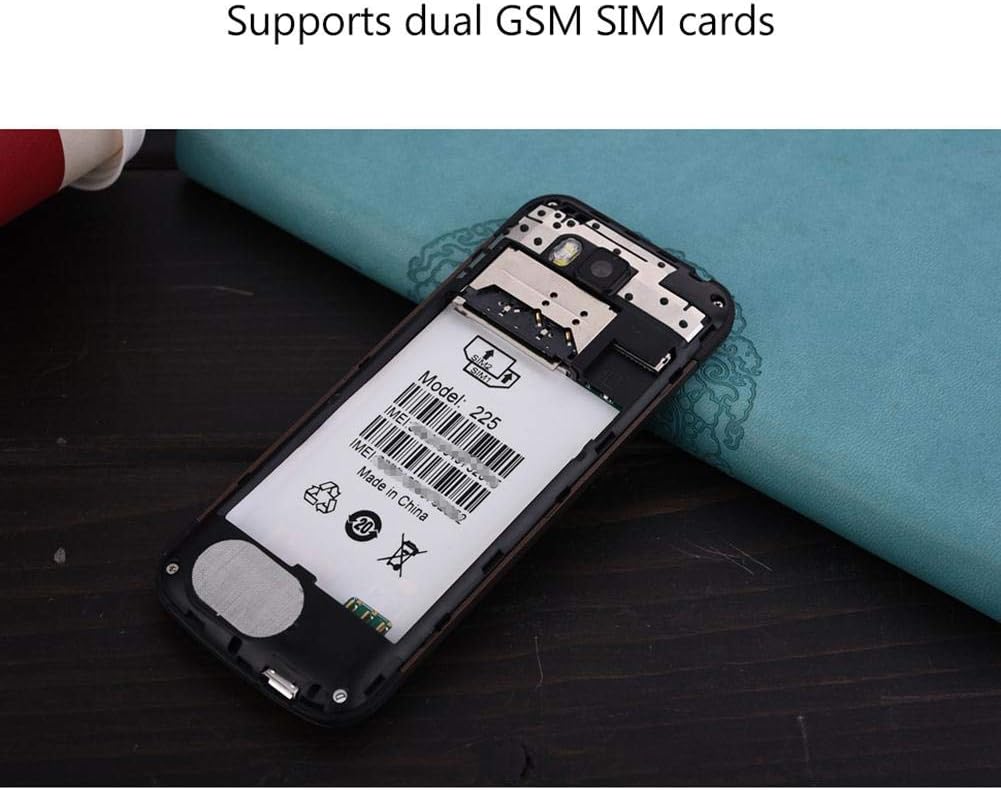
פיגורע 5.2: אינערלעכער view of the SERVO 225, illustrating the dual SIM card slots and the memory card slot.
6. אַפּערייטינג ינסטרוקטיאָנס
6.1. מאַכט אויף / אויסגעלאשן
- צו מאַכט אויף: Press and hold the Power/End Call key until the screen lights up.
- צו מאַכט אַוועק: דריק און האלט די פּאַוער/ענד רוף קנעפּל ביז די אויסשליסן אָפּציעס דערשייַנען, און דערנאָך סעלעקטיר "אויסשליסן".
6.2. יקערדיק פאַנגקשאַנז
- מאַכן קאַללס: אַרייַן די טעלעפאָן נומער ניצנדיק די קלאַוויאַטור און דריקן די רוף קנעפּל.
- ענטפֿערן קאַללס: דריק דעם "רוף" קנעפּל ווען דער טעלעפאָן קלינגט.
- שיקן אַרטיקלען: Navigate to the "Messages" menu, select "Write message", enter your text, and send to the desired recipient.
- מעניו נאַוויגאַציע: Use the navigation keys (up, down, left, right) to browse through menus and the center key to select.
6.3. שליסל פֿעיִקייטן
- בלועטאָאָטה: Connect to other Bluetooth-enabled devices for file transfer or hands-free communication.
- עפעם ראַדיאָ: Listen to your favorite radio stations. Requires headphones to be plugged in as an antenna.
- MP3/MP4 שפּילער: שפּילן אַודיאָ און ווידעאָ fileאיז סטאָרד אויף דיין זכּרון קאָרט.
- GPRS/WAP: Access basic internet services and WAP sites.
- אַפּאַראַט: Capture photos with the 0.3MP rear camera.
- נאָך מכשירים: Calendar, Sound Recorder, Calculator, World Clock, Alarm.
7. וישאַלט
- רייניקונג: Use a soft, dry cloth to clean the phone's surface. Do not use liquid cleaners or aerosols.
- סטאָרידזש: האַלט דעם טעלעפאָן אין אַ קיל, טרוקן אָרט ווען עס איז נישט אין באַנוץ פֿאַר לענגערע פּעריאָדן.
- באַטערי זאָרגן: Avoid overcharging or completely draining the battery frequently to prolong its life.
8. טראָובלעשאָאָטינג
| פּראָבלעם | מעגלעך סיבה | לייזונג |
|---|---|---|
| דער טעלעפאָן גייט נישט אָן. | די באַטעריע איז נידעריק אָדער נישט ריכטיק אינסטאַלירט. | Charge the battery. Ensure battery is properly inserted and insulating tape is removed. |
| קיין נעץ סיגנאַל. | SIM card not inserted correctly or out of network coverage. | Reinsert SIM card. Move to an area with better network coverage. |
| קען נישט מאַכן אָדער באַקומען רופן. | No network, SIM card issue, or call barring enabled. | Check network signal. Verify SIM card. Disable call barring if active. |
| זכּרון קאַרטל נישט דעטעקטירט. | Memory card not inserted correctly or corrupted. | Reinsert memory card. Try a different memory card. |
9. ספּעסאַפאַקיישאַנז
| שטריך | באַשרייַבונג |
|---|---|
| סאָרט | סערוואָ |
| מאָדעל | 225 |
| ווייַז | 2.4-inch VGA |
| פּלאַטפאָרמע | Spreadtrum6531CA |
| SIM טיפּ | Dual SIM, Dual Standby (Dual GSM) |
| נעץ אָפטקייַט | GSM850/900/1800/1900 MHz (2G) |
| אינערלעכער זכּרון | 32MB RAM, 32MB ROM |
| עקספּאַנדאַבלע זכּרון | Up to 32GB (T-Flash / microSD card, not included) |
| אַפּאַראַט | 0.3 Megapixel CMOS (Rear) with Flash |
| באַטערי | 1400 מאַה לי-יאָן |
| רעדן צייט | בעערעך. 6 שעה |
| דימענשאַנז | 122 X 52 X 11 מם (4.80 X 2.05 X 0.43 אינטשעס) |
| וואָג | בעערעך. 80 ג |
| קאַנעקטיוויטי | בלועטאָאָטה |
| אנדערע פֿעיִקייטן | FM Radio, MP3/MP4 Player, GPRS, WAP, Calendar, Recorder, Calculator, World Clock, Alarm |
10. וואָראַנטי און שטיצן
Your SERVO 225 mobile phone comes with a standard manufacturer's warranty. Please refer to the warranty card included in your package for specific terms and conditions. For technical support, troubleshooting assistance, or warranty claims, please contact your point of purchase or the official SERVO customer service channels.
האַלט אייער קויף קוויטל ווי אַ באַווייַז פון קויפן פֿאַר גאַראַנטיע צוועקן.
Ask a question about this manual
Ask about setup, troubleshooting, compatibility, parts, safety, or missing instructions. Manuals+ will review the question and use this page’s manual context to help answer it.