
הקדמה
This manual provides essential information for the installation, operation, and maintenance of your SilverStone SST-ST65F-GS 650W 80 Plus Gold Fully Modular ATX Power Supply. The SST-ST65F-GS is designed to meet the demands of modern desktop computers, offering a compact, fully modular design with 80 PLUS Gold level efficiency. It features a 650W maximum DC output, strict voltage regulation, low ripple and noise, and a silent 120mm fan for continuous 24/7 operation at 40°C.
זיכערקייַט אינפֿאָרמאַציע
- Always disconnect the AC power cord from the wall outlet before installing, removing, or cleaning the power supply unit (PSU).
- The PSU contains high voltagקאָמפּאָנענטן. עפֿנט נישט די PSU casinז. עס זענען נישטאָ קיין באַניצער-סערוויסאַבאַל טיילן אינעווייניק.
- Ensure the PSU is installed in a well-ventilated area. Do not block the fan or ventilation openings.
- Use only the modular cables provided with this power supply. Using third-party cables may cause damage to the PSU or connected components.
- Connect the correct cables to the appropriate ports on the PSU and your system components. Incorrect connections can cause severe damage.
- דאָס פּראָדוקט איז דיזיינד פֿאַר נוצן אין פּערזענלעכע קאָמפּיוטער סיסטעמען. ניצט עס נישט פֿאַר קיין אַנדער צוועק.
- האַלט די PSU אַוועק פון וואַסער, נעץ און עקסטרעמע טעמפּעראַטורן.
פּעקל אינהאַלט
Verify that all items are present in the package before installation.
- SilverStone SST-ST65F-GS 650W Power Supply Unit
- Modular Cable Set (including ATX 24-pin, EPS/ATX 8-pin, PCIe 6+2-pin, SATA, Peripheral 4-pin cables)
- אַק מאַכט שנור
- מאַונטינג סקרוז
- קאַבל טייז / וועלקראָ רימען
- באַניצער מאַנואַל / וואָראַנטי אינפֿאָרמאַציע

Image: The SilverStone SST-ST65F-GS power supply unit shown with its full set of modular cables, mounting screws, and documentation.
פּראָדוקט איבערview
The SilverStone SST-ST65F-GS is a high-performance, fully modular power supply designed for reliability and efficiency. Key features include:
- 650 Watt Maximum DC Output: גיט ample power for most gaming and workstation systems.
- סאָליד פּלאַן: With a depth of 140mm, it allows for easy integration into various PC cases.
- 100% Modular Cables: Enables users to connect only the necessary cables, reducing clutter and improving airflow.
- 80 PLUS Gold Certification: Ensures high power efficiency, reducing heat generation and operating costs.
- Class-Leading Single +12V Rail: Delivers stable and reliable power to demanding components.
- Strict Voltage רעגולירן: Maintains output voltages within 3% of the nominal value.
- Low Ripple & Noise: Ensures clean power delivery to sensitive components.
- 24/7 Continuous Power Output: Capable of sustained operation at 40°C ambient temperature.
- Silent Running 120mm Fan: Operates with a minimum noise level of 18dBA for quiet performance.
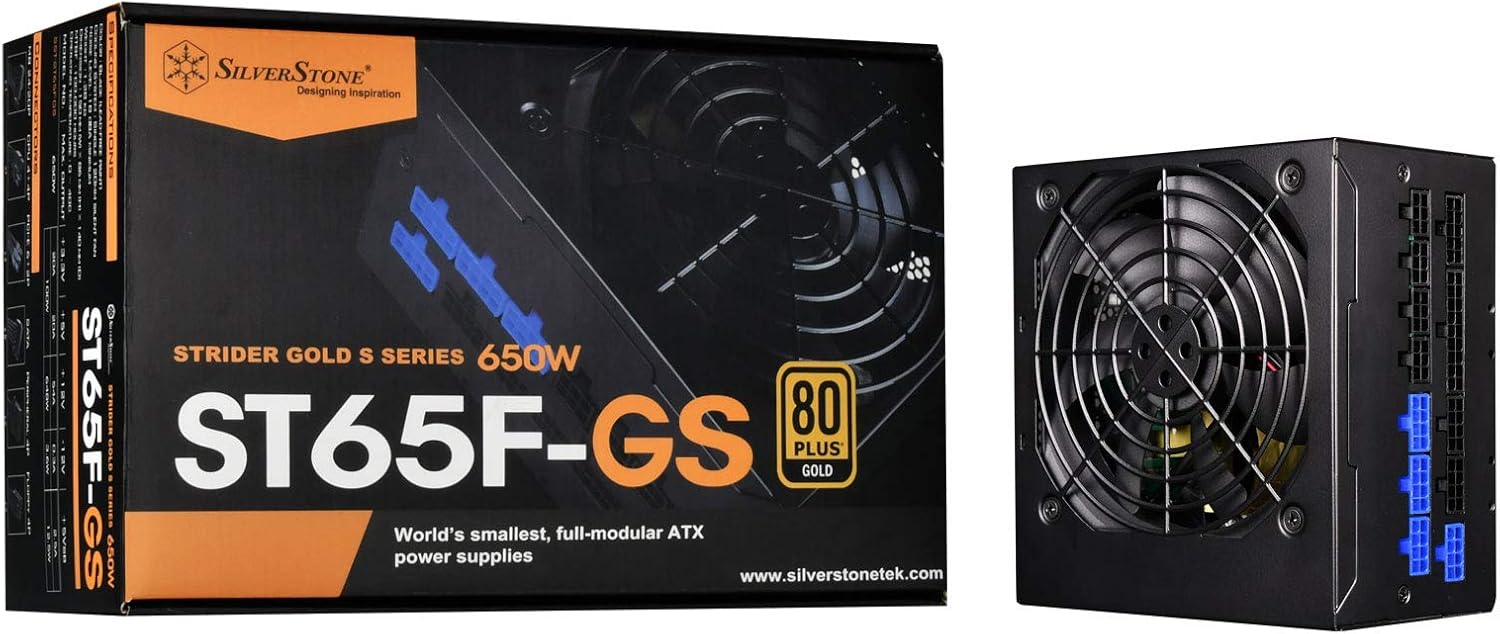
Image: The SilverStone SST-ST65F-GS power supply unit alongside its retail packaging, highlighting its compact size and 80 PLUS Gold certification.

בילד: א ווינקלדיקע view of the SilverStone SST-ST65F-GS power supply, showing the fan grill and modular cable connectors.

בילד: נאָענט-אַרויף view of the fully modular cable connection panel on the SilverStone SST-ST65F-GS, with blue connectors for main power and black for peripherals.

בילד: פון אויבן אַראָפּ view of the 120mm cooling fan and grill on the SilverStone SST-ST65F-GS power supply.

בילד: הינטערשטע view of the SilverStone SST-ST65F-GS power supply, showing the AC power inlet, ventilation grille, and the main power switch.
סעטאַפּ און ינסטאַלירונג
- צוגרייטן אייער סיסטעם: Ensure your computer is completely powered off and unplugged from the wall outlet. Open your computer case to access the PSU mounting area.
- אַראָפּנעמען אַלטע PSU (אויב אָנווענדלעך): Disconnect all cables from your old power supply and remove its mounting screws. Carefully slide the old PSU out of the case.
- מאָנטירן די נייע PSU: Slide the SilverStone SST-ST65F-GS into the designated PSU bay in your computer case. Align the screw holes and secure the PSU with the provided mounting screws. Ensure the fan is facing the correct direction for optimal airflow (typically facing down if there's a bottom vent, or up if there isn't).
- פֿאַרבינדן מאָדולאַרע קאַבלען:
- Main ATX Power (20+4 pin): Connect the 24-pin cable to the corresponding port on the PSU and the motherboard.
- CPU Power (4+4 pin EPS/ATX): Connect the 8-pin (or 4+4 pin) CPU power cable to the PSU and the motherboard's CPU power connector.
- PCIe Power (6+2 pin): Connect the necessary PCIe cables to the PSU and your graphics card(s). Each 6+2 pin connector can be used for either 6-pin or 8-pin PCIe power.
- SATA מאַכט: פֿאַרבינדט SATA מאַכט קייבאַלז צו אייערע SSDs, HDDs און אָפּטישע דרייווז.
- פּעריפערישע (מאָלעקס) מאַכט: Connect peripheral cables for case fans, older drives, or other accessories as needed.
וויכטיק: Ensure all cable connections are firm and correctly oriented. Do not force connectors.
- קאַבלע פאַרוואַלטונג: Route cables neatly to improve airflow and aesthetics within your case. Use the provided cable ties or Velcro straps.
- פֿאַרמאַכן דעם קעסטל און פֿאַרבינדן וועקסלשטראָם: Once all internal connections are made, close your computer case. Connect the AC power cord to the PSU's inlet and then to a wall outlet or surge protector.
- מאַכט אויף: Flip the power switch on the back of the PSU to the "I" (On) position. Then, power on your computer.
אַפּערייטינג ינסטראַקשאַנז
The SilverStone SST-ST65F-GS power supply operates automatically once installed and powered on. It is designed for continuous operation under normal computing loads.
- מאַכט אויף / אַוועק: Use the main power switch on the back of the PSU to completely cut power to the unit. For daily use, power your computer on and off via the operating system or case power button.
- פאָכער אָפּעראַציע: The integrated 120mm fan will automatically adjust its speed based on the PSU's internal temperature and load to maintain optimal cooling and quiet operation.
- עפעקטיווקייַט: The 80 PLUS Gold certification indicates high efficiency, meaning less power is wasted as heat, contributing to lower energy consumption and a cooler system.
וישאַלט
געהעריקע אויפהאלטונג גאראנטירט די לאנגעוויטי און אפטימאלע פאָרשטעלונג פון אייער מאַכט צושטעל.
- שטויב רייניקונג: Periodically (e.g., every 6-12 months), disconnect the PSU from AC power and use compressed air to gently clean dust from the fan grille and ventilation openings. Do not open the PSU casing.
- פאַרזיכערן אַירפלאָוו: Make sure that the PSU's intake and exhaust vents are not obstructed by cables, dust, or other components within the PC case. Good airflow is crucial for cooling.
- קאַבלע דורכקוק: Occasionally check that all modular cables are securely connected to both the PSU and your components.
טראָובלעשאָאָטינג
אויב איר טרעפט פּראָבלעמען מיט אייער מאַכט צושטעל, זעט די פאלגענדע געוויינטלעכע טראָובלעשווטינג טריט:
- קיין מאַכט:
- זיכער מאַכן אַז די AC מאַכט שנור איז זיכער פארבונדן צו ביידע די PSU און די וואַנט אַוטלעט.
- Check that the power switch on the back of the PSU is in the "I" (On) position.
- Verify all modular cables are correctly and firmly seated in the PSU and connected components (motherboard, CPU, GPU).
- פּרובירט די וואַנט אַוטלעט מיט אַן אַנדער דעווייס צו זיכער מאַכן אַז עס האָט שטראָם.
- סיסטעם אינסטאביליטעט/קראכן:
- זייט זיכער אז אייער סיסטעם'ס מאַכט רעקווייערמענץ טאָן נישט איבערשטייגן די PSU'ס 650W קאַפּאַציטעט.
- קוק פֿאַר פרייַ קאַבלע קאַנעקשאַנז.
- Monitor system temperatures to ensure components are not overheating, which can be exacerbated by poor PSU performance or airflow.
- הויך פען ראַש:
- Clean any dust buildup from the PSU fan and vents.
- Ensure adequate airflow within the PC case.
- If the noise is excessive and persistent even under low load, contact SilverStone support.
If these steps do not resolve your issue, please contact SilverStone customer support for further assistance.
ספּעסאַפאַקיישאַנז
| שטריך | באַשרייַבונג |
|---|---|
| סאָרט | זילבערסטאָנע |
| מאָדעל נומער | SST-ST65F-GS |
| סעריע | Strider Gold S |
| Maximum DC Output | 650 וו |
| 80 פּלוס סערטאַפאַקיישאַן | גאָלד |
| פאָרם פאַקטאָר | אַטקס |
| מאָדולאַר טיפּ | גאָר מאָדולאַר |
| קאָאָלינג אופֿן | 120mm Fan (Silent running, 18dBA minimum) |
| VoltagE רעגולירן | Strict 3% |
| ריפּאַל & ראַש | נידעריק 3% |
| Continuous Output Temperature | 40°C (24/7 operation) |
| דימענשאַנז (LxWxH) | 5.91 X 5.51 X 3.39 אינטשעס (150 X 140 X 86 מם) |
| פּונקט וואָג | 2.83 פונט (1.28 קג) |
| קאַמפּאַטאַבאַל דעוויסעס | פערזענלעכע קאָמפּיוטער |
| קאַנעקטער טיפּ | אַטקס |
וואָראַנטי און שטיצן
SilverStone Technology provides a limited warranty for its power supply units. Please refer to the warranty information included in your product package for specific terms and conditions, including warranty duration and coverage details. You can also visit the official SilverStone Technology website for the most up-to-date warranty policy and to access customer support resources.
For technical support, troubleshooting assistance beyond this manual, or warranty claims, please contact SilverStone Technology customer service through their official webפּלאַץ: