
1. הקדמה
Thank you for choosing the Easytry123 Replacement Remote Control. This remote is designed to provide convenient control for various Goodman AC Air Conditioner models. It is an infrared, button-controlled device, engineered for ease of use.
Compatible Goodman AC Models include: WMC-24-1-KFAA, WMH241, WMH181A, HDP181A, HG31ES, WMH121, HG31AS, WMH241A.
Important Note: As a replacement unit, this remote control may not support all functions of your original air conditioner remote. Please verify compatibility with your specific AC model before use.
2. אויפשטעלן: באַטעריע אינסטאַלאַציע
Your Easytry123 Replacement Remote Control requires two (2) AAA batteries (not included) for operation. Follow these steps to install the batteries:
- געפֿינען די באַטאַרייע אָפּטייל אויף די צוריק פון די ווייַט קאָנטראָל.
- Press down on the tab and slide the battery compartment cover downwards to open it.
- אַרײַנשטעלן צוויי AAA באַטעריעס, און זיכער מאַכן אַז די פּאָזיטיוו (+) און נעגאַטיוו (-) טערמינאַלן זענען ריכטיק אויסגעשטעלט מיט די מאַרקירונגען אינעווייניק אין דעם אָפּטייל.
- שטופּט צוריק דעם דעקל פון דעם באַטעריע־אָפּטייל ביז עס קליקט זיכער.
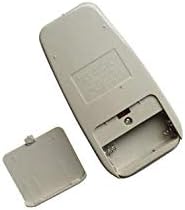
Figure 1: Back of the remote control with the battery cover removed, illustrating the battery compartment for AAA batteries.
After installing the batteries, the remote control is ready for use.
3. אַפּערייטינג ינסטרוקטיאָנס
To operate your Goodman AC Air Conditioner using the Easytry123 Replacement Remote Control, follow these general guidelines:
- Point the Remote: Ensure the remote control is pointed directly at the infrared receiver on your Goodman AC unit. Obstructions between the remote and the AC unit can prevent proper communication.
- מאַכט אויף / אַוועק: דרוק די מאַכט קנעפּל צו דרייען דעם לופטקילונג אן אדער אויס.
- סטרויערן טעמפּעראַטור: ניצן די TEMP UP (▲) און TEMP DOWN (▼) buttons to set your desired temperature.
- אויסקלייַבן מאָדע: דרוק די מאָדע button to cycle through available operating modes such as Cool, Fan, Dry, or Heat (if supported by your AC unit).
- פאַן גיכקייַט: ניצן די FAN SPEED button to adjust the fan's intensity (e.g., Low, Medium, High, Auto).
- טיימער פאַנגקשאַנז: If your AC unit and this replacement remote support timer functions, refer to your AC unit's original manual for specific timer settings.
Familiarize yourself with the buttons on the remote and their corresponding functions. Due to the nature of replacement remotes, some advanced features present on your original remote may not be available or function identically.
4. וישאַלט
Proper care and maintenance will extend the life of your remote control:
- רייניקונג: Wipe the remote control with a soft, dry cloth. Do not use liquid cleaners, abrasive pads, or chemical solvents, as these can damage the surface or internal components.
- באַטערי פאַרבייַט: Replace batteries promptly when the remote's range decreases or it stops responding. Always replace both batteries at the same time with new AAA batteries. Do not mix old and new batteries, or different types of batteries.
- סטאָרידזש: אויב די ווײַטקאָנטראָל וועט נישט ווערן גענוצט פֿאַר אַ לענגערע צײַט, נעמט אַרויס די באַטעריעס כּדי צו פֿאַרמײַדן ליקאַדזש און מעגלעכע שאָדן. האַלט די ווײַטקאָנטראָל אין אַ קיל, טרוקן אָרט, ווײַט פֿון דירעקטער זון און עקסטרעמע טעמפּעראַטורן.
- ויסמיידן טראפנס: באַשיצט דעם ווײַטקאָנטראָל פֿון פֿיזישן קלאַפּ. אויב איר לאָזט אַראָפּ דעם ווײַטקאָנטראָל, קען דאָס שאַטן די אינעווייניקסטע קרייזן.
5. טראָובלעשאָאָטינג
If you encounter issues with your Easytry123 Replacement Remote Control, please refer to the following troubleshooting steps:
- ווייַט ניט ריספּאַנדינג:
- Check the batteries. Ensure they are inserted correctly with the correct polarity (+/-).
- פאַרבייַטן די באַטעריז מיט פריש אַאַאַ באַטעריז.
- Ensure there are no obstructions between the remote control and the AC unit's infrared receiver.
- Confirm you are within the effective operating range of the AC unit (typically within 20 feet and direct line of sight).
- געוויסע פונקציעס ארבעטן נישט:
- As a replacement remote, some specific or advanced functions of your original AC remote may not be supported. This is normal for universal or replacement remotes.
- Verify that your AC unit model is listed as compatible in the introduction section of this manual.
- AC Unit Not Responding to Any Remote:
- Ensure the AC unit itself is powered on and receiving electricity.
- Consult your Goodman AC unit's original user manual for troubleshooting steps related to the AC unit's receiver.
6. ספּעסאַפאַקיישאַנז
| סאָרט | גרינג צו טריי123 |
| מאָדעל נומער | גרינג צו טריי3659 |
| קאַמפּאַטאַבאַל דעוויסעס | Goodman AC Air Conditioners (specific models listed in Introduction) |
| קאַנעקטיוויטי טעכנאָלאָגיע | ינפרערעד |
| קאָנטראָללער טיפּ | קנעפּל קאָנטראָל |
| באַטערי טיפּ | 2 X AAA באַטעריז (ניט אַרייַנגערעכנט) |
| ספּעציעלע שטריך | ערגאַנאַמיק פּלאַן |
7. וואָראַנטי און שטיצן
For any questions, concerns, or support regarding your Easytry123 Replacement Remote Control, please contact the seller directly through the platform where you made your purchase.
Please note that the product typically comes with a return policy of 30 days from the date of purchase. Refer to your purchase details for specific return and warranty information.