
1. הקדמה
Thank you for choosing the Walfront LCD Digital Programmable Weekly Timer Switch. This device is designed for automatic control of various electrical appliances based on user-defined schedules. Please read this manual carefully before installation and operation to ensure proper use and to prevent damage.
2. זיכערקייַט אינפֿאָרמאַציע
ווארענונג: Electrical installation should only be performed by qualified personnel. Disconnect power before installation or maintenance to prevent electric shock.
- פאַרזיכערן די אַרייַנשרייַב וואָלtage matches the timer's specifications (24V for this model).
- Do not exceed the maximum load capacity of 16A 250VAC (resistive load).
- האַלט דעם אַפּאַראַט אַוועק פון וואַסער און איבערגעטריבענער הומידיטי.
- Do not attempt to disassemble or repair the unit yourself. Contact support if issues arise.
3. פּראָדוקט איבערview
The Walfront LCD Digital Programmable Weekly Timer Switch is a high-precision device built with durable, moisture-resistant, and corrosion-protected materials. It features a clear LCD display and supports up to 16 ON/OFF programs daily and weekly.
3.1 שליסל פֿעיִקייטן
- High-quality construction for long lifespan.
- Automatic ON/OFF control for various electrical devices.
- Built-in 1.2V/40mA rechargeable battery for memory retention.
- Industrial-grade chip for high precision and strong anti-interference.
- Up to 16 ON and 16 OFF programming settings per day/week.
- LCD display showing real-time, hour, minute, and ON/AUTO/OFF status.
- DIN rail mounting design.
3.2 קאַמפּאָונאַנץ

בילד 1: פראָנט view of the Walfront LCD Digital Programmable Weekly Timer Switch. Shows the LCD display and control buttons.

בילד 2: צוריק view of the timer switch, illustrating the wiring terminals and basic electrical specifications printed on the unit.
4. אויפשטעלן און אינסטאַלירן
This timer is designed for DIN rail mounting. Ensure the DIN rail is securely installed before attaching the timer.
4.1 וויירינג דיאַגראַמע

בילד 3: Wiring diagrams showing direct connection (left) and connection with an AC contactor (right). The direct connection illustrates neutral and live wire inputs and load output. The AC contactor diagram shows 220V power input and output to the load device.
Direct Wiring: Connect the neutral and live wires to the designated input terminals (L and N). Connect the load to the output terminals (typically 3 and 4 for normally open, or 3 and 5 for normally closed, as indicated on the device). Refer to the diagram on the device for exact terminal numbering.
Wiring with AC Contactor: For higher loads, connect the timer to control an AC contactor. The timer's output will switch the coil of the contactor, which in turn controls the main power to the load. This setup is shown on the right side of Image 3.
4.2 ערשטע אויפשטעל און באַטעריע אויפלאָדן
Upon first use, connect the timer to power. The internal 1.2V/40mA rechargeable battery will begin charging. If the display is blank or shows incorrect time, allow it to charge for a few minutes. Press the "Reset" button (often labeled with a small 'R' or 'C' and requires a pointed object) to clear all settings and start fresh.
5. אַפּערייטינג ינסטרוקטיאָנס
5.1 שטעלן די איצטיקע צייט
- דרוק די "CLOCK" button (often labeled with a clock icon) and hold it.
- בשעת האלטן "CLOCK", דריקן די "D+" קנעפּל צו שטעלן דעם קראַנט טאָג פון דער וואָך.
- בשעת האלטן "CLOCK", דריקן די "H+" קנעפּל צו שטעלן די קראַנט שעה.
- בשעת האלטן "CLOCK", דריקן די "M+" קנעפּל צו שטעלן די קראַנט מינוט.
- מעלדונג די "CLOCK" קנעפּל. די צייט איז איצט איינגעשטעלט.
5.2 Setting 12/24 Hour Mode
By default, the timer operates in 24-hour mode. To switch between 12-hour (AM/PM) and 24-hour modes, press and hold the "CLOCK" button for approximately 5 seconds. The display will show "AM" for 12-hour mode or switch back to 24-hour format.
5.3 פּראָגראַמירן אויף/אויס סקעדזשולז
The timer supports up to 16 ON and 16 OFF programs. Each program consists of an ON time and an OFF time.
- דרוק די "PROG" קנעפל איין מאל. די דיספלעי וועט ווייזן "1 ON".
- דרוק "D+" to select the day(s) for this ON program (e.g., Mon-Fri, Sat-Sun, or specific days).
- דרוק "H+" to set the desired ON hour.
- דרוק "M+" to set the desired ON minute.
- דרוק "PROG" ווידער. די דיספּלעי וועט ווײַזן "1 OFF".
- Repeat steps 2-4 to set the OFF time for the first program.
- פאָרזעצן דרינגלעך "PROG" to cycle through "2 ON", "2 OFF", up to "16 ON", "16 OFF", setting each as needed.
- נאכדעם וואס איר האט איינגעשטעלט אלע געוואונטשענע פראגראמען, דריקט דעם "CLOCK" button to exit programming mode and return to real-time display.
באַמערקונג: If you need to cancel a program, press the "PROG" button to select the program, then press the "MANUAL" button until "----" appears on the display for that program's time slot.
5.4 מאַנועלע איבערשרייבונג (אויף/אויטאָמאַטיש/אויס)
דרוק די "MANUAL" קנעפּל צו דורכגיין די אפערירן מאָדעס:
- אויף: The output is continuously ON, ignoring all programs.
- אָטאַמאַטיק: The timer operates according to the programmed ON/OFF schedules.
- OFF: The output is continuously OFF, ignoring all programs.
Ensure the timer is in "AUTO" mode for programmed operation.
5.5 שליסל לאַק פונקציע
To prevent accidental changes to settings, the timer features a key lock function.

בילד 4: The timer display showing the key lock symbol, indicating that the buttons are locked.
- To lock the keys: Press and hold the "C/R" (Cancel/Reset) button for approximately 4 seconds until a lock symbol appears on the LCD.
- To unlock the keys: Press and hold the "C/R" button again for approximately 4 seconds until the lock symbol disappears.
6. ספּעסאַפאַקיישאַנז
| פּאַראַמעטער | ווערט |
|---|---|
| אַרייַנשרייַב וואָלtage | AC/DC 24V (This model) |
| Contact Rated Voltage | AC 180V~264V (50/60Hz) |
| מאַסע קאַפּאַציטעט | 16A 250VAC (Resistive Load) |
| אויף / אַוועק אָפּעראַטיאָנס | 16 ON / 16 OFF (Manual/Auto) |
| ווייַז | לקד |
| מאַכט קאַנסאַמשאַן | 4.5VA (Max) |
| טעות | ≤2 seconds/day (at 25℃) |
| מאַונטינג אופֿן | DIN Rail (sold separately) |
| טיימינג קייט | 1 מינוט צו 168 שעה |
| מינימום ינטערוואַל | 1 מינוט |
| אַפּערייטינג טעמפּעראַטור | -10 ℃ צו 55 ℃ |
| אַפּערייטינג הומידיטי | 35-85% רה |
| דימענסיעס (L X W X H) | 86 X 36 X 65 מם |
| ינערלעך באַטערי | 1.2V/40mA rechargeable, >15 days backup |
| נומער פון סערקאַץ | Changeover switch (SPDT) |
| סערוויס לעבן | Mechanical: 107, Electrical: 105 |
| וואָג | 125ג |
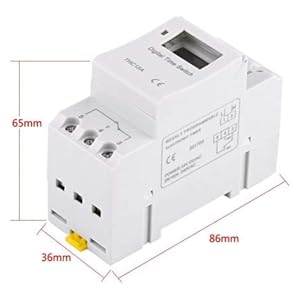
בילד 5: Diagram illustrating the dimensions of the timer switch: 86mm length, 36mm width, and 65mm height.
7. וישאַלט
- Keep the timer clean and free from dust. Use a dry, soft cloth for cleaning.
- דו זאלסט נישט נוצן אַברייסיוו קלינערז אָדער סאָלוואַנץ.
- Periodically check wiring connections to ensure they are secure.
- The internal battery is designed for long life and typically does not require replacement. If the timer loses settings frequently after power outages, the battery may need servicing by a qualified technician.
8. טראָובלעשאָאָטינג
| פּראָבלעם | מעגלעך סיבה | לייזונג |
|---|---|---|
| די אַרויסווייַזן איז ליידיק. | No power supply or internal battery discharged. | Check power connections. Allow the timer to charge for a few minutes after connecting to power. |
| Timer does not switch ON/OFF as programmed. | Timer is not in "AUTO" mode, programs are incorrect, or key lock is active. | Press "MANUAL" until "AUTO" is displayed. Review and correct programs. Unlock keys if necessary. |
| די קנעפּלעך זענען נישט ריספּאַנדינג. | Key lock function is active. | Press and hold "C/R" for 4 seconds to unlock the keys. |
| צייט איז ומפּינקטלעך. | Minor drift (within specifications) or internal battery issue. | Reset and re-set the time. If inaccuracy persists or settings are lost frequently, contact support. |
9. וואָראַנטי און שטיצן
Walfront strives to provide high-quality products. If you encounter any issues with your product, please contact us for prompt assistance. We offer return and refund services for product defects.
For support, please refer to the contact information provided with your purchase or visit the Walfront store on Amazon: Walfront Amazon Store.