
יאַהעעטעק יאַ-00097936
Yaheetech Multistore 2002 Computer Desk User Manual
מאָדעל: YA-00097936 | בראַנד: יאעטעטש
הקדמה
Thank you for choosing the Yaheetech Multistore 2002 Computer Desk. This manual provides detailed instructions for assembly, operation, maintenance, and troubleshooting to ensure safe and efficient use of your new desk. Please read this manual thoroughly before beginning assembly or use, and retain it for future reference.
זיכערקייַט אינפֿאָרמאַציע
- האַלט אַלע טיילן און פּאַקאַדזשינג מאַטעריאַלן אַוועק פון קינדער.
- שטעלט צוזאַמען דעם טיש אויף אַ ווייכער, ריינער ייבערפלאַך צו פאַרמייַדן קראַצן.
- זיכער מאַכן אַז אַלע שרויפן און פֿאַרשטאַרקערס זענען זיכער צוגעצויגן איידער נוצן. קאָנטראָלירט פּעריִאָדיש און פֿאַרשטאַרקט ווידער ווי נויטיק.
- Do not overload the desk. Refer to the "Specifications" section for weight capacities.
- Avoid placing hot items directly on the desk surface.
- Use caution when moving the desk, especially on uneven surfaces. Ensure casters are unlocked if moving.
פּאַרץ רשימה
איידער איר שטעלט עס צונויף, זאָלט איר זיכער מאַכן אַז אַלע קאָמפּאָנענטן וואָס זענען אויסגערעכנט אונטן זענען פאַראַן און נישט געשעדיגט. אויב עס פעלט אָדער זענען געשעדיגט עטלעכע טיילן, ביטע קאָנטאַקטירט קונה שטיצע.

פיגורע 1: עקספּלאָדעד view of the desk showing main components and their names. This image highlights the heavy MDF boards, thickened frame, smooth steel ball drawer, open middle shelf, open bottom shelf, and lockable casters.
- A: Top Board (1 pc)
- B: Middle Shelf (1 pc)
- C: Bottom Shelf (1 pc)
- D: Side Frames (2 pcs)
- E: Drawer Front (1 pc)
- F: Drawer Sides (2 pcs)
- G: Drawer Back (1 pc)
- H: Drawer Bottom (1 pc)
- I: שופלאד שלעפער (2 סעטס)
- J: Casters (4 pcs, 2 lockable)
- K: Hardware Pack (Screws, bolts, Allen wrench)
אַסעמבלי אינסטרוקציעס
פֿאָלגט די שריט קערפֿול פֿאַר ריכטיקער פֿאַרזאַמלונג. עס איז רעקאָמענדירט צו האָבן צוויי מענטשן פֿאַר דער פֿאַרזאַמלונג.
- Step 1: Attach Casters to Side Frames.
Carefully attach the four casters (J) to the bottom of the two side frames (D). Ensure the two lockable casters are placed on the front side for easy access. Tighten securely with the provided wrench.

פיגורע 2: Detail of a caster wheel attached to the desk's metal frame. This shows the sturdy connection point and the wheel's design.
- שריט 2: צוזאַמענשטעלן דעם הויפּט ראַם.
Connect the bottom shelf (C) and middle shelf (B) to the side frames (D) using the appropriate screws from the hardware pack (K). Do not fully tighten screws until all parts are aligned.
- שריט 3: צוזאַמענשטעלן די שופלאָד.
Assemble the drawer components (E, F, G, H) using the provided screws. Ensure the drawer bottom (H) slides into the grooves correctly. Attach the drawer slides (I) to the sides of the assembled drawer.

פיגורע 3: The desk's pull-out drawer, shown partially open, revealing its interior space. This image demonstrates the drawer's functionality and capacity.
- Step 4: Install Drawer Slides to Desk Frame.
Attach the other part of the drawer slides (I) to the designated points on the desk's main frame, just below where the top board will sit. Ensure they are level and aligned.

פיגורע 4: א דיטיילד view of the smooth steel ball drawer slide mechanism. This highlights the quality of the sliding components for the drawer.
- Step 5: Attach the Top Board.
Place the top board (A) onto the assembled frame and secure it with screws. Ensure all pre-drilled holes align.
- Step 6: Insert the Drawer.
Carefully slide the assembled drawer into the installed drawer slides until it clicks into place.
- שריט 7: לעצטער צושטייַגונג.
Once all components are in place and aligned, fully tighten all screws and fasteners. Do not overtighten.
אַפּערייטינג ינסטראַקשאַנז
The Yaheetech Multistore 2002 Computer Desk is designed for versatile use in various settings, including home offices, living rooms, or bedrooms.

פיגורע 5: The computer desk positioned next to a sofa in a living room, demonstrating its compact size and suitability for small spaces. A laptop is placed on the top surface.
- אָרט: Position the desk on a flat, stable surface. If using on carpet, ensure the casters can move freely.
- מאָביליטי: To move the desk, unlock the two lockable casters by flipping their levers. Push or pull the desk gently to its desired location. Once in place, lock the casters to prevent accidental movement.
- סטאָרידזש:
- The top surface is suitable for laptops, monitors, or writing.
- The pull-out drawer provides enclosed storage for small items like pens, notebooks, or external hard drives.
- The open middle shelf is ideal for books, documents, or small electronic devices.
- The open bottom shelf can accommodate larger items such as a CPU tower, printer, or storage boxes.
- וואָג קאַפּאַציטעט: Adhere to the maximum weight capacities specified in the "Specifications" section to prevent damage.
וישאַלט
Regular maintenance will help prolong the life and appearance of your Yaheetech Multistore 2002 Computer Desk.
- רייניקונג: ווישן סערפאַסיז מיט אַ ווייך, דamp שטאָף. פֿאַרמײַדט ניצן שאַרפֿע כעמיקאַלן, אַברייסיוו רייניגער, אָדער פּאָליר וואָס קענען שאַטן די ענדיקונג.
- ספּילז: Clean up spills immediately to prevent staining or damage to the MDF boards.
- פאַסטענערס: קאָנטראָלירט פּעריִאָדיש אַלע שרויפן און פֿאַרשטאַרקער צו זיכער מאַכן אַז זיי בלייבן פֿעסט. פֿעסטשטײַערט ווידער ווי נייטיק צו האַלטן די סטאַביליטעט.
- קאַסטערז: Keep casters free of debris (hair, dust, etc.) to ensure smooth movement.
- Sunlight/Heat: פֿאַרמײַדן פּראַלאָנגד ויסשטעלן צו דירעקט זונשייַן אָדער עקסטרעמע היץ, וואָס קען פאַרשאַפן פֿאַרבלאַסן אָדער קרום ווערן.
טראָובלעשאָאָטינג
אויב איר טרעפט פראבלעמען מיט אייער טיש, זעט די פאלגנדע אלגעמיינע פראבלעמען און לייזונגען:
| פּראָבלעם | מעגלעך סיבה | לייזונג |
|---|---|---|
| דער טיש איז וואקלדיק. | לויזע פֿאַרשטאַרקונגען; אומגלייכער שטאָק. | Ensure all screws are fully tightened. Move desk to a level surface or use shims if necessary. |
| שופלאָד טוט נישט רוק סמודלי. | Drawer slides misaligned; debris in tracks. | Check that drawer slides are correctly installed and aligned. Clean tracks of any dust or debris. |
| Casters do not roll freely. | Casters locked; debris in wheels. | Unlock casters if they are engaged. Remove any hair or debris from the wheels. |
| פעלנדיקע טיילן נאך אויספאקן. | פּאַקאַדזשינג טעות. | Contact Yaheetech customer support with your purchase details and the specific missing parts. |
ספּעסאַפאַקיישאַנז
Detailed dimensions and material information for the Yaheetech Multistore 2002 Computer Desk.
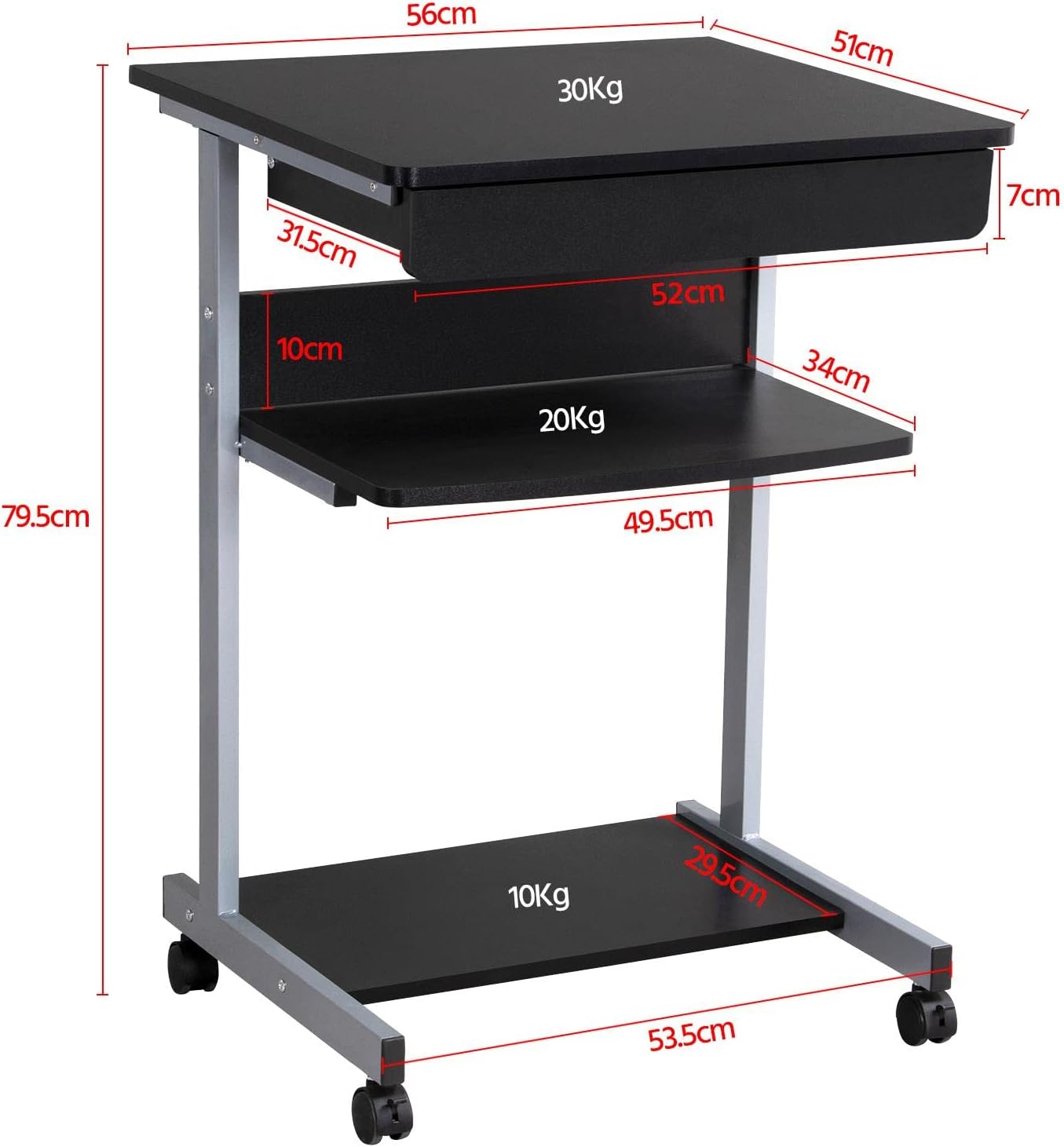
פיגורע 6: Detailed dimensional drawing of the desk, including measurements for overall height, width, depth, and individual shelf and drawer dimensions. Also shows weight capacities for each surface.
| שטריך | דעטאַל |
|---|---|
| מאָדעל נומער | YA-00097936 |
| קוילעלדיק דימענשאַנז (L X W X H) | 56 X 51 X 79.5 סענטימעטער (22 X 20.1 X 31.3 אינטשעס) |
| Top Board Dimensions | 56 רענטגענ 51 סענטימעטער (22 רענטגענ 20.1 אינטשעס) |
| Drawer Dimensions (Inner) | 45 X 30 X 6 סענטימעטער (17.7 X 11.8 X 2.4 אינטשעס) |
| Middle Shelf Dimensions | 50 רענטגענ 34 סענטימעטער (19.7 רענטגענ 13.4 אינטשעס) |
| אונטערשטע פּאָליצע דימענסיעס | 50 רענטגענ 30.5 סענטימעטער (19.7 רענטגענ 12 אינטשעס) |
| מאַטעריאַל | MDF (Medium Density Fiberboard) with Metal Frame |
| קאָליר | שוואַרץ |
| נעץ וואָג | בעערעך. 10.9 קג (24 לבס) |
| Max. Load Capacity (Top Board) | 30 קג (66 לבס) |
| Max. Load Capacity (Middle Shelf) | 20 קג (44 לבס) |
| מאַקס. לאָד קאַפּאַציטעט (אונטערשטע פּאָליצע) | 10 קג (22 לבס) |
| קאַסטערס | 4 (2 with locking mechanism) |
וואָראַנטי און שטיצן
Yaheetech products are manufactured to high-quality standards. For specific warranty information, please refer to the warranty card included with your product or visit the official Yaheetech website. If you have any questions, require assistance with assembly, or need to report missing/damaged parts, please contact our customer support team:
- Webפּלאַץ: www.yaheetech.com (ביטע טשעק פֿאַר רעגיאָנאַלע webזייטלעך)
- בליצפּאָסט: Refer to your purchase documentation for customer service email.
- טעלעפֿאָן: Refer to your purchase documentation for customer service phone number.
When contacting support, please have your model number (YA-00097936) and purchase date ready.
Ask a question about this manual
Ask about setup, troubleshooting, compatibility, parts, safety, or missing instructions. Manuals+ will review the question and use this page’s manual context to help answer it.