
1. הקדמה
This manual provides essential information for the safe and efficient operation of your Zerone 10.8V-12V Lithium Battery Charger. This charger is designed for use with 10.8V to 12V Lithium-Ion batteries, offering quick and reliable charging. Please read this manual thoroughly before first use and retain it for future reference.

Image 1: The Zerone 10.8V-12V Lithium Battery Charger, showing its compact design and universal compatibility label.
2. זיכערקייַט אינסטרוקציעס
Always observe the following safety precautions to reduce the risk of electric shock, fire, or serious injury:
- לייענען אַלע ינסטראַקשאַנז: איידער איר נוצן די טשאַרדזשער, לייענען אַלע ינסטראַקשאַנז און וואָרענען מאַרקינגז אויף די טשאַרדזשער, באַטאַרייע און פּראָדוקט ניצן די באַטאַרייע.
- בלויז דרינענדיק נוצן: דו זאלסט נישט ויסשטעלן די טשאַרדזשער צו רעגן אָדער נאַס טנאָים.
- געהעריק וולtage: פאַרזיכערן די מאַכט צושטעלן וואָלtage שוועבעלעך די וולtagוואָס איז ספּעציפֿיצירט אויף דער טשאַרדזשער'ס שאַץ טעלער.
- פֿאַרמייַדן שאָדן: Do not operate the charger if it has received a sharp blow, been dropped, or otherwise damaged. Take it to a qualified service person.
- ווענטילאַטיאָן: Do not block any ventilation openings. Ensure adequate airflow around the charger during operation.
- אָפּשטעקן ווען ניט אין נוצן: Always unplug the charger from the power outlet before attempting any maintenance or cleaning, and when not in use.
- ניצן ספּעציפֿישע באַטעריעס: Only charge batteries specifically designed for this charger. Charging other battery types may cause them to burst, leading to personal injury and damage.
- נישט קורץ-שליסן: קיינמאָל קורץ-קרייַז די באַטאַרייע טערמינאַלס.
- האַלטן אַוועק פון קינדער: דער אַפּפּליאַנסע איז נישט בדעה פֿאַר נוצן דורך מענטשן (אַרייַנגערעכנט קינדער) מיט רידוסט גשמיות, סענסערי אָדער גייַסטיק קייפּאַבילאַטיז, אָדער פעלן פון דערפאַרונג און וויסן, סייַדן זיי האָבן באקומען השגחה אָדער לימעד וועגן די נוצן פון דעם אַפּפּליאַנסע דורך אַ מענטש פאַראַנטוואָרטלעך פֿאַר זייער זיכערקייַט.
3. פּעקל אינהאַלט
באַשטעטיקן אַז אַלע זאכן זענען פאַראַן און אין גוטן צושטאַנד:
- 1 x Zerone 10.8V-12V Lithium Battery Charger
- 1 x באַניצער מאַנואַל
4. פּראָדוקט פֿעיִקייטן
The Zerone 10.8V-12V Lithium Battery Charger offers the following key features:
- וניווערסאַל קאַמפּאַטאַבילאַטי: Specifically designed for 10.8V to 12V Lithium-Ion batteries.
- LED ינדיקאַטאָר: Built-in LED display provides intuitive monitoring of battery status.
- סמאַרט טשאַרדזשינג פאַרוואַלטונג: Utilizes a 'first in, first charged' system and protects against overload.
- שנעל טשאַרדזשינג: Capable of charging a 12V Lithium-Ion 1.5Ah battery in approximately 50 minutes.
- Wide Model Compatibility: Compatible with models such as DC10WD, DC10SB, DC10WC, BL1015, BL1016, BL1021B, and BL1041B.

Image 2: The charger displaying its compatibility with various battery models, including DC10WD, DC10SB, DC10WC, BL1015, BL1016, BL1021B, and BL1041B.
5. סעטאַפּ
פֿאָלגט די סטעפּס צו סעטאַפּן אייער באַטאַרייע טשאַרדזשער:
- ופשליסן די טשאַרדזשער: פֿאָרזיכטיק אַרויסנעמען דעם טשאַרדזשער און אַלע קאָמפּאָנענטן פֿון דער פּאַקאַדזשינג.
- פאַרבינדן צו מאַכט: Plug the charger's power cord into a standard 100V-260V AC electrical outlet. The charger's LED indicator will flash green once to confirm power connection.
- Prepare Battery: Ensure the battery to be charged is clean and free from debris.
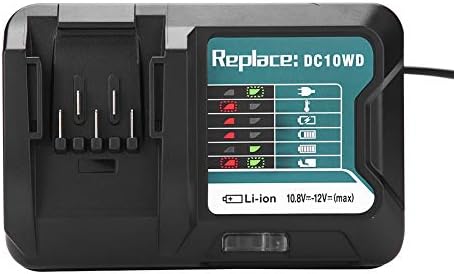
Image 3: The Zerone charger with its integrated power cord, ready for connection to an electrical outlet.
6. אַפּערייטינג ינסטרוקטיאָנס
צו באַשולדיקן אַ באַטאַרייע:
- אַרייַנלייגן באַטערי: Align the battery with the charger's slot and slide it in until it clicks securely into place.
- מאָניטאָר טשאַרדזשינג: The LED indicator will show the charging status. Refer to the "LED Indicator Guide" section for detailed explanations of the light patterns.
- טשאַרדזשינג גאַנץ: Once the battery is fully charged, the LED indicator will show a solid green light.
- אַראָפּנעמען באַטערי: Press the release button on the battery (if applicable) and slide it out of the charger.
- אַרויסנעמען דעם טשאַרדזשער: דיסקאַנעקט די טשאַרדזשער פון די מאַכט ווענטיל ווען ניט אין נוצן.

Image 4: The Zerone charger with a compatible lithium-ion battery inserted, ready for charging.
7. געפירט ינדיקאַטאָר גייד
The charger features an LED display to communicate the battery's status:
| ינדיקאַטאָר ליכט | סטאַטוס |
|---|---|
| גרין פלאַשינג | Charger is plugged in and ready. |
| רויט פלאַשינג | Battery is in cooling mode. Charging will begin once the battery temperature is within the optimal range. |
| Red Sustained Light | Battery is currently charging (0-100%). |
| Green Sustained Light | Charging is completed. The battery is fully charged. |
| Red and Green Flashing | Indicates a defective battery pack or charger. |

בילד 5: א נאָענטע בילד view of the charger's LED indicator panel, detailing the meaning of each light pattern for battery status.
8. וישאַלט
Proper maintenance ensures the longevity and performance of your charger:
- רייניקונג: Disconnect the charger from the power supply before cleaning. Use a dry, soft cloth to wipe the exterior of the charger. Do not use water or chemical cleaners.
- סטאָרידזש: Store the charger in a dry, cool place, away from direct sunlight and moisture.
- קאָנטראָלירן קעסיידער: Periodically inspect the charger and its cord for any signs of damage. If damage is found, discontinue use and seek professional repair.
9. טראָובלעשאָאָטינג
אויב איר טרעפט פּראָבלעמען מיט אייער טשאַרדזשער, זעט די פאלגענדע געוויינטלעכע פּראָבלעמען און לייזונגען:
- טשאַרדזשער איז נישט פּאַוערינג:
- Ensure the power cord is securely plugged into both the charger and a working electrical outlet.
- Check the power outlet with another device to confirm it is functional.
- Battery not charging (Red Flashing LED):
- The battery may be too hot or too cold. Allow the battery to reach room temperature before attempting to charge again. Charging will automatically resume once the temperature is optimal.
- Battery not charging (Red and Green Flashing LED):
- This indicates a defective battery or charger. Try charging a different, known-good battery. If the issue persists, the charger may be faulty. If only the original battery causes this, the battery is likely defective.
- פּאַמעלעך טשאַרדזשינג:
- Ensure the battery is fully seated in the charger.
- Verify that the battery is compatible with this charger.
אויב די טריט לייזן נישט דעם פראבלעם, ביטע קאנטאקטירט קאסטומער סופארט.
10. ספּעסאַפאַקיישאַנז
| באַשרייַבונג | דעטאַל |
|---|---|
| מאָדעל נומער | Zeronegfvetp6dn8-01 |
| אַרייַנשרייַב וואָלtage | 100V-260V AC, 50-60Hz |
| רעזולטאַט חלקtage | 10.8V-12V (גלייכשטראָם) |
| פּראָדוקט דימענשאַנז | 4.72 X 1.97 X 5.91 אינטשעס |
| פּונקט וואָג | 11.6 אונס (0.33 קילאָגראַמס) |
| פאַבריקאַנט | נול |
| קאָמפּאַטיבלע באַטערי טייפּס | 10.8V-12V Lithium-Ion (e.g., BL1015, BL1016, BL1021B, BL1041B) |
| Compatible Charger Models | DC10WD, DC10SB, DC10WC |

Image 6: The bottom view of the Zerone charger, showing its input/output specifications and model number.
11. וואָראַנטי און שטיצן
For warranty information or technical support, please refer to the documentation provided with your purchase or contact Zerone customer service through the retailer where the product was purchased. Keep your purchase receipt as proof of purchase.