
Nanit N211US
Nanit Plus Smart Baby Monitor and Wall Mount Instruction Manual
Model: N211US
1. הקדמה
The Nanit Plus Smart Baby Monitor and Wall Mount provides a comprehensive solution for monitoring your baby. This system offers a crystal-clear overhead view of the crib, enabling HD video and audio monitoring, sleep tracking, and breathing motion detection. It integrates advanced sensors for temperature and humidity, ensuring a comfortable environment for your baby. This manual provides detailed instructions for setting up, operating, and maintaining your Nanit Plus monitor.
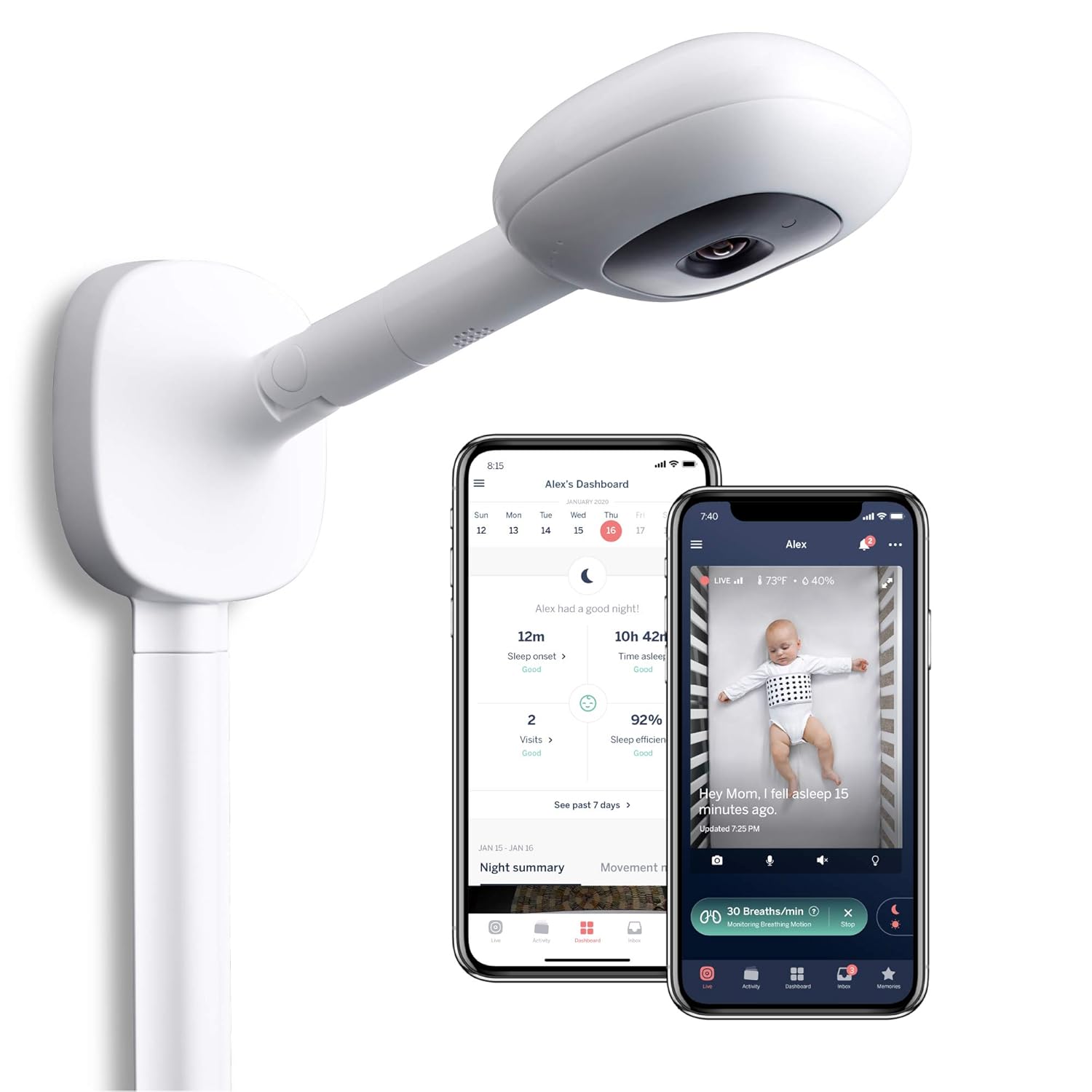
Image 1: Nanit Plus Smart Baby Monitor with Wall Mount and accompanying mobile application interface.
2. פּעקל אינהאַלט
Verify that all components are present in your Nanit Plus package:
- Nanit Plus Camera Unit
- Wall Mount (includes cable management)
- מאַכט אַדאַפּטער
- מאָנטירונג האַרדווער (שרויף, אַנקערס)
- שנעל אָנהייב גייד
Note: Breathing Wear for breathing motion monitoring is sold separately.

Image 2: Nanit Breathing Wear, an accessory for breathing motion monitoring (sold separately).
3. סעטאַפּ און ייַנמאָנטירונג
3.1. אַפּ דאַונלאָודינג און אַקאַונט שאַפונג
- Download the Nanit app from the Apple App Store or Google Play Store.
- עפֿנט די אַפּ און פֿאָלגט די אינסטרוקציעס אויף דעם עקראַן צו שאַפֿן אַ נײַעם חשבון אָדער זיך אַרײַנלאָגירן אין אַן עקזיסטירנדיקן.
- Add your Nanit Plus camera to your account by following the in-app pairing process. Ensure your device is connected to a 2.4 GHz Wi-Fi network during setup.
3.2. וואַנט בארג ינסטאַלירונג
The wall mount positions the Nanit Plus camera securely above your baby's crib, providing an optimal bird's-eye view. Proper installation is crucial for accurate monitoring and safety.
- Choose a wall location directly above the center of the crib. Ensure there are no obstructions to the camera's view.
- Use the provided mounting template to mark the drill holes on the wall.
- באָרט פּילאָט לעכער און אַרײַנשטעלן די וואַנט אַנקערס אויב נייטיק.
- Secure the wall mount base to the wall using the provided screws.
- Attach the camera arm to the base.
- Route the power cable through the integrated cable management system to ensure it is out of reach of your baby.
- פֿאַרבינדט דעם מאַכט אַדאַפּטער צו דער קאַמעראַ און שטעקט עס אַרײַן אין אַן עלעקטרישער ווענטיל.

Image 3: Wall mount installation demonstrating bird's-eye view and safe cable management.
3.3. Free Stand Installation (Optional)
If using the optional free stand, assemble the tripod base and attach the camera arm. Position the stand next to the crib, ensuring stability and a clear view פון די בעיבי.
4. Operating the Nanit Plus Monitor
The Nanit app serves as your primary interface for controlling and monitoring your Nanit Plus camera.
4.1. לייוו View און גרונטלעכע קאָנטראָלן
Access the live feed of your baby's crib through the Nanit app. The live view גיט:
- HD Video & Night Vision: Clear video feed day and night.
- פארגרעסער: Pinch to zoom in on your baby.
- צוויי-וועג אַודיאָ: Use the microphone icon to speak to your baby and the speaker icon to hear them.
- הינטערגרונט אַודיאָ: Listen to your baby even when the app is in the background.
- געבויט-אין נאַכט ליכט: Control the camera's integrated night light.

Image 4: Nanit app live view with various control options and feature indicators.
4.2. Sleep Tracking and Analysis
The Nanit Plus camera tracks your baby's sleep patterns and provides personalized insights and guidance directly through the app.
- View daily and weekly sleep summaries, including sleep duration, wake-ups, and sleep efficiency.
- Receive personalized tips and recommendations to improve your baby's sleep.

Image 5: Nanit app displaying sleep guidance and daily sleep statistics.
4.3. Breathing Motion Monitoring
When used with Nanit Breathing Wear (sold separately), the camera can monitor your baby's breathing motion without any electronic sensors touching them.
- Dress your baby in the Nanit Breathing Wear. The unique pattern on the fabric allows the camera to detect subtle movements.
- Activate breathing motion monitoring in the Nanit app.
- The app will display real-time breathing rate and alert you if no breathing motion is detected for a specified period.

Image 6: Baby in crib wearing Nanit Breathing Wear for motion monitoring.
4.4. Smart Notifications and Sensors
The Nanit Plus provides intelligent alerts to keep you informed about your baby's environment.
- Sound & Motion Notifications: Receive alerts for significant sound or movement in the crib.
- טעמפּעראַטור און הומידיטי סענסאָרן: Monitor the nursery's temperature and humidity levels directly from the app. Set custom thresholds for alerts.

בילד 7: איבערview of Nanit Plus features including environmental sensors and security.
4.5. Memories and Multiple Users
- זכרונות: The app automatically captures and organizes key moments and milestones, creating a digital baby book.
- מערערע באנוצער: Share access to your Nanit camera with family members or caregivers through the app's 'Parenting Team' feature.

Image 8: Nanit app 'Memories' feature, capturing and organizing baby milestones.
4.6. פּראָדוקט איבערview ווידעא
ווידעא 1: אן איבערview of the Nanit Plus Smart Baby Monitor's features and benefits.
5. וישאַלט
To ensure optimal performance and longevity of your Nanit Plus monitor, follow these maintenance guidelines:
- רייניקונג: Gently wipe the camera lens and exterior with a soft, dry, lint-free cloth. Do not use abrasive cleaners or solvents.
- ווייכווארג דערהייַנטיקונגען: Keep your Nanit app and camera firmware updated to the latest versions. The app will notify you when updates are available.
- קאַבלע דורכקוק: Periodically check the power cable and wall mount for any signs of wear or damage. Ensure cables remain securely managed and out of reach.
6. טראָובלעשאָאָטינג
If you encounter issues with your Nanit Plus monitor, refer to the following common troubleshooting steps:
- No Live Video/Connectivity Issues:
- זיכער מאַכן אַז אייער Wi-Fi נעץ איז אַקטיוו און די קאַמעראַ איז אין דערגרייך.
- Restart your Wi-Fi router and the Nanit camera by unplugging it for 30 seconds and plugging it back in.
- Verify that the Nanit app is updated to the latest version.
- Breathing Motion Not Detected:
- Ensure your baby is wearing the Nanit Breathing Wear correctly and the pattern is visible to the camera.
- Check the app for a 'Restart monitoring session' prompt. You may need to adjust the baby's position or the camera's view to center the Breathing Wear pattern within the designated circle in the app.
- Confirm that the camera's view איז אַנאַבסטראַקטיד.
- נעבעך אַודיאָ קוואַליטעט:
- Check the volume settings on your mobile device and within the Nanit app.
- Ensure there are no external sources of interference near the camera or your mobile device.
- Temperature/Humidity Readings Incorrect:
- Ensure the camera is not placed directly in sunlight or near a heat/AC vent, which can affect sensor accuracy.
For further assistance, consult the Nanit app's help section or contact Nanit customer support.
7. ספּעסאַפאַקיישאַנז
| שטריך | דעטאַל |
|---|---|
| סאָרט | Nanit |
| מאָדעל נומער | N211US |
| מאַטעריאַל | פּלאַסטיק |
| קאָליר | ווייַס |
| קאַמפּאַטאַבאַל דעוויסעס | סמאַרטפאָונז (iOS, אַנדרויד) |
| פּראָדוקט דימענשאַנז | 3.3"ל x 3.5"בר x 1"ה |
| פּונקט וואָג | 16 אונסעס (1 פונט) |
| סענסאָר טיפּ | Auditory, Night Vision, Room Temperature, Humidity |
| קאָמוניקאַציע טעכנאָלאָגיע | ווי-פי |
| באַטערי טיפּ | Lithium-Ion (for camera, not required for operation) |
| UPC | 857034008010 |
8. וואָראַנטי און שטיצן
The Nanit Plus Smart Baby Monitor comes with a manufacturer's warranty. For detailed information regarding warranty coverage, terms, and conditions, please refer to the warranty card included in your product packaging or visit the official Nanit webפּלאַץ.
For technical support, product inquiries, or assistance with any issues not covered in this manual, please contact Nanit Customer Support through the Nanit app or their official website. Have your product model number (N211US) and proof of purchase ready when contacting support.
Ask a question about this manual
Ask about setup, troubleshooting, compatibility, parts, safety, or missing instructions. Manuals+ will review the question and use this page’s manual context to help answer it.