
1. הקדמה
This manual provides detailed instructions for the KECAG KC-608EW Portable DVD/CD Player. This device integrates multiple functions including a DVD player, CD player, Bluetooth speaker, FM radio, and USB player, offering versatile audio and video entertainment. Please read this manual thoroughly before use to ensure proper operation and to maximize your product experience.
2. זיכערקייַט אינפֿאָרמאַציע
- שטעלט נישט אויס דעם אפאראט צו רעגן אדער פייכטקייט כדי צו פארמיידן פייער אדער עלעקטרישע שאק.
- נישט עפענען דעם סיasinז. איבערגעבן אלע סערוויסינג צו קוואַליפֿיצירטע פּערסאָנעל.
- פאַרזיכערן די מאַכט צושטעלן שוועבעלעך די וואָלtage requirements specified on the device.
- האַלטן די מיטל אַוועק פון היץ קוואלן אַזאַ ווי ראַדיאַטאָרס, היץ רעדזשיסטערז, סטאָוווז אָדער אנדערע אַפּאַראַט וואָס פּראָדוצירן היץ.
- ריין בלויז מיט אַ טרוקן שטאָף.
- Avoid placing the device on unstable surfaces.
- דו זאלסט נישט פאַרשפּאַרן קיין ווענטאַליישאַן אָופּאַנינגז.
3. פּעקל אינהאַלט
באַשטעטיקט אַז אַלע זאכן וואָס זענען אויסגערעכנט אונטן זענען אַרייַנגערעכנט אין אייער פּעקל. אויב עפּעס פעלנדיק אָדער צעבראָכן, ביטע קאָנטאַקטירט קונה שטיצע.

Image: Contents of the KECAG KC-608EW player package, showing the DVD player, wall mount plate, wall mount kit, desk stand, 5V2A USB adapter, disc cover, remote control, HDMI cord, and AV cord.
- KECAG KC-608EW DVD/CD Player (with 2.5m power cord)
- וואנט בארג פּלאַטע
- Wall Mount Kit (screws and anchors)
- שרייַבטיש שטיין
- 5V2A USB Adapter
- דיסק קאָווער
- ווײַטקאָנטראָל (מיט 1 CR2 באַטעריע אַרייַנגערעכנט)
- HDMI קאַבלע
- אב קאַבלע
4. פּראָדוקט איבערview
4.1 הויפּט פֿעיִקייטן

בילד: פראָנט view of the KECAG KC-608EW player on a desk stand, highlighting its functions: DVD player, CD player, Bluetooth speaker, FM radio, USB player, and Line in/out.
- DVD שפּילער: Full-HD 1080p output via HDMI, 480p+720p output via AV port.
- קאָמפּאַקטדיסק שפּילער: Supports various CD/DVD formats including CD, DVD, CD-R/RW, DVD-R/+R, DVD+RW/-RW, VCD, SVCD.
- בלועטאָאָטה ספּיקער: Built-in Bluetooth 4.2 receiver for wireless audio streaming.
- עפעם ראַדיאָ: Full band 87.5KHz-108.0MHz with auto search and manual set, 99 presets.
- וסב שפּילער: Reads and plays video, audio, and photo fileס פֿון וסב דרייווז.
- Line In/Out: 3.5mm auxiliary input for connecting external devices (laptops, iPods) and output for headphones/external speakers/ampליפערז.
- ינאַגרייטיד ספּיקערז: Built-in HiFi stereo speakers.
- שלאָפן טימער: Adjustable sleep timer from 30 to 180 minutes.
4.2 קאָנטראָלן און פּאָרטן

בילד: פון אויבן אַראָפּ view of the KECAG KC-608EW player, showing the disc protection dust cover, various control buttons (MODE, VOL-, VOL+, PREV/REWIND, NEXT/FORWARD), and connection ports (AV, HDMI, USB charging, USB reading). The pull switch for power on/off is also illustrated.
- ציען סוויטש: Located at the bottom, pull the power cord to turn the unit ON or OFF.
- מאָדע קנעפּל: Cycles through DVD, USB, Bluetooth (BT), FM Radio, and AUX input modes.
- VOL - / VOL + קנעפּלעך: סטרויערן באַנד לעוועלס.
- PREV/REWIND Button: שפּרינגט צום פריערדיקן טראַק/קאַפּיטל אָדער שפּולט צוריק בעת ווידערשפּיל.
- NEXT/FORWARD Button: Skips to the next track/chapter or fast-forwards during playback.
- Disc Cover: A removable transparent cover protects the disc slot.
- HDMI רעזולטאַט: For connecting to a TV or projector for Full HD 1080p video output.
- AV רעזולטאַט: For connecting to a TV or display using composite video and stereo audio cables (480p + 720p output).
- וסב פּאָרט: פֿאַר פּלייינג מידיאַ fileס פון אַ וסב פאָר.
- AUX Input/Output (3.5mm jack): For connecting external audio sources or outputting audio to headphones/speakers.
5. סעטאַפּ
5.1 מאַכט קאַנעקשאַן
- Connect the power cord to the DC IN port on the player.
- Plug the 5V2A USB adapter into a standard wall outlet.
- To power on the device, gently pull the power cord downwards (the pull switch). Pull again to power off.
5.2 מאַונטינג אָפּציעס
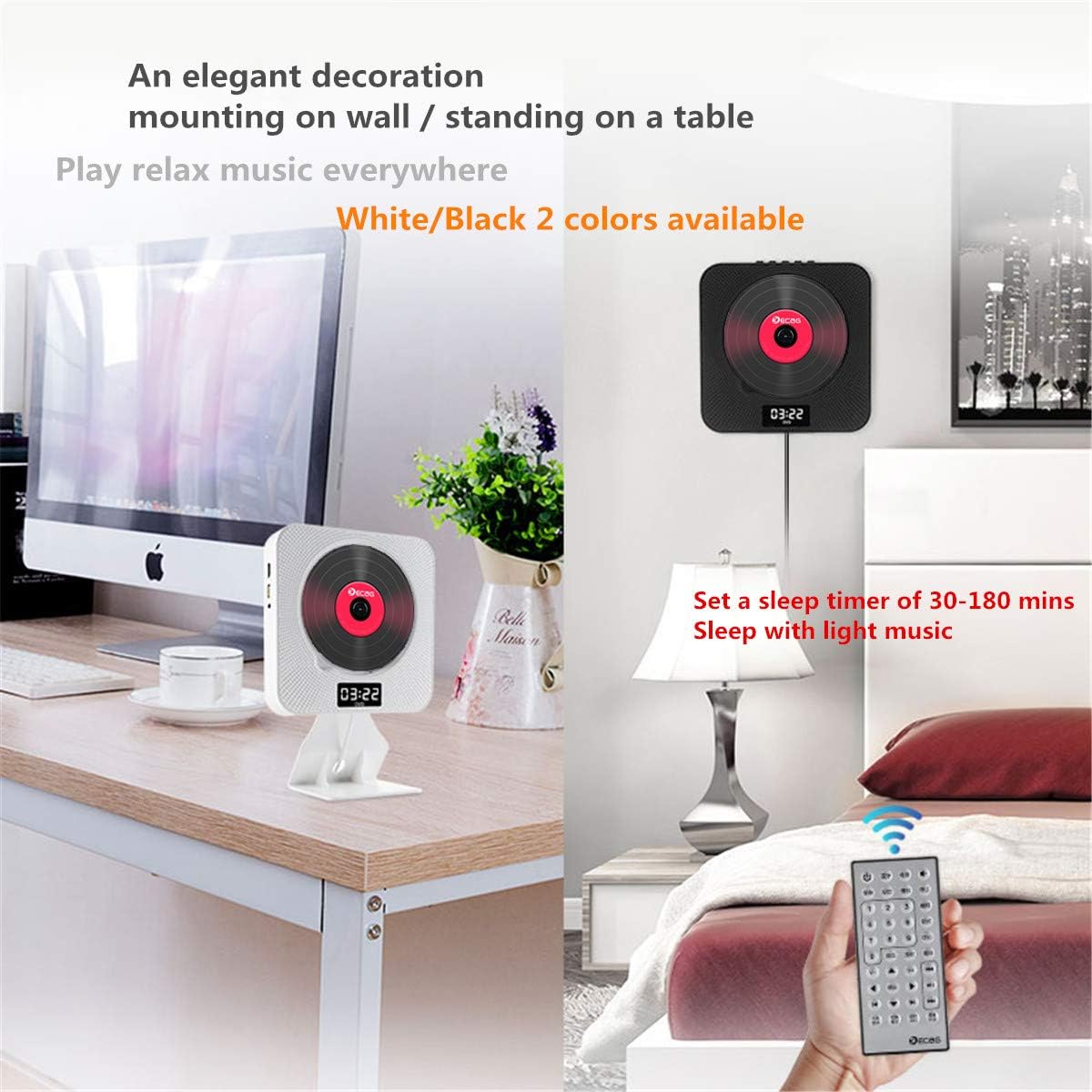
Image: Two KECAG KC-608EW players, one mounted on a wall and another standing on a desk with its stand, demonstrating flexible placement options.
5.2.1 וואנט מאָונטינג
- אויסקלײַבן אַ פּאַסיק אָרט אויף אַ וואַנט.
- Use the provided wall mount plate as a template to mark the drilling points.
- באָרט לעכער און אַרײַנשטעלט די וואַנט אַנקערס.
- Secure the wall mount plate to the wall using the screws.
- Carefully slide the DVD player onto the mounted plate until it clicks into place.
5.2.2 Desk Stand Installation
- Insert the bottom edge of the DVD player into the slot on the desk stand.
- Ensure the player is securely seated in the stand.
- Place the assembled unit on a stable, flat surface.
5.3 פֿאַרבינדן זיך צו אַ טעלעוויזיע/דיספּליי
5.3.1 HDMI Connection (Recommended for Full HD)

Image: The KECAG KC-608EW player connected to a television via an HDMI cable, illustrating its use as a home entertainment device.
- זייט זיכער אז סיי דער דיווידי שפּילער און סיי אייער טעלעוויזיע זענען אויסגעלאָשן.
- Connect one end of the HDMI cable to the HDMI OUT port on the DVD player.
- Connect the other end of the HDMI cable to an HDMI IN port on your TV.
- Power on both devices and select the correct HDMI input source on your TV.
5.3.2 AV קאַנעקשאַן
- זייט זיכער אז סיי דער דיווידי שפּילער און סיי אייער טעלעוויזיע זענען אויסגעלאָשן.
- Connect the AV cable to the AV OUT ports on the DVD player (Yellow for Video, White for Left Audio, Red for Right Audio).
- Connect the other end of the AV cable to the corresponding AV IN ports on your TV.
- Power on both devices and select the correct AV input source on your TV.
6. אַפּערייטינג ינסטרוקטיאָנס
Use the MODE button on the player or the remote control to switch between functions.
6.1 DVD/CD ווידערשפּילן
- פאַרזיכערן אַז די שפּילער איז פּאַוערד אויף.
- Gently remove the disc protection dust cover.
- Insert a DVD or CD into the disc slot with the label side facing outwards.
- Replace the disc protection dust cover.
- Press the MODE button until "DVD" or "CD" mode is selected.
- The disc should begin playing automatically. If not, press the PLAY button on the remote control.
- Use the PREV/REWIND, NEXT/FORWARD, PLAY, PAUSE, and STOP buttons on the player or remote for control.
שטיצט דיסק פֿאָרמאַטירונגען: DVD, CD, CD-ROM, CD-RM, CD-G, HD-CD, DVD-RM, DVD-R, VCD, WMA, AVI, XVID, MP3, JPEG.
6.2 בלועטאָאָטה מאָדע

Image: The KECAG KC-608EW player wirelessly connected via Bluetooth to a smartphone, indicating its use for streaming music.
- Press the MODE button until "BT" (Bluetooth) mode is selected. The display will show "BT" and a blinking Bluetooth icon, indicating it's ready for pairing.
- אויף אייער מאָבילער מיטל (סמאַרטפאָן, טאַבלעט, אאז"וו), אַקטיווירט בלועטוט און זוכט פֿאַר פֿאַראַן דעוויסעס.
- Select "KECAG KC-608EW" from the list of devices.
- Once paired, the Bluetooth icon on the player's display will stop blinking.
- You can now play audio from your mobile device through the player's speakers. Use your mobile device or the player's controls for playback.
6.3 עפעם ראַדיאָ מאָדע
- Press the MODE button until "FM" mode is selected.
- אַוטאָ זוך: Press the PLAY/PAUSE button on the remote control or player to initiate an auto-scan for FM stations. The player will automatically save found stations (up to 99 presets).
- מאַנואַל טונינג: Use the PREV/REWIND or NEXT/FORWARD buttons to manually tune to specific frequencies or navigate through saved presets.
6.4 יו-עס-בי פּלייבּעק
- Insert a USB flash drive into the USB port on the player.
- Press the MODE button until "USB" mode is selected.
- The player will automatically detect and begin playing compatible media fileס פון די USB דרייוו.
- Use the PREV/REWIND, NEXT/FORWARD, PLAY, PAUSE, and STOP buttons for control.
שטיצט וסב File פֿאָרמאַטירונגען: WMA, AVI, XVID, MP3, JPEG.
6.5 AUX Input/Output
- AUX אַרייַנשרייַב: Connect an external audio device (e.g., smartphone, MP3 player) to the 3.5mm AUX jack using an audio cable. Press the MODE button until "AUX" mode is selected. Audio from the external device will play through the player's speakers.
- AUX רעזולטאַט: Connect headphones or external speakers/amplifiers to the 3.5mm AUX jack. The player's audio will be routed to the connected device.
6.6 שלאָפן טיימער
The sleep timer allows you to set a duration after which the player will automatically turn off. This feature is useful for falling asleep to music or radio.
- While the player is on, press the SLEEP button on the remote control.
- Repeatedly press the SLEEP button to cycle through available timer settings (e.g., 30, 60, 90, 120, 180 minutes, or OFF).
- The selected time will be displayed briefly. The player will automatically power off after the set duration.
7. וישאַלט
7.1 רייניקונג די אַפּאַראַט
- שטענדיק רייניקן די מאַכט שנור איידער רייניקונג.
- Use a soft, dry cloth to wipe the exterior surfaces of the player.
- ניצט נישט קיין שרײַבנדיקע רייניגער, וואַקסן אדער סאָלווענטן, ווײַל זיי קענען שאַטן די ענדיקונג.
7.2 דיסק האַנדלינג
- האַלט אָן די דיסקס ביי זייערע ברעגן כּדי צו פֿאַרמייַדן פֿינגער־אָפּדרוקן אויף דער שפּיל־פֿלאַך.
- האַלט די דיסקס ריין און פריי פון קראַצן. ווישט די דיסקס פֿאָרזיכטיק פֿון צענטער אַרויס מיט אַ ווייכן, לינט-פֿרייעם שטאָף אויב רייניקונג איז נייטיק.
- Store discs in their cases when not in use to prevent dust and damage.
8. טראָובלעשאָאָטינג
| פּראָבלעם | מעגלעך סיבה | לייזונג |
|---|---|---|
| קיין מאַכט | Power cord not properly connected or unit not turned on via pull switch. | Ensure the power adapter is securely plugged into the wall outlet and the player. Pull the power cord downwards to activate the pull switch and turn on the unit. |
| קיין געזונט | Volume too low; incorrect mode selected; external speakers/headphones not connected properly. | Increase the volume. Ensure the correct mode (DVD, BT, FM, USB, AUX) is selected. Check connections if using external audio devices. |
| No video output to TV | Incorrect TV input selected; HDMI/AV cable loose or faulty. | Select the correct HDMI or AV input on your TV. Check that the HDMI or AV cables are securely connected to both the player and the TV. |
| Disc error or disc not playing | די דיסק איז שמוציק, קראַצט, אדער נישט קאָמפּאַטיבל אין אַ פֿאָרמאַט. | Clean the disc with a soft cloth. Try a different disc. Ensure the disc format is supported by the player. |
| בלועטאָאָטה פּערינג ניט אַנדערש | Player not in BT mode; device too far; Bluetooth on mobile device is off. | Ensure the player is in "BT" mode. Keep your mobile device within range. Turn Bluetooth on your mobile device off and on again. |
| נעבעך עפעם ראַדיאָ אָפּטראָג | שוואַך סיגנאַל; שטערונג. | Adjust the position of the player. Try auto-scanning again. Avoid placing near other electronic devices that may cause interference. |
9. ספּעסאַפאַקיישאַנז
- מאָדעל נומער: KC-608EW
- סאָרט: KECAG
- קאַנעקטיוויטי טעכנאָלאָגיע: HDMI, AV, AUX 3.5 mm
- קאָליר: ווייַס
- רעדנער טיפּ: צווייענדיק ספּיקערז
- נומער דימענשאַנז (L x W x H): 19.7 X 19.7 X 3.7 סענטימעטער (7.76 X 7.76 X 1.46 אינטשעס)
- מאַכט מקור: Electric Cable (5V2A USB adapter)
- Supported Standards (Disc): CD, MP3, WMA, WAV, DVD, CD-ROM, CD-RM, CD-G, HD-CD, DVD-RM, DVD-R, VCD, AVI, XVID, JPEG
- בלועטאָאָטה קאַמפּאַטאַבאַל: יא (בלוטוט 4.2)
- אַודיאָ פֿאָרמאַטירונג שטיצט: MP3, WMA, CD-DA
- נומער פון ספּיקערז: 2
- FM ראַדיאָ אָפטקייַט: 87.5KHz-108.0MHz
- באַטעריע (ווייטקאָנטראָל): 1 CR2 (אריינגערעכנט)
10. וואָראַנטי און שטיצן
Specific warranty information for the KECAG KC-608EW is not available in the provided product details. For warranty claims or technical support, please refer to the documentation included with your purchase or contact the retailer/manufacturer directly.