
1. הקדמה
This manual provides detailed instructions for the safe and efficient operation of your COSOOS MiBOXER C4-12 Universal 4-Bay Smart Battery Charger. This intelligent charger is designed to accommodate a wide range of rechargeable battery types and sizes, offering advanced features such as rapid charging, temperature control, and comprehensive display information. Please read this manual thoroughly before first use to ensure proper functionality and safety.

Image 1: The COSOOS MiBOXER C4-12 Smart Battery Charger and its included power adapter.
2. זיכערקייַט אינפֿאָרמאַציע
ביטע ליינט אלע זיכערהייט ווארענונגען און אינסטרוקציעס איידער איר ניצט דעם פראדוקט. נישט נאכפאלגן די אינסטרוקציעס קען רעזולטירן אין עלעקטרישן שאק, פייער, אדער ערנסטע שאדן.
- אַלגעמיינע זיכערקייַט: Always use the charger in a dry, well-ventilated area. Avoid exposure to water, high temperatures, or direct sunlight.
- באַטערי קאַמפּאַטאַבילאַטי: Only charge compatible rechargeable batteries as specified in this manual. Attempting to charge non-rechargeable batteries or incompatible types may cause explosion or leakage.
- טעמפּעראַטור קאָנטראָל: The charger features intelligent temperature control. If the battery temperature exceeds 60℃ (140℉), the charging speed will be reduced. If it exceeds 70℃ (158℉), charging will stop automatically.
- אָווערטשאַרדזש שוץ: The charger automatically stops charging when batteries are fully charged to prevent overcharging.
- Reverse Polarity & Short Circuit Protection: The charger is equipped with protection against incorrect battery insertion and short circuits. An error symbol will be displayed if detected.
- אַקטאַוויישאַן פֿונקציע: The smart charger can activate over-discharged batteries.
- השגחה: Do not leave the charger unattended during operation, especially when charging for the first time.
- שעדיקן: If the charger or power adapter is damaged, discontinue use immediately and contact customer support.

Image 2: The charger features multiple protection mechanisms including flame-retardant materials, reverse battery protection, and short circuit protection.
3. פּעקל אינהאַלט
באַשטעטיקן אַז אַלע זאכן זענען פאַראַן אין דיין פּעקל:
- 1 x COSOOS MiBOXER C4-12 Smart Battery Charger (Batteries not included)
- 1 X מאַכט אַדאַפּטער (12V/5A)
- 1 x באַניצער מאַנואַל

Image 3: The package includes the C4-12 charger, power adapter, and user manual.
4. ספּעסאַפאַקיישאַנז
| פּאַראַמעטער | ווערט |
|---|---|
| מאָדעל | C4-12 |
| דימענשאַנז | 6.2in X 4.7in X 1.7in (15.7cm X 11.9cm X 4.3cm) |
| וואָג | 485 ג (1.07 לבס) |
| מאַטעריאַל | Fireproofing PC+ABS |
| אַרייַנשרייַב וואָלtagE/קראַנט | דק 12וו 5אַ |
| Output Current (Li-ion) | Maximum 4*3A |
| Output Current (Ni-MH/Ni-Cd) | Maximum 4*1A |
| Compatible Li-ion Batteries | 10340, 10350, 10440, 10500, 12340, 12500, 12650, 13450, 13500, 13650, 14350, 14430, 14500, 14650, 16500, 16340 (RCR123), 16650, 17350, 17500, 17650, 17670, 18350, 18490, 18500, 18650, 18700, 20700, 21700, 22500, 22650, 25500, 26500, 26650 (4.2V, 4.35V, 3.6V LiFePO4) |
| Compatible Ni-MH/Ni-Cd Batteries | AA, AAA, AAAA, C, SC (1.48V) |
| ווייַז | מולטי-פאַנגקשאַנאַל לקד |
5. סעטאַפּ
- אַנפּאַק: נעמט פֿאָרזיכטיק אַרויס דעם טשאַרדזשער און אַלע אַקסעסאָריעס פֿון דער פּאַקאַדזשינג.
- פאַרבינדן מאַכט: Insert the DC plug of the power adapter into the input port on the back of the charger. Plug the AC end of the power adapter into a standard wall outlet (AC 90-260V). The LCD display will illuminate.
- ערשטע אויסשטעלונג: Upon power-up, the LCD will show a brief self-test, then display 'NULL' for empty slots.
6. אַפּערייטינג ינסטרוקטיאָנס
The C4-12 charger features four independent charging bays, allowing simultaneous charging of different battery types.
6.1 ינסערטינג באַטעריז
- Identify the correct polarity (+/-) on your battery and the charger slot.
- Gently slide the battery into an empty charging slot, ensuring proper contact with the positive and negative terminals. The spring-loaded negative pole slide track accommodates various battery lengths.
- The charger will automatically detect the battery type (Li-ion, Ni-MH/Ni-Cd) and begin charging. The LCD will display charging information for that slot.
6.2 פֿאַרשטיין דעם LCD דיספּלעי
The large LCD display provides real-time information for each charging slot:
- באַטערי טיפּ: Indicates detected battery chemistry (e.g., Li-ion 4.2V, Ni-MH/Ni-Cd).
- VoltagE (V): קראַנט באַטאַרייע וואָלtage.
- איצטיקע (א): קראַנט טשאַרדזשינג ampעראַגע.
- טשאַרדזשינג צייט: Elapsed charging duration.
- Battery Capacity (mAh/mWh): Accumulated charge capacity.
- Internal Resistance (mΩ): Displays the battery's internal resistance.
- טעמפּעראַטור (℃/℉): רעאַל-צייט באַטאַרייע טעמפּעראַטור.
- באַטערי פּערסיזtage: Estimated charge level.
- Charge Symbol: Indicates active charging.

Image 4: The LCD provides rich information including battery type, temperature, internal resistance, current, voltage, and charge status.
6.3 Mode and Slot Buttons
Use the 'SLOT' and 'MODE' buttons to interact with the charger:
- SLOT Button: Press to cycle through the display information for each individual charging slot.
- מאָדע קנעפּל: After selecting a slot with the 'SLOT' button, press 'MODE' to change charging parameters (e.g., voltage for Li-ion batteries like 4.2V, 4.35V, or 3.6V LiFePO4). A long press may be required to enter mode selection.
The charger automatically selects the optimum charge current. For Li-ion batteries, the maximum is 3A per bay. For Ni-MH/Ni-Cd batteries, the maximum is 1A per bay.
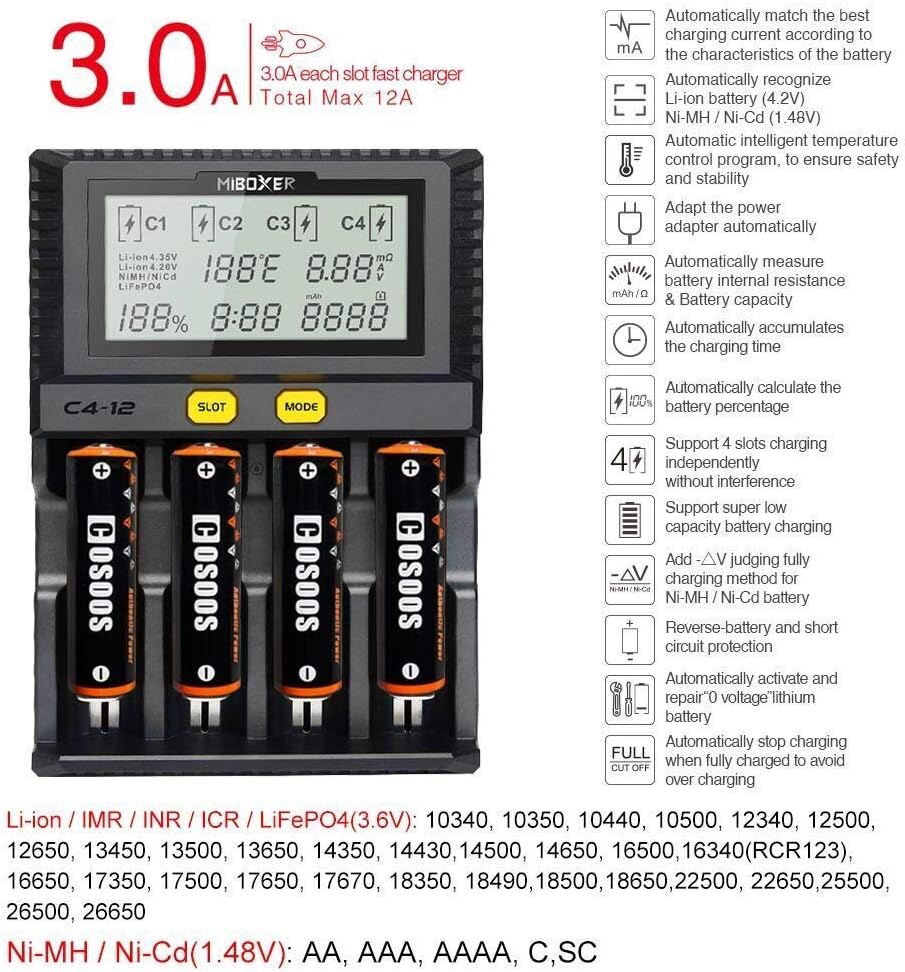
Image 5: Key features include 3A/bay charging for Li-ion, automatic battery recognition, intelligent temperature control, and support for various battery types.
7. וישאַלט
To ensure the longevity and optimal performance of your COSOOS MiBOXER C4-12 charger:
- רייניקונג: Disconnect the charger from power before cleaning. Use a soft, dry cloth to wipe the surface. Do not use abrasive cleaners or solvents.
- סטאָרידזש: האַלט דעם טשאַרדזשער אין אַ קיל, טרוקן אָרט אַוועק פון דירעקט זונשייַן און נעץ ווען נישט אין באַנוץ.
- דורכקוק: Periodically inspect the power adapter and charging slots for any signs of damage or wear.
8. טראָובלעשאָאָטינג
אויב איר טרעפט פּראָבלעמען מיט אייער טשאַרדזשער, זעט די פאלגענדע געוויינטלעכע פּראָבלעמען און לייזונגען:
| פּראָבלעם | מעגלעך סיבה | לייזונג |
|---|---|---|
| Display shows 'Error' or 'NULL' | Incorrect battery insertion, short circuit, or incompatible battery. | Ensure battery is inserted with correct polarity. Check for any foreign objects in the slot. Verify battery type is compatible. |
| די באַטאַרייע איז נישט טשאַרדזשינג | Poor contact, battery too deeply discharged, or charger malfunction. | Re-insert battery, ensuring good contact. The charger may attempt to activate deeply discharged batteries automatically. If not, the battery may be beyond recovery. |
| Charger or battery becomes excessively hot | High ambient temperature, faulty battery, or internal issue. | Ensure adequate ventilation. The charger will reduce current or stop charging if temperature limits are exceeded. If overheating persists, remove battery and discontinue use. |
| LCD backlight dims after 1 minute | נאָרמאַל אָפּעראַציע. | This is a power-saving feature. Press any button to re-illuminate. |
9. וואָראַנטי און שטיצן
COSOOS products are manufactured with quality and reliability in mind. For warranty information or technical support, please refer to the contact details provided on the product packaging or visit the official COSOOS webזייטל. האַלט אייער קויף קוויטל ווי אַ באַווייַז פון קויפן פֿאַר קיין וואָראַנטי קליימז.