
1. הקדמה
This manual provides detailed instructions for the proper installation, operation, and maintenance of your Roadstar RD8410N and RD8200N TV Tuner and TV Antenna. Please read this manual thoroughly before using the product to ensure safe and efficient operation. Keep this manual for future reference.
2. זיכערקייַט אינפֿאָרמאַציע
- פאַרזיכערן די מאַכט צושטעלן וואָלtage שוועבעלעך די רעקווירעמענץ ספּעסיפיעד אויף די מיטל.
- שטעלט נישט אויס דעם אפאראט צו רעגן, פייכטקייט, אדער עקסטרעמע טעמפעראטורן.
- ויסמיידן פּלייסינג די מיטל לעבן היץ קוואלן אָדער אין דירעקט זונשייַן.
- נישט עפענען דעם סיasing of the TV tuner; refer all servicing to qualified personnel.
- Keep the antenna away from high-voltage power lines and other electrical hazards.
- Disconnect the power adapter during lightning storms or when unused for long periods.
3. פּעקל אינהאַלט
ביטע קאָנטראָלירט דעם אינהאַלט פֿון דער פּאַקעט בײַם עפֿענען. אויב עס פֿעלן אָדער זענען געשעדיגט עפּעס, קאָנטאַקטירט אײַער פֿאַרקויפֿער.
- Roadstar TV Tuner (RD8410N or RD8200N)
- טעלעוויזיע אַנטענע
- מאַכט אַדאַפּטער
- Remote Control (if included with your model)
- באַניצער מאַנואַל (דעם דאָקומענט)
4. פּראָדוקט איבערview
Familiarize yourself with the components of your Roadstar TV Tuner and Antenna.
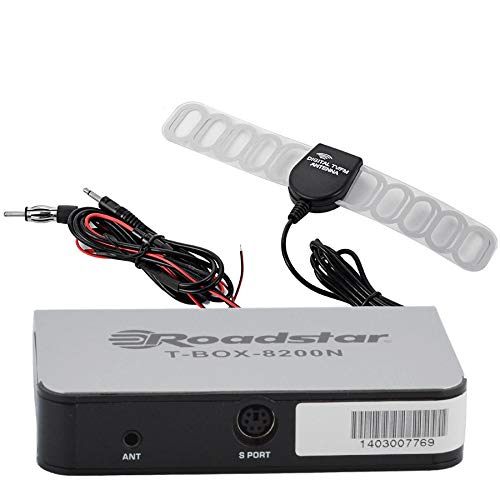
Figure 1: Roadstar T-BOX-8200N TV Tuner
This image displays the Roadstar T-BOX-8200N TV Tuner. It is a compact, silver-grey rectangular device with black side panels. The front face prominently features the "Roadstar" logo and the model name "T-BOX-8200N". On the right side, two ports are visible: one labeled "12V" for power input and another labeled "ANT" for antenna connection. This device is designed to receive and process television signals.
4.1. TV Tuner Ports and Indicators
- ANT Input: Connects to the TV antenna for receiving broadcast signals.
- 12V DC אַרייַנשרייַב: פֿאַרבינדט זיך צום צוגעשטעלטן מאַכט אַדאַפּטער.
- (Other ports like HDMI Out, USB, AV Out may be present depending on specific model variant. Refer to your device for exact port configuration.)
4.2. TV Antenna
The included TV antenna is designed to capture terrestrial broadcast signals. Its performance may vary based on location, signal strength, and obstacles.
5. סעטאַפּ
5.1. Connecting the TV Tuner
- פאַרבינדן די אַנטענע: Plug the antenna cable into the "ANT" input port on the Roadstar TV Tuner.
- פאַרבינדן צו טעלעוויזיע: Use an appropriate cable (e.g., HDMI, AV) to connect the TV tuner's output port to an available input port on your television. Note the input port you use (e.g., HDMI 1, AV 2).
- פאַרבינדן מאַכט: Insert the small end of the power adapter into the "12V DC" input port on the TV tuner. Plug the other end of the power adapter into a standard electrical outlet.
5.2. Positioning the TV Antenna
- Place the antenna in a location with minimal obstructions, ideally near a window or high up.
- Experiment with different antenna positions to find the best signal reception.
- Avoid placing the antenna near large metal objects or other electronic devices that may cause interference.
6. אַפּערייטינג ינסטרוקטיאָנס
6.1. ערשטע איינשאַלטונג און קאַנאַל סקען
- Turn on your television and select the correct input source (e.g., HDMI 1, AV 2) that the TV tuner is connected to.
- The TV tuner should power on automatically or can be turned on using its power button or remote control.
- Follow the on-screen prompts for initial setup. This typically includes selecting your language and country.
- Initiate an "Auto Scan" or "Channel Search" from the TV tuner's menu. This process will scan for available digital television channels. This may take several minutes.
- Once the scan is complete, the tuner will save the found channels, and you should be able to view זיי.
6.2. Basic TV Viewing
- Use the remote control's channel up/down buttons to navigate through channels.
- Use the volume buttons on your TV's remote control to adjust audio levels.
- Access the menu to adjust settings, view program guides (EPG), or manage channels.
7. וישאַלט
7.1. רייניקונג
- פאַרזיכערן די מיטל איז אַנפּלאַגד איידער רייניקונג.
- Wipe the exterior of the TV tuner and antenna with a soft, dry cloth.
- Do not use liquid cleaners, aerosols, or abrasive chemicals.
7.2. סטאָרידזש
- אויב איר לייגט דאָס אַפּאַראַט אַוועק פֿאַר אַ לענגערע צײַט, זאָלט איר עס אָפּשטעקן פֿון עלעקטרישן מאַכט און עס אַוועקלייגן אין אַ קילן, טרוקענעם אָרט.
- האַלטן עס אַוועק פון דירעקט זונשייַן און עקסטרעם טעמפּעראַטורעס.
8. טראָובלעשאָאָטינג
| פּראָבלעם | מעגלעך סיבה | לייזונג |
|---|---|---|
| קיין מאַכט | שטראָם אַדאַפּטער נישט פארבונדן אדער אַ דעפעקטיווע אַוטלעט. | Ensure power adapter is securely connected to the tuner and a working electrical outlet. |
| No signal / "No Channel" message | Antenna not connected, poor antenna position, or no channels scanned. |
|
| Poor picture quality / pixelation | Weak signal, interference, or antenna position. |
|
| קיין געזונט | TV volume muted or too low, incorrect audio settings. |
|
9. ספּעסאַפאַקיישאַנז
באַמערקונג: די ספּעסאַפאַקיישאַנז קענען זיין געביטן אָן באַמערקן.
- מאָדעל: Roadstar RD8410N, Roadstar RD8200N
- פּראָדוקט טיפּ: TV Tuner and Antenna Package
- טונער טיפּ: Digital Terrestrial Television (DTT)
- אַרייַנשרייַב וואָלtage: 12V DC (דורך די איינגעשלאסענע מאַכט אַדאַפּטער)
- אַנטענע טיפּ: Passive or Active (depending on specific antenna model)
- קאַנעקטיוויטי: ANT In, 12V DC In, (e.g., HDMI Out, USB, AV Out - specific to model)
- ASIN: B07GXJPR3R
- סאָרט: ראָאַדסטאַר
10. וואָראַנטי און שטיצן
פֿאַר וואָראַנטי אינפֿאָרמאַציע און טעכנישע שטיצע, ביטע זעט די דאָקומענטאַציע וואָס איז צוגעשטעלט געוואָרן מיט אייער קויף אָדער קאָנטאַקטירט אייער הענדלער. האַלט אייער קויף באַווייַז פֿאַר וואָראַנטי קליימז.