
BoxWave bw-1173-16092-8831
BoxWave SlimKeys Bluetooth Keyboard User Manual
Model: bw-1173-16092-8831
הקדמה
The BoxWave SlimKeys Bluetooth Keyboard is a portable, ultra-thin keyboard designed for seamless connectivity with your Bluetooth-enabled devices, including the Samsung Galaxy A6 (2018). Its chiclet-style keys provide a comfortable typing experience, making it ideal for productivity on the go. This manual provides detailed instructions for setting up, operating, maintaining, and troubleshooting your SlimKeys Bluetooth Keyboard.
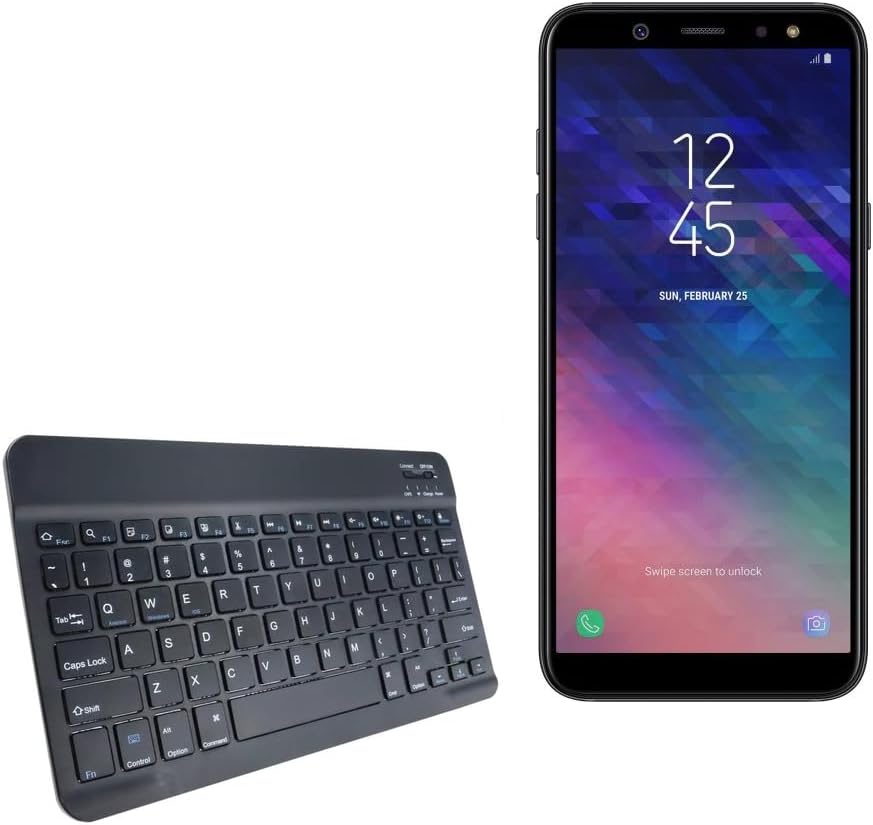
Image: The SlimKeys Bluetooth Keyboard shown alongside a compatible Samsung Galaxy A6 (2018) device, highlighting its compact size.
סעטאַפּ
טשאַרדזשינג די קלאַוויאַטור
Before initial use, ensure your SlimKeys Bluetooth Keyboard is fully charged. Use the included charging cable to connect the keyboard to a USB power source (e.g., computer USB port, USB wall adapter). The charging indicator light will illuminate during charging and turn off when fully charged.

בילד: א דעטאַלירטע view of the keyboard's charging port, demonstrating how to connect the charging cable for its long-lasting battery.
בלועטאָאָטה פּערינג
- מאַכט אויף: Locate the ON/OFF switch on the keyboard (usually on the top right) and slide it to the 'ON' position. The power indicator light will briefly illuminate.
- אַרייַן די פּערינג מאָדע: Press the 'Connect' button (often located near the ON/OFF switch or as a dedicated key). The Bluetooth indicator light will start blinking, indicating the keyboard is in pairing mode.
- אַקטיווירן בלועטוט אויף דיין מיטל: On your Samsung Galaxy A6 (2018) or other compatible device, go to 'Settings' > 'Connections' > 'Bluetooth' and turn Bluetooth ON.
- אויסקלייבן קלאַוויאַטור: Your device will scan for available Bluetooth devices. Select 'BoxWave SlimKeys Keyboard' (or similar name) from the list.
- באַשטעטיקן פּערינג: Follow any on-screen prompts to complete the pairing process. You may be asked to enter a code displayed on your device using the keyboard and then press Enter. Once paired, the Bluetooth indicator light on the keyboard will stop blinking.
The keyboard supports Bluetooth 3.0 for quick and reliable pairing across Android, Windows, and iOS platforms.
אַפּערייטינג ינסטראַקשאַנז
יקערדיק באַניץ
Once paired, the SlimKeys Bluetooth Keyboard functions like a standard keyboard. Simply open any application that requires text input (e.g., messaging app, word processor) and begin typing. The chiclet-style keys are designed for quiet and comfortable typing.

Image: A user's hands demonstrating comfortable and efficient typing on the SlimKeys keyboard.
ספּעציעלע פֿונקציע קיז
The SlimKeys Bluetooth Keyboard includes specialized function keys (F1-F12) that provide quick access to common commands. These functions are typically accessed by pressing the Fn קנעפּל גלײַכצײַטיק מיטן געוואונטשענעם פֿונקציע קנעפּל.
| שליסל קאָמבינאַציע | פֿונקציע |
|---|---|
| Fn + Esc (F1) | היים |
| Fn + F2 | זוכן |
| Fn + F3 | אויסקלייַבן אַלע |
| Fn + F4 | קאָפּי |
| Fn + F5 | שנייַדן |
| Fn + F6 | האָפּקען צוריק |
| Fn + F7 | שפּיל / פּויזע |
| Fn + F8 | האָפּקען פאָרויס |
| Fn + F9 | באַנד אַראָפּ |
| Fn + F10 | באַנד אַרויף |
| Fn + F11 | ברייטנאַס אַראָפּ |
| Fn + F12 | ברייטנאַס אַרויף |
| Fn + ויסמעקן | שלאָס |

Image: A visual guide to the specialized function keys available on the SlimKeys keyboard for quick access to various commands.
וישאַלט
רייניקונג
To clean your keyboard, gently wipe the surface with a soft, lint-free cloth. For stubborn dirt or grime, slightly dampווישט דעם שטאָף מיט וואַסער אָדער אַ מילדער, נישט-שלייפיגער רייניקונג לייזונג. פֿאַרמייַדט איבעריקע פֿײַכטקייט און שפּריצט נישט רייניקונגס-מיטלען גלייך אויף דער קלאַוויאַטור.
סטאָרידזש
When not in use, store the keyboard in a cool, dry place away from direct sunlight and extreme temperatures. Its ultra-thin design allows for easy storage in bags or cases, making it ideal for travel.

Image: The SlimKeys keyboard being stored in a bag, emphasizing its convenience for travel and compact design.
טראָובלעשאָאָטינג
- Keyboard not connecting/pairing:
- זייט זיכער אז די קלאַוויאַטור איז אויפגעלאָדן און אנגעצונדן.
- מאַכן זיכער אַז בלועטאָאָטה איז ענייבאַלד אויף דיין מיטל.
- Ensure the keyboard is in pairing mode (Bluetooth indicator blinking).
- פארגעסט דעם דעווייס אויף אייער טעלעפאן'ס בלועטוט סעטינגס און פרובירט נאכאמאל צו פארבינדן.
- Restart both the keyboard (turn off/on) and your device.
- קנעפּלעך רעאַגירן נישט:
- Check if the keyboard is still connected via Bluetooth.
- זייט זיכער אז די קלאַוויאַטור האט גענוג באַטאַרייע אָפּצאָל.
- פּרוּווט ווידער צו פאַרבינדן די קלאַוויאַטור מיט דיין דעווייס.
- פֿאַרשפּעטיקונג אָדער פֿאַרשפּעטיקונג פֿון אַרייַנשרייַב:
- Ensure there are no strong interferences (e.g., other Bluetooth devices, Wi-Fi routers) nearby.
- ריקט זיך נענטער צו אייער אפאראט.
- ריטשאַרדזש די קלאַוויאַטור.
ספּעסאַפאַקיישאַנז
- מאָדעל נומער: bw-1173-16092-8831
- קאַנעקטיוויטי טעכנאָלאָגיע: בלועטאָאָטה 3.0
- קלאַוויאַטור באַשרייַבונג: Wireless, Chiclet-Style Keys
- קאָליר: דזשעט שווארצע
- נומער וואָג: 7.7 אונסעס
- פּעקל דימענשאַנז: 11.06 X 6.81 X 0.55 אינטשעס
- ספּעציעלע שטריך: Lightweight, Ultra-Thin Design (3/16 inch thick)
- באַטעריז: 1 פּראָדוקט ספּעציפיש באַטאַרייע (אַרייַנגערעכנט)
- פאַבריקאַנט: BoxWave
- לאַנד פון אָריגין: כינע

Image: A diagram illustrating the precise dimensions of the SlimKeys keyboard, emphasizing its compact and lightweight form factor.
וואָראַנטי און שטיצן
For warranty information or technical support, please contact BoxWave Corporation directly. Refer to the product packaging or the official BoxWave webזייטל פֿאַר די מערסט אַקטועלע קאָנטאַקט דעטאַלן און וואָראַנטי טערמינען.
באָקסוואַווע קאָרפּאָראַטיאָן
Webפּלאַץ: www.boxwave.com
Ask a question about this manual
Ask about setup, troubleshooting, compatibility, parts, safety, or missing instructions. Manuals+ will review the question and use this page’s manual context to help answer it.