
1. הקדמה
The Portkeys HS7T II is a high-brightness 7-inch DSLR camera field monitor designed for professional videography and filmmaking. It features a 1920x1200 resolution display with 1200 Nits brightness, ensuring clear visibility even in daylight conditions. The monitor supports 4K HDMI and 3G-SDI inputs and outputs without delay, offering robust connectivity. Built with a durable CNC metal frame and tempered glass panel, it is engineered for reliability in various production environments. Advanced monitoring tools such as 3D LUT, Histogram, Peaking, False Color, and Audio Levels Meters are integrated to assist with precise image control.

Figure 1: Portkeys HS7T II 7-inch field monitor with high brightness display.
2. וואָס איז אין דער קעסטל
באַשטעטיקט אַז אַלע זאכן וואָס זענען אויסגערעכנט אונטן זענען אַרייַנגערעכנט אין אייער פּעקל:
- 1 × HS7T Monitor
- 1 × D-TAP B ANTO - 4 PIN Aerial Cable
- 1 × רייניקונג שטאָף
- 1 × USB drive
- 1 × Black gift box
3. סעטאַפּ
3.1 מאַכט די מאָניטאָר
The HS7T II monitor offers flexible power options to suit various shooting scenarios:
- V-Mount Batteries: Connect a V-mount battery via the provided D-TAP B ANTO - 4 PIN Aerial Cable.
- NP-F Series Batteries: The monitor features dual swappable battery plates compatible with NP-F series batteries for extended operation.
- Dummy Battery Support: Utilize a dummy battery to power your camera directly from the monitor, simplifying your power setup.

Figure 2: Dual battery plates for uninterrupted power supply.
3.2 פֿאַרבינדן ווידעאָ קוועלער
The monitor supports both HDMI and 3G-SDI connections:
- HDMI אַרייַנשרייַב / רעזולטאַט: Connect your camera or other video source using a 4K HDMI cable to the HDMI IN port. The HDMI OUT port allows for signal pass-through to another display.
- 3G-SDI Input/Output: For professional setups, use the 3G-SDI IN port for camera connection and 3G-SDI OUT for signal pass-through.

Figure 3: Rear panel with HDMI and 3G-SDI input/output ports.
3.3 מאָנטירן דעם מאָניטאָר
The HS7T II features a NATO sliding mounting bracket for secure and flexible attachment to camera rigs or stands.
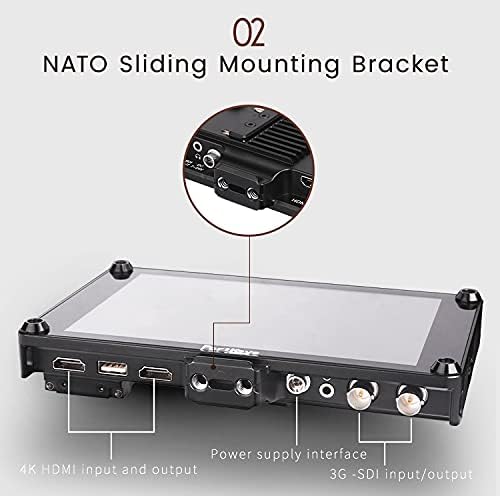
Figure 4: NATO sliding mounting bracket for versatile attachment.
4. אָפּעראַציע
4.1 יקערדיק נאַוויגאַציע
ניצן די MENU, אַרויסגאַנג, און אַרייַנשרייַב buttons located on the top of the monitor to navigate through settings and switch between input sources. Customizable function buttons (F1-F4) allow quick access to frequently used features.
4.2 ווייַז פֿעיִקייטן
- הויך ברייטנאַס: The 1200 Nit screen ensures excellent visibility outdoors and in bright conditions.
- הויך האַכלאָטע: A 1920x1200 resolution provides sharp and detailed images for critical focus.
- הויך קאַנטראַסט: A 1200:1 contrast ratio delivers rich blacks and vibrant colors.
4.3 Advanced Monitoring Tools
The HS7T II integrates a suite of professional monitoring tools:
- 3D LUT Support: Store up to 20 sets of 3D LUT files for accurate color grading and previewing log footage.
- Audio Levels Meters: Monitor audio input levels to prevent clipping and ensure optimal sound recording.
- היסטאָגראַם: Visualize the tonal distribution of your image to prevent overexposure or underexposure.
- Aspect Ratio Guides: Overlay various aspect ratio guides for precise framing.
- שפּיץ: A new peaking algorithm enhances focus assist, making focus more precise.
- DSLR Scaling & Zooming: Adjust image scaling and zoom for detailed inspection of your footage.
- פאַלש קאָליר: Use false color to evaluate exposure levels across your image.
- פּיקסעל צו פּיקסעל: View the image at its native resolution for critical focus and detail checking.

Figure 5: Enhanced peaking feature for accurate focus.
4.4 Wireless Video Transmission Integration
The HS7T II is designed to integrate with wireless video transmission systems like Claymore. When connected, the monitor can function as a wireless receiver, streamlining your setup and reducing cable clutter. The monitor can also power compatible wireless transmitters.
Video 1: Demonstrating the Portkeys HS7T II display and its integration with wireless video transmission. This video highlights the monitor's features and connectivity options in a practical setting.

Figure 6: Monitor compatible with wireless video transmission systems.
5. וישאַלט
- רייניקונג: Use the provided cleaning cloth or a soft, lint-free cloth to gently wipe the screen and body. Avoid abrasive materials or harsh chemicals.
- סטאָרידזש: When not in use, store the monitor in a protective case to prevent scratches and damage.
- ינווייראַנמענאַל טנאָים: Avoid exposing the monitor to extreme temperatures, high humidity, or direct sunlight for prolonged periods.
- גשמיות שוץ: The CNC metal frame and tempered glass panel offer robust protection, but care should still be taken to avoid drops or impacts.

Figure 7: Rugged CNC metal construction with cooling holes for durability.
6. טראָובלעשאָאָטינג
If you encounter issues with your Portkeys HS7T II monitor, refer to the following common problems and solutions:
- Monitor Does Not Power On:
- זיכער מאַכן אַז די באַטעריעס זענען גאָר אויפגעלאָדן און ריכטיק אַרײַנגעשטעלט.
- Verify that the D-TAP cable is securely connected to both the monitor and the power source.
- If using a dummy battery, confirm it is properly connected and the external power source is active.
- קיין ווידעא סיגנאַל:
- Check that the HDMI or SDI cable is securely connected to both the camera/source and the monitor.
- Confirm the camera's video output settings match the monitor's input capabilities (e.g., resolution, frame rate).
- Ensure the correct input source (HDMI or SDI) is selected on the monitor.
- Dummy NP Battery Not Providing Power:
- Verify that the monitor itself is powered on and receiving sufficient power.
- Ensure the dummy battery is correctly seated in its slot.
- Test with a different dummy battery or external device if possible to isolate the issue.
- Battery Slots Not Locking Securely:
- Ensure batteries are inserted correctly and fully engaged.
- אויב די אַרויסגעבן בלײַבט, קאָנטאַקט קונה שטיצן פֿאַר הילף.
- Image Quality Issues (e.g., blue dot, screen pushes in):
- קאָנטראָלירט דעם עקראַן פֿאַר קיין גשמיות שעדיקן.
- If these issues are present upon initial use, it may indicate a manufacturing defect. Refer to the warranty section for replacement or repair options.
7. ספּעסאַפאַקיישאַנז
| שטריך | דעטאַל |
|---|---|
| פּראָדוקט דימענשאַנז | 7.5 X 4.9 X 0.8 אינטשעס |
| פּונקט וואָג | 12.3 אונסעס |
| מאָדעל נומער | HS7T |
| פאַרשטעלן גרייס | 7 אינטשעס |
| האַכלאָטע | 1920 x 1200 Pixels (2K DCI 1080p) |
| בילד ברייטנאַס | 1200 ניץ |
| קאַנטראַסט פאַרהעלטעניש | 1200:1 |
| אַספּעקט פאַרהעלטעניש | 1.60:1 |
| Voltage | 24 וואלטס |
| גאַנץ וסב פּאָרץ | 1 |
| קאַנעקטיוויטי | HDMI, 3G-SDI |
| פאַרשטעלן ייבערפלאַך | גלאָסי |
| פאַבריקאַנט | פּאָרטקייס |
| ערשטער בנימצא טאָג | 24 אויגוסט 2018 |
8. וואָראַנטי און שטיצן
The Portkeys HS7T II monitor comes with a איין יאָר וואָראַנטי from the date of purchase. This warranty covers manufacturing defects and issues arising from normal use. If you encounter any problems or require technical assistance, please contact Portkeys customer support. Free technical support is available to assist you with any operational or technical queries.
For support, please visit the official Portkeys webזייטל אדער זעט די קאנטאקט אינפארמאציע וואס איז צוגעשטעלט אין אייער פראדוקט פארפאקונג.