
Lexmark E460DN
Lexmark E460DN Laser Printer User Manual
Model: E460DN
הקדמה
This manual provides essential instructions for the Lexmark E460DN laser printer. Designed for small and midsize workgroups, the E460DN offers efficient, high-quality monochrome printing with advanced features. This document covers unpacking, setup, operation, maintenance, and troubleshooting to ensure optimal performance of your device.
The Lexmark E460DN is a Certified Refurbished product, meaning it has been tested and certified to function like new. It includes a toner drum and comes with a 90-day warranty.
פּראָדוקט איבערview
The Lexmark E460DN is a compact laser printer featuring a light gray and dark gray exterior. It is equipped with a user-friendly control panel and supports various paper handling options.
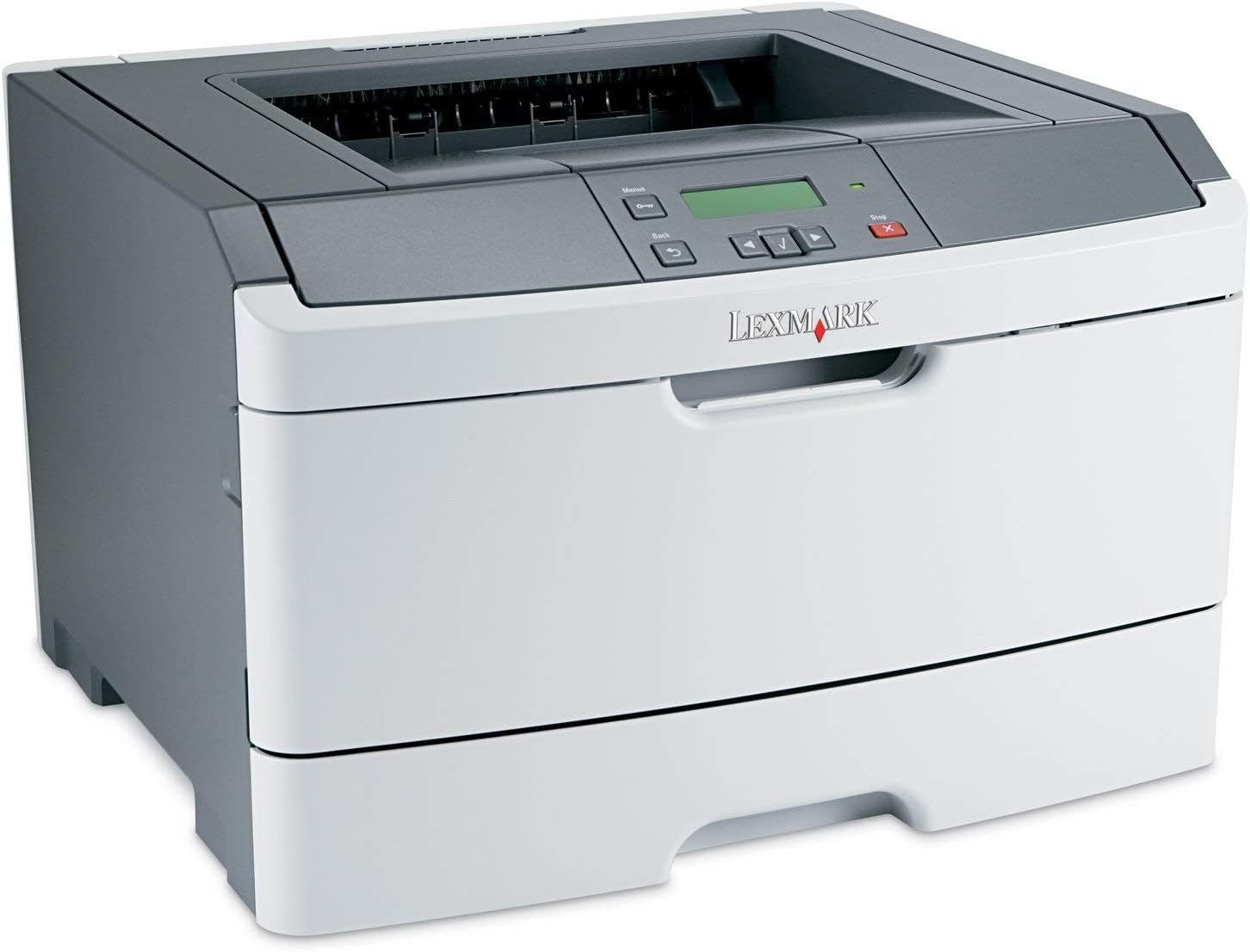
פיגורע 1: פראָנט view of the Lexmark E460DN Laser Printer. The image displays the printer's light gray body with a dark gray top section, including the output tray and control panel. The Lexmark logo is visible on the front panel.
שליסל פֿעיִקייטן:
- שנעל פּרינט ספּידז: Up to 40 pages per minute (ppm) for monochrome documents.
- High Print Quality: True 1200 x 1200 dpi resolution for sharp text and graphics.
- אויטאָמאַטיש דופּלעקסינג: Standard feature for two-sided printing, reducing paper consumption.
- Network Ready: Ethernet connectivity for shared use in workgroup environments.
- באַניצער-פרייַנדלעך צובינד: Four-line operator panel for easy navigation and control.
- ימפּרוווד זיכערהייט: Numeric pad for confidential printing.
- עפעקטיוו אָפּעראַציע: Instant warm-up fuser for fast first-page-out times and reduced power consumption.
סעטאַפּ אינסטרוקציעס
- אויספּאַקן דעם דרוקער: נעמט פֿאָרזיכטיק אַרויס דעם דרוקער פֿון זײַן פּאַקאַדזשינג. נעמט אַראָפּ אַלע פּאַקאַדזשינג מאַטעריאַלן, טעיפּס און פּראַטעקטיוו פֿילמען.
- Place the Printer: Position the printer on a stable, level surface with adequate ventilation. Ensure sufficient space around the printer for paper loading and output.
- פאַרבינדן מאַכט: Plug the power cord into the printer's power inlet, then into a grounded electrical outlet.
- Install Toner/Drum (if applicable): If the toner cartridge and imaging drum are not pre-installed, follow the instructions provided with the consumables to install them. For refurbished units, these components are typically pre-installed.
- מאַסע פּאַפּיר: Open the paper tray and adjust the paper guides to fit the paper size. Load the desired print media (e.g., plain paper, envelopes) into the tray.
- פאַרבינדן צו נעץ/קאָמפּיוטער:
- Ethernet (Wired): פֿאַרבינדט אַן עטערנעט קאַבל פֿון דעם דרוקער'ס עטערנעט פּאָרט צו אייער נעץ ראַוטער אָדער סוויטש.
- USB (Optional, if available): פֿאַרבינדט אַ USB קאַבל פֿונעם דרוקער צו אייער קאָמפּיוטער.
- ינסטאַלירן דריווערס: Turn on the printer. Install the appropriate printer drivers on your computer. Drivers can usually be found on the manufacturer's webפּלאַץ.
- Perform a Test Print: After driver installation, print a test page to confirm proper setup and connectivity.
אַפּערייטינג ינסטראַקשאַנז
קאָנטראָל פּאַנעל נאַוויגאַציע:
The Lexmark E460DN features a four-line display and several buttons for navigating menus and controlling printer functions. Use the arrow buttons to scroll through options and the 'Menu' or 'Select' button to confirm selections. The 'Back' button allows you to return to previous menus, and the 'Stop' button can cancel print jobs.
Basic Printing:
- זיכער מאַכן אַז דער דרוקער איז אנגעצונדן און פארבונדן צו אייער קאָמפּיוטער אָדער נעץ.
- עפֿנט דאָס דאָקומענט וואָס איר ווילט דרוקן אויף אייער קאָמפּיוטער.
- אויסקלייַבן File > דרוקן (אדער דער עקוויוואַלענטער באַפֿעל אין אייער אַפּליקאַציע).
- Choose the Lexmark E460DN from the list of available printers.
- Adjust print settings as needed (e.g., number of copies, paper size, print quality).
- For two-sided printing, select the duplex option in your printer settings. The E460DN supports automatic duplexing.
- דריקט דרוקן.
Confidential Printing:
The printer supports confidential printing using a numeric pad. When sending a confidential print job from your computer, you will be prompted to enter a PIN. To release the job at the printer, enter the same PIN using the control panel's numeric pad.
וישאַלט
Toner Cartridge and Imaging Drum Replacement:
The Lexmark E460DN uses a combined toner cartridge and imaging drum unit. The printer's control panel will display early-warning alerts for low toner. When prompted:
- עפֿנט די פֿאָדערשטע צוטריט טיר פֿונעם דרוקער.
- Carefully remove the old toner/drum unit by pulling it straight out.
- Unpack the new toner/drum unit and gently shake it to distribute the toner.
- Insert the new unit into the printer until it clicks into place.
- פֿאַרמאַכט די פֿאָדערשטע צוטריט טיר.
Dispose of used toner cartridges according to local regulations or return them to Lexmark for recycling.
רייניקן דעם דרוקער:
- עקסטעריע: ווישן די יקסטיריער סערפאַסיז מיט אַ ווייך, דamp, א לינט-פֿרײַער שטאָף. ניצט נישט קיין שרײַבנדיקע רייניגער אָדער סאָלווענטן.
- ינלענדיש: Periodically clean the paper path and other accessible interior areas to remove dust and paper debris. Refer to the printer's on-screen messages or full service manual for detailed internal cleaning procedures.
טראָובלעשאָאָטינג
This section provides solutions to common issues you may encounter with your Lexmark E460DN printer. For more complex problems, consult the full service manual or Lexmark support.
פּראָסט ישוז און סאַלושאַנז:
- דרוקער רעאגירט נישט:
- קאָנטראָלירט די מאַכט קאַנעקשאַנז און זיכער מאַכן אַז דער דרוקער איז אנגעצינדן.
- וועריפֿיצירט נעץ אָדער USB קאַבל פֿאַרבינדונגען.
- ריסטאַרט דעם דרוקער און אייער קאָמפּיוטער.
- זיכער מאַכן אַז דרוקער דרייווערס זענען ריכטיק אינסטאַלירט און דערהייַנטיקט.
- פּאַפּיר דזשאַמז:
- Follow the instructions on the printer's display or in the full service manual to locate and clear jammed paper.
- זיכער מאַכן אַז די פּאַפּיר איז ריכטיק אײַנגעלאָדן און נישט צו פֿול אין טאַץ.
- ניצט רעקאָמענדירטע פּאַפּיר טיפּן.
- נעבעך דרוק קוואַליטעט:
- Check toner levels. Replace the toner/drum unit if low or empty.
- Ensure the imaging drum is clean and free from damage.
- Perform a print quality test from the printer's menu to diagnose issues.
- Clean the printer's interior as described in the maintenance section.
- טעות אָנזאָגן:
Refer to the customizable operator panel messaging for specific error codes or descriptions. Consult the full service manual for detailed explanations and solutions for each error message.
ספּעסאַפאַקיישאַנז
| שטריך | באַשרייַבונג |
|---|---|
| מאָדעל נומער | E460DN |
| דרוק טעכנאָלאָגיע | לייזער |
| דרוקער רעזולטאַט | מאָנאָטשראָמע |
| מאַקסימום דרוק גיכקייט (מאָנאָכראָם) | Up to 40 ppm (letter-size paper) |
| דרוק האַכלאָטע | 1200 רענטגענ 1200 דפּי |
| דופּלעקס פּרינטינג | Automatic (Dual-sided printing) |
| קאַנעקטיוויטי טעכנאָלאָגיע | Wired; Ethernet |
| ייַזנוואַרג צובינד | עטהערנעט |
| זכּרון סטאָרידזש קאַפּאַסיטי | 64 מב |
| מאַקסימום אַרייַנשרייַב בלאַט קאַפּאַסיטי | 300 שיץ |
| אויסגאַבע בלאַט קאַפּאַציטעט | 150 שיץ |
| דרוק מעדיע געשטיצט | Envelopes, Plain Paper |
| פּראָדוקט דימענשאַנז | 14.55 X 15.98 X 10.2 אינטשעס |
| קאָליר | ליכט גרוי / טונקל גרוי |
| UPC | 748926547406 |
וואָראַנטי און שטיצן
This Lexmark E460DN printer is a Certified Refurbished product and comes with a 90-טאָג לימיטעד וואָראַנטי. די וואָראַנטי קאָווערס חסרונות אין מאַטעריאַלס און ווערקמאַנשיפּ אונטער נאָרמאַל נוצן.
For warranty claims, technical support, or further assistance, please refer to the documentation provided with your refurbished product or contact the seller directly. Additional support resources may be available on the official Lexmark webפּלאַץ.
Ask a question about this manual
Ask about setup, troubleshooting, compatibility, parts, safety, or missing instructions. Manuals+ will review the question and use this page’s manual context to help answer it.