
1. הקדמה
This manual provides essential information for the safe and efficient installation, operation, and maintenance of your LINAK CBD3 Control Box. The CBD3 is designed for use with LINAK DESKLINE systems, providing reliable control for adjustable desks and workstations.
Please read this manual thoroughly before installing or operating the product. Keep this manual for future reference.
2. זיכערקייַט אינסטרוקציעס
- זיכער מאַכן אַז די מאַכט צושטעל שטימט מיט די ספּעסיפיקאַציעס וואָס זענען ליסטעד אויף דער פּראָדוקט עטיקעט.
- Do not open the control box. There are no user-serviceable parts inside. Opening the unit will void the warranty.
- Keep the control box away from moisture, direct sunlight, and extreme temperatures.
- אָפּשטעקן די מאַכט איידער איר דורכפירן קיין ינסטאַלירונג, וישאַלט אָדער פּראָבלעם לייזונג.
- דער פּראָדוקט איז בדעה בלויז פֿאַר דרינענדיק נוצן.
- Only use LINAK approved components and accessories with this control box.
3. פּראָדוקט איבערview
The LINAK CBD3 Control Box is a compact and efficient power and control unit for DESKLINE systems. It features two channels for connecting lifting columns and provides a stable power supply for smooth and synchronized movement.
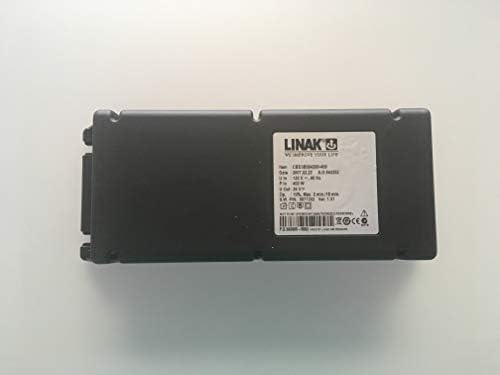
פיגורע 1: פראָנט view of the LINAK CBD3 Control Box. This image shows the compact black casing of the control box, designed to power and manage adjustable desk systems.

Figure 2: Close-up of the product label on the LINAK CBD3 Control Box. The label displays critical information such as item number (CBD3B004200-409), date of manufacture, input voltage (120 V~, 60 Hz), power input (400 W), output voltage (24 V---), operation cycle (10%, max. 2 min./18 min.), and software P/N. It also includes safety certifications and a barcode.
4. סעטאַפּ און ייַנמאָנטירונג
- מאָונטינג: Securely mount the CBD3 Control Box to a stable surface, typically under the desk frame, using appropriate fasteners (not included). Ensure adequate ventilation around the unit.
- Connecting Lifting Columns: Connect the lifting columns (actuators) to the designated channels on the control box. Refer to the specific DESKLINE system manual for correct port identification.
- Connecting Control Panel: Plug the control panel (handset) into the appropriate port on the control box.
- מאַכט קשר: Connect the power cable to the control box and then plug it into a grounded electrical outlet.
- איניציאליזאציע: After all connections are made and power is supplied, perform the initialisation procedure as described in your DESKLINE system manual. This typically involves driving the desk to its lowest position and holding the down button for a few seconds.
באַמערקונג: Always ensure all cables are securely connected and routed to prevent pinching or damage.
5. אַפּערייטינג ינסטרוקטיאָנס
The CBD3 Control Box operates in conjunction with a LINAK DESKLINE control panel. Refer to your specific control panel's manual for detailed operating instructions.
- אַדזשאַסטינג הייך: Use the UP and DOWN buttons on your control panel to adjust the desk height.
- Memory Positions: If your control panel supports memory functions, follow its instructions to save and recall preferred desk heights.
- זיכערקייַט האַלטן: The system is equipped with an anti-collision feature. If the desk encounters an obstruction during movement, it will stop and reverse slightly.
וויכטיק: Do not overload the desk. Refer to your desk frame's specifications for maximum load capacity.
6. וישאַלט
- רייניקונג: Clean the exterior of the control box with a dry, soft cloth. Do not use liquid cleaners or solvents.
- קאַבלע דורכקוק: Periodically inspect all cables for signs of wear, damage, or loose connections. Replace damaged cables immediately.
- קיין אינערלעכע אויפהאלטונג: The CBD3 Control Box is a sealed unit and requires no internal maintenance. Any attempt to open the unit will void the warranty and may cause damage.
7. טראָובלעשאָאָטינג
If you experience issues with your LINAK DESKLINE system, consult the following common troubleshooting steps:
| פּראָבלעם | מעגלעך סיבה | לייזונג |
|---|---|---|
| דער טיש רירט זיך נישט. | No power, loose cables, system not initialized. | Check power connection. Ensure all cables are securely plugged in. Perform system initialization. |
| Desk moves unevenly or stops. | Overload, obstruction, synchronization issue. | Reduce load on the desk. Check for obstructions. Perform system initialization to re-synchronize columns. |
| קאָנטראָל פּאַנעל רעאַגירט נישט. | Loose connection, faulty control panel. | Check control panel cable connection. Try disconnecting and reconnecting. If issue persists, contact support. |
If the problem persists after attempting these solutions, please contact LINAK support or your dealer.
8. ספּעסאַפאַקיישאַנז
| שטריך | דעטאַל |
|---|---|
| סאָרט | לינאק |
| מאָדעל נומער | CBD3B004200-009 |
| אַרייַנשרייַב וואָלtage | 120 V~, 60 Hz (as per label, may vary by region/model) |
| מאַכט אַרייַנשרייַב | 400 W (as per label) |
| רעזולטאַט חלקtage | 24 V--- (as per label) |
| טשאַנאַלז | 2 |
| אָפּעראַציע ציקל | 10%, max. 2 min./18 min. (as per label) |
| דימענשאַנז (פּאַקאַץ) | 25.15 X 9.65 X 7.87 סענטימעטער |
| וואָג (פּאַקעט) | 1.59 קג |
| קאַמפּאַטאַבילאַטי | LINAK DESKLINE systems |
9. וואָראַנטי אינפֿאָרמאַציע
LINAK products are manufactured to high-quality standards. This product comes with a standard manufacturer's warranty. For specific warranty terms and conditions, please refer to the warranty documentation provided with your purchase or visit the official LINAK webפּלאַץ. די וואָראַנטי דעקט טיפּיש חסרונות אין מאַטעריאַלן און אַרבעט אונטער נאָרמאַל נוצן.
באַמערקונג: Opening the control box or using non-approved components will void the warranty.
10. שטיצע און קאָנטאַקט
For technical assistance, spare parts, or further information regarding your LINAK CBD3 Control Box or DESKLINE system, please contact your authorized LINAK dealer or visit the official LINAK webפּלאַץ.
When contacting support, please have your product model number (CBD3B004200-009) and serial number (if applicable) ready.
LINAK Official Webפּלאַץ: www.linak.com
Part Number from label: P.O.393605-0052 (This link is a hypothetical search on Linak's site for the part number found on the label image)


