
הקדמה
The Aputure 120D Mark II is a high-performance 180W daylight-balanced LED video light designed for professional film and photography applications. It features enhanced brightness, improved color accuracy (CRI 96+, TLCI 97+), and a redesigned integrated controller-power unit for a streamlined setup. This manual provides essential information for the safe and effective use of your Aputure 120D Mark II.
זיכערקייַט אינפֿאָרמאַציע
- Do not look directly into the light source when operating.
- Ensure proper ventilation to prevent overheating. The unit features an ultra-silent fan for cooling.
- Use only the specified power adapter and cables.
- האַלטן די מיטל אַוועק פון וואַסער און אנדערע ליקווידס.
- פרובירט נישט צו צענעמען אדער מאדיפיצירן דעם איינהייט. לאָזט איבער אלע סערוויסעס צו קוואַליפֿיצירטע פּערסאָנעל.
- Always secure the light head properly on a stand or mounting point.
פּעקל אינהאַלט
באַשטעטיקן אַז אַלע זאכן זענען פאַראַן אין דיין פּעקל:
- Aputure 120D Mark II LED Light Head
- Integrated Controller-Power Unit
- נאָרמאַל רעפלעקטאָר
- ווייַט קאָנטראָל
- מאַכט קאַבלע
- קאַנעקטינג קאַבלעס
- קעריינג באַג
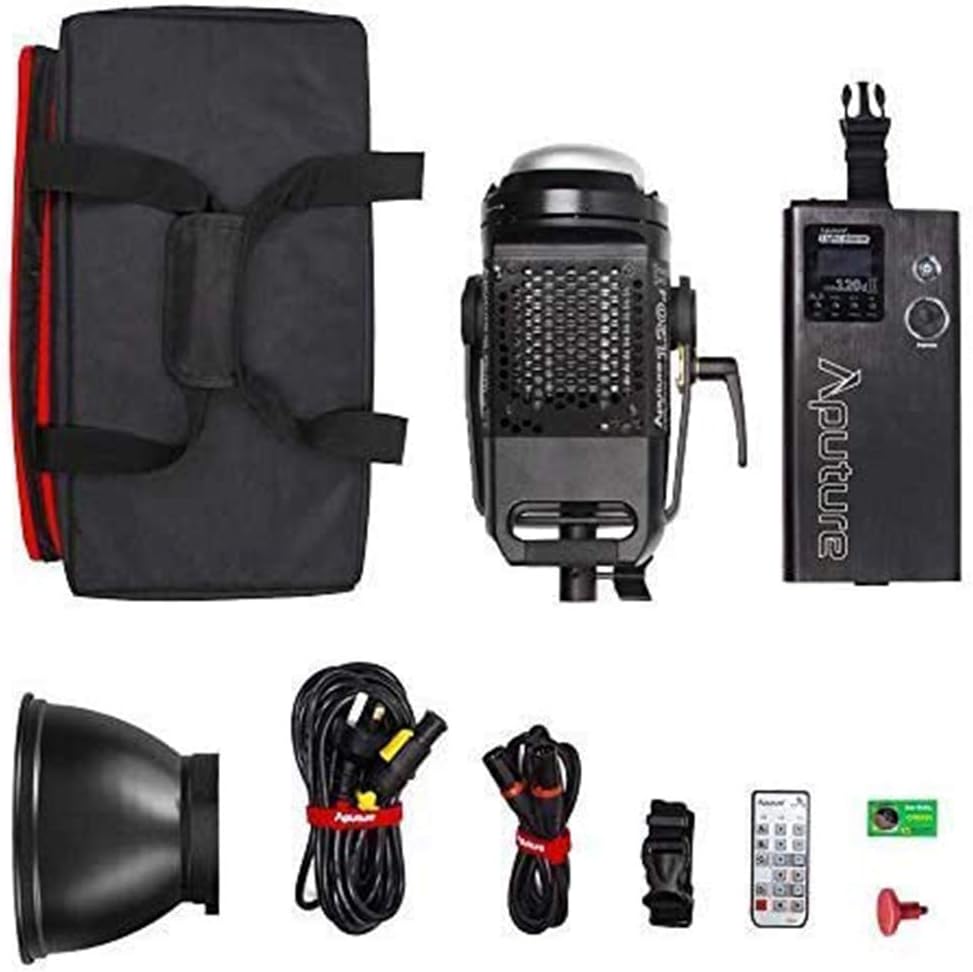
Image: All components included in the Aputure 120D Mark II package, neatly arranged.
סעטאַפּ
- מאָנטירן די ליכט קאָפּ: Attach the Aputure 120D Mark II light head to a compatible light stand using its handbrake locking yoke. Ensure it is securely fastened.
- Connecting the Controller-Power Unit: Connect the light head to the integrated controller-power unit using the provided Neutrik locking cables. The unified design simplifies cabling.
- אַטאַטשינג אַקסעסעריז: The light features a universal Bowens mount. To attach the standard reflector or other Bowens-mount modifiers (like a softbox or Fresnel lens), align the accessory with the mount on the light head and twist until it locks into place. Press the release switch to detach.
- מאַכט קשר: Connect the power cable from the controller-power unit to a suitable power outlet.

Image: The Aputure 120D Mark II light head, showcasing its compact design and handle, alongside its dedicated carrying bag.

Image: Close-up of the Aputure 120D Mark II light head with a standard reflector, emphasizing its robust aircraft-grade aluminum construction and the versatile Bowens mount.
ווידעא: אן הקדמה איבערview of the Aputure 120D Mark II LED Video Light, demonstrating its features and basic setup.
אַפּערייטינג
- מאַכט אויף / אַוועק: Press the power button on the controller-power unit to turn the light on or off.
- ברייטנאַס אַדזשאַסטמאַנט: Use the control knob on the unit to adjust the brightness from 0% to 100%. The C120D II allows for fine adjustments even below 10%.
- DMX קאָנטראָל: The C120D II supports DMX lighting functions, allowing integration into professional lighting setups for precise control.
- Pre-Programmed Lighting Effects: Access and select from 5 pre-programmed lighting effects (e.g., thunder, fireworks) via the controller.
- ווירעלעסס קאָנטראָל: The light can be controlled wirelessly using the included remote control or a compatible mobile application.

Image: The integrated controller-power unit of the Aputure 120D Mark II, showing its display and intuitive control knobs for brightness and settings.

Image: The Aputure 120D Mark II in an outdoor environment, illustrating its powerful and adjustable brightness output.

Image: A visual representation of the Aputure 120D Mark II's accurate color rendition, featuring a color chart and the light illuminating a scene.
וישאַלט
- רייניקונג: Use a soft, dry cloth to clean the exterior of the light head and controller. Avoid using harsh chemicals or abrasive materials.
- פאָכער וישאַלט: The ultra-silent fan is designed for longevity. Ensure the fan vents are clear of dust and obstructions to maintain optimal cooling performance.
- סטאָרידזש: When not in use, store the Aputure 120D Mark II in its dedicated carrying bag in a cool, dry place, away from direct sunlight and extreme temperatures.

בילד: א דעטאַלירטע view of the Aputure 120D Mark II light head, highlighting its ultra-silent fan system designed for efficient temperature control.
טראָובלעשאָאָטינג
- ליכט נישט קערן אויף: Check all cable connections, especially the Neutrik locking cables between the light head and controller. Ensure the power cable is securely plugged into a working outlet.
- פאָכער ראַש: The 120D Mark II features an ultra-silent fan. If unusual noise occurs, check for obstructions in the fan vents. If the issue persists, contact customer support.
- רימאָוט קאָנטראָל ישוז: Ensure the remote control has fresh batteries and is within range. Verify that the light and remote are set to the same channel and group.
- ינקאַנסיסטענט ברייטנאַס: Check for loose cable connections. If using DMX, verify DMX settings.
ספּעסאַפאַקיישאַנז
| שטריך | באַשרייַבונג |
|---|---|
| סאָרט | Aputure |
| מאָדעל נומער | LS C120d II |
| מאַכט קאַנסאַמשאַן | מאַקסימום 180 וו |
| קאָליר טעמפּעראַטור | 5500K (Daylight Balanced) |
| CRI | ≥96 |
| TLCI | ≥97 |
| יללומינאַנסע | 30,000 lux@0.5m (with Reflector) |
| קאַנעקטיוויטי טעכנאָלאָגיע | DMX, 2.4GHz Wireless |
| פּונקט וואָג | 16.53 פונט |
וואָראַנטי און שטיצן
The Aputure 120D Mark II LED Video Light comes with a manufacturer's warranty. Please refer to the warranty card included in your product packaging for specific terms and conditions. For technical support, troubleshooting assistance, or warranty claims, please contact Aputure customer service through their official webפּלאַץ אָדער אָטערייזד דיסטריביאַטערז.
פֿאַר נאָך רעסורסן און פּראָדוקט אינפֿאָרמאַציע, באַזוכט די Aputure Store on Amazon.