
1. הקדמה
This user manual provides detailed instructions for the installation, operation, and maintenance of your CHORTAU Full HD 1080P WiFi Dashcam. Please read this manual thoroughly before using the device to ensure proper functionality and safety.
2. פּעקל אינהאַלט
באַשטעטיקן אַז אַלע זאכן זענען פאַראַן אין פּעקל:
- CHORTAU Full HD 1080P WiFi Dashcam
- מאַשין טשאַרדזשער
- Car Mount (with adhesive and suction cup options)
- באַניצער מאַנואַל
- USB Cable (for PC connection)
3. פּראָדוקט איבערview
Familiarize yourself with the components of your dashcam.

בילד: פראָנט און זייט view of the CHORTAU Dashcam, showing the screen, control buttons, lens, USB port, and microSD card slot.
שליסל פֿעיִקייטן:
- SONY IMX323 Sensor: Captures clear Full HD 1080P video with F2.0 large aperture and 170° wide-angle lens, suitable for day and night recording.
- WiFi קאַנעקטיוויטי: Integrated WiFi module for connecting to the "RoadCam" app on smartphones or tablets. Allows real-time viewing, saving, and sharing of recorded files.
- טעמפּעראַטור קעגנשטעל: Designed to operate in temperatures from -20°C to 70°C.
- ג-סענסאָר: אויטאָמאַטיש דעטעקטירט פּלוצעמדיקע שאָקלען אָדער קאָליזיעס און שלאָסט די איצטיקע ווידעאָ פֿוס.tagE צו פאַרמייַדן אָווועררייטינג.
- באַוועגונג דעטעקשאַן: Initiates recording when motion is detected in front of the vehicle.
- פּאַרקינג מאָניטאָר: Provides 24-hour surveillance for your parked vehicle.
- 2 אינטש פאַרשטעלן: Compact display that does not obstruct the driver's view.
4. ינסטאַלירונג
The dashcam can be easily installed on your windshield using the provided removable plate or suction cup mount.
- קלייַבן מאַונטינג אָרט: אויסקלייבן אַ פּלאַץ אויף אייער ווינטשילד וואָס שטערט נישט אייער view פון דער וועג. טיפּישערװײַז איז דאָס הינטער די הינטןview שפּיגל.
- ריין ייבערפלאַך: Ensure the windshield surface is clean and dry before attaching the mount.
- צוטשעפּען בארג: Securely attach the chosen mount (adhesive or suction cup) to the windshield.
- Attach Dashcam: Slide the dashcam onto the mount until it clicks into place.
- פאַרבינדן מאַכט: Connect the car charger to the dashcam and plug it into your vehicle's cigarette lighter socket. Route the cable neatly to avoid interference with driving.
- אַרייַנלייגן מיקראָסד קאָרט: Insert a Class 10 or higher microSD card (up to 32GB, not included) into the designated slot. Ensure it is inserted correctly.

Image: The CHORTAU Dashcam mounted on a car's windshield, showing its compact size and placement.

Image: A visual guide demonstrating the easy installation process of the dashcam onto its removable plate.
5. ערשטע סעטאַפּ און Wi-Fi פֿאַרבינדונג
Before first use, format the microSD card and set up basic preferences.
5.1. Formatting the MicroSD Card
- מאַכט אויף די דאַשקאַם.
- דרוק די M קנעפּל צו אַרייַן די מעניו.
- Navigate to the "Format" option using the arrow buttons.
- דרוק OK to confirm and format the card. This will erase all data on the card.
5.2. ווי-פי קאַנעקשאַן
Connect your dashcam to your smartphone or tablet via Wi-Fi using the "RoadCam" app.
- On the dashcam, press the M קנעפּל צו אַרייַן די מעניו.
- Navigate to the "Wi-Fi" option.
- דרוק OK to turn Wi-Fi ON. The dashcam display will show the Wi-Fi network name (SSID) and password.
- On your smartphone/tablet, download and install the "RoadCam" app.
- Go to your device's Wi-Fi settings and connect to the dashcam's Wi-Fi network (SSID).
- Enter the default password (usually 12345678).
- Open the "RoadCam" app and select the dashcam to establish a connection. You can now view לעבן פאָאָtage, צוטריט רעקאָרדירט files, and adjust settings via the app.
Video: This video demonstrates how to connect the CHORTAU B-T007 dashcam's Wi-Fi to a smartphone, including navigating the dashcam menu, finding the Wi-Fi network, entering the password, and connecting via the RoadCam app.
6. אַפּערייטינג ינסטרוקטיאָנס
6.1. אויטאָמאַטישע רעקאָרדינג
The dashcam automatically starts recording when connected to power and the vehicle engine is started. It will stop recording and save the file when the engine is turned off.
6.2. שלייף רעקאָרדינג
The dashcam records video in continuous loops (e.g., 1, 3, or 5-minute segments). When the memory card is full, the oldest unlocked files will be overwritten by new recordings. You can adjust the loop recording duration in the settings menu.
6.3. G-Sensor (Emergency Lock)
The built-in G-Sensor detects sudden impacts or rapid acceleration/deceleration. When triggered, it automatically locks the current video segment, preventing it from being overwritten by loop recording. This ensures critical footage is preserved in case of an accident.

Image: Illustration of the G-Sensor function, which automatically locks video files during a collision to secure accident evidence.
6.4. פּאַרקינג מאָניטאָר
When enabled, the parking monitor function allows the dashcam to automatically start recording if it detects a collision or vibration while your vehicle is parked. This provides surveillance for your car 24 hours a day.
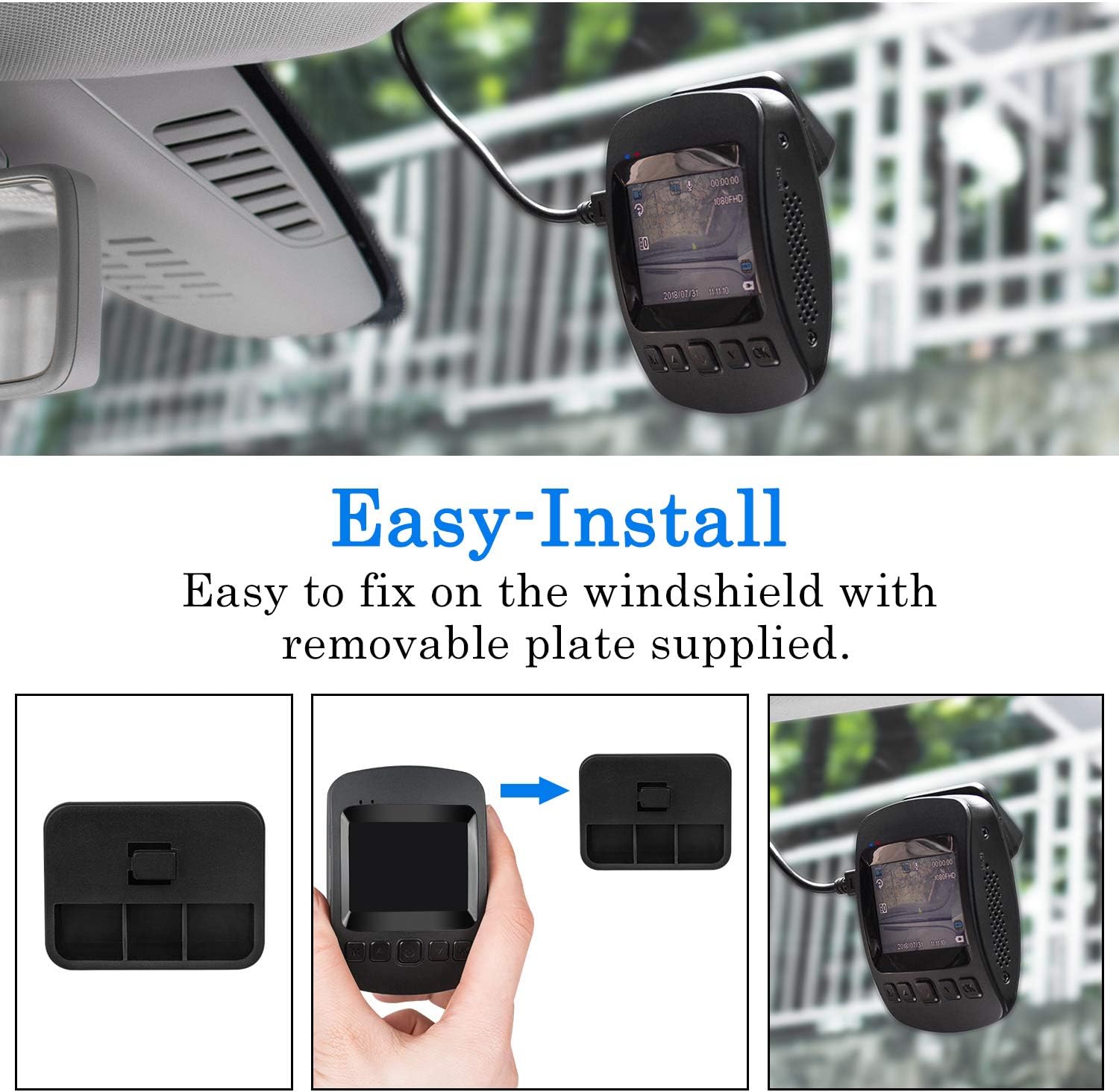
Image: The dashcam actively monitoring a parked car in a parking garage, demonstrating its 24-hour parking surveillance capability.
6.5. באַוועגונג דעטעקשאַן
With motion detection enabled, the dashcam will begin recording automatically if it senses movement in its field of view while the vehicle is stationary. This is useful for capturing events around your parked car.
7. Viewing Playback
איר קענען view recorded videos directly on the dashcam or through the "RoadCam" app on your smartphone/tablet.
7.1. On the Dashcam
- Stop recording by pressing the OK button if it's currently recording.
- לאנג דריקן די M קנעפּל צוויי מאָל צו אַרייַן פּלייבאַק מאָדע.
- Use the arrow buttons to navigate through the recorded files.
- דרוק OK צו שפּילן די אויסגעקליבן ווידעא.
Video: This video demonstrates how to view רעקאָרדעד פוtage directly on the CHORTAU B-T007 dashcam's screen, including stopping recording and navigating to playback mode.
7.2. Via RoadCam App
Once connected via Wi-Fi (as described in Section 5.2), open the "RoadCam" app. You can access live view, browse recorded videos, download them to your device, or share them.
8. וישאַלט
- מיקראָסד קאָרט: Regularly format the microSD card (at least once a month) to ensure optimal performance and prevent data corruption. Replace the card if it shows signs of wear or error.
- לענס רייניקונג: Keep the camera lens clean for clear recordings. Use a soft, lint-free cloth.
- Firmware דערהייַנטיקונגען: Check the CHORTAU official website or app for any available firmware updates to improve performance and add features.
- טעמפּעראַטור: Avoid exposing the dashcam to extreme temperatures outside its operating range (-20°C to 70°C) for extended periods.
9. טראָובלעשאָאָטינג
| פּראָבלעם | מעגלעך סיבה | לייזונג |
|---|---|---|
| די דאַשקאַם גייט נישט אָן. | קיין שטראָם צושטעל; דעפעקטיווער אויטאָ טשאַרדזשער; פרייַ פֿאַרבינדונג. | Check car charger connection and vehicle's cigarette lighter socket. Ensure the car charger is functional. |
| די אויפנאמע שטעלט זיך אפ אומגעריכט. | MicroSD card full; card error; low power. | Format the microSD card. Replace the card if errors persist. Ensure continuous power supply. |
| ווידעא שפּילtage is blurry. | שמוציקע לינז; שוץ־פילם נאך אויף דער לינז; נישט ריכטיקער פאָקוס. | Clean the lens. Remove any protective film. Ensure the lens is not obstructed. |
| Wi-Fi פֿאַרבינדונג פּראָבלעמען. | Incorrect password; app not updated; interference. | Verify Wi-Fi password (default: 12345678). Update the "RoadCam" app. Try connecting in a different location. |
| G-Sensor too sensitive/not sensitive enough. | G-סענסאָר סענסיטיוויטי שטעלונג. | Adjust G-Sensor sensitivity in the dashcam's settings menu. |
10. ספּעסאַפאַקיישאַנז
| סאָרט: | CHORTAU |
| מאָדעל: | B-T007 (also known as B-T006) |
| דימענסיעס: | 1.52 X 7.98 X 4.98 סענטימעטער |
| וואָג: | 310 גראַמז |
| ווייַז גרייס: | 2 אינטשעס |
| ווידעא האַכלאָטע: | 1080 פּ גאַנץ הד |
| סענסאָר: | SONY IMX323 |
| אָביעקטיוו עפענונג: | פ2.0 |
| Viewאין ווינקל: | 170 דיגריז |
| קאַנעקטיוויטי: | וסב, ווי-פי |
| סטאָרידזש: | MicroSD (up to 32GB, Class 10 recommended) |
| באַטערי: | 1 ליטהיום פּאָלימער באַטאַרייע (אַרייַנגערעכנט) |
| אַפּערייטינג טעמפּעראַטור: | -20°C צו 70°C |
| ספּעציעלע פֿעיִקייטן: | G-Sensor, Motion Detection, Parking Monitor, Loop Recording |
11. וואָראַנטי און שטיצן
CHORTAU products typically come with a warranty. Please refer to the warranty information provided with your purchase or visit the official CHORTAU webזייטל פֿאַר פרטים וועגן וואָראַנטי טערמינען און באדינגונגען.
For technical support or further assistance, please contact CHORTAU customer service. Contact information can usually be found on the product packaging or the official brand webפּלאַץ.
איר קענען באַזוכן די CHORTAU Store on Amazon פֿאַר מער אינפֿאָרמאַציע.