
1. הקדמה
א דאנק פארן קויפןasing the sainlogic GBlife PT3378 Wireless Weather Forecast Station. This device provides accurate indoor and outdoor temperature and humidity readings, weather forecasts, moon phases, and atmospheric pressure. It features a clear display, a wireless outdoor sensor, and a convenient USB charging port. Please read this manual carefully to ensure proper setup and operation.
2. פּאַקעט אינהאַלט און פּראָדוקט איבערview
2.1 פּעקל אינהאַלט
- GBlife PT3378 Main Unit (Weather Station Display)
- ווירעלעסס דרויסנדיק סענסאָר
- מאַכט אַדאַפּטער פֿאַר הויפּט אַפּאַראַט
- באַניצער מאַנואַל
2.2 פּראָדוקט איבערview
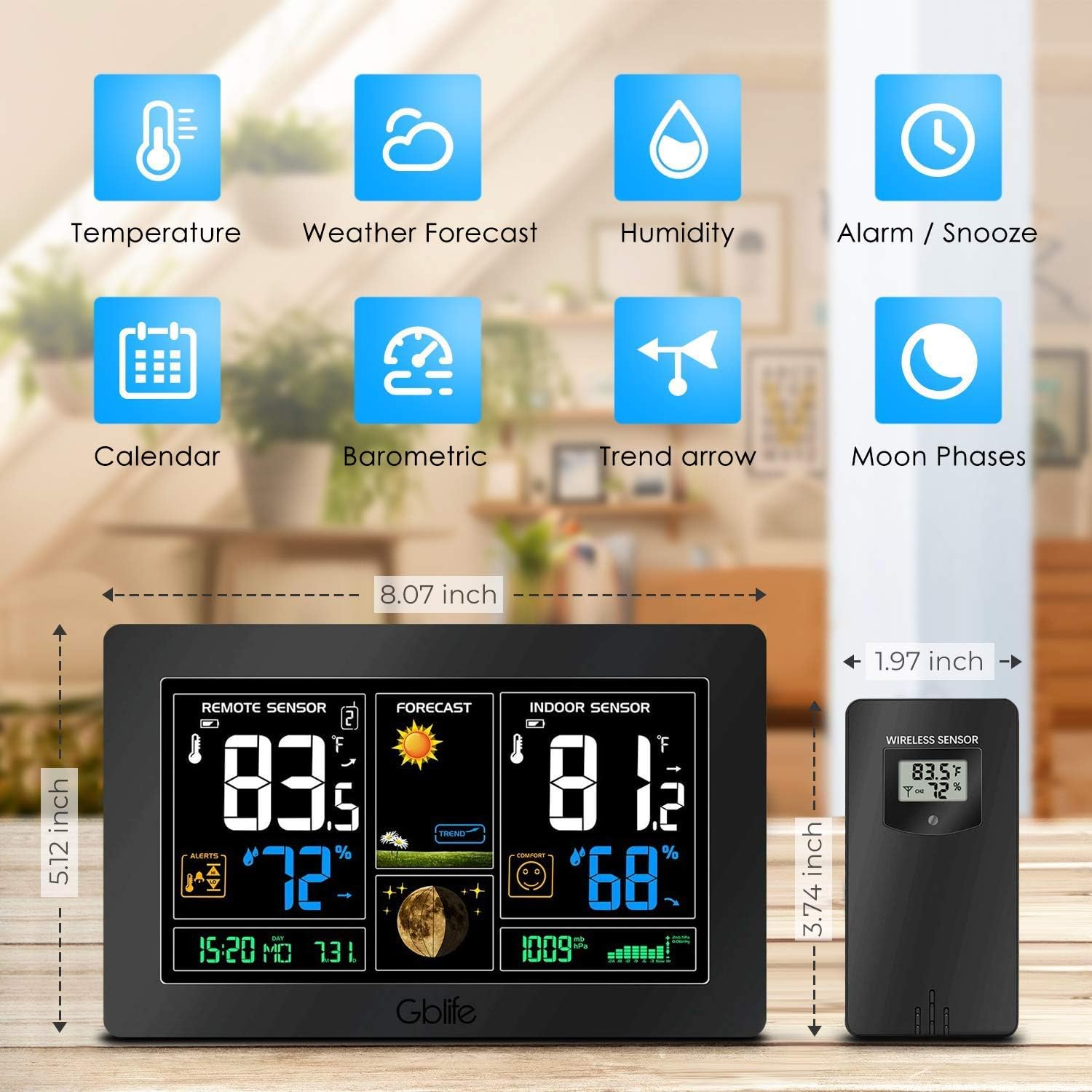
בילד 2.1: איבערview of the GBlife PT3378 Weather Station highlighting its main features including temperature, weather forecast, humidity, alarm/snooze, calendar, barometric pressure, trend arrow, and moon phases.

בילד 2.2: דעטאַילעד view of the GBlife PT3378 display showing remote temperature, remote humidity, time/date, weather forecast, weather trend, moon phase, indoor temperature, indoor humidity, comfort level, and atmospheric pressure. The image also labels the side buttons for time setting, alarm clock, up/down, alert setting, brightness adjustment, max/min value, and mute.
3. סעטאַפּ גייד
3.1 אנשטעלן דעם הויפט איינהייט
- Connect the provided power adapter to the DC 5V port on the back of the main unit.
- שטעקט אריין דעם אַדאַפּטער אין אַ נאָרמאַלער וואַנט אַוטלעט. דער עקראַן וועט זיך אָנצינדן.
- Optionally, insert 3 x AAA batteries (not included) into the battery compartment for backup power in case of power outage.
3.2 Installing Batteries in the Wireless Outdoor Sensor
- עפֿענען די באַטאַרייע אָפּטייל אויף די צוריק פון די וויירליס סענסער.
- אַרײַנשטעלן 2 x AA באַטעריעס (נישט אַרײַנגערעכנט), אָבסערווירנדיק די ריכטיקע פּאָלאַריטעט (+/-).
- פאַרמאַכן די באַטאַרייע אָפּטייל סיקיורלי.
3.3 צוזאמענשטעלן דעם סענסאר
The main unit and wireless sensor should automatically pair upon initial power-up. If pairing does not occur:
- Ensure both the main unit and sensor have power.
- Press and hold the 'CH' button on the main unit for 3 seconds to initiate a search for the outdoor sensor.
- The outdoor temperature and humidity should appear on the main unit's display.
3.4 סענסאָר פּלייסמאַנט

בילד 3.1: Illustration of wireless data transmission between the indoor receiver (main unit) and the remote outdoor sensor. The sensor should be placed outdoors within range of the main unit.

בילד 3.2: The main unit can be placed on a table or mounted on a wall. The outdoor sensor is shown mounted on an exterior wall, indicating suitable placement for outdoor readings.
Place the wireless outdoor sensor in a dry, shaded location away from direct sunlight and precipitation to ensure accurate readings. The transmission range is up to 50 meters (150 feet) in an open area. The main unit can be placed on a tabletop using its integrated stand or mounted on a wall.
4. אַפּערייטינג ינסטרוקטיאָנס
4.1 ווייַז אינפֿאָרמאַציע
דער הויפּט אַפּאַראַט'ס אַרויסווייַז גיט אַ פולשטענדיק איבערבליקview of weather conditions:
- ווייַט סענסאָר: ווײַזט די דרויסנדיקע טעמפּעראַטור און הומידיטי.
- פאָרויסזאָגן: Shows weather forecast icons (sunny, cloudy, rainy, etc.) and weather trend.
- אינעווייניקסטע סענסאָר: Displays indoor temperature and humidity, along with a comfort level indicator.
- צייט / טאָג: קראַנט צייט און דאַטע.
- לבנה פאַסע: Current moon phase.
- אַטמאָספעריק דרוק: Current atmospheric pressure reading.
ווידעא 4.1: A short demonstration of the GBlife PT3378 Weather Station's display features, including outdoor temperature/humidity, weather forecasts, moon phase, comfort level, and atmospheric pressure. This video provides a visual guide to the station's various readings.
4.2 באַשטעטיקן צייט און דאַטע
Refer to the 'Time Setting' button (labeled '1' in Image 2.2) on the side of the main unit. Press this button to enter time/date setting mode. Use the 'Up' and 'Down' buttons to adjust values and the 'Time Setting' button again to confirm and move to the next setting.
4.3 וועקער זייגער פונקציע
Use the 'Alarm Clock' button (labeled '2' in Image 2.2) to set and activate alarms. Follow similar steps as time setting to adjust alarm time.
4.4 ברייטנאַס אַדזשאַסטמאַנט

בילד 4.1: The weather station display showing adjustable backlight brightness. High brightness is suitable for daytime viewing, while low brightness is ideal for night to avoid dazzling.
The display features adjustable backlight brightness. Use the 'Brightness Adjustment' button (labeled '6' in Image 2.2) to cycle through different brightness levels to suit your environment, from bright daytime viewing to a dimmer setting for night.
4.5 וסב טשאַרדזשינג פּאָרט

בילד 4.2: The GBlife PT3378 weather station with a smartphone connected to its USB output port for charging. The station provides 5V, 1A output for charging compatible devices.
The main unit includes a USB output port (5V, 1A) for charging compatible devices such as smartphones. Connect your device's USB charging cable to this port.
5. ספּעסאַפאַקיישאַנז
| שטריך | דעטאַל |
|---|---|
| פּראָדוקט דימענשאַנז | 20.5 X 13 X 3 סענטימעטער |
| וואָג | 600 גראַמז |
| מאַכט מקור (הויפּט אַפּאַראַט) | AC Adapter (included), 3x AAA batteries (backup, not included) |
| מאַכט מקור (דרויסנדיק סענסאָר) | 2x AA באַטעריז (ניט אַרייַנגערעכנט) |
| דרינענדיק טעמפּעראַטורע ראַנגע | 0°C - 60°C |
| דרויסנדיק טעמפּעראַטורע ראַנגע | -40°C – 60°C |
| טעמפּעראַטור אַקקוראַסי | ± 1°C |
| ווירעלעסס טראַנסמיסיע קייט | ביז 50 מעטער (150 פֿיס) אין אַן אָפֿענער געגנט |
| קאַנעקטיוויטי טעכנאָלאָגיע | וסב, ווירעלעסס |
| ספּעציעלע פֿעיִקייטן | Indoor/Outdoor Sensor, Waterproof (sensor), USB Charging Port |
6. וישאַלט
- Clean the display and unit with a soft, dry cloth. Do not use abrasive cleaners or solvents.
- Ensure the outdoor sensor is kept in a dry, shaded location to prolong its lifespan and maintain accuracy.
- Replace batteries in the outdoor sensor and main unit (if using backup) when the low battery indicator appears on the display.
7. טראָובלעשאָאָטינג
- קיין דרויסנדיקע טעמפּעראַטור/הויך מעסטונג:
- Ensure the outdoor sensor has fresh batteries and is within range of the main unit.
- Press and hold the 'CH' button on the main unit to re-establish connection.
- Check for any obstructions between the sensor and the main unit.
- נישט פּינקטלעכע טעמפּעראַטור מעסטונגען:
- Ensure the outdoor sensor is not in direct sunlight or exposed to extreme weather conditions.
- Verify that the main unit is not placed near heat sources or air conditioning vents.
- דיספּליי איז טונקל אָדער ליידיק:
- Check if the power adapter is securely connected.
- If using backup batteries, ensure they are fresh.
- Adjust the backlight brightness using the dedicated button.
8. וואָראַנטי און שטיצן
The sainlogic GBlife PT3378 Wireless Weather Forecast Station includes a 45-day money-back guarantee and an 18-month customer service warranty. For any questions or support needs, please contact sainlogic customer service.