
הקדמה
Thank you for choosing the AGPTEK M16SB 16GB Bluetooth MP3 Player. This manual provides detailed instructions for setting up, operating, and maintaining your device. Please read it carefully to ensure proper use and to maximize your listening experience.
פּראָדוקט איבערview
מאַכט זיך באַקאַנט מיט די קאָמפּאָנענטן און קאָנטראָלס פֿון דעם אַפּאַראַט.

בילד: פראָנט און זייַט view of the AGPTEK M16SB MP3 player with numbered labels indicating each button and port function.
קנעפּל דעפֿיניציעס:
- צוריקקומען: Navigates back to the previous menu.
- Bluetooth/FM Radio: Short press for Bluetooth, long press for FM Radio.
- Submenu/Screen-lock: Accesses submenus or locks/unlocks the screen.
- רוק זיך ארויף: Navigates up in menus.
- Previous/Fast rewind: Skips to the previous track or fast rewinds during playback.
- מאַך אַראָפּ: Navigates down in menus.
- Next/Fast forward: Skips to the next track or fast forwards during playback.
- Enter/Play/Pause: Confirms selection or plays/pauses media.
- באנד +: ינקריסאַז באַנד.
- באַנד -: דיקריסיז באַנד.
- Power on/off; Screen on/off: Powers the device on/off or turns the screen on/off.
פּאָרטן און פֿעיִקייטן:
- Card slot (TF): For Micro SD card expansion up to 128GB.
- עאַרפאָנע דזשאַק: 3.5mm audio output for wired headphones.
- מיקראָ וסב פּאָרט: פֿאַר טשאַרדזשינג און דאַטן אַריבערפירן.
- געבויט-אין רעדנער: פֿאַר אַודיאָ ווידערשפּיל אָן כעדפאָונז.
- מיקראָפאָן (MIC): פֿאַר קול רעקאָרדינג.
סעטאַפּ
1. טשאַרדזשינג די מיטל
Before first use, fully charge the MP3 player. A full charge takes approximately 2 hours using a 5V/500mA charger or a computer USB port.

בילד: A person relaxing while listening to the MP3 player, with text indicating "2 HOURS for full charge" and "28-30 hours playtime".
- Connect the Micro USB cable to the player's Micro USB port and the other end to a USB power source.
- דער באַטעריע אינדיקאַטאָר אויפן עקראַן וועט ווײַזן דעם טשאַרדזשינג סטאַטוס.
- Once fully charged, the device offers up to 28 hours of music playback (screen off, medium volume) or 5 hours via Bluetooth headphones.
2. מאַכט אויף / אויסגעלאשן
- צו אָנפאַנגען, דריקן און האַלטן די מאַכט קנעפּל (11) ביז די פאַרשטעלן לייץ אַרויף.
- צו האַלטן אַוועק, דריקן און האַלטן די מאַכט קנעפּל (11) ביז די מיטל פאַרמאַכן זיך.
- א קורץ דרוק פון די מאַכט קנעפּל (11) will turn the screen on or off.
3. אריינשטעלן א מיקראָ SD קאַרטל
The device has 16GB of internal memory and supports external Micro SD cards up to 128GB (not included).

בילד: א דיטיילד view of the MP3 player's side, highlighting the TF card slot with a Micro SD card partially inserted, indicating 16GB internal memory and support for up to 128GB external storage.
- געפינען די Card slot (TF) (12) on the side of the player.
- דזשענטלי אַרייַנלייגן די מיקראָ סד קאָרט אין די שפּעלטל ביז עס קליקס אין פּלאַץ.
- צו אַרויסנעמען, שטופּ די קאַרטל אַ ביסל אַרײַן ביז זי שפּרינגט אַרויס.
אַפּערייטינג ינסטראַקשאַנז
1. יקערדיק נאַוויגאַציע
- ניצן די Move up (4) און Move down (6) buttons to navigate through menus.
- דרוק די Enter/Play/Pause button (8) צו אויסקלייַבן אַן אָפּציע.
- דרוק די Return button (1) צו גיין צוריק צו די פריערדיקע פאַרשטעלן.
- סטרויערן באַנד ניצן די Volume + (9) און Volume - (10) קנעפּלעך אויף דער זייט.
2. מוזיק פּלייבאַק
The player supports MP3, WMA, OGG, APE, FLAC, WAV, AAC-LC, and ACELP audio formats.

בילד: A person holding the AGPTEK MP3 player, displaying the music playback interface with track information and a Bluetooth connection indicator.
- פֿון הויפּט מעניו, אויסקלײַבן "מוזיק".
- Browse by Artist, Album, Songs, Playlists, or Folder.
- דרוק Enter/Play/Pause (8) צו אָנהייבן אָדער פּויזירן ווידערשפּיל.
- ניצן Previous/Fast rewind (5) און Next/Fast forward (7) to change tracks or fast forward/rewind.
- Access submenus (e.g., Equalizer, Repeat Mode) by pressing the Submenu button (3) בעשאַס פּלייבאַק.
3. בלועטאָאָטה פּערינג
Connect your MP3 player to Bluetooth headphones or speakers for wireless audio.

בילד: An illustration demonstrating three audio output options for the MP3 player: wired headphones for private listening, the built-in speaker for sharing, and a Bluetooth speaker for party settings.
- From the main menu, select "Bluetooth".
- אַלטערנאַטיוועלי, קורץ דריקן די Bluetooth/FM Radio button (2) to quickly enable Bluetooth.
- Ensure your Bluetooth device (headphones/speaker) is in pairing mode.
- דער שפּילער וועט זוכן נאָך פֿאַראַן דעווייסעס. אויסקלײַבן אײַער דעווייס פֿון דער רשימה צו פֿאַרבינדן.
- The player supports automatic reconnection to previously paired devices.
4. עפעם ראַדיאָ
Listen to FM radio stations. Wired headphones must be connected as they act as the antenna.
- Connect wired headphones to the Earphone jack (13).
- פֿון הויפּט מעניו, אויסקלײַבן "FM ראַדיאָ".
- Alternatively, long press the Bluetooth/FM Radio button (2) to quickly enter FM Radio mode.
- Use the navigation buttons to scan for stations or select from presets.
- The radio function allows saving up to 30 preset stations and supports FM recording.
5. אנדערע פאַנגקשאַנז
- קול רעקאָרדער: Select "Record" from the main menu to use the built-in microphone for voice recording.
- E- בוך: Read TXT format e-books by selecting "E-book".
- ווידעא: Play AMV format videos by selecting "Video".
- בילד Viewער: Browse JPG, GIF, and BMP images by selecting "Pictures".
- סעטטינגס: Access various device settings, including equalizer, volume limit, display brightness, and timed shutdown.
וישאַלט
1. Firmware Update
Free firmware updates are available to improve device performance and add new features.
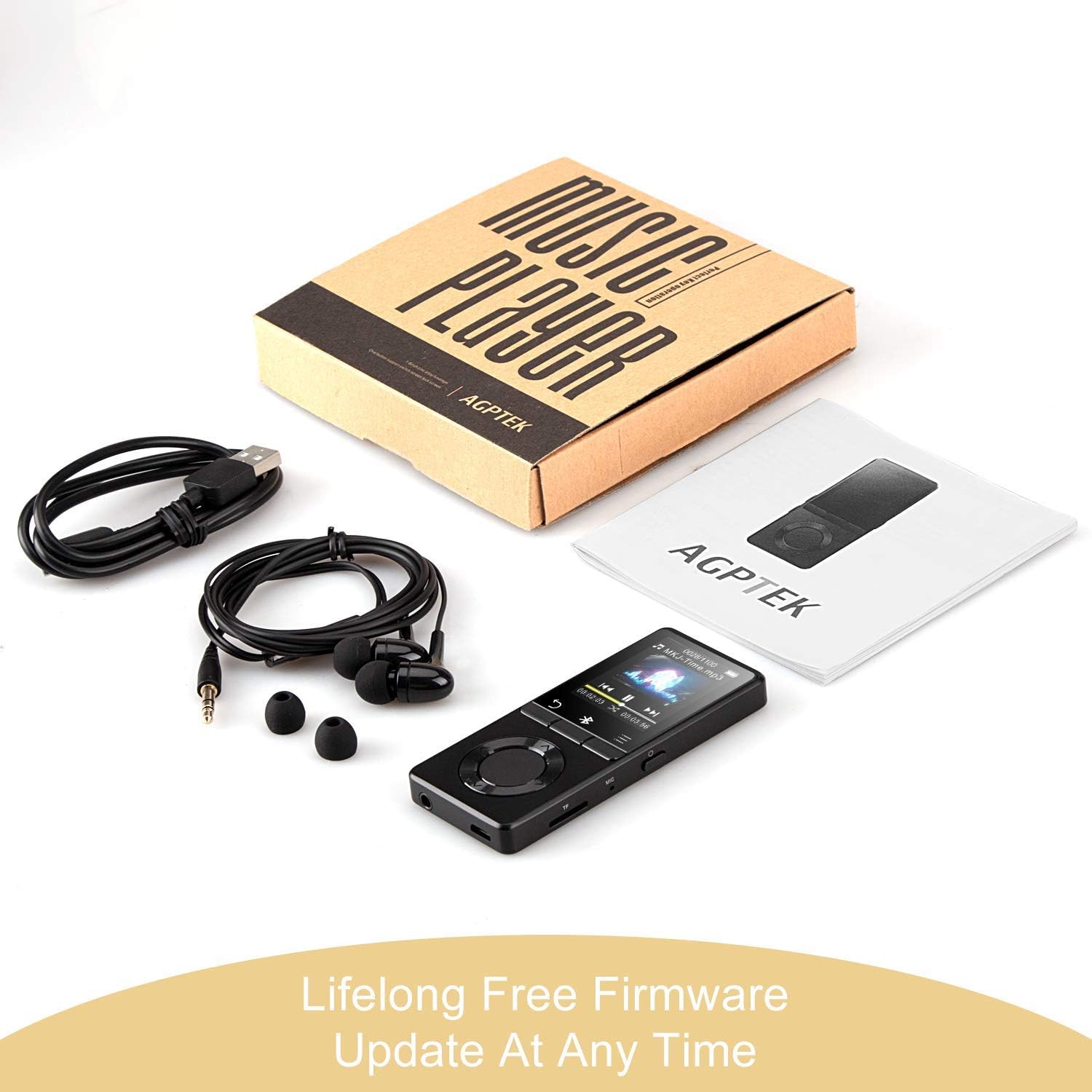
בילד: The AGPTEK MP3 player, its packaging, and included accessories (earphones, USB cable), emphasizing the availability of lifelong free firmware updates.
- Visit the official AGPTEK webוועבזייטל פֿאַר די לעצטע פירמווער און אינסטרוקציעס.
- Follow the provided instructions carefully to update your device.
2. רייניקונג
- ניצט אַ ווייכן, טרוקענעם שטאָף צו רייניקן די אויסערלעכע זייט פון דעם אַפּאַראַט.
- ויסמיידן ניצן פליסיק קלינערז אָדער אַברייסיוו מאַטעריאַלס.
טראָובלעשאָאָטינג
- מיטל נישט קער אויף: זיכער מאַכן אַז די באַטאַרייע איז אויפגעלאָדן. פֿאַרבינדט עס צו אַ טשאַרדזשער און פּרוּווט ווידער.
- קיין קול: Check volume levels. Ensure headphones are properly connected or Bluetooth device is paired and connected. If using the built-in speaker, ensure it is enabled in settings.
- פּראָבלעמען מיט בלוטוט פֿאַרבינדונג: Ensure the Bluetooth device is in pairing mode and within range. Disconnect the MP3 player from other Bluetooth devices if it was previously paired elsewhere.
- Fileס ניט פּלייינג: Verify that the audio/video file format is supported (MP3, WMA, OGG, APE, FLAC, WAV, AAC-LC, ACELP for audio; AMV for video).
- אַפּאַראַט רעאַגירט נישט: Press and hold the Power button for 10-15 seconds to force a reset.
- Micro SD card not detected: Ensure the card is inserted correctly. Try reinserting or using a different card to rule out card issues.
- Issues during PC sync: Avoid altering files directly in the player's window while synced. Make changes on the PC, then re-upload. If the player crashes, perform a long press on the power button to reset.
ספּעסאַפאַקיישאַנז
| סאָרט | AGPTEK |
| מאָדעל נאָמען | AGPTEK 16GB Bluetooth 4.0 MP3 Player with Touch Buttons |
| מאָדעל נומער | M16SB-EU |
| קאַנעקטיוויטי טעכנאָלאָגיע | בלועטאָאָטה |
| זכּרון סטאָרידזש קאַפּאַסיטי | 16 GB (expandable up to 128 GB with Micro SD card) |
| קאָליר | שוואַרץ |
| פאַרשטעלן גרייס | 1.8 אינטשעס |
| קאַמפּאַטאַבאַל דעוויסעס | Headphones, Personal Computer |
| מעדיע טיפּ | mp3 |
| געשטיצטע אַודיאָ סטאַנדאַרדן | AAC, ACELP, APE, FLAC, MP3, OGG, WAV, WMA |
| שטיצט ווידעא סטאַנדאַרדס | AMV |
| Supported Image Standards | JPG, GIF, BMP |
| באַטעריע לעבן (מוזיק ווידערשפּיל) | Up to 28 hours (screen off, medium volume) |
| Battery Life (Bluetooth Playback) | אַרויף צו 5 שעה |
| טשאַרדזשינג צייט | בעערעך. 2 שעה |
וואָראַנטי און שטיצן
AGPTEK is committed to providing reliable and high-quality products. While specific warranty details are not provided in this manual, AGPTEK offers free firmware updates and customer support.
- For any product issues or inquiries, please contact AGPTEK customer service.
- Refer to the official AGPTEK website for support contact information and the latest firmware updates.