
הקדמה
This manual provides detailed instructions for the MONODEAL MD-ANC5 Active Noise Cancelling Headphones. Please read this manual thoroughly before using the product to ensure proper operation and to maximize your listening experience. This document covers setup, operation, maintenance, troubleshooting, and product specifications.
פּעקל אינהאַלט
- MONODEAL MD-ANC5 Active Noise Cancelling Headphones
- וסב טשאַרדזשינג קאַבלע
- קעריינג באַג
- Airplane Adapter (two-pin)
- באַניצער מאַנואַל (דעם דאָקומענט)
פּראָדוקט איבערview
The MONODEAL MD-ANC5 headphones are designed for comfort and effective noise reduction, making them suitable for travel and daily use. They feature active noise cancelling technology, a built-in microphone, and a foldable design for portability.
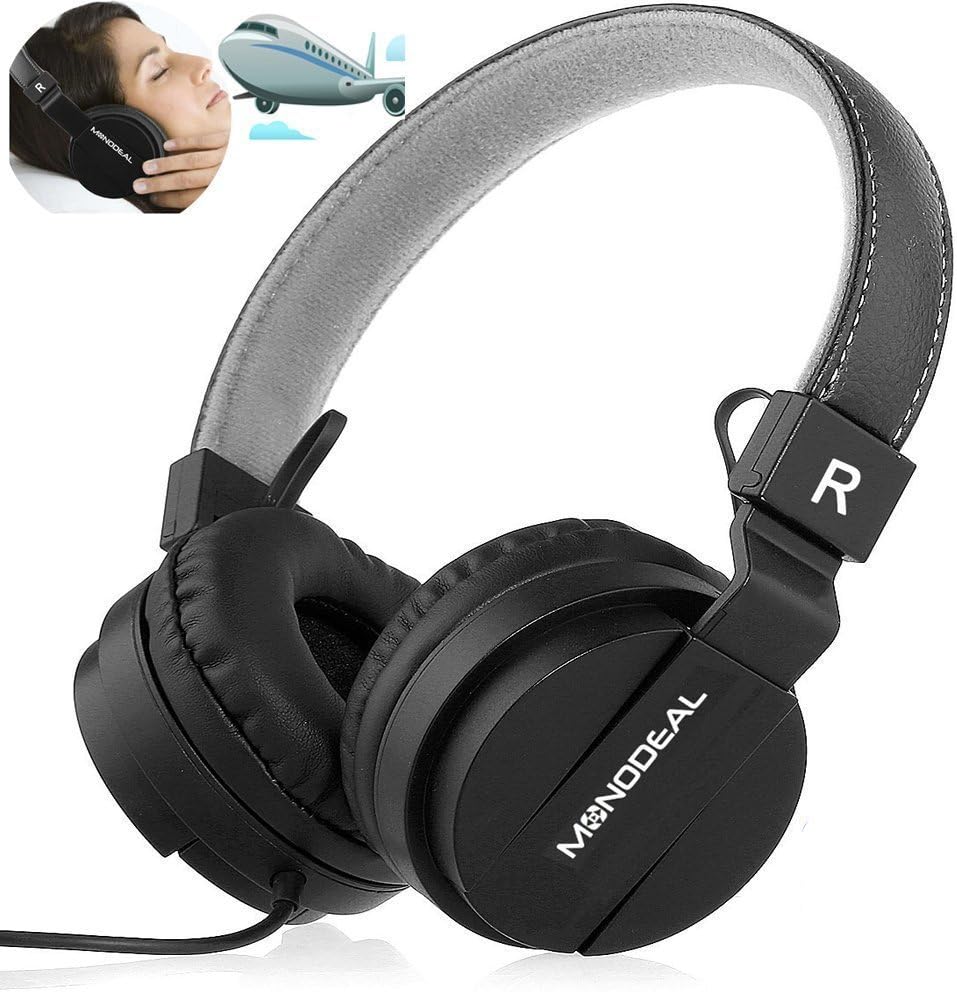
A pair of black MONODEAL MD-ANC5 on-ear headphones, showcasing their design and the brand logo on the earcups. An inset image shows a person wearing headphones on an airplane, illustrating their use for travel and noise reduction.
שליסל פֿעיִקייטן
- אַקטיוו ראַש קאַנסאַליישאַן (ANC): Reduces ambient noise by up to 85%, ideal for environments with low-frequency sounds like airplane engines or traffic.
- געבויט-אין מיקראָפאָן: Enables hands-free phone calls.
- פאָלדאַבלע פּלאַן: Allows for compact storage and portability, accompanied by a carrying bag.
- Adjustable Headband & Comfortable Ear Cushions: Ensures a snug and comfortable fit for various head shapes.
- לאנג באַטאַרייע לעבן: Up to 20 hours of playtime per charge for ANC function.
- ווייערד קאַנעקטיוויטי: Standard 3.5mm audio jack for wide compatibility.
- Airplane Adapter: Included for in-flight entertainment systems.

The MONODEAL MD-ANC5 headphones are shown in a folded configuration, highlighting their space-saving design for easy portability. An inset image shows a person resting with headphones on an airplane, demonstrating their suitability for travel.

An illustration detailing the battery life of the MONODEAL MD-ANC5 headphones, indicating up to 20 hours for music playback, 20 hours for phone calls, and 250 hours of standby time.
סעטאַפּ
ערשט טשאַרדזשינג
פארן ערשטן באַנוץ, זאָלט איר גאָר אויפלאָדן די כעדפאָונז.
- Connect the small end of the provided USB charging cable to the USB Charging Port on the headphone's inline controller.
- פֿאַרבינדט דעם גרעסערן עק פֿונעם USB קאַבל צו אַ USB פּאָרט מיט אַ שטאַרקן מאַכט (למשל, קאָמפּיוטער, USB וואַנט אַדאַפּטער).
- The Noise Cancelling Indicator Light will illuminate during charging.
- Charging typically takes approximately 2 hours for a full charge. The indicator light may change or turn off when fully charged.
קאַנעקטינג צו אַודיאָ מקור
- Insert the 3.5mm Audio Plug into the audio jack of your device (smartphone, tablet, computer, MP3 player, etc.).
- The headphones are wired and do not require Bluetooth pairing for audio playback.
אַפּערייטינג ינסטראַקשאַנז
אַקטיוו ראַש קאַנסאַליישאַן (ANC)
To activate the Active Noise Cancellation feature:
- Locate the "Noise Cancelling On/Off" switch on the inline controller.
- רוקט דעם סוויטש צו דער "ON" פאזיציע.
- The Noise Cancelling Indicator Light will illuminate, indicating ANC is active.
- To deactivate ANC, slide the switch to the "OFF" position.
באַמערקונג: ANC primarily reduces low-frequency ambient noise. It may not completely eliminate human voices or sudden high-frequency sounds. The ANC function requires battery power. If the battery is depleted, the headphones can still be used for audio playback without ANC.
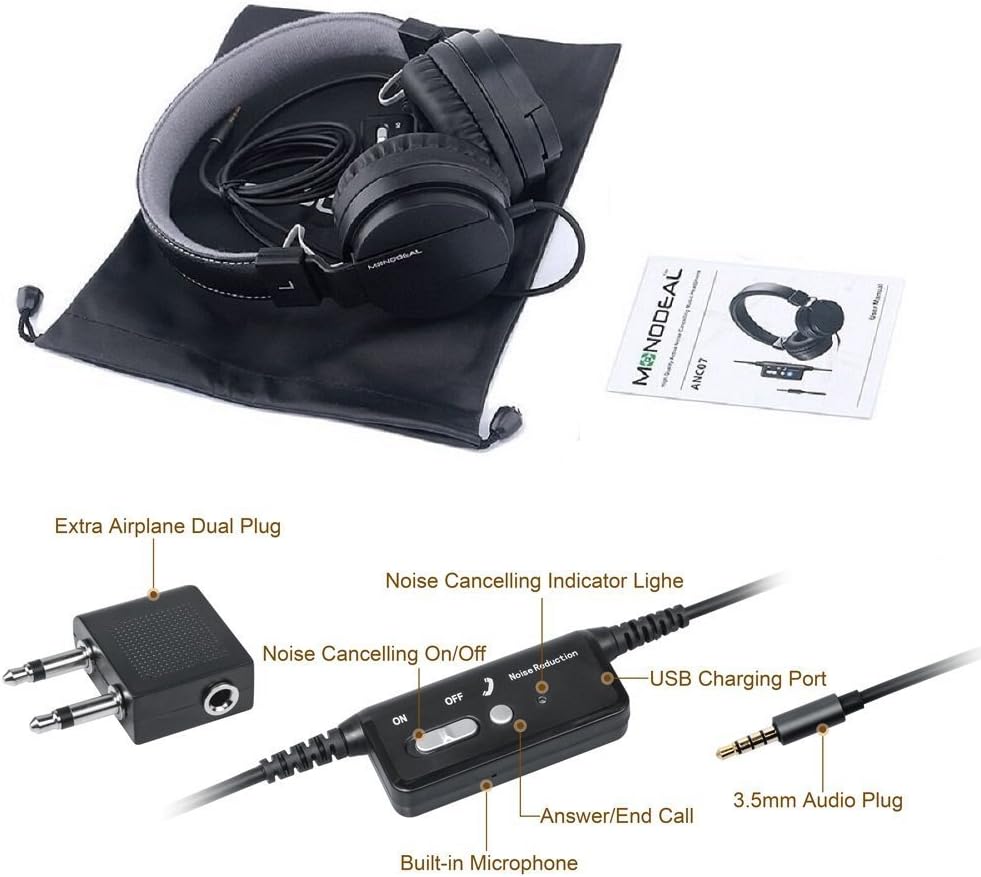
אַ נאָענט-אַרויף view of the inline controller for the MONODEAL MD-ANC5 headphones, showing the Noise Cancelling On/Off switch, the Noise Cancelling Indicator Light, the USB Charging Port, the Built-in Microphone, and the 3.5mm Audio Plug. An 'Extra Airplane Dual Plug' adapter is also visible.
Using the Microphone/Controller
The inline controller includes a built-in microphone and an "Answer/End Call" button.
- ענטפֿערן / סאָף רופט: Press the "Answer/End Call" button once to answer an incoming call. Press it again to end an active call.
- מוזיק פּלייבאַק קאָנטראָל: This model primarily focuses on ANC and basic call functions. For music control (play/pause, track skip), use your connected device.
Using the Airplane Adapter
For in-flight entertainment systems that use a dual-pin audio jack:
- Connect the 3.5mm Audio Plug of your headphones into the single input of the Airplane Adapter.
- Insert the dual pins of the Airplane Adapter into the corresponding jacks on the airplane's armrest.
וישאַלט
- רייניקונג: Use a soft, dry cloth to clean the headphones. Do not use liquid cleaners or solvents.
- סטאָרידזש: When not in use, fold the headphones and store them in the provided carrying bag to protect them from dust and damage.
- באַטערי זאָרגן: כדי צו פארלענגערן די לעבן פון די באַטעריע, זאָלט איר נישט אָפט אויסלאָדן די באַטעריע. לאָדט די כעדפאָונז רעגולער אויף, אפילו אויב זיי ווערן נישט גענוצט פֿאַר לענגערע צייטן.
- ויסמיידן עקסטרעמע טנאָים: שטעלט נישט אויס די כעדפאָונז צו עקסטרעמע טעמפּעראַטורן, הומידיטי, אדער דירעקטע זונשייַן.
- וואַסער קעגנשטעל: These headphones are not water-resistant. Avoid contact with liquids.
טראָובלעשאָאָטינג
| פּראָבלעם | מעגלעך סיבה | לייזונג |
|---|---|---|
| קיין געזונט | קאָפּהערער פּלאָג נישט גאָר אַרײַנגעשטעקט. | Ensure the 3.5mm audio plug is securely inserted into both the headphones and the audio source. |
| קיין געזונט | די קול-קוואל איז צו נידעריג אדער שטיל. | Increase the volume on your connected device. Check if the device is muted. |
| ANC טוט נישט אַרבעטן | ANC switch is off. | Slide the "Noise Cancelling On/Off" switch to the "ON" position. |
| ANC טוט נישט אַרבעטן | Headphone battery is low or depleted. | טשאַרדזש די כעדפאָונז פֿאַר בעערעך 2 שעה. |
| מיקראָפאָן טוט נישט אַרבעטן | Microphone port blocked or damaged. | Ensure the microphone is not obstructed. Test with another device if possible. |
| Poor sound quality with ANC on | ANC can sometimes alter sound profile. | If preferred, turn off ANC for music listening, especially if sound quality is a priority over noise reduction. |
| קאָפּהערער נישט באַקוועם | Headband or earcups not adjusted. | Adjust the headband for a comfortable fit. Ensure ear cushions sit properly on the ears. |
פֿאַר ווייטערדיקע הילף, ביטע זעט די וואָראַנטי און שטיצע אָפּטייל.
ספּעסאַפאַקיישאַנז
| שטריך | דעטאַל |
|---|---|
| מאָדעל נומער | MD-ANC5 |
| סאָרט | מאָנאָדעאַל |
| קאַנעקטיוויטי טעכנאָלאָגיע | מיט אַ דראָט (3.5 מ״מ דזשעק) |
| ראַש קאָנטראָל | אַקטיוו ראַש קאַנסאַליישאַן |
| אויער פּלייסמאַנט | אויף אויער |
| פאָרם פאַקטאָר | אויף אויער |
| Battery Life (ANC) | אַרויף צו 20 שעה |
| טשאַרדזשינג צייט | בעערעך. 2 שעה |
| אָפטקייַט ענטפער | 20 הערץ - 20000 הערץ |
| פּונקט וואָג | 6.5 אונסעס (184 גראַם) |
| פּראָדוקט דימענשאַנז | 7.87 X 6.3 X 2.36 אינטשעס |
| מאַטעריאַל | פאָקס לעדער |
| ספּעציעלע שטריך | Foldable, Rechargeable, Built-in Microphone |
| קאַמפּאַטאַבאַל דעוויסעס | Smartphones, Tablets, Laptops, MP3/MP4 Players |
| אַרייַנגערעכנט קאַמפּאָונאַנץ | Carrying Bag, USB Charging Cable, Airplane Adapter |
וואָראַנטי און שטיצן
The MONODEAL MD-ANC5 headphones come with an 18-month warranty.
For any questions, issues, or warranty claims, please contact MONODEAL customer support.
קאָנטאַקט בליצפּאָסט: amzus@monodeal.net
Important Warning: Prolonged listening at high volume levels may cause hearing damage. It is recommended to take breaks every 1-2 hours to relax your ears and ensure a better listening experience.