
הקדמה
This manual provides detailed instructions for the setup, operation, and maintenance of your Zerone BN59-01179A Replacement Remote Control. Please read this manual carefully before using the product to ensure proper functionality and longevity.
פּראָדוקט איבערview
The Zerone BN59-01179A is a universal replacement remote control designed for compatible Smart TVs. It offers a compact design and a comprehensive set of buttons for various functions.
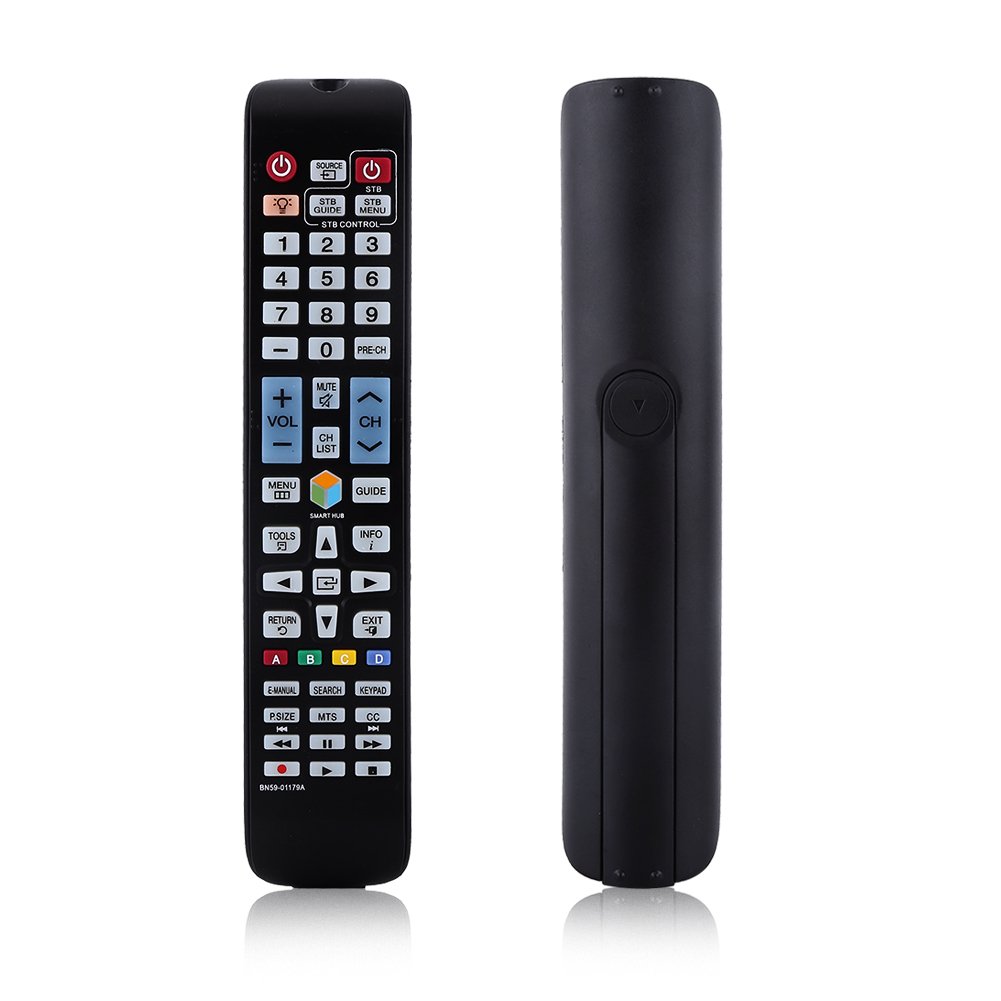
בילד: פראָנט view of the Zerone BN59-01179A remote control, showing its full layout and approximate dimensions (23cm length, 4.7cm width, 2cm thickness).
סעטאַפּ
ייַנמאָנטירונג פון באַטאַרייע
- געפֿינען די באַטאַרייע אָפּטייל אויף די צוריק פון די ווייַט קאָנטראָל.
- רוקט דעם באַטעריע דעקל אַראָפּ אָדער דריק דעם לאַטש און הייבט אויף צו עפֿענען.
- אַרײַנשטעלן צוויי (2) AAA באַטעריעס, און זיכער מאַכן אַז די פּאָזיטיוו (+) און נעגאַטיוו (-) טערמינאַלן זענען ריכטיק אויסגעשטעלט מיט די מאַרקירונגען אינעווייניק אין דעם אָפּטייל.
- לייגט צוריק דעם באַטעריע דעקל דורך עס צוריקצורוקן אין זיין פּאָזיציע ביז עס קליקט זיכער.
באַמערקונג: Batteries are not included with the remote control. Please use new AAA batteries for optimal performance.

Image: The back of the remote control with the battery cover removed, showing the empty battery compartment ready for two AAA batteries.
אַפּערייטינג ינסטראַקשאַנז
This remote control is designed for immediate use with compatible TVs without requiring programming. Simply insert batteries and point the remote towards your television.
שליסל פאַנגקשאַנז

Image: A hand holding the Zerone remote control, with inset close-ups highlighting the power/source buttons and the navigation/Smart Hub buttons.
- מאַכט (רויטער קנעפּל): טורנס די טעלעוויזיע אויף אָדער אַוועק.
- מקור: אויסקלייבט אריינגאנג קוועלער (HDMI, AV, אאז"וו).
- STB/DTV: Switches between Set-Top Box and Digital TV modes.
- נומער קנעפּלעך (0-9): דירעקטע קאַנאַל אויסוואַל.
- PRE-CH: קערט צו דעם פריערדיקן קאַנאַל.
- באַנד (+/-): אַדזשאַסץ די באַנד מדרגה.
- שטום: שטומט אדער אנשטומט דעם טעלעוויזיע קלאַנג.
- Channel (CH Up/Down): טוישט טעלעוויזיע קאַנאַלן סיקווענשעל.
- טש רשימה: דיספּלייז די קאַנאַל רשימה.
- מעניו: גייט אריין אין דעם הויפּט מעניו פון דער טעלעוויזיע.
- Smart Hub: Opens the Smart Hub interface for apps and streaming services.
- גייד: ווײַזט דעם עלעקטראָנישן פּראָגראַם גייד.
- אינפֿאָרמאַציע: Shows information about the current program.
- מכשירים: Accesses quick settings or contextual options.
- נאַוויגאַציע קנעפּלעך (אַרויף/אַראָפּ/לינקס/רעכטס/אַרייַן): נאַוויגירט דורך מעניוז און סעלעקטירט אָפּציעס.
- צוריקקומען: גייט צוריק צום פריערדיקן עקראַן אָדער מעניו.
- אַרויסגאַנג: פֿאַרלאָזט דעם איצטיקן מעניו אָדער אַפּליקאַציע.
- קאָלירטע קנעפּלעך (A, B, C, D): פונקציאָנאַליטעט ווערייִרט לויט טעלעוויזיע מאָדעל און אַפּלאַקיישאַן.
- E-MANUAL: Accesses the TV's electronic manual.
- זוכן: Opens the search function.
- קלאַוויאַטור: Displays an on-screen keypad.
- P.SIZE: Adjusts picture size/aspect ratio.
- MTS: Multi-channel Television Sound (SAP).
- סיסי: Closed Captioning.
- מעדיע קאָנטראָל קנעפּלעך (שפּילן, פּויזע, האַלטן, צוריקדרייען, שנעל פאָרויסשפּולן): קאָנטראָלס מעדיע פּלייבאַק.
וישאַלט
- רייניקונג: ניצט אַ ווייכע, טרוקענע שטאָף צו רייניקן די ווײַטקאָנטראָל. ניצט נישט קיין פֿליסיקע רייניגער אָדער שרײַבנדיקע מאַטעריאַלן.
- באַטערי פאַרבייַט: טוישט די באַטעריעס ווען די ווײַטקאָנטראָל רעאַקציע ווערט טראָג אָדער הערט אויף צו אַרבעטן. טוישט שטענדיק ביידע באַטעריעס אין דער זעלבער צייט מיט נײַע.
- סטאָרידזש: אויב דער ווײַטקאָנטראָל וועט נישט ווערן גענוצט פֿאַר אַ לענגערע צײַט, נעמט אַרויס די באַטעריעס כּדי צו פֿאַרמײַדן ליקאַדזש און שאָדן.
- פארמיידט אויסגעשטעלטקייט: האַלט די ווייַטקאָנטראָל אַוועק פון דירעקט זונשייַן, היץ קוועלער און נעץ.
טראָובלעשאָאָטינג
- ווייַט ניט ריספּאַנדינג:
- זיכער מאַכן אַז די באַטעריעס זענען ריכטיק אַרײַנגעשטעלט מיט דער ריכטיקער פּאָלאַריטעט.
- פאַרבייַטן אַלטע באַטעריעס מיט נייַע AAA באַטעריעס.
- קוקט איבער פֿאַר קיין שטערונגען צווישן דעם ווײַטקאָנטראָל און דעם טעלעוויזיע'ס אינפֿראַרעד סענסאָר.
- Ensure the remote is pointed directly at the TV.
- לימיטירטע קייט:
- פאַרבייַטן באַטעריז.
- Ensure there are no strong light sources or electronic devices interfering with the signal.
- ספעציפישע קנעפּלעך ארבעטן נישט:
- Clean the remote control, especially around the unresponsive buttons, to remove any dirt or debris.
- If the issue persists after battery replacement and cleaning, the remote may be faulty.
ספּעסאַפאַקיישאַנז
| שטריך | באַשרייַבונג |
|---|---|
| סאָרט | נול |
| מאָדעל נאָמען | Zerone32687x9gqs (BN59-01179A compatible) |
| קאַנעקטיוויטי טעכנאָלאָגיע | ינפרערעד |
| קאַמפּאַטאַבאַל דעוויסעס | Television (specifically for Samsung BN59-01179A compatible models) |
| מאַקס נומער פון שטיצט דעוויסעס | 8 (Universal functionality) |
| קנעפּל קוואַנטיטעט | 12 (referring to main function groups, actual count is higher) |
| קאָנטראָללער טיפּ | קנעפּל קאָנטראָל |
| מאַקסימום קייט | 8 מעטער |
| באַטערי טיפּ | אַאַאַ |
| נומער פון באַטעריז | 2 AAA באַטעריז פארלאנגט (ניט אַרייַנגערעכנט) |
| ספּעציעלע שטריך | Universal replacement, no programming required |
וואָראַנטי און שטיצן
Zerone provides a service guarantee for this product. If you encounter any questions or issues regarding your remote control, please contact the seller or manufacturer for assistance. They will provide follow-up services to address your concerns.
For specific warranty details and support contact information, please refer to your purchase documentation or the retailer's webפּלאַץ.