
1. הקדמה
The UNI-T UT251A is a high-accuracy, high-sensitivity leakage current clamp meter designed for precise testing of AC leakage current. This high-resolution meter is suitable for various applications, including checking leakage current in motors, home appliances, and other electrical equipment up to 600A. It features a 4-digit LCD digital display with 10000 display count, auto-ranging capabilities, a 2/s sampling rate, peak hold function, and the ability to store 99 sets of data. The device also includes an RS-232 interface for data transmission, data hold, auto power-off, overload indication, and low battery indication.
2. זיכערקייַט אינפֿאָרמאַציע
ביטע ליינט און פארשטייט אלע זיכערהייט אינסטרוקציעס איידער איר ניצט דעם אפאראט. נישט נאכפאלגן די אינסטרוקציעס קען רעזולטירן אין עלעקטרישן שאק, פייער, אדער ערנסטע שאדן.
- טראָגט שטענדיק פּאַסיק פּערזענלעכע שוץ-עקוויפּמענט (PPE) ווען איר אַרבעט מיט עלעקטרישע סיסטעמען.
- ניצט נישט דעם מעטער אויב עס קוקט אויס צעבראכן אדער ארבעט נישט גוט.
- זיכער מאַכן אַז די באַטאַרייע אָפּטייל איז זיכער פֿאַרמאַכט איידער נוצן.
- נישט איבערשרייטן די מאקסימום אינפוט רייטינגס פאר קיין פונקציע.
- Avoid touching live circuits with bare hands or conductive materials.
- האַלטן די מיטל טרוקן און ריין.
- Refer to local and national safety codes for proper electrical work procedures.
3. פּראָדוקט איבערview
The UNI-T UT251A is a compact and robust leakage current clamp meter. Key features include:
- 4-digit LCD Digital Display: Provides clear readings with a 10000 display count.
- אַוטאָ קייט: אויטאָמאַטיש אויסקלייבט די פּאַסיקע מעסטונג קייט.
- 2/s Sampלענג קורס: Ensures quick and responsive measurements.
- שפּיץ האַלטן: Captures and displays the maximum measured value.
- דאַטאַ לאָגינג: Stores up to 99 sets of data for later analysis.
- RS-232 צובינד: Allows connection to a PC for data transfer and analysis.
- דאַטן האַלטן: איינפֿרירט די איצטיקע לייענונג אויפן דיספּלעי.
- אַוטאָ מאַכט אַוועק: שפּאָרט באַטאַרייע לעבן דורך אויטאָמאַטיש אויסשליסן נאָך אַ פּעריאָד פון אינאַקטיוויטעט.
- אָווערלאָאַד אָנווייַז: Alerts the user when the measurement exceeds the range.
- נידעריק באַטערי ינדיקאַטיאָן: Notifies the user when the battery needs replacement.

פיגורע 3.1: פראָנט view of the UNI-T UT251A Leakage Current Clamp Meter, showing the display, clamp jaw, and control buttons.
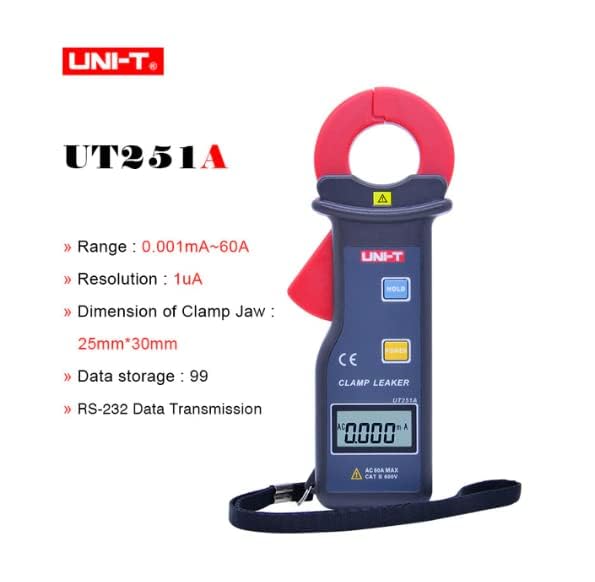
Figure 3.2: The UNI-T UT251A Clamp Meter highlighting its range, resolution, clamp jaw dimension, data storage, and RS-232 data transmission capabilities.
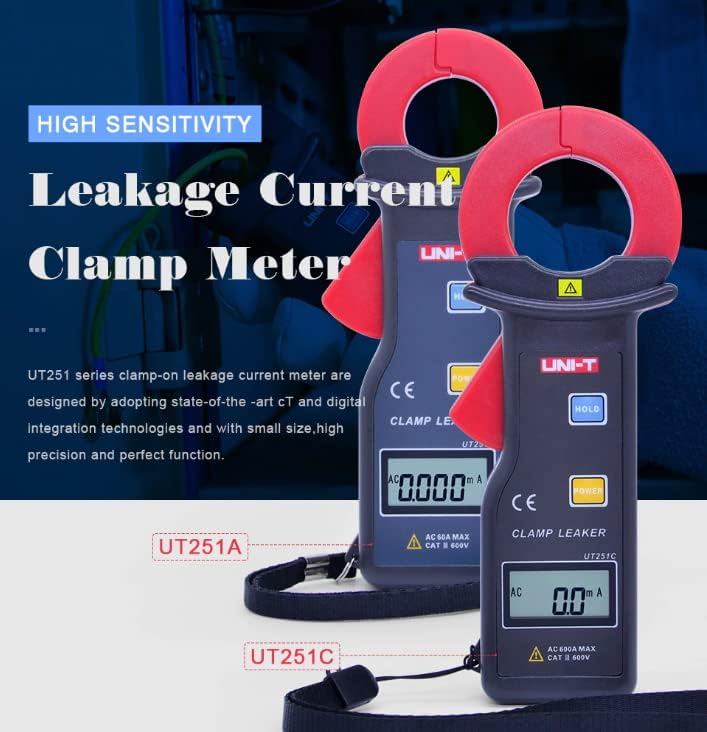
Figure 3.3: Comparison of UT251A and UT251C models, emphasizing their high sensitivity for leakage current measurement.
4. סעטאַפּ
4.1 באַטאַרייע ייַנמאָנטירונג
- געפינט דעם דעקל פונעם באַטעריע־אָפּטייל אויף דער הינטערשטער זייט פונעם מעטער.
- ניצט אַ שרויפנציהער צו לייזן די שרויף(ן) און אַראָפּנעמען דעם דעקל.
- Insert the 9V battery (6F22) into the compartment, observing correct polarity.
- לייג צוריק דעם דעקל פונעם באַטעריע־אָפּטייל און פֿעסטציִען די שרויף(ן).
4.2 ערשט טשעק
- Press the POWER button to turn on the meter.
- Verify that the LCD display shows "0.000mA" or a similar low reading in a stable environment.
- If a low battery indicator appears, replace the battery before use.
5. אַפּערייטינג ינסטרוקטיאָנס
5.1 Measuring AC Leakage Current
- צינדט אן דעם מעטער דורך דריקן דעם מאַכט קנעפּל.
- עפענען די קלamp קין דורך דריקן דעם טריגער.
- קערפאַלי קלamp the meter around a single conductor (live, neutral, or ground wire) of the circuit you wish to measure. Ensure the jaw is completely closed.
- Read the leakage current value displayed on the LCD. The meter will automatically select the appropriate range.
- For accurate readings, ensure no other conductors are within the clamp קין.
5.2 דאַטאַ האַלטן פֿונקציע
- בעשאַס אַ מעזשערמאַנט, דריקן די האַלטן קנעפּל צו פֿאַרפֿרירן די איצטיקע לייענונג אויף דער אַרויסווייַז.
- דרוק די האַלטן button again to release the data hold and resume live measurement.
5.3 שפּיץ האַלטן פונקציע
- The meter automatically captures peak values. Refer to the specific manual for detailed instructions on accessing and clearing peak hold readings.

Figure 5.1: The UNI-T UT251A Clamp Meter in use, measuring current on an electrical wire.

Figure 5.2: A user wearing protective gloves operating the UNI-T UT251A Clamp Meter within an electrical panel, demonstrating a typical application.
6. Data Logging and RS-232 Interface
The UT251A can store up to 99 sets of measurement data. This data can be retrieved and analyzed using the RS-232 interface and the provided PC software.
6.1 אויפֿהיטן דאַטן
- During a measurement, press the appropriate button (refer to the specific manual for button identification, often labeled "MEM" or similar) to save the current reading.
- The meter will indicate successful data storage, often by displaying a memory location number.
6.2 Connecting to PC via RS-232
- Install the PC software from the provided CD onto your computer.
- Connect the RS-232 interface cable to the meter's RS-232 port and to your computer's serial port (or a USB-to-serial adapter).
- Launch the PC software.
- Follow the software's instructions to establish communication with the meter and download the stored data.
Video 6.1: An official product video demonstrating the features and usage of the UNI-T UT251A/UT251C clamp meters, including a comparison of the two models and their accessories.
7. וישאַלט
7.1 רייניקונג
- ווישט אויס דעם מעטער'ס קasinג מיט אַדamp שטאָף און מילד וואַשפּולווער. דו זאלסט נישט נוצן אַברייסיווז אָדער סאָלוואַנץ.
- האַלטן די קלamp jaw clean and free of debris to ensure accurate measurements.
7.2 באַטערי פאַרבייַט
- When the low battery indicator appears, replace the 9V battery as described in the "Battery Installation" section.
- Remove the battery if the meter will not be used for an extended period to prevent leakage.
7.3 סטאָרידזש
- Store the meter in a cool, dry place, away from direct sunlight and extreme temperatures.
- ניצט דעם צוגעשטעלטן טראָג־זאַק פֿאַר שוץ בעת סטאָרידזש און טראַנספּאָרט.
8. טראָובלעשאָאָטינג
| פּראָבלעם | מעגלעך סיבה | לייזונג |
|---|---|---|
| דער מעטער גייט נישט אן. | טויטע אדער נישט ריכטיק אינסטאלירטע באַטעריע. | קאָנטראָלירט די פּאָלאַריטעט פון די באַטעריע אָדער פאַרבייט די 9V באַטעריע. |
| ומפּינקטלעך רידינגז. | שמוציק קלamp jaw; external magnetic fields; multiple conductors in jaw. | ריין די קלamp jaw; move away from strong magnetic fields; ensure only one conductor is clampעד. |
| "OL" (איבערלאָד) ווערט געוויזן. | Measured current exceeds the meter's range. | Ensure the current is within the meter's specified range (up to 60A for UT251A). |
| קען נישט פאַרבינדן צום פּיסי. | Incorrect cable connection; software not installed or configured properly. | Verify RS-232 cable connection; reinstall PC software; check software communication settings. |
9. ספּעסאַפאַקיישאַנז
| כאַראַקטעריסטיש | דעטאַל |
|---|---|
| מאָדעל | וט 251 אַ |
| Range (Leakage Current) | 0.001mA ~ 60A |
| האַכלאָטע | 1 µA |
| ווייַז גראף | 10000 |
| Sampלינג קורס | 2 מאל / רגע |
| Clamp Jaw Dimension | 25 מם X 30 מם |
| דאַטאַ סטאָרידזש | 99 שטעלט |
| צובינד | רס-232 |
| מאַכט | 9V באַטאַרייע (6F22) |
| ווייַז גרייס | 32 מם X 15 מם |
| פּראָדוקט נעץ וואָג | 120ג |
| פּראָדוקט גרייס | 175 מם X 70 מם X 38 מם |
| זיכערקייַט רייטינג | קאַץ III 600 וו |
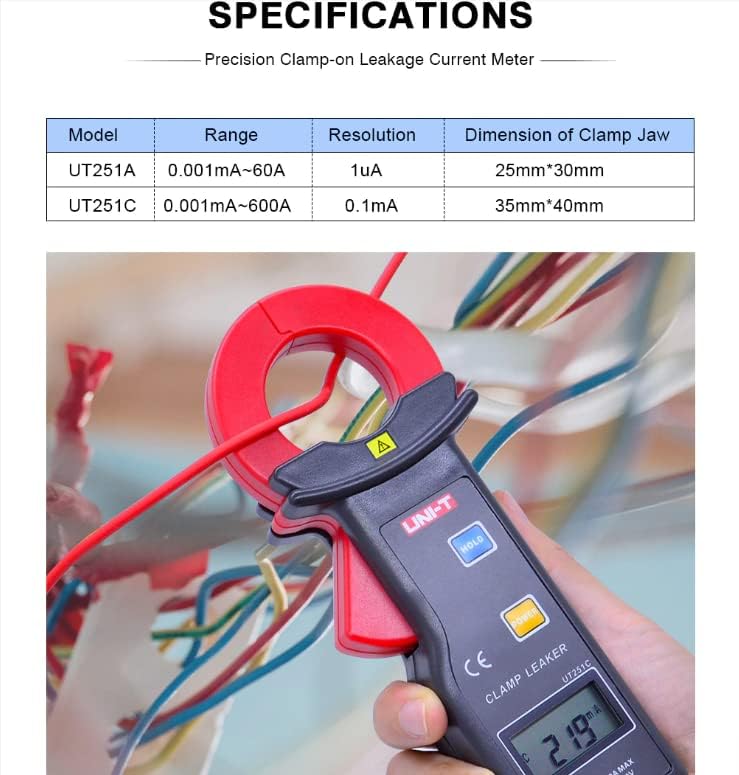
Figure 9.1: Detailed specifications table comparing the UT251A and UT251C models, including range, resolution, and clamp גרייס.
10. וואָס איז אין דער קעסטל
The standard package for the UNI-T UT251A includes:
- UNI-T UT251A Leakage Current Clamp מעטער
- 9V באַטעריע (6F22)
- RS-232 אינטערפייס קאַבל
- פּיסי ווייכווארג סי-די
- טאַלאַנט באָקס
- קעריינג באַג
- ענגליש מאַנואַל
- מכשיר באָקס

Figure 10.1: The UNI-T UT251A Clamp Meter shown with its packaging and included accessories, such as the RS-232 cable and software CD.
11. וואָראַנטי און שטיצן
For warranty information and technical support, please refer to the documentation included with your product or contact UNI-T customer service directly. Details can typically be found on the official UNI-T webוועבזייטל אדער דורך אייער קויפן-פונקט.