
הקדמה
This manual provides detailed instructions for the proper use and maintenance of your iCarsoft VOL V2.0 Auto Diagnostic Scanner. This device is designed to perform comprehensive diagnostics on Volvo and SAAB vehicles, offering a range of functions from reading and clearing trouble codes to performing specialized service resets. Please read this manual thoroughly before operating the device to ensure safe and effective use.
פּראָדוקט איבערview און פֿעיִקייטן
The iCarsoft VOL V2.0 is a multi-system diagnostic scanner engineered for Volvo and SAAB vehicles. It offers extensive diagnostic capabilities across various vehicle systems.
- פולע סיסטעם דיאַגנאָסטיק: Reads and clears trouble codes for all major systems including engine, transmission, ABS, and airbag.
- OBD II/EOBD Support: Supports all ten modes of OBD II/EOBD operations for complete ECU diagnosis.
- Oil Light/Service Reset: Resets the oil service light and performs other service resets.
- Electronic Parking Brake (EPB) System Maintenance: Facilitates safe and easy replacement of brake pads by retracting and engaging the electronic parking brake calipers.
- סטירינג ווינקל סענסאָר (SAS) קאַליבראַציע: Calibrates the steering angle sensor after replacement or maintenance.
- באַטעריע פאַרוואַלטונג סיסטעם (BMS) ריסעט: Resets the battery management system to register new batteries.
- ABS בלוטונג: Releases air from the ABS system to restore brake sensitivity or relearn after ABS replacement.
- אינדזשעקטאָר קאָדירונג: Relearns injector control parameters when injectors are renewed or replaced.
- דאַטן דרוקן: Allows printing of diagnostic data recorded by the scan tool or customized test reports.

פיגורע 1: פראָנט view of the iCarsoft VOL V2.0 Diagnostic Scanner, showing the display and control buttons.
וואָס איז אין די קעסטל
ווען איר עפֿענען דעם פּעקל, איר זאָל געפֿינען די פאלגענדע זאכן:
- iCarsoft VOL V2.0 Diagnostic Device
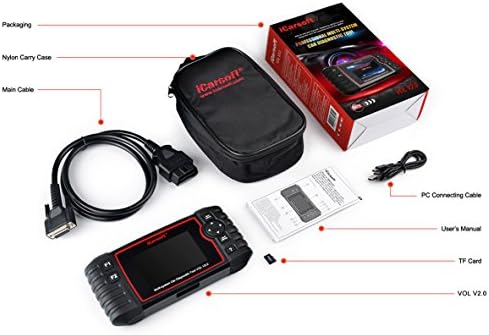
Figure 2: The iCarsoft VOL V2.0 package contents, including the diagnostic device, cables, and user manual.
סעטאַפּ
- געפינט דעם OBD-II פּאָרט: The OBD-II port is typically located under the dashboard on the driver's side of your vehicle.
- פאַרבינדן די מיטל: Plug the diagnostic device's cable firmly into the vehicle's OBD-II port.
- מאַכט אויף: The device will automatically power on once connected to the vehicle's OBD-II port. Ensure the vehicle's ignition is in the ON position (engine off) for most diagnostic functions.
אַפּערייטינג ינסטראַקשאַנז
The iCarsoft VOL V2.0 features an intuitive interface for easy navigation. Use the directional buttons and 'OK'/'ESC' buttons to move through menus and confirm selections.
1. לייענען און אויסמעקן פראבלעם קאודס
- From the main menu, select 'OBDII/EOBD' or 'For Volvo/SAAB' depending on the desired diagnostic depth.
- Choose 'Read Codes' to display current, pending, and permanent diagnostic trouble codes (DTCs).
- Select 'Clear Codes' to erase DTCs from the vehicle's ECU. Ensure you have addressed the underlying issue before clearing codes.
2. ספּעציעלע פאַנגקשאַנז
The device offers several specialized functions for vehicle maintenance:
- אָיל באַשטעטיק: Navigate to 'Oil Reset' from the main menu and follow the on-screen prompts to reset the oil service light.
- EPB צוריקשטעלן: For Electronic Parking Brake maintenance, select 'EPB Reset'. The device will guide you through the steps to safely retract and engage the brake calipers for pad replacement.
- SAS קאַלאַבריישאַן: Access 'SAS Reset' to perform steering angle sensor calibration.
- BMS צוריקשטעלן: Use 'BMS Reset' to register a new battery with the vehicle's system.
- ABS בלוטונג: Select 'ABS Bleeding' to perform the necessary procedures for bleeding the ABS system.
- אינדזשעקטאָר קאָדירונג: Choose 'Injector Coding' to relearn injector parameters after replacement.
3. לייוו דאַטן סטרים
- Select 'Data Stream' to view real-time data parameters from the vehicle's sensors. This can help in diagnosing intermittent issues.
וישאַלט
To ensure optimal performance and compatibility, it is recommended to regularly update the device's software. iCarsoft provides free lifetime updates for the VOL V2.0 scanner. Visit the official iCarsoft website for instructions on how to download and install the latest software updates.
טראָובלעשאָאָטינג
If you encounter issues with your iCarsoft VOL V2.0 scanner, consider the following:
- מיטל נישט פּאַוערינג אויף: Ensure the device is securely connected to the vehicle's OBD-II port and the vehicle's ignition is in the ON position. Check the vehicle's battery voltage.
- קאָמוניקאַציע ערראָרס: Verify that the vehicle is OBD-II compliant. Ensure the cable connection is secure. Try turning the ignition off, waiting 10 seconds, and then turning it back on.
- Incorrect Readings/Functions: Ensure the device software is up to date. Some advanced functions may not be supported on all vehicle models or years.
For further assistance, please visit the official iCarsoft website for detailed FAQs and technical support.
ספּעסאַפאַקיישאַנז
| באַשרייַבונג | דעטאַל |
|---|---|
| פאַבריקאַנט | iCarsoft |
| מאָדעל | VOL V2.0 |
| פּונקט וואָג | 1.54 פונט |
| פּראָדוקט דימענשאַנז | 2.8 X 9.2 X 5.5 אינטשעס |
| פאַרשטעלן גרייס | 1.4 אינטשעס |
| אָפּערייטינג סיסטעם | MAC OS or Windows |
| מאַכט מקור | קאָרדעד עלעקטריק |
וואָראַנטי און שטיצן
The iCarsoft VOL V2.0 comes with a 1-year seller assurance. For any questions, technical support, or warranty claims, please visit the official iCarsoft webפּלאַץ בייַ www.icarsoft.com. It is recommended to check the official webוועבזייטל פֿאַר די מערסט אַרויף-צו-דאַטע שטיצע אינפֿאָרמאַציע און רעסורסן.