
1. הקדמה און איבערview
The Quanta QTLBC95BT is a versatile wireless barcode reader designed for efficient data capture. It offers dual connectivity options: USB wireless and Bluetooth, providing flexibility for various scanning environments. This manual provides essential information for setting up, operating, and maintaining your device.
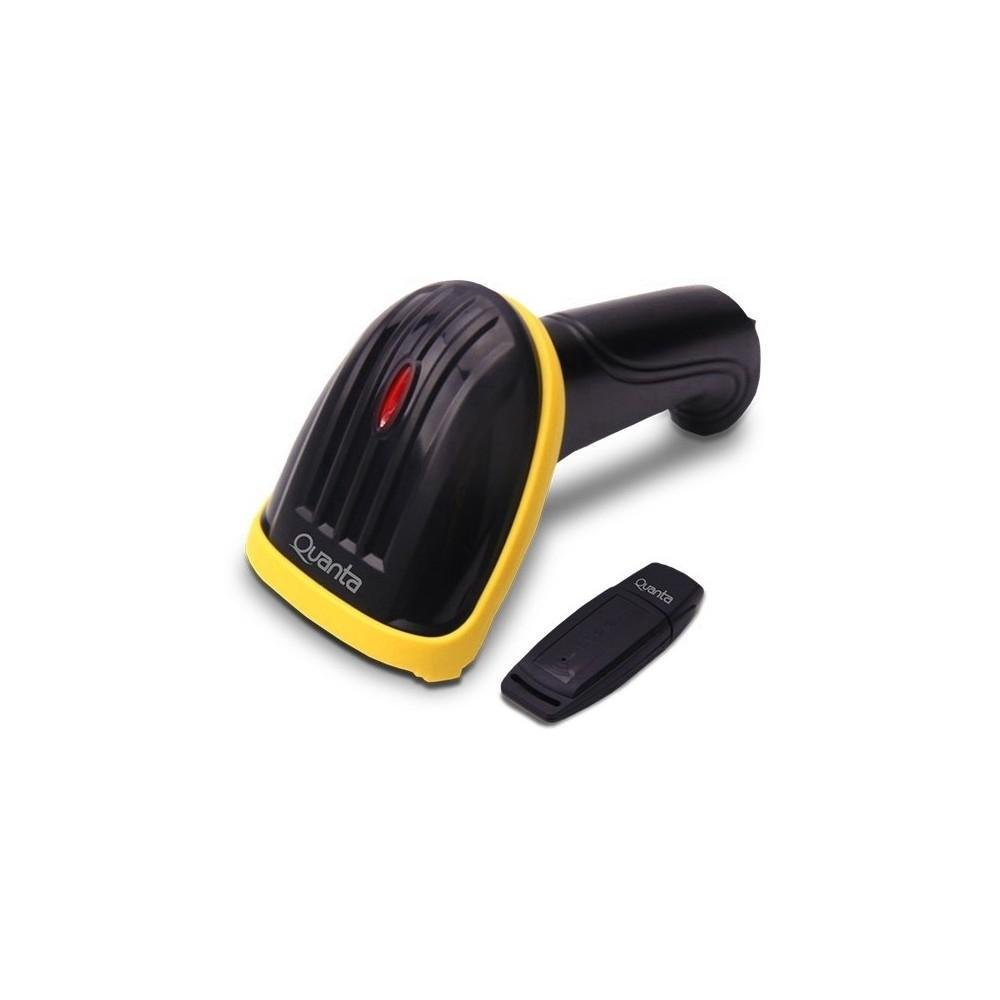
Image showing the black and yellow Quanta QTLBC95BT barcode reader and its compact black USB wireless adapter.
2. פּעקל אינהאַלט
ביטע באַשטעטיקן אַז אַלע זאכן זענען פאַראַן אין דעם פּעקל:
- 1 x Quanta QTLBC95BT Barcode Reader
- 1 x USB Wireless Adapter
- 1 x Charger (Bivolt 110V/220V)
- 1 x USB Cable (for charging and wired connection)
3. סעטאַפּ
3.1. טשאַרדזשינג די מיטל
- Connect the charger to the barcode reader's charging port.
- Plug the charger into a standard electrical outlet (110V/220V, 50Hz/60Hz).
- The device features a 3.7V Li-Ion 750 mAh rechargeable battery. Allow sufficient time for a full charge before first use.
3.2. Connecting via USB Wireless Adapter
- Insert the USB wireless adapter into an available USB port on your computer or host device.
- Turn on the barcode reader. It should automatically pair with the adapter.
- A successful connection is typically indicated by an audible beep or a change in the indicator light status on the scanner.
- The wireless transmission range for the USB adapter is approximately 30 meters.
3.3. קאַנעקטינג דורך בלועטאָאָטה
- זיכער מאַכן אַז אייער האָסט דעווייס (קאָמפּיוטער, טאַבלעט, סמאַרטפאָון) האט בלועטוט ענייבאַלד.
- Turn on the barcode reader.
- Initiate the pairing mode on the barcode reader (refer to specific instructions if a dedicated pairing button or sequence exists, otherwise it may automatically enter pairing mode).
- On your host device, search for new Bluetooth devices and select "Quanta QTLBC95BT" (or similar name) from the list.
- באַשטעטיקן די פּאָרינג.
- The Bluetooth transmission range is approximately 10 meters.
4. אַפּערייטינג ינסטרוקטיאָנס
4.1. סקאַנינג באַרקאָדעס
- Ensure the device is powered on and successfully connected to your host device.
- Point the scanner's window at the barcode you wish to read.
- Press the trigger button. A red scanning line will emit from the device.
- Position the scanner approximately 25 cm (10 inches) from the barcode for optimal reading.
- The scanner is bidirectional and has a decoding speed of 200 scans per second.
- Upon successful scan, the device will typically emit an audible beep, and the data will be transmitted to your connected device.
4.2. Auto-Sensor Mode
The scanner features an auto-sensor mode with an interval time of 0.3 seconds. In this mode, the scanner can automatically detect and read barcodes without requiring a trigger press, which is useful for hands-free operation.
5. וישאַלט
5.1. רייניקונג
- Use a soft, dry cloth to clean the exterior of the barcode reader.
- פֿאַרן סקענען פֿענצטער, ניצט אַ לינט-פֿרײַען שטאָף לײַכט אָפּגעווישט.ampגעוואשן מיט אַ מילדן, נישט-אברייזיוון רייניגער. פֿאַרמייַדן שטרענגע כעמיקאַלן.
- זיכער מאַכן אַז די דעוויס איז אויסגעלאָשן איידער רייניקונג.
5.2. באַטערי קער
- כדי צו פארלענגערן די לעבן פון די באַטעריע, זאָל מען נישט אָפט אויסלאָדן די באַטעריע גאָר.
- האַלט דעם אַפּאַראַט אין אַ קיל, טרוקן אָרט ווען נישט אין באַנוץ פֿאַר לענגערע פּעריאָדן.
6. טראָובלעשאָאָטינג
6.1. Device Not Scanning
- פאַרזיכערן אַז די מיטל איז פּאַוערד אויף און גאָר באפוילן.
- Verify that the scanner is properly connected to your host device (USB adapter or Bluetooth).
- Check if the barcode is damaged or unreadable.
- אַדזשאַסטירן די דיסטאַנץ און ווינקל צווישן דעם סקאַנער און דעם באַרקאָד.
6.2. No Data Transmission
- Confirm the connection status (USB or Bluetooth). Re-pair if necessary.
- Ensure the host device's input method is active and ready to receive data.
- Check the operating range (30m for USB wireless, 10m for Bluetooth).
6.3. באַטאַרייע ניט טשאַרדזשינג
- Verify that the charger is correctly connected to both the scanner and the power outlet.
- מאַכן זיכער אַז די מאַכט ווענטיל איז פאַנגקשאַנאַל.
- Try using a different USB cable or charger if available.
7. ספּעסאַפאַקיישאַנז
| שטריך | דעטאַל |
|---|---|
| סאָרט | קוואַנטאַ |
| מאָדעל נומער | QTLBC95BT |
| קאַנעקטיוויטי טעכנאָלאָגיע | Bluetooth, USB Wireless, USB Cable |
| מאַכט מקור | באַטאַרייע פּאַוערד, קאָרדעד עלעקטריק |
| באַטערי טיפּ | DC 3.7V Li-Ion 750 mAh Rechargeable |
| אַרייַנשרייַב וואָלtage | 110V/220V - 60Hz/50Hz (Bivolt) |
| סקאַננער טיפּ | בידירעקטיאָנאַל |
| Auto-Sensor Interval | 0.3 סעקונדעס |
| דעקאָדירונג גיכקייט | 200 סקאַנז / סעקונדע |
| Optimal Scanning Distance | 25 סענטימעטער |
| USB Wireless Transmission Range | אַרויף צו 30 מעטער |
| בלועטאָאָטה טראַנסמיסיע קייט | אַרויף צו 10 מעטער |
| קאָליר | שוואַרץ |
| פּעקל דימענשאַנז | 18 X 11 X 8 סענטימעטער |
| פּעקל וואָג | 350 ג |
8. וואָראַנטי און שטיצן
For warranty information or technical support, please refer to the documentation provided with your purchase or contact Quanta customer service directly. Contact details can typically be found on the manufacturer's official webפּלאַץ.