
הקדמה
Thank you for choosing the Cygnett FreePlay Bluetooth Earbuds. These truly wireless earbuds are designed to provide a seamless audio experience with comfort and convenience. This manual will guide you through the setup, operation, and maintenance of your new earbuds.
The FreePlay earbuds feature a secure fit with ultra-comfortable silicone ear tips, a lightweight design, and a 10-meter wireless range. They come with an integrated microphone and a portable charging case for extended use.
פּעקל אינהאַלט
ביטע זיכער מאַכן אַז אַלע זאכן זענען פאַראַן אין דיין פּעקל:
- Cygnett FreePlay Bluetooth Earbuds (Left and Right)
- טשאַרדזשינג קאַסע
- מיקראָ וסב טשאַרדזשינג קאַבלע
- סיליקאָנע אויער עצות (קליין, מיטל, גרויס)
פּראָדוקט איבערview
Familiarize yourself with the components of your Cygnett FreePlay Bluetooth Earbuds and how they fit.

בילד: A man wearing a Cygnett FreePlay earbud, demonstrating its discreet and secure fit.

בילד: A woman wearing a Cygnett FreePlay earbud, illustrating its comfortable placement for active use.

בילד: Close-up of a single Cygnett FreePlay earbud, showing the speaker mesh and silicone ear tip.
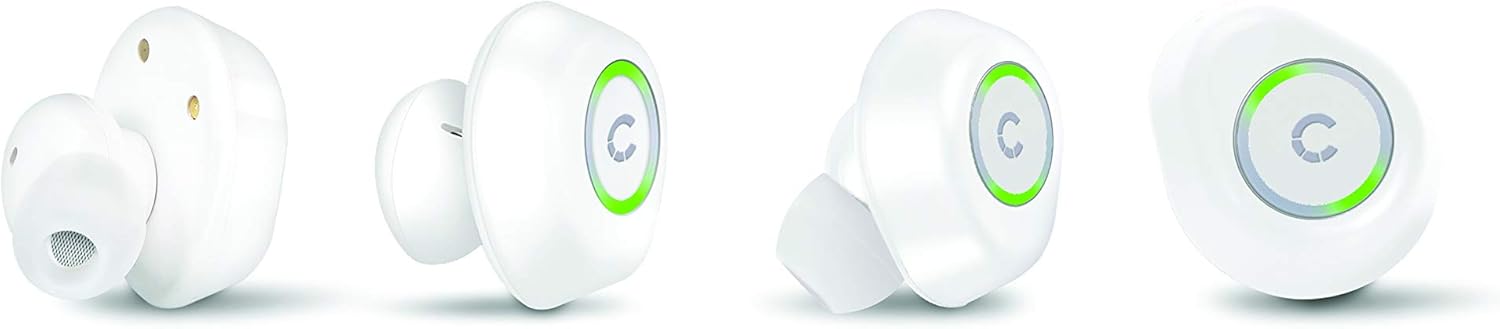
בילד: Various angles of the Cygnett FreePlay earbuds, highlighting their compact design and the illuminated 'C' logo.

בילד: The Cygnett FreePlay earbuds placed inside their open charging case, showing the charging contacts and the Cygnett branding.
סעטאַפּ
1. אויפלאָדן די אויערקנעפּלעך און קעסטל
פארן ערשטן באַנוץ, לאָדן די אויערקנעפּלעך און די טשאַרדזשינג קעסטל גאָר אויף.
- לייגט די אויערן-קנעפּלעך אין דעם טשאַרדזשינג קעסטל. מאַכט זיכער אַז זיי זענען ריכטיק אַרײַנגעזעצט אין זייערע ריספּעקטיווע סלאָץ (L פֿאַר לינקס, R פֿאַר רעכטס).
- Connect the Micro USB cable to the charging port on the case and the other end to a USB power source (e.g., computer, wall adapter).
- The indicator lights on the earbuds and/or case will show charging status.
- Once fully charged, disconnect the charging cable. The case provides approximately 6 hours of additional playback time for the earbuds.
2. בלועטאָאָטה פּערינג
To connect your Cygnett FreePlay earbuds to your device:
- Ensure the earbuds are charged and removed from the charging case. They should automatically enter pairing mode, indicated by a flashing LED light (color/pattern may vary).
- אויף אייער סמאַרטפאָון, טאַבלעט, אָדער אַנדער בלוטוט-ענייבאַלד מיטל, גייט צו די בלוטוט סעטטינגס.
- קער אויף בלועטאָאָטה.
- זוכן פֿאַר available devices. You should see "Cygnett FreePlay" or a similar name appear in the list.
- Select "Cygnett FreePlay" to connect. Once connected, the earbud LED light will typically stop flashing or change to a solid color.
- The earbuds will automatically reconnect to the last paired device when removed from the case and within range.
באַמערקונג: אויב די פּאָרינג פיילז, מאַכט אויס די אויערקנעפּלעך, דיאַקטיווירט בלועטוט אויף אייער מיטל, און איבערחזרט די טריט.
אפערירן די אויערקנעפלעך
The Cygnett FreePlay earbuds feature a simple single-button control for managing calls and music playback.
מוזיק קאָנטראָל
- שפּיל / פּויזע: Press the button once on either earbud.
- ווייַטער שפּור: Double-press the button on the right earbud.
- פֿריִערדיקע שפּור: Double-press the button on the left earbud.
- באַנד אַרויף: Triple-press the button on the right earbud.
- באַנד אַראָפּ: Triple-press the button on the left earbud.
רופן קאָנטראָל
- ענטפֿערן / סוף רופן: Press the button once on either earbud.
- אָפּוואַרפן רופן: Press and hold the button for approximately 2 seconds on either earbud.
- שטימע אַססיסטאַנט: Press and hold the button for approximately 2 seconds (when not on a call) to activate your device's voice assistant (e.g., Siri, Google Assistant).
מאַכט אויף / אַוועק
- מאַכט אויף: נעמט ארויס די אויערקנעפלען פון די טשאַרדזשינג קעסטל. זיי וועלן זיך אויטאָמאַטיש אנצינדן. אדער, דריקט און האלט דעם קנעפּל אויף יעדן אויערקנעפל פאר 3 סעקונדעס.
- מאַכט אַוועק: לייגט צוריק די אויערן-קנעפל אין די טשאַרדזשינג קעסטל. זיי וועלן זיך אויטאמאטיש אויסלעשן. אדער, דריקט און האלט דעם קנעפל אויף יעדן אויערן-קנעפל פאר 5 סעקונדעס.
וישאַלט
Proper care will extend the life of your Cygnett FreePlay earbuds.
- רייניקונג: Regularly clean the silicone ear tips with a soft, dry cloth. If necessary, use a slightly damp cloth with mild soap, then dry thoroughly. Do not use harsh chemicals or abrasive materials.
- סטאָרידזש: שטענדיק האַלטן די אויערקנעפּלעך אין זייער טשאַרדזשינג קעסטל ווען זיי זענען נישט אין באַנוץ צו באַשיצן זיי פון שטויב, שמוץ און שעדיקן.
- ויסמיידן נעץ: Keep the earbuds and charging case away from water and excessive moisture. While designed for active lifestyles, they are not waterproof.
- טעמפּעראַטור: Avoid exposing the device to extreme temperatures (hot or cold) as this can shorten battery life and affect performance.
טראָובלעשאָאָטינג
אויב איר טרעפט פּראָבלעמען מיט אייערע אויערן-קנעפּלעך, פּרוּווט די פֿאָלגנדיקע לייזונגען:
| פּראָבלעם | לייזונג |
|---|---|
| די אויערקנעפּלעך פאַרבינדן זיך נישט מיטן אַפּאַראַט. |
|
| קיין קול פון די אויערקנעפלעך. |
|
| איין אויערקנעפל ארבעט נישט. |
|
| די טשאַרדזשינג קעיס טשאַרדזשט זיך נישט. |
|
ספּעסאַפאַקיישאַנז
| מאָדעל נאָמען | Cy2496Frepl |
| מאָדעל נומער | CY2496FREPL |
| סאָרט | סיגנעט |
| קאַנעקטיוויטי טעכנאָלאָגיע | ווירעלעסס |
| ווירעלעסס קאָמוניקאַציע טעכנאָלאָגיע | בלועטאָאָטה |
| ווירעלעסס ראַנגע | 10 מעטער |
| פאָרם פאַקטאָר | אין אויער |
| מאַטעריאַל | סיליקאָנע |
| קאָליר | ווייַס |
| באַטערי טיפּ | 1 ליטיום מעטאַל (אַרייַנגערעכנט) |
| רעדן צייט | 3 שעה |
| סטאַנדביי צייט | 100 שעה |
| Additional Playback from Case | 6 שעה |
| קאָנטראָל טיפּ | קנעפּל קאָנטראָל |
| קאַמפּאַטאַבאַל דעוויסעס | סמאַרטפאָנע, טאַבלעט |
| אַרייַנגערעכנט קאַמפּאָונאַנץ | מיקראָ וסב קאַבלע |
| טשאַרדזשינג פּאָרט | וסב |
וואָראַנטי און שטיצן
For warranty information and customer support, please refer to the documentation provided with your purchase or visit the official Cygnett webפּלאַץ.
If you require further assistance or have questions not covered in this manual, please contact Cygnett customer service.