
1. הקדמה
Thank you for choosing the Zerone LP-838 Small Power Amplifier. This manual provides essential information for the safe and efficient operation of your device. Please read these instructions thoroughly before use and retain them for future reference.
2. פּראָדוקט איבערview
2.1 שליסל פֿעיִקייטן
- סאָליד און פּאָרטאַטיוו פּלאַן.
- RCA and 3.5mm audio input compatibility.
- High-power audio amplifier chip for 2.1 channel output.
- Adjustable Treble, Bass, and Volume controls.
- Durable all-aluminum alloy shell for electromagnetic interference reduction.
2.2 קאָמפּאָנענט לעגיטימאַציע
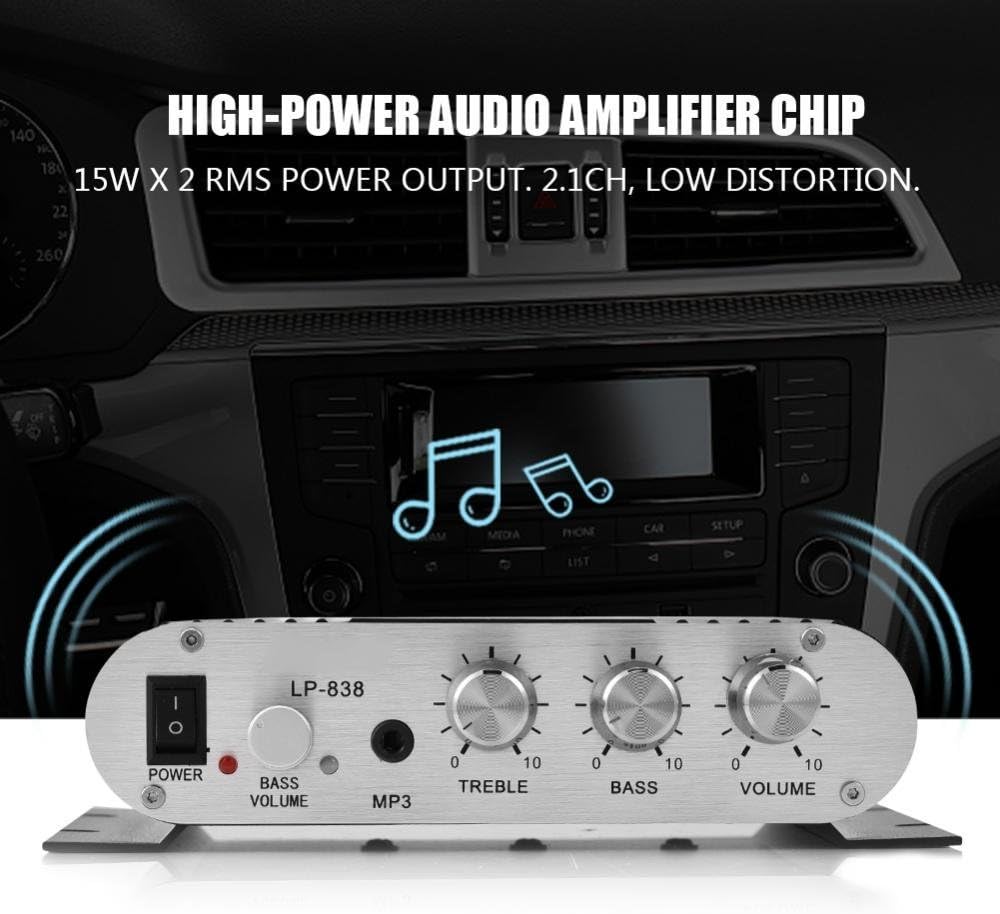
פיגור 1: פראָנט פּאַנעל קאָנטראָלס און אינפוטס
This image displays the front panel of the LP-838 amplifier. From left to right, it features a power switch, a bass volume knob, a 3.5mm MP3 input jack, and three rotary knobs for Treble, Bass, and Master Volume control. The unit also supports RCA audio input, as indicated by the text overlay.
פיגור 2: הינטערשטע פּאַנעל קאַנעקשאַנז
This image shows the rear panel of the LP-838 amplifier. On the left are the RCA audio input jacks (red for right, white for left). In the center are the spring-clip speaker terminals for connecting left and right speakers. On the right is the DC 12V/3A power input jack and a 'Q.C. PASSED' stamp, indicating quality control.
פראָנט פּאַנעל:
- מאַכט באַשטימען: טאַגאַלז די ampליפיער אויף / אַוועק.
- BASS VOLUME Knob: אַדזשאַסטירט דעם באַס לעוועל פון די אַודיאָ אַוטפּוט.
- MP3 אַרייַנשרייַב: 3.5mm jack for connecting portable audio devices.
- טרעבל קנופּ: אַדזשאַסטירט די הויך-פרעקווענץ רעאַקציע.
- באַס קנופּ: אַדזשאַסטירט די נידעריק-פרעקווענץ רעאַקציע.
- VOLUME קנופּ: קאָנטראָלס די קוילעלדיק רעזולטאַט באַנד.
ריר פּאַנעל:
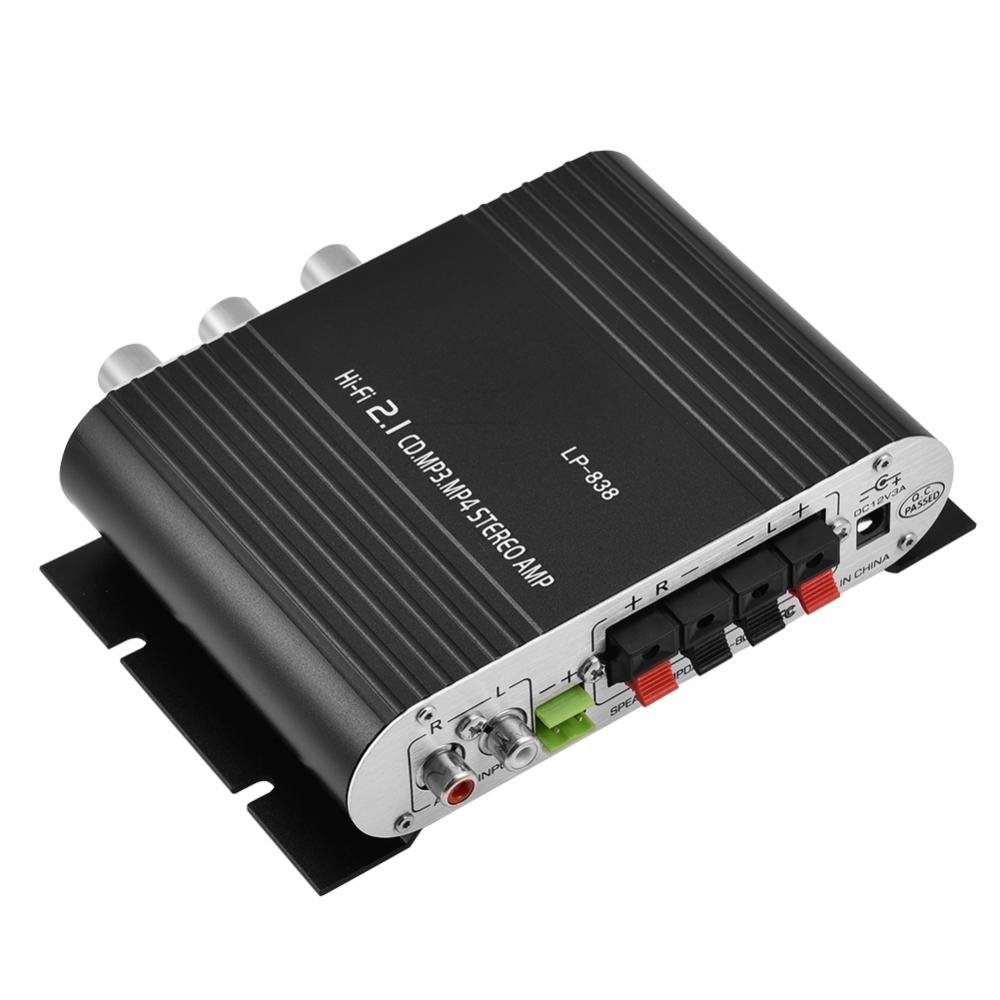
- AUDIO INPUT (RCA): Red and white RCA jacks for connecting audio sources (e.g., DVD players, computers).
- SPEAKER OUTPUTS (+R -R +L -L): Spring-clip terminals for connecting passive speakers. Ensure correct polarity (+ to + and - to -).
- DC 12V/3A Input: Power input jack for connecting the external power adapter (not included).
3. סעטאַפּ
- פֿאַרבינדן רעדנערס: Connect your passive speakers to the SPEAKER OUTPUT terminals on the rear panel. Ensure the positive (+) terminal of the amplifier connects to the positive (+) terminal of the speaker, and the negative (-) terminal of the amplifier connects to the negative (-) terminal of the speaker. The ampדער ליפיער שטיצט רעדנערס מיט אן אימפעדאַנס פון 4-8 אָום.
- פֿאַרבינדן אַודיאָ מקור:
- For RCA input: Connect your audio source (e.g., CD player, TV, computer) to the RCA AUDIO INPUT jacks on the rear panel using an RCA cable.
- For 3.5mm input: Connect your portable audio device (e.g., smartphone, MP3 player) to the MP3 input jack on the front panel using a 3.5mm audio cable.
- פאַרבינדן מאַכט: Connect a compatible DC 12V/3A power adapter (not included) to the DC 12V/3A input jack on the rear panel. Plug the power adapter into a wall outlet.
Important: Ensure all connections are secure before powering on the ampליפער.
4. אַפּערייטינג ינסטרוקטיאָנס
- מאַכט אויף: Flip the POWER switch on the front panel to the 'ON' position. The power indicator light will illuminate.
- אויסקלייַבן אַרייַנשרייַב: די amplifier automatically uses the active input. If both RCA and 3.5mm inputs are connected, the 3.5mm input may take precedence.
- סטרויערן באַנד: Start with the VOLUME knob set to a low level. Begin playing audio from your source, then slowly increase the VOLUME knob to your desired listening level.
- צופּאַסן טאָן: Use the TREBLE and BASS knobs to fine-tune the high and low frequencies according to your preference. The BASS VOLUME knob provides additional control over the bass output.
- מאַכט אַוועק: When finished, turn the VOLUME knob down to its minimum setting, then flip the POWER switch to the 'OFF' position.
5. וישאַלט
- רייניקונג: ניצן אַ ווייך, טרוקן שטאָף צו ריין די יקסטיריער פון די ampניצט נישט קיין פליסיקע רייניגער אדער סאָלווענטן.
- ווענטילאַטיאָן: פאַרזיכערן די amplifier is placed in a well-ventilated area to prevent overheating. Do not block the ventilation slots.
- סטאָרידזש: ווען נישט אין באַנוץ פֿאַר לענגערע צייטן, אָפּשטעקן דעם מאַכט אַדאַפּטער און לאַגערן דעם amplifier in a cool, dry place.
6. טראָובלעשאָאָטינג
| פּראָבלעם | מעגלעך סיבה | לייזונג |
|---|---|---|
| קיין מאַכט | שטראָם אַדאַפּטער נישט פארבונדן אָדער דעפעקטיוו; שטראָם אויסשאַלט. | Ensure power adapter is securely connected and functional. Flip power switch to ON. |
| קיין געזונט רעזולטאַט | Incorrect audio input connection; speaker wires loose or incorrect polarity; volume too low; audio source issue. | Check audio input cables and connections. Verify speaker wire connections and polarity. Increase volume. Test audio source with another device. |
| פאַרקרימט געזונט | Volume too high; incorrect tone settings; faulty audio source or cable. | Reduce volume. Adjust Treble and Bass knobs. Test with a different audio source or cable. |
| כאַמינג אָדער באַזינג ראַש | Ground loop issue; interference from other electronics; faulty cables. | Ensure all components are properly grounded. Move amplifier away from other electronic devices. Try different audio cables. |
7. ספּעסאַפאַקיישאַנז
- סאָרט: נול
- מאָדעל נומער: Zeroneq8ae3d902g-02 (LP-838)
- Voltage: 14.4 וואלטס (אין ארבעט)
- נומער פון טשאַנאַלז: 2
- רעדנער ימפּידאַנס: 4-8 אָהמס
- מאַונטינג טיפּ: ייבערפלאַך בארג
- נומער וואָג: 7.8 אונסעס
- ASIN: B07DM4QJGX
- UPC: 763741184919
- ערשטער דאַטע בנימצא: יולי 4, 2019
8. וואָראַנטי אינפֿאָרמאַציע
For specific warranty terms and conditions, please refer to the documentation provided at the time of purchase or contact your retailer. Warranty coverage typically includes defects in materials and workmanship under normal use.
9. שטיצן
If you encounter issues that cannot be resolved using the troubleshooting guide, please contact the retailer or manufacturer for assistance. Provide your product model number (LP-838) and a detailed description of the problem when seeking support.