
1. פּראָדוקט איבערview
The Zerone Multi-Language Translator Bluetooth Earphone is a portable wireless device designed for real-time language translation and audio playback. It features Bluetooth 4.1 connectivity, high-fidelity audio output, and a compact in-ear design for comfortable use during various activities.

בילד 1.1: הויפּט view of the Zerone Multi-Language Translator Bluetooth Earphone.
2. פּעקל אינהאַלט
ביטע באַשטעטיקן אַז אַלע זאכן וואָס זענען ליסטעד אונטן זענען אַרייַנגערעכנט אין דיין פּעקל:
- Zerone Multi-Language Translator Bluetooth Earphone
- וסב טשאַרדזשינג קאַבלע
- Additional Ear Tips (various sizes)
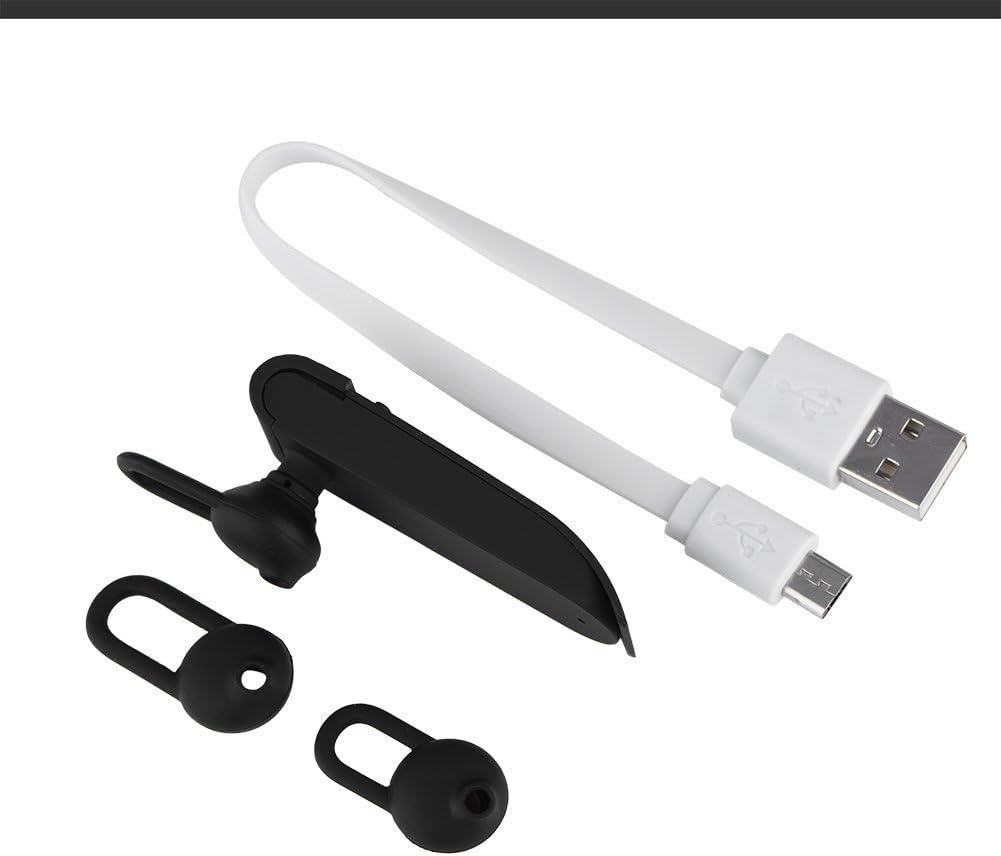
Image 2.1: The earphone with its charging cable and two additional ear tips.
3. פּראָדוקט פֿעיִקייטן
- Multi-Language Translation: Supports up to 16 languages for real-time translation. Speak into the earphone, and it will translate into the desired language.
- High Fidelity Audio Output: Equipped with an 8mm moving coil speaker for clear, smooth audio and enhanced bass.
- True Wireless In-Ear Design: Mini and compact, offering a stable and comfortable fit without tangled wires, suitable for various activities.
- בלועטאָאָטה 4.1 קאַנעקטיוויטי: Optimized Bluetooth 4.1 version ensures a stable and fast wireless connection with a range of up to 10 meters.
- עקסטענדעד באַטאַרייע לעבן: Built-in 90mAh rechargeable lithium battery provides approximately 5-8 hours of playback time and up to 13 hours of talk time.

Image 3.1: Visual representation of the 16 languages translation feature.

Image 3.2: Illustration of the high fidelity audio output with an 8mm moving coil speaker.

Image 3.3: Visual representation of the Bluetooth true wireless connection with a 10-meter transmission range.

Image 3.4: Details on the earphone's 90mAh rechargeable lithium battery and extended usage times.
4. סעטאַפּ
4.1 אויפלאָדן די אויערפאָן
Before initial use, fully charge the earphone. Connect the provided USB charging cable to the earphone's charging port and the other end to a USB power source (e.g., computer, wall adapter). The charging time is approximately 2 hours.
4.2 בלועטאָאָטה פּערינג
- Ensure the earphone is fully charged and powered off.
- Press and hold the multi-function button on the earphone until the indicator light flashes red and blue alternately, indicating pairing mode.
- אויף אייער סמאַרטפאָון אָדער בלועטוט-ענייבאַלד מיטל, נאַוויגירט צו די בלועטוט סעטטינגס.
- זוכן פֿאַר available devices and select "Zerone Translator Earphone" (or similar name) from the list.
- אַמאָל פארבונדן, וועט די אינדיקאַטאָר ליכט טיפּיש ווערן האַרט בלוי אָדער בלינקען בלוי לאַנגזאַם.
4.3 Companion Application (for Translation)
To utilize the multi-language translation feature, you will need to download and install a compatible companion application on your smartphone. Refer to the packaging or product documentation for the specific app name and download instructions. Ensure your phone is connected to the internet for translation services.
5. אַפּערייטינג ינסטרוקטיאָנס
5.1 מאַכט אויף / אַוועק
- מאַכט אויף: Press and hold the multi-function button for approximately 3 seconds until the indicator light turns blue.
- מאַכט אַוועק: Press and hold the multi-function button for approximately 5 seconds until the indicator light turns red.
5.2 מוזיק פּלייבאַק
- שפּיל / פּויזע: קורץ דריקן די מולטי-פונקציע קנעפּל.
- ווייַטער שפּור: דריקט צוויי מאָל דעם מולטי-פונקציע קנעפּל.
- פֿריִערדיקע שפּור: דריק דריי מאָל דעם מולטי-פֿונקציע קנעפּל.
5.3 רוף פאַרוואַלטונג
- ענטפֿערן / סוף רופן: קורץ דריקן די מולטי-פונקציע קנעפּל.
- אָפּוואַרפן רופן: דריקן און האַלטן די מולטי-פונקציע קנעפּל פֿאַר 2 סעקונדעס.
5.4 ניצן די איבערזעצונג פונקציע
After successfully pairing the earphone with your device and setting up the companion application:
- Open the translation application on your smartphone.
- Select the source and target languages within the app.
- Activate the translation mode as instructed by the application (this may involve pressing a button on the earphone or within the app).
- Speak clearly into the earphone's microphone. Your speech will be translated and played back through the earphone or your phone's speaker, depending on the app's settings.

Image 5.1: A conceptual image demonstrating the earphone's translation capability between two languages.
6. וישאַלט
- רייניקונג: Use a soft, dry cloth to clean the earphone. Do not use abrasive cleaners or immerse the device in water.
- סטאָרידזש: האַלט די אויערפאָן אין אַ קיל, טרוקן אָרט אַוועק פון דירעקט זונשייַן און עקסטרעמע טעמפּעראַטורן.
- באַטערי זאָרגן: כדי צו פארלענגערן די לעבן פון די באַטעריע, זאָלט איר נישט אָפט אויסלאָדן די אויערפאָן. לאָדט עס אָפט אויף, אפילו אויב עס ווערט נישט גענוצט פאר לענגערע צייטן.
7. טראָובלעשאָאָטינג
| פּראָבלעם | מעגלעך סיבה | לייזונג |
|---|---|---|
| Earphone does not power on | נידעריק באַטאַרייע | Charge the earphone for at least 30 minutes. |
| קען נישט צוזאמענשטעלן מיטן אפאראט | Earphone not in pairing mode; Bluetooth off on device; device too far | Ensure earphone is in pairing mode (flashing red/blue). Turn on Bluetooth on your device. Move device closer to earphone (within 10m). |
| No sound during playback/calls | Volume too low; earphone not connected; media output not selected | Increase volume on both earphone and connected device. Re-pair the earphone. Check device's audio output settings. |
| איבערזעצונג פונקציע ארבעט נישט | Companion app not open/configured; no internet connection; microphone blocked | Ensure the companion app is open and correctly configured. Verify internet connectivity. Check if the earphone's microphone is clear. |
8. ספּעסאַפאַקיישאַנז
| שטריך | דעטאַל |
|---|---|
| מאָדעל נומער | 4351510494 |
| קאַנעקטיוויטי טעכנאָלאָגיע | ווירעלעסס (בלועטאָאָטה) |
| בלועטאָאָטה ווערסיע | 4.1 |
| בלועטאָאָטה קייט | אַרויף צו 10 מעטער |
| באַטאַרייע קאַפּאַציטעט | 90 מאַה ליטהיום באַטערי |
| פּלייַינג צייט | 5-8 שעה |
| רעדן צייט | אַרויף צו 13 שעה |
| טשאַרדזשינג צייט | בעערעך 2 שעה |
| כעדפאָונז דזשאַק | USB (פֿאַר טשאַרדזשינג) |
| מאַטעריאַל | פּלאַסטיק |
| אויער פּלייסמאַנט | אין אויער |
| פאָרם פאַקטאָר | אין אויער |
| קאָנטראָל טיפּ | מעדיע קאָנטראָל, ריר |
| ראַש קאָנטראָל | אַקטיוו ראַש קאַנסאַליישאַן |
| פּונקט וואָג | 2.39 אונסעס |
9. וואָראַנטי און שטיצן
For warranty information and technical support, please refer to the documentation included with your purchase or visit the official Zerone webזייטל. האַלט דיין קויפן באַווייַז פֿאַר וואָראַנטי קליימז.