
Amazon Basics DLB111-US290
אַמאַזאָן באַסיקס איין קאָמפּיוטער מאָניטאָר שטאַנד באַניצער מאַנואַל
Model: DLB111-US290 | Brand: Amazon Basics
הקדמה
This user manual provides comprehensive instructions for the assembly, operation, and maintenance of your Amazon Basics Single Computer Monitor Stand. This desk-mounted arm is designed to enhance your workspace ergonomics and free up valuable desk space by securely holding a single computer monitor.
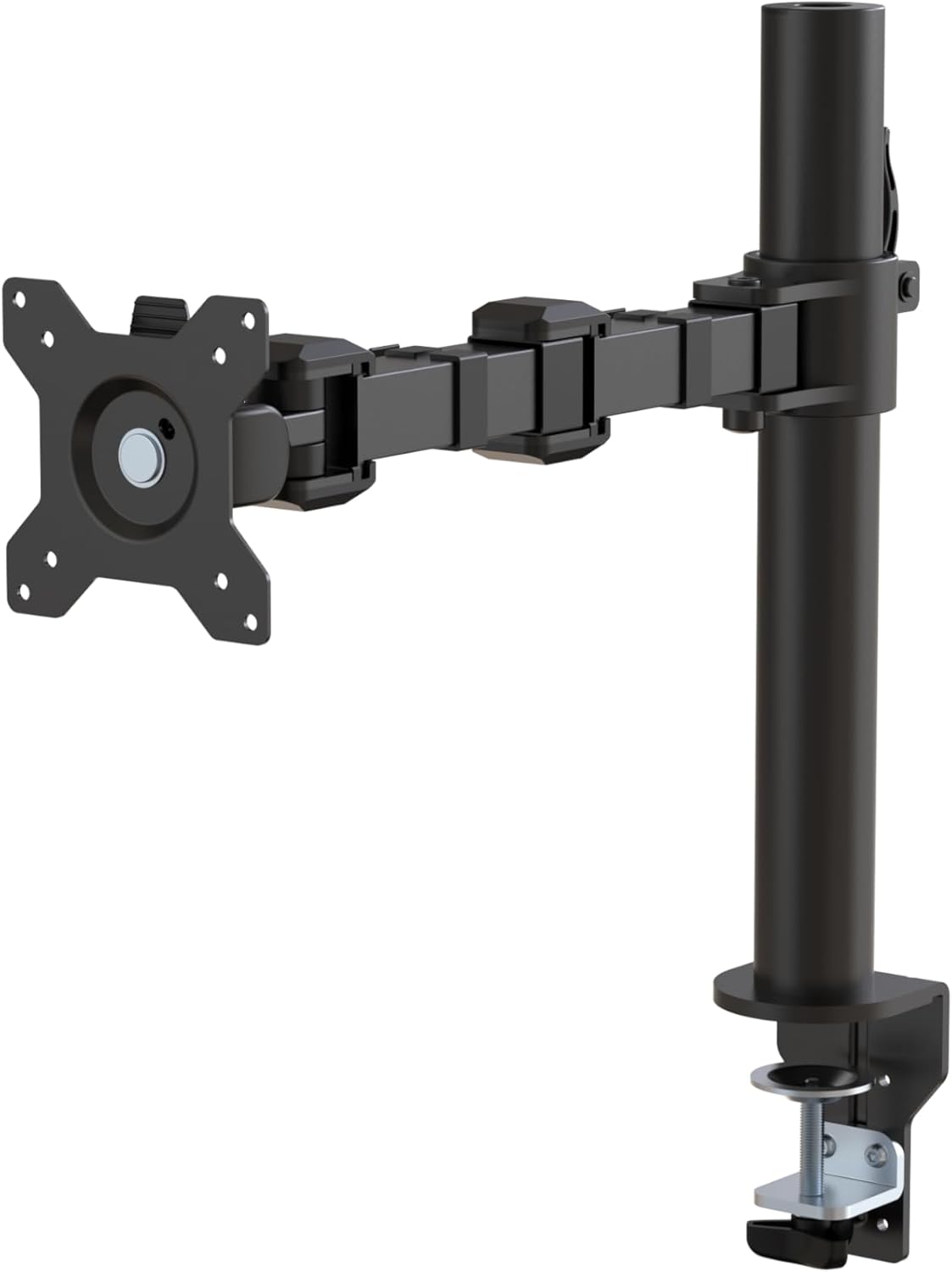
פיגורע 1: איבערview of the Amazon Basics Single Computer Monitor Stand.
וויכטיק סאַפעטי אינפֿאָרמאַציע
- לייענען אַלע ינסטראַקשאַנז קערפאַלי איידער פֿאַרזאַמלונג און נוצן.
- נישט איבערשטייגן די מאקסימום וואָג קאַפּאַציטעט פון 22 פונט (10 ק"ג).
- Ensure your desk surface is stable and can support the combined weight of the monitor arm and your monitor.
- Verify that the desk thickness is between 0.8 to 3.9 inches (2 cm to 10 cm) for proper clamp ייַנמאָנטירונג.
- Use only the provided hardware. If any parts are missing or damaged, contact customer support.
- האַלטן קינדער און פּעץ אַוועק בעשאַס פֿאַרזאַמלונג.
- קאָנטראָלירט פּעריִאָדיש אַלע שרויפן און פֿאַרבינדונגען צו זיכער מאַכן אַז זיי בלייבן פֿעסט און זיכער.
פּעקל אינהאַלט
ביטע באַשטעטיקן אַז אַלע קאָמפּאָנענטן זענען פאַראַן איידער איר הייבט אָן צו פֿאַרזאַמלען:
- Monitor Arm Assembly (Pre-assembled arm and VESA plate)
- דעסק קלamp באַזע
- מאָונטינג פּאָול
- Hardware Kit (Screws for VESA mounting, Allen keys)
- קאַבלע מאַנאַגעמענט קליפּס
- באַניצער מאַנואַל
סעטאַפּ אינסטרוקציעס
Step 1: Attach Desk Clamp באַזע
שטעלן די שרייַבטיש קלamp base on your desk edge. Ensure the desk thickness is compatible (0.8 to 3.9 inches). Tighten the clamp screw securely until the base is firmly attached to the desk. Do not overtighten.

Figure 2: Securely attaching the desk clamp base to your desk.
Step 2: Install Mounting Pole
Insert the mounting pole into the hole on the desk clamp base. Secure it by tightening the set screw on the side of the clamp base using the provided Allen key.
Step 3: Attach Monitor Arm to Pole
Slide the monitor arm assembly onto the mounting pole. Adjust the height to your desired position and tighten the height adjustment screw on the arm collar to secure it.
שריט 4: צוטשעפּען די VESA פּלאַטע צום מאָניטאָר
The monitor arm features a detachable VESA plate. Remove the VESA plate from the arm by lifting it up. Align the VESA plate with the mounting holes on the back of your monitor (compatible with 100x100mm and 75x75mm VESA patterns). Use the appropriate screws from the hardware kit to secure the plate to your monitor. Ensure the screws are tightened firmly but do not overtighten.

Figure 3: The detachable VESA plate for easy monitor attachment.
Step 5: Mount Monitor to Arm
Carefully slide the monitor (with the attached VESA plate) onto the monitor arm. Ensure it clicks securely into place. You may need to adjust the tension screws on the arm joints to support the monitor's weight and allow for smooth movement.

Figure 4: Monitor securely mounted on the arm, viewעד פון די פראָנט.

Figure 5: Top-down perspective of the monitor mounted, showcasing desk space optimization.
שריט 6: קאַבלע פאַרוואַלטונג
Utilize the integrated cable management system to route your monitor cables (power, video, etc.) along the arm and down the pole. This helps maintain a tidy workspace and prevents cable clutter.
אַפּערייטינג ינסטראַקשאַנז
The monitor arm offers a full range of motion to customize your viewדערפאַרונג:
- הייך אַדזשאַסטמאַנט: The horizontal arm can be adjusted from 7.9 to 14.2 inches high along the pole. Loosen the height adjustment screw on the arm collar, slide the arm to the desired height, and re-tighten.
- טילט: Adjust the screen tilt from -15 to +85 degrees to reduce glare and optimize viewינג אַנגלעס.
- סוויוול: Swivel the monitor left or right up to 180 degrees at various joints for collaborative viewing or screen sharing.
- ראָוטיישאַן: Rotate the monitor 360 degrees to switch between landscape and portrait modes without removing the monitor.

Figure 6: Visual representation of the flexible screen adjustment capabilities: Tilt (-85/+15 degrees), Swivel (±180 degrees), and Rotation (360 degrees).
ערגאַנאַמיק פּאַזישאַנינג
Proper monitor positioning is crucial for ergonomic comfort and reducing strain. Adjust the monitor arm so that the top of your monitor screen is at or slightly below eye level when you are sitting upright. Your eyes should be approximately an arm's length away from the screen. Ensure your wrists are straight and your forearms are parallel to the floor when typing.

Figure 7: Comparison of correct and incorrect sitting postures, highlighting the importance of proper monitor height.
וישאַלט
- רייניקונג: ווישט דעם מאָניטאָר אָרעם מיט אַ ווייכן, דamp שטאָף. פֿאַרמײַדט אַברייסיוו רייניגער אָדער סאָלווענטן וואָס קענען שאַטן די ענדיקונג.
- פעסטקייט קאָנטראָל: Periodically check all screws and connections, especially the desk clamp and VESA plate screws, to ensure they are tight and secure. Re-tighten if necessary.
- שמירן: No lubrication is required for the moving parts.
טראָובלעשאָאָטינג
| פּראָבלעם | מעגלעך סיבה | לייזונג |
|---|---|---|
| מאָניטאָר אָרעם בייגט זיך אָדער האַלט נישט די פּאָזיציע. | Tension screws are too loose. | Tighten the tension screws on the arm joints using the provided Allen key until the arm holds the monitor's weight. |
| מאָניטאָר וואָקלט זיך אויף דער אָרעם. | וועסאַ פּלאַטע שרויפן זענען לויז אָדער טיש קלעפּיקamp is not secure. | Ensure the VESA plate screws attaching the monitor are tight. Re-tighten the desk clamp שרויף. |
| Cannot adjust monitor height. | Height adjustment screw is too tight. | Loosen the height adjustment screw on the arm collar, adjust height, then re-tighten. |
ספּעסאַפאַקיישאַנז
| שטריך | דעטאַל |
|---|---|
| מאָדעל נומער | DLB111-US290 |
| פּראָדוקט דימענשאַנז | 20 X 18.13 X 4.5 אינטשעס |
| פּונקט וואָג | 5.59 פונט |
| מאַטעריאַל | אַללוי סטיל |
| קאָליר | שוואַרץ |
| מאַונטינג טיפּ | טאַבלעטאָפּ קלamp בארג |
| קאָמפּאַטיבלע פאַרשטעלן גרייס | 13-30 אינטשעס |
| מאַקסימום וואָג קאַפּאַציטעט | 22 פונט (10 קג) |
| Desk Thickness Compatibility | 0.8-3.9 אינטשעס |
| VESA קאַמפּאַטאַבילאַטי | 75 קס 75 מם, 100 קס 100 מם |
| הייך אַדדזשוסטמענט ראַנגע | 7.9 to 14.2 inches (horizontal arm) |
| טילט ווינקל | -קסנומקס צו + קסנומקס דיגריז |
| ראָוטיישאַן | 360 דיגריז |
וואָראַנטי און שטיצן
This product is backed by an Amazon Basics limited 1-year warranty.
For detailed warranty information or technical support, please refer to the official documentation or contact Amazon Basics customer service.
- באַניצער מאַנואַל (PDF): אראפקאפיע באַניצער מאַנואַל
- גאַראַנטיע (PDF): דאַונלאָוד וואָראַנטי אינפֿאָרמאַציע
Ask a question about this manual
Ask about setup, troubleshooting, compatibility, parts, safety, or missing instructions. Manuals+ will review the question and use this page’s manual context to help answer it.