
1. הקדמה
א דאנק פארן קויפןasing the CAIWEI A8AB-NEW Video Projector. This manual provides essential information for the safe and efficient operation of your device. Please read it thoroughly before use and retain it for future reference.
2. זיכערקייַט אינסטרוקציעס
- קוק נישט גלייך אריין אין די פּראָיעקטאָר לינז ווען די לamp איז אויף.
- פאַרזיכערן געהעריק ווענאַליישאַן אַרום די פּראַדזשעקטער צו פאַרמייַדן אָוווערכיטינג.
- שטעלט נישט אויס דעם פּראָיעקטאָר צו רעגן אָדער פֿײַכטקייט.
- ניצט נאָר דעם מאַכט אַדאַפּטער וואָס ווערט צוגעשטעלט מיטן פּראָיעקטאָר.
- Keep the projector away from flammable materials.
- נעמט ארויס דעם פּראָיעקטאָר בעת בליץ-שטורעמס אדער ווען מען ניצט אים נישט פאר לאַנגע פּעריאָדן.
- פרובירט נישט צו פאררעכטן דעם פראיעקטאר אליין. לאָזט איבער אלע סערוויסעס צו קוואַליפֿיצירטע פּערסאָנעל.
3. פּעקל אינהאַלט
ביטע קאָנטראָלירט אַז אַלע זאכן זענען פאַראַן ביים אויספּאַקן:
- CAIWEI A8AB-NEW Video Projector
- מאַכט קאַבלע
- ווייַט קאָנטראָל
- HDMI קאַבלע
- ווגאַ קאַבלע
- אב קאַבלע
- באַניצער מאַנואַל
4. פּראָדוקט איבערview
Familiarize yourself with the projector's components:
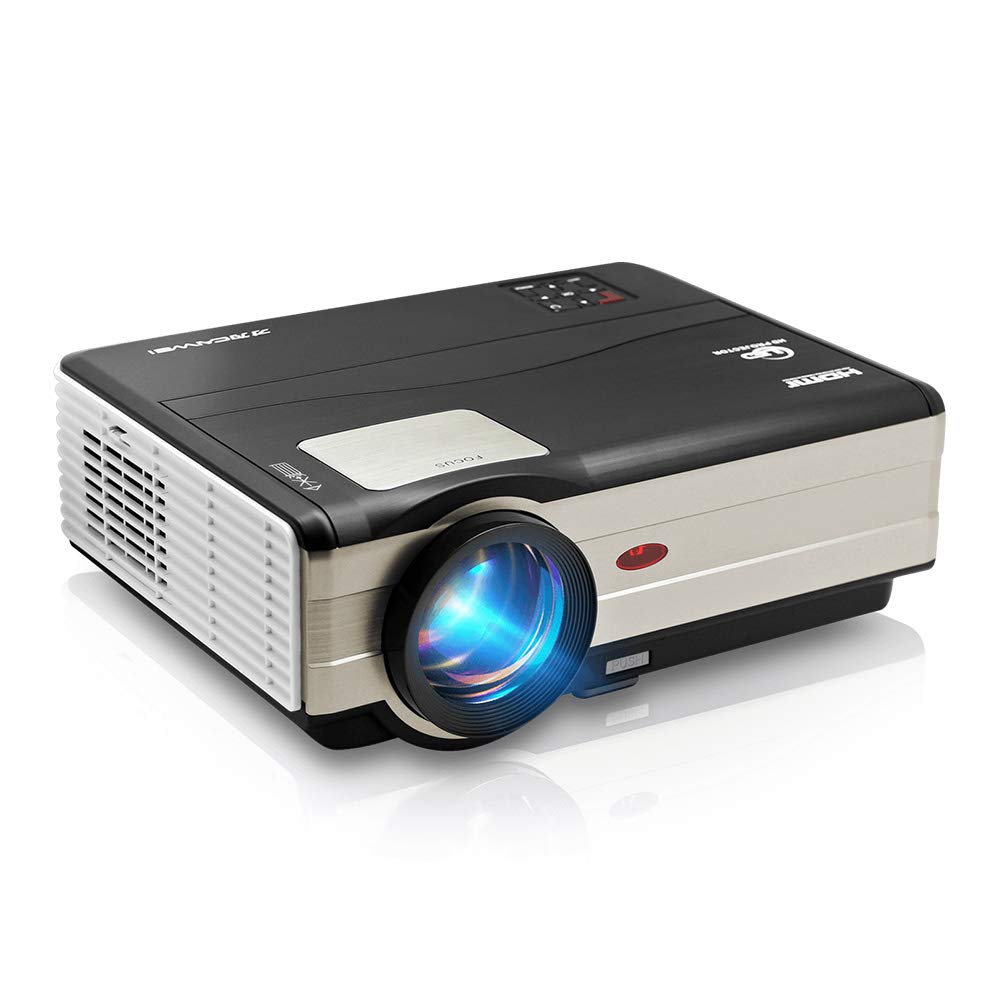
פיגורע 1: פראָנט view of the CAIWEI A8AB-NEW Video Projector, showing the lens and ventilation.
פראָנט פּאַנעל
- פּרויעקציע לענס: לאָזט אַרויס דאָס בילד.
- פאָקוס רינג: אַדזשאַסטירט בילד קלעריטי.
- Keystone Correction: קאָריגירט טראַפּעזאָידאַל בילד דיסטאָרשאַן.
דערציען פּאַנעל
- מאַכט פּאָרט: פֿאַרבינדט זיך צום מאַכט קאַבל.
- HDMI פּאָרטן (x2): Connects to HDMI-enabled devices (e.g., Blu-ray player, game console).
- USB פּאָרטן (x2): Connects to USB storage devices or other USB peripherals.
- VGA פּאָרט: Connects to computers or laptops with VGA output.
- AV פּאָרט: Connects to older devices using composite video and stereo audio.
- אַודיאָ אַרויס (3.5 מ״מ): פֿאַרבינדט זיך צו עקסטערנע רעדנערס אדער כעדפאָונז.
5. סעטאַפּ
5.1 פּלייסמאַנט
Place the projector on a stable, flat surface or mount it to a ceiling. Ensure the projector is perpendicular to the projection screen or wall. The optimal projection distance varies, but generally, a larger distance yields a larger image.
5.2 מאַכט קאַנעקשאַן
- Connect the power cable to the projector's power port.
- צאַפּן די אנדערע סוף פון די מאַכט קאַבלע אין אַ מאַכט ווענטיל.
- די מאַכט גראדן ליכט וועט ילומיניט.
5.3 פֿאַרבינדן אַרייַנשרייַב דעוויסעס
דער פּראָיעקטאָר שטיצט פֿאַרשידענע אַרייַנשרייַב קוואלן:
- הדמי: Connect an HDMI cable from your device (e.g., laptop, game console, streaming stick) to one of the projector's HDMI ports.
- וסב: Insert a USB flash drive into a USB port to play media files גלייַך.
- ווגאַ: Connect a VGA cable from your computer to the projector's VGA port.
- פון: Use the provided AV cable to connect to devices with composite video output.
- ווייערלעס (WiFi): For screen mirroring from smartphones or tablets, navigate to the 'Wireless Display' or 'Screen Mirroring' option in the projector's menu and follow the on-screen instructions. Ensure your device and the projector are on the same Wi-Fi network.
- בלועטאָאָטה: To connect external Bluetooth speakers, go to the Bluetooth settings in the projector's menu, enable Bluetooth, and pair with your desired audio device.
5.4 פאָקוס און קיסטאָון אַדזשאַסטמענט
- קער אויף די פּראַדזשעקטער און ווייַזן אַ בילד.
- דרייען די פאָקוס רינג on the lens until the image appears sharp and clear.
- If the image is trapezoidal (wider at the top or bottom), adjust the קייסטאָנע קערעקשאַן dial or setting until the image is rectangular.
6. אַפּערייטינג ינסטרוקטיאָנס
6.1 מאַכט אויף / אַוועק
- מאַכט אויף: דרוק די מאַכט קנעפּל אויף די פּראַדזשעקטער אָדער די ווייַט קאָנטראָל.
- מאַכט אַוועק: דריק נאכאמאל דעם פאוער קנעפל. באשטעטיגט דעם אפשטעל אויב געבעטן.
6.2 מעניו נאַוויגאַציע
Use the navigation buttons (Up, Down, Left, Right, OK) on the projector or remote control to browse the on-screen menu. The 'Menu' button typically opens the main settings, and 'Exit' or 'Back' closes sub-menus.
6.3 אויסוואל פון איינגאבע מקור
Press the 'Source' or 'Input' button on the remote control or projector. A list of available input sources (HDMI1, HDMI2, USB1, USB2, VGA, AV, Wireless Display) will appear. Select the desired source using the navigation buttons and press 'OK'.
6.4 אַודיאָ סעטטינגס
Access the audio settings through the main menu to adjust volume, select audio output (internal speaker, external via 3.5mm jack, or Bluetooth), and modify sound modes.
6.5 Wireless/Bluetooth Connection
Refer to section 5.3 for detailed instructions on connecting via Wi-Fi for screen mirroring or Bluetooth for audio output.
7. וישאַלט
7.1 רייניקן די לינז
Use a soft, lint-free cloth specifically designed for optical lenses. Gently wipe the lens surface. Avoid using abrasive cleaners or excessive force, which can scratch the lens.
7.2 Cleaning the Air Filter/Vents
Regularly check the air intake and exhaust vents for dust accumulation. Use a soft brush or a can of compressed air to gently clean the vents. This helps maintain proper airflow and prevents overheating.
7.3 סטאָרידזש
When not in use, store the projector in a cool, dry, and dust-free environment. Use the original packaging or a protective case to prevent damage.
8. טראָובלעשאָאָטינג
| פּראָבלעם | מעגלעך סיבה | לייזונג |
|---|---|---|
| קיין בילד אויף פאַרשטעלן | Power not connected; Incorrect input source; Device not powered on. | Check power cable; Select correct input source; Ensure connected device is on. |
| די בילד איז בלערי | פאָקוס נישט אַדזשאַסטיד; פּראָיעקטאָר צו ווייט/נאָענט. | Adjust the focus ring; Reposition the projector. |
| בילד איז טראַפּעזאָידאַל | Keystone not adjusted. | סטרויערן די קיסטאָנע קערעקשאַן. |
| קיין געזונט | Volume too low; Muted; Incorrect audio output; Cable issue. | Increase volume; Unmute; Check audio settings; Verify cable connections. |
| ווייַט קאָנטראָל נישט ארבעטן | Batteries dead; Obstruction; Out of range. | Replace batteries; Remove obstructions; Ensure line of sight to IR receiver. |
| אָוווערכיטינג ווארענונג | Blocked vents; Poor ventilation. | Clear vents; Ensure adequate space around projector. |
9. ספּעסאַפאַקיישאַנז
- מאָדעל: A8AB-NEW
- סאָרט: CAIWEI
- ווייַז האַכלאָטע: 1280 X 800
- קאַנעקטיוויטי טעכנאָלאָגיע: Bluetooth, HDMI, USB, VGA, Wireless
- ספּעציעלע פֿעיִקייטן: איינגעבויט Wi-Fi, פּאָרטאַטיוו, וויירלעס
- רעקאַמענדיד ניצט: Gaming, Home Theater
- נומער וואָג: 6.1 פונט
- פּראָדוקט דימענשאַנז: 11.2 X 14.7 X 5 אינטשעס
10. וואָראַנטי און שטיצן
CAIWEI products are designed for reliability and performance. For specific warranty details, please refer to the warranty card included with your purchase or contact CAIWEI customer support. If you encounter any issues not covered in this manual, please reach out to our support team for assistance.
קונה שטיצן: Please visit the official CAIWEI website or contact your retailer for support information.